
Hisense Hi-Smart Air Portable AC & Dehumidifier User Manual
Content
Hisense Hi-Smart Air Portable AC & Dehumidifier: Smart Cooling and Moisture Control for Modern Homes
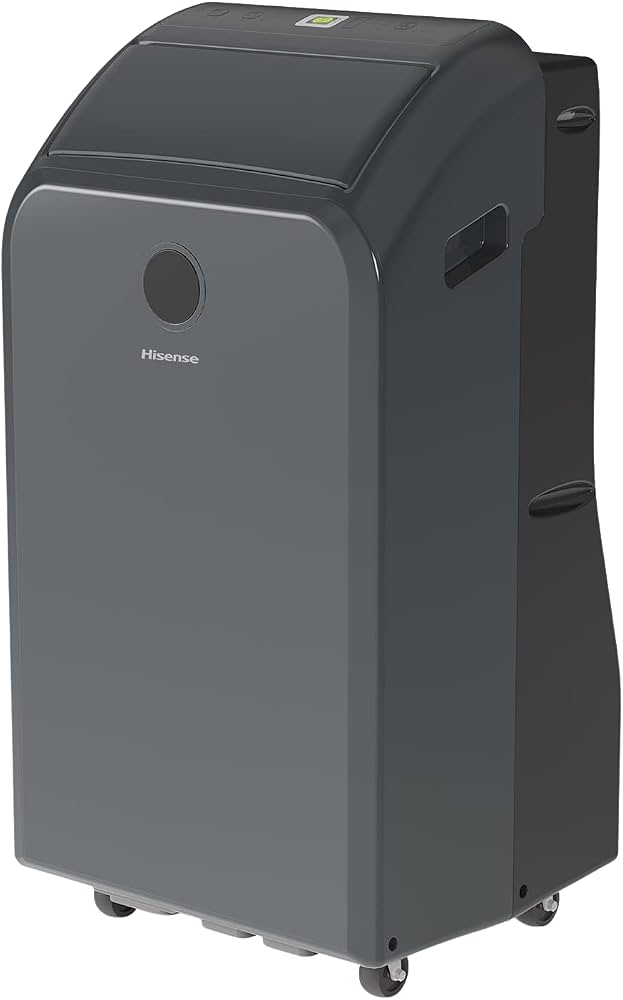
The hisense Hi-Smart Air Portable AC & Dehumidifier is designed for users who want flexible climate control in a single compact unit. It combines portable cooling, dehumidification, and smart connectivity, making it a practical choice for bedrooms, apartments, home offices, dorm rooms, and other medium-sized spaces where window units are not ideal. With app control, voice assistant compatibility, and multiple operating modes, it offers a convenient upgrade over basic portable air conditioners.
One of the biggest advantages of the hisense Hi-Smart Air Portable AC & Dehumidifier is its balance of everyday usability and smart features. Users can adjust settings remotely, manage humidity during muggy seasons, and move the unit between rooms as needed. It is especially appealing for renters and homeowners who need a temporary cooling solution without permanent installation. The design also suits people looking for a portable AC with dehumidifier function for seasonal use, helping reduce stickiness in humid climates while keeping indoor temperatures more comfortable.
In terms of pricing, the unit has historically been positioned in the mid-range portable AC category, with estimated street prices commonly falling around $389 to $500 depending on retailer, season, and exact model variant. Availability is generally strongest through major home improvement stores, large online marketplaces, and brand channels. For shoppers comparing the best portable AC with dehumidifier features, this model stands out for its smart controls, simple setup, and practical room-cooling performance.
Hisense Hi-Smart Air Portable AC & Dehumidifier Specifications and Key Features
- Cooling capacity: Typically listed around 10,000 BTU SACC, suitable for spaces up to about 450 sq. ft.
- Power requirements: 115V / 60Hz / 15A standard household connection.
- Energy efficiency: CEER rating around 7.8 for efficient portable cooling.
- Noise level: Approximately 50 to 52 dBA in low-to-high operation on common variants.
- Airflow: Around 230 CFM for steady room circulation.
- Fan settings: 3-speed fan control for customizable comfort.
- Smart features: Wi-Fi connectivity, mobile app control, and support for voice assistants.
- Control type: Electronic controls with LED display.
- Air direction: Motorized air swing for broader cooling coverage.
- Hose setup: Includes a flexible exhaust hose for quick installation.
Compared with many basic portable air conditioners, the hisense Hi-Smart Air Portable AC & Dehumidifier offers stronger smart-home integration and better everyday convenience. It competes well against similarly sized 10,000 BTU models, especially for users who value app-based control and a cleaner user interface. While some dual-hose models may cool slightly faster in demanding conditions, this Hisense unit is a strong choice for balanced performance, portability, and ease of use.
Pros and Cons of the Hisense Hi-Smart Air Portable AC & Dehumidifier
Pros
- Smart connectivity: App control and voice assistant support make it easy to adjust temperature from anywhere.
- Dual-purpose convenience: Functions as both a portable AC and dehumidifier, which is ideal for humid weather.
- Good room coverage: Works well for bedrooms, offices, and medium-sized living spaces up to about 450 sq. ft.
- Easy mobility: Portable design allows flexible placement without permanent installation.
- Solid value: Often priced competitively for a smart portable AC with dehumidifier functionality.
Cons
- Not the quietest option: Like many portable AC units, it can be noticeable at higher fan speeds.
- Best for medium rooms: Larger open-plan areas may need a higher-capacity or dual-hose alternative.
- Single-hose limitations: Some competing portable air conditioners offer faster efficiency in hotter spaces.
- Setup still required: Window venting is necessary, so it is not a completely plug-and-play solution.
For buyers comparing portable cooling solutions, the hisense Hi-Smart Air Portable AC & Dehumidifier delivers strong value for money if smart features and versatility matter more than absolute peak cooling power. Alternatives from other brands may offer lower noise or higher BTU ratings, but they often cost more or lack the same app-based convenience.
Customer Reviews for Hisense Hi-Smart Air Portable AC & Dehumidifier
Customer feedback for the hisense Hi-Smart Air Portable AC & Dehumidifier is generally positive, with many users praising its cooling performance, easy installation, and smart-home control. A common rating pattern is around 4 out of 5 stars, especially among buyers who use it in bedrooms or home offices.
Typical praise includes comments like, “Cools my apartment quickly and the app makes it so convenient,” and “Great for humid summer days because it removes moisture well.” Frequent complaints include hose noise, limited effectiveness in very large rooms, and occasional confusion during Wi-Fi setup. Some users also mention that the remote and app features feel more valuable than the onboard controls.
Most buyers recommend it for renters, apartment dwellers, and anyone needing a portable AC with dehumidifier capabilities for medium-sized spaces. It is a strong purchase for users who want convenience, smart controls, and dependable seasonal cooling without investing in a permanent HVAC solution.
Is the Hisense Hi-Smart Air Portable AC & Dehumidifier Worth Buying?
The hisense Hi-Smart Air Portable AC & Dehumidifier is worth considering if you need a versatile, smart, and portable solution for cooling and moisture control. It is especially appealing for medium rooms, humid climates, and users who want remote access through an app or voice assistant.
For the best experience, use it in a properly sized room, seal the window kit carefully, and pair it with regular filter cleaning to maintain airflow. If your priority is maximum cooling power for large open spaces, a higher-capacity dual-hose portable AC may be a better fit. For most everyday users, however, this model offers an excellent mix of comfort, convenience, and value.
Faqs
How do I set up the hisense Hi-Smart Air Portable AC & Dehumidifier for the first time?
Why is my hisense Hi-Smart Air Portable AC & Dehumidifier not pairing with the Hi-Smart Air app?
What should I do if the hisense Hi-Smart Air Portable AC & Dehumidifier is cooling poorly or blowing warm air?
How do I use the dehumidifier mode on the hisense Hi-Smart Air Portable AC & Dehumidifier effectively?
What Wi-Fi and smartphone requirements does the hisense Hi-Smart Air Portable AC & Dehumidifier need?
How often should I clean and maintain the hisense Hi-Smart Air Portable AC & Dehumidifier?
Why does my hisense Hi-Smart Air Portable AC & Dehumidifier keep turning off or showing an error?
What are the best ways to improve performance on the hisense Hi-Smart Air Portable AC & Dehumidifier?
More hisense manuals
Leave a Comment