
Hisense 55R6E3 Roku TV User Manual
Content
Hisense 55R6E3 Roku TV Manual: Features, Setup, Troubleshooting, and Buying Guide
Introduction to the Hisense 55R6E3 Roku TV
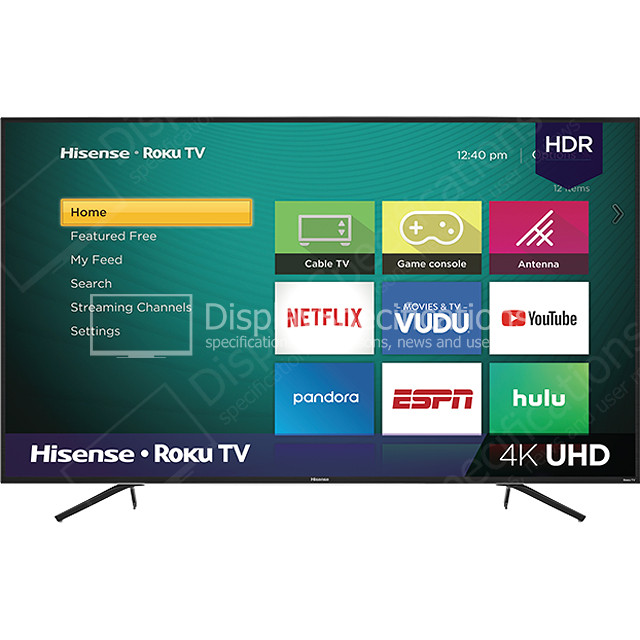
The Hisense 55R6E3 Roku TV is a 55-inch 4K smart television designed for everyday streaming, casual gaming, and family entertainment. It combines Roku’s simple interface with Hisense hardware, giving users fast access to popular apps, live TV options, and a clean home screen that is easy to navigate. With 4K resolution, HDR10 support, and a 60Hz refresh rate, this model delivers sharp picture quality for movies, sports, and TV shows in a living room, bedroom, or apartment setup.
One of the biggest advantages of the hisense 55R6E3 Roku TV is its balance of value and usability. It includes three HDMI inputs, Ethernet, USB, composite video input, and built-in Wi-Fi, making it flexible for streaming devices, game consoles, soundbars, and older AV gear. Its slim design and relatively light build also make wall mounting and setup straightforward. The integrated Roku platform is especially appealing for users who want a simple smart TV experience without dealing with complicated menus.
This TV is a strong fit for budget-conscious buyers, cord-cutters, first-time smart TV users, and households that want dependable 4K streaming at a moderate price. The estimated price range typically falls around the mid-budget category, often varying by retailer and promotions. Availability is generally through major online and electronics retailers, though stock can fluctuate depending on season and region.
Troubleshooting Common Hisense 55R6E3 Roku TV Problems
If your hisense 55R6E3 Roku TV will not turn on, first check the power cable, outlet, and remote batteries. A blinking standby light can sometimes indicate a power cycle issue, so unplug the TV for 60 seconds and reconnect it. If apps are freezing or buffering, restart the TV and test your internet connection. For Wi-Fi issues, move the router closer or switch to Ethernet for a more stable connection.
Common Roku error codes often relate to network or update problems. Error 014 usually points to a network connection issue, while error 001 or 003 may appear during software updates. The usual fix is to reconnect Wi-Fi, restart the router, and check for system updates in the Roku settings. To prevent repeated problems, keep firmware updated, avoid overloaded HDMI ports, and power cycle the TV occasionally.
For warranty help, Hisense support typically offers product registration and customer care assistance. In the U.S., support is commonly available through the Electronics Consumer Care Center at 1-888-935-8880, and email support is available at service@hisense-usa.com. If repair is needed, check your retailer receipt and warranty status before requesting service.
Pros and Cons of the Hisense 55R6E3 Roku TV
Pros
- Affordable 4K smart TV option with strong value for money.
- Roku TV interface is simple, fast, and beginner-friendly.
- HDR10 support improves contrast in compatible content.
- Three HDMI ports make it easy to connect consoles, streaming boxes, and soundbars.
- Good choice for streaming, casual viewing, and secondary rooms.
Cons
- 60Hz refresh rate is not ideal for serious competitive gaming.
- Built-in speakers are serviceable but not as powerful as a separate sound system.
- Picture quality is solid for the price, but not on the level of premium QLED or OLED models.
- Local dimming and advanced contrast features are limited compared with higher-end alternatives.
Compared with similar budget Roku TVs, the hisense 55R6E3 Roku TV stands out for its practical port selection and easy setup. It is a smarter buy than many ultra-cheap models, but users who want better motion handling, richer color, or brighter HDR performance may prefer a higher-tier Hisense or TCL alternative.
Customer Reviews and User Feedback on the Hisense 55R6E3 Roku TV
Overall customer feedback for the hisense 55R6E3 Roku TV is generally positive, with many users giving it around 4 out of 5 stars for value and ease of use. Buyers often praise the simple Roku interface, quick app access, and solid 4K picture quality for the price. One common testimonial is that it is an excellent “plug it in and start streaming” TV for bedrooms and family rooms.
Frequent complaints include average sound quality, occasional Wi-Fi lag, and black levels that are not as deep as premium televisions. Some users also note that motion during sports can look less smooth than on higher-refresh models. Even so, most reviews describe it as a reliable budget smart TV that delivers good performance for casual entertainment. It is often recommended for shoppers who want an easy-to-use Roku television without paying for premium features.
Best Uses, Setup Tips, and Final Buying Advice
The hisense 55R6E3 Roku TV is best for streaming Netflix, YouTube, Hulu, and live TV apps, plus everyday movie watching and console gaming at standard settings. For the best experience, place the TV at eye level, use a high-speed HDMI cable for 4K devices, and enable picture presets for movies or sports depending on the content. If you want an affordable 55-inch smart TV with a familiar platform, this model remains a practical and search-friendly choice for home entertainment.
Faqs
How do I set up my hisense 55R6E3 Roku TV for the first time?
What should I do if my hisense 55R6E3 Roku TV will not turn on?
How do I connect devices like a soundbar, game console, or streaming stick to the hisense 55R6E3 Roku TV?
Why is the picture on my hisense 55R6E3 Roku TV too dark, too bright, or blurry?
How can I fix Wi‑Fi connection issues on my hisense 55R6E3 Roku TV?
What Roku TV features should I use to get the best experience on the hisense 55R6E3 Roku TV?
Is the hisense 55R6E3 Roku TV compatible with universal remotes and replacement remotes?
How should I clean and maintain my hisense 55R6E3 Roku TV to keep it working well?
More hisense manuals
- Hisense Portable Air Conditioner AP09KVG User Manual
- Hisense A4 SeriesVidaa Smart TV User Manual
- Hisense AP0721CR1W Portable Air Conditioner User Manual
- Hisense 70A6H UHD 4K VIDAA Smart TV User Manual
- Hisense APIOCRIW Portable Air Conditioner User Manual
- Hisense 2.0 Channel Sound Bar Theater System HS205 User Manual
Leave a Comment