
Hp 12c Financial Calculator User Manual
Content
HP 12C Financial Calculator: Complete Product Manual and Buyer Guide
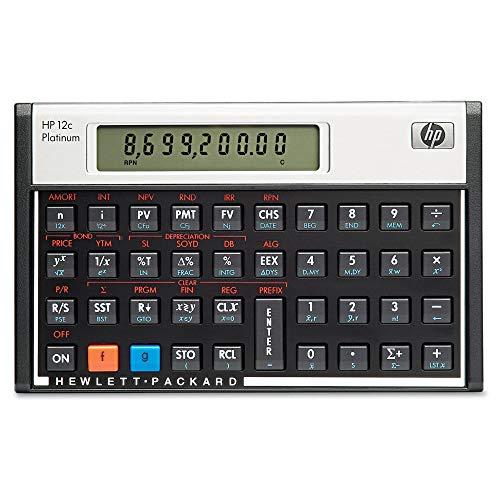
The HP 12C Financial Calculator is a legendary business calculator known for its reliability, compact design, and powerful financial functions. Built for finance professionals, accountants, analysts, bankers, and students, it remains one of the most trusted tools for time value of money, amortization, cash flow analysis, bond calculations, and statistical work. Its reverse Polish notation workflow is especially valued by experienced users who want fast, efficient input once the learning curve is mastered.
One of the biggest advantages of the HP 12C Financial Calculator is its long-standing reputation for durability and consistent performance. The one-line LCD display, portable size, and battery-powered operation make it ideal for office desks, classrooms, and travel. It is especially useful for mortgage calculations, loan comparisons, investment analysis, and exam preparation for finance certifications.
As of 2026, the estimated price range is typically around $35 to $70 depending on the seller, edition, and availability. The calculator is widely available through office supply stores, online marketplaces, and major electronics retailers. If you need a compact financial calculator that is still relevant decades after its release, the HP 12C Financial Calculator continues to be a strong choice.
Specifications for HP 12C Financial Calculator
- Display: 1-line LCD with 10-character readout
- Power source: Battery powered, commonly CR2032
- Dimensions: Approximately 5.1 x 3.1 x 0.6 inches
- Weight: About 0.26 lb, making it highly portable
- Functions: Around 120 built-in business and financial functions
- Memory: 20 memory registers
- Entry system: RPN and, on some Platinum variants, algebraic input
- Key features: Loan calculations, cash flow analysis, amortization, interest rate conversions, depreciation, linear regression, and bond-related calculations
- Auto shutoff: Yes, to conserve battery life
- Warranty: Commonly sold with a 1-year limited warranty
Compared with graphing calculators, the HP 12C focuses on finance instead of general math visualization. Compared with simpler financial calculators, it offers deeper functionality and a more professional workflow. For users who want a classic business calculator with proven performance, it remains a benchmark model.
Detailed Description: How the HP 12C Financial Calculator Works
The HP 12C Financial Calculator works by combining specialized financial keys with a highly efficient calculation method. Its RPN workflow lets users enter values first and operations second, which can reduce keystrokes for repetitive financial tasks. This is especially helpful when calculating loan payments, present value, future value, internal rate of return, or net present value.
In real-world use, the calculator is ideal for mortgage professionals, investment analysts, real estate investors, and MBA students. Users can solve amortization schedules, compare payment structures, and analyze cash flows without relying on spreadsheet software. The compact form factor makes it easy to carry between meetings, offices, and classrooms.
The build quality is another major selling point. The calculator uses a durable plastic body with a professional black finish, and many packages include a protective case. The keys are tactile and responsive, which contributes to a satisfying user experience. While the display is modest by modern standards, its simplicity supports fast, distraction-free financial work.
Setup Guide: How to Start Using the HP 12C Financial Calculator
Setting up the HP 12C Financial Calculator is straightforward. Insert the included battery, confirm the screen powers on, and review the basic key layout before entering any financial values. If the calculator includes a case, keep it nearby to protect the device during travel or storage.
- Step 1: Install the battery according to the battery compartment markings.
- Step 2: Press the power key or clear key to wake the calculator.
- Step 3: Learn the main financial keys, including PV, FV, PMT, NPV, and IRR.
- Step 4: Choose the correct input method, especially if you are using an RPN-based model.
- Step 5: Test a simple loan calculation to confirm the calculator is working correctly.
For connectivity, the HP 12C Financial Calculator does not offer Bluetooth, USB, or wireless pairing. It is a standalone device designed for offline professional use. Avoid exposing it to moisture, extreme heat, or heavy impact. If numbers appear incorrect, clear the memory and re-enter the known values carefully. For best results, review the user manual before attempting advanced functions.
Troubleshooting the HP 12C Financial Calculator
Common problems usually involve incorrect key entry, low battery power, or misunderstanding the RPN workflow. If the calculator produces unexpected results, clear the stack, verify the order of operations, and re-enter the financial variables. Many issues are not hardware failures but input-method mistakes.
- Problem: Blank screen. Solution: Replace the battery and check battery orientation.
- Problem: Wrong loan result. Solution: Confirm that N, I, PV, PMT, and FV values are entered consistently.
- Problem: Confusing key behavior. Solution: Review the RPN entry sequence or model-specific instructions.
- Problem: Frozen or unresponsive keys. Solution: Reset the calculator by removing and reinserting the battery.
- Problem: Displayed values seem inconsistent. Solution: Check for accidental memory entries or incomplete clearing.
Preventive care includes replacing the battery before it fully drains, storing the calculator in its case, and keeping the keyboard clean. Warranty support is typically limited to one year from the manufacturer, though seller policies may vary. For help, contact the retailer, HP support channels, or the authorized service provider listed in the product documentation.
Pros and Cons of the HP 12C Financial Calculator
Pros
- Excellent for finance, banking, and investment analysis
- Compact and lightweight for daily portability
- Durable construction with a long-lasting reputation
- Efficient RPN workflow for experienced users
- Strong value for money given its specialized capabilities
- Trusted by professionals for decades
Cons
- RPN can be difficult for beginners
- Single-line display is limited compared with modern calculators
- No wireless connectivity or app integration
- Best suited for finance, not general-purpose math
- Some alternatives offer backlit or larger displays
Compared with newer financial calculators, the HP 12C Financial Calculator trades modern convenience features for reliability and speed in core financial tasks. For users who need a dedicated business tool, that tradeoff is often worthwhile.
Customer Reviews: What Users Say About the HP 12C Financial Calculator
Average user sentiment is typically very positive, with many buyers rating it around 4.5 out of 5 stars. Professionals praise its accuracy, durability, and ability to handle complex financial calculations efficiently. One common testimonial is: “A classic calculator that still outperforms newer models for serious finance work.”
Frequent complaints focus on the learning curve, especially for first-time users unfamiliar with RPN input. Some users also wish for a larger screen or more modern design. Even so, many reviews recommend it as a dependable purchase for students and professionals who want a specialized finance calculator rather than a general-purpose device.
If you need a portable, proven, and highly respected business calculator, the HP 12C Financial Calculator is still an excellent choice in 2026.
Faqs
How do I set up the hp 12c Financial Calculator for the first time?
Why is my hp 12c Financial Calculator showing wrong loan or interest results?
How do I clear memory and reset the hp 12c Financial Calculator without losing the wrong settings?
What does RPN mean on the hp 12c Financial Calculator, and how do I use it correctly?
Can the hp 12c Financial Calculator handle mortgage, bond, and investment calculations?
What batteries does the hp 12c Financial Calculator use, and how do I know when to replace them?
How can I clean and maintain the hp 12c Financial Calculator for long-term use?
Why are some functions on the hp 12c Financial Calculator hard to find, and how can I use them faster?
Tags
More hp manuals
Leave a Comment