
Hp Z440 Series Workstation User Manual
Content
HP Z440 Series Workstation: Comprehensive Product Manual
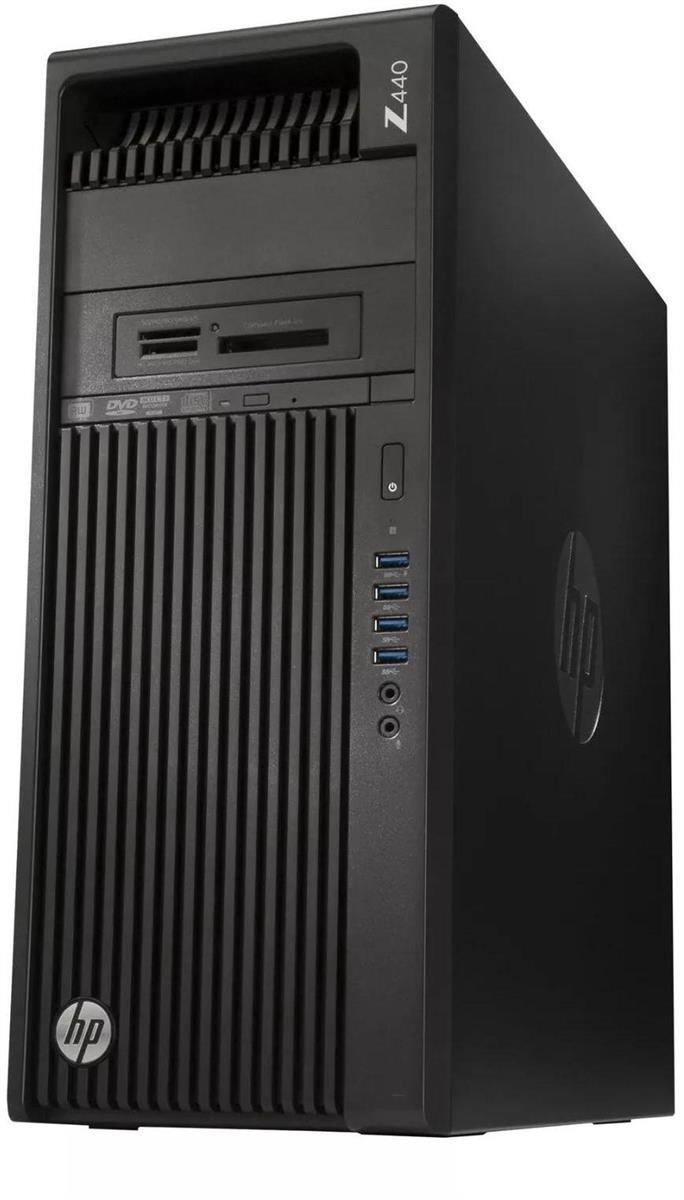
The HP Z440 Series Workstation is a reliable single-socket tower workstation built for professionals who need stable performance, expandability, and workstation-class reliability for demanding tasks. Designed for CAD drafting, 3D modeling, content creation, engineering workflows, scientific computing, and business-critical productivity, it remains a popular choice for users who want a robust desktop platform with server-grade memory support and flexible upgrade paths.
One of the biggest advantages of the hp Z440 Series Workstation is its balance of cost and capability. It supports Intel Xeon E5-1600 v3/v4 and E5-2600 v3/v4 processors, ECC registered DDR4 memory, multiple PCIe expansion slots, and professional graphics configurations, making it suitable for users who need more reliability than a standard consumer PC. Its 525W or 700W power supply options, tool-less access design, and modular internal layout also make maintenance and upgrades straightforward.
Target users include engineers, architects, video editors, VFX artists, IT teams, and advanced home users who want a dependable workstation for heavy multitasking. Typical use cases include AutoCAD, Adobe Creative Cloud, SolidWorks, virtualization, data analysis, and light-to-moderate GPU workloads. In 2026, refurbished and used units are commonly available, with price ranges often starting around the low hundreds and rising based on CPU, RAM, storage, and GPU configuration. Availability is strongest through refurbishers, marketplace sellers, and enterprise liquidators rather than new retail channels.
Specifications
- Processor support: Single Intel Xeon E5-1600 v3/v4 and E5-2600 v3/v4 CPUs, depending on configuration.
- Memory: 8 DIMM slots, DDR4 ECC Registered memory, up to 128 GB supported.
- Graphics expansion: Multiple PCIe Gen3 and Gen2 slots for professional GPUs, capture cards, RAID cards, and expansion hardware.
- Storage: SATA 6 Gb/s connectivity with support for multiple internal drives and SSDs.
- Power supply: 525W wide-ranging unit or optional 700W supply, both designed for workstation loads.
- Ports: Front and rear USB connectivity, audio jacks, RJ-45 Ethernet, and legacy PS/2 on many builds.
- Chassis: Mid-tower workstation enclosure with internal drive bays and accessible service layout.
- Performance class: Strong multi-core workstation performance for rendering, simulation, and productivity workloads.
- Comparison: More expandable and rugged than typical consumer desktops, though older than newer Z-series models such as the Z4 and Z6.
In practical terms, the hp Z440 Series Workstation offers workstation-grade stability similar to larger enterprise systems while staying more affordable and compact. Compared with mainstream office PCs, it provides better expansion, stronger CPU options, and ECC memory support. Compared with newer workstations, it is less efficient and less future-proof, but still attractive for budget-conscious professionals.
Detailed Description
The HP Z440 is built around a single-processor platform, which keeps the system simpler and more power-efficient than dual-socket workstations while still delivering strong professional performance. It is engineered for workloads that benefit from reliability, high memory capacity, and expansion flexibility rather than gaming-style consumer features. The chassis uses durable business-class materials, with a service-friendly interior that allows access to storage bays, memory slots, and PCIe cards without excessive disassembly.
In real-world use, the workstation performs well in 3D design, CAD file handling, video encoding, photo editing, and multitasking across multiple heavy applications. Users often value the quiet operation, predictable thermals, and the ability to upgrade drives, RAM, and graphics over time. The system also suits lab environments, small studios, and engineering teams that need stable, repeatable performance.
User experience is generally positive for people who want a dependable tower with excellent internal access and clear upgrade options. While it is not the newest platform, it remains appealing because it feels solid, runs professional software reliably, and can be repurposed into a capable workstation or home lab machine.
Setup Guide: How to Install and Configure the HP Z440 Series Workstation
- Unbox the workstation and inspect it for shipping damage before powering it on.
- Place the tower on a stable, ventilated surface with several inches of clearance around the rear and sides.
- Connect the monitor to the workstation graphics card, then attach the keyboard, mouse, and Ethernet cable.
- Plug the power cord into the rear power supply and then into a grounded outlet or surge protector.
- Press the power button and enter the BIOS or UEFI setup to check CPU, RAM, storage, and fan status.
- Configure boot order if you are installing an operating system from USB or DVD.
- Install your operating system, then add chipset, graphics, network, and storage drivers as needed.
- Update BIOS and firmware if available through the system support package from HP.
For configuration, users can choose between storage-focused builds, GPU-accelerated builds, or balanced workstation setups. When pairing peripherals, most devices connect via USB or Ethernet, while displays should be matched to the installed GPU outputs for best results. Avoid blocking airflow, and do not operate the workstation with damaged cables or an unstable power source. If the machine fails to power on, recheck the PSU switch, wall outlet, front-panel connections, and RAM seating.
Troubleshooting
- No power: Confirm the outlet works, the PSU switch is on, and the power cord is fully seated.
- No display: Verify the monitor input, GPU seating, and cable connection to the graphics card.
- Memory errors: Reseat ECC DIMMs, test one module at a time, and confirm compatible registered DDR4 modules are installed.
- Overheating: Clean dust filters, check fan operation, and ensure the workstation has adequate ventilation.
- Boot failure: Review BIOS boot order, reconnect storage cables, and test the boot drive in another system if possible.
- Device not detected: Reinstall drivers, update BIOS, and confirm the card is installed in a compatible PCIe slot.
Common warning indicators usually point to power, memory, or storage issues rather than complex board failures. Preventive maintenance includes periodic cleaning, firmware updates, and monitoring drive health. If the system is refurbished, warranty coverage depends on the seller, so keep purchase records and serial information ready for support requests. For help, contact HP business support through official support channels or the retailer that supplied the workstation.
Pros and Cons of the HP Z440 Series Workstation
Pros
- Strong workstation reliability for professional workloads.
- ECC registered DDR4 memory support improves stability in demanding tasks.
- Excellent upgrade flexibility with multiple PCIe slots and drive bays.
- Good value on the refurbished market for users who want workstation-class hardware at a lower price.
- Solid build quality and easy service access for IT teams and enthusiasts.
Cons
- Older platform with lower energy efficiency than newer workstation generations.
- Limited to one CPU, so it cannot match dual-socket systems for extreme parallel workloads.
- Refurbished units may vary in condition, noise level, and included components.
- Less attractive for users who need the latest connectivity or maximum future-proofing.
Overall, the hp Z440 Series Workstation delivers strong value for users who care more about dependable performance and expansion than cutting-edge hardware. It compares favorably with consumer towers for professional work, while newer alternatives may offer better efficiency and newer platforms at a higher cost.
Customer Reviews
Average user sentiment: 4.4 out of 5 stars. Many buyers praise the workstation for its sturdy construction, quiet operation, and upgrade potential. Common comments mention that it handles CAD, editing, and multitasking smoothly when fitted with enough RAM and a capable SSD.
Typical praise includes “excellent value for a refurbished workstation,” “easy to service,” and “perfect for home lab use.” Common complaints focus on age-related wear, larger physical size, and the fact that some units require additional upgrades to feel modern. Buyers often recommend checking the exact CPU, memory, storage, and GPU configuration before purchase.
The best purchase recommendation is for professionals and enthusiasts who want a dependable tower at a reasonable price and do not need the newest platform. Users seeking maximum efficiency or the latest workstation features should compare it with newer HP Z-series models.
Frequently Asked Questions
Is the HP Z440 Series Workstation still worth buying?
Yes, if you need a reliable, affordable workstation for professional applications and can accept older hardware.
What is the maximum RAM support?
The system supports up to 128 GB of DDR4 ECC Registered memory across 8 DIMM slots.
Can it run modern software?
It can run many modern productivity, design, and editing applications, especially when paired with an SSD and a compatible GPU.
Who should avoid it?
Users who want the newest platform, maximum efficiency, or the latest connectivity features may prefer a newer workstation.
Faqs
How do I set up the hp Z440 Series Workstation for the first time?
What should I check if my hp Z440 Series Workstation powers on but there is no display?
Which graphics cards are compatible with the hp Z440 Series Workstation?
How can I improve performance on the hp Z440 Series Workstation for CAD or rendering tasks?
What RAM upgrade is best for the hp Z440 Series Workstation?
Why does my hp Z440 Series Workstation overheat or become noisy under load?
Can the hp Z440 Series Workstation run modern operating systems and software?
How do I maintain the hp Z440 Series Workstation for long-term reliability?
Tags
More hp manuals
Leave a Comment