
Hp DesignJet T1700 Series Printer User Manual
Content
HP DesignJet T1700 Series Printer: Comprehensive Product Manual and Buyer Guide
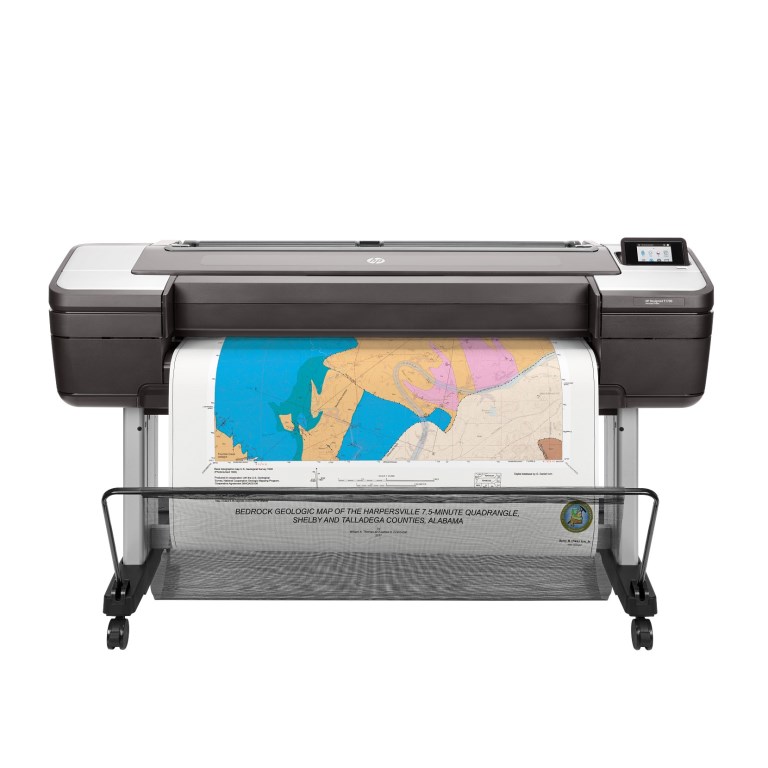
The hp DesignJet T1700 Series Printer is a professional large-format plotter built for architecture, engineering, construction, GIS, and design teams that need precise line work, vivid color output, and dependable wide-format printing. It is designed to handle technical drawings, maps, posters, and presentation graphics with strong consistency, making it a smart choice for offices that require both speed and accuracy. With print speeds up to 116 A1 prints per hour and optimized color resolution up to 2400 x 1200 dpi, the T1700 series balances productivity with detail-rich output.
One of the biggest advantages of the hp DesignJet T1700 Series Printer is its security-focused design, which suits shared work environments handling sensitive files. It also supports roll and sheet media, automatic horizontal cutting, and optional dual-roll configurations on select models for more efficient job switching. The series uses six inks, including gray, to improve neutral tones and deliver sharper CAD line quality and more refined graphics. Users also benefit from a built-in 500 GB self-encrypting hard drive on supported configurations, helping protect stored print jobs and data.
This printer is intended for teams that produce detailed technical documents at scale, including architectural plans, engineering schematics, and high-end maps. Typical pricing for the hp DesignJet T1700 Series Printer varies widely by configuration and market, but new units and bundle pricing generally sit in the upper professional plotter range, often around several thousand dollars. Availability is usually best through HP resellers, office equipment dealers, and enterprise print suppliers.
Technical Specifications for HP DesignJet T1700 Series Printer
- Print technology: HP Thermal Inkjet
- Print speed: up to 116 A1 prints per hour, about 26 seconds per A1 page
- Maximum print resolution: up to 2400 x 1200 optimized dpi
- Ink system: 6 inks, including cyan, magenta, yellow, photo black, matte black, and gray
- Line accuracy: ±0.1%
- Minimum line width: 0.02 mm
- Media width: up to 1118 mm
- Sheet size support: 210 x 279 mm to 1118 x 1676 mm
- Media handling: sheet feed, roll feed, automatic cutter, and optional dual-roll switching on select models
- Connectivity: Gigabit Ethernet, Fast Ethernet, 10/100/1000Base-T, and USB Type-A host port
- Storage: 500 GB self-encrypting hard drive on supported configurations
- Performance advantage: faster and more secure than many entry-level wide-format printers
- Comparison note: stronger security and broader workflow features than basic CAD plotters, while offering more precision-focused output than many general-purpose large-format printers
The hp DesignJet T1700 Series Printer is especially strong for line accuracy and color consistency, which makes it more suitable for technical workflows than many low-cost large-format devices.
Detailed HP DesignJet T1700 Series Printer Overview
The hp DesignJet T1700 Series Printer works by using thermal inkjet technology to place highly controlled ink droplets onto a wide range of media. The six-ink system helps produce sharp black lines, smooth fills, and more balanced grayscale output for detailed drawings and presentation-quality prints. This makes the printer effective for CAD files, GIS maps, posters, and other graphics-heavy documents that need both scale and precision.
In real-world use, the T1700 series is commonly deployed in design studios, engineering firms, municipal planning offices, and construction departments. It handles everything from rolled blueprint sets to oversized presentation boards, allowing teams to reduce outsourcing and keep production in-house. The printer chassis is built for office-grade durability, with a professional enclosure and components intended for regular high-volume operation. The design supports clean media loading and straightforward job handling, which helps reduce interruptions during busy workdays.
User experience is generally strongest when the printer is used in networked environments where multiple staff members can send print jobs efficiently. The combination of accuracy, speed, and security makes it a reliable production tool for organizations that need dependable wide-format output.
Setup Guide: How to Install and Configure the HP DesignJet T1700 Series Printer
- Unpack the printer carefully and place it on a level surface with enough clearance for media loading and output.
- Remove all shipping materials, protective tapes, and transport locks before powering on.
- Install the printheads and ink cartridges according to the labeled color slots.
- Load plain paper first for calibration, then configure your preferred roll or sheet media.
- Connect the printer to power and network using Ethernet for the most stable office setup.
- Use the front panel or HP software tools to complete language, region, and network settings.
- Print an alignment or calibration page to confirm proper ink flow and media handling.
For connectivity, Ethernet is usually the best option for shared office printing, while USB host support can help with direct access in certain workflows. If the printer does not appear on the network, restart the router, check the IP settings, and confirm the cable is seated properly. Always keep hands clear of moving cutter parts and paper paths during operation.
Safety precautions include using the printer on a stable surface, avoiding blocked ventilation, and unplugging the device before cleaning internal areas.
Troubleshooting the HP DesignJet T1700 Series Printer
- Problem: Printer will not turn on. Solution: Check the power cord, outlet, and rear switch position before contacting support.
- Problem: Print jobs stall in the queue. Solution: Clear the queue, restart the printer, and verify network connectivity.
- Problem: Poor line quality or banding. Solution: Run printhead cleaning, check media type settings, and perform calibration.
- Problem: Paper jams or misfeeds. Solution: Reload media, confirm correct roll alignment, and inspect for torn paper.
- Problem: Cartridge or printhead warning. Solution: Reseat the component and replace consumables if warnings continue.
- Problem: Network printer not found. Solution: Recheck IP address, Ethernet connection, and firewall settings.
Common error messages often relate to media loading, ink system status, or communication issues. Preventive maintenance such as regular cleaning, firmware updates, and using approved media helps reduce downtime. The printer typically includes a one-year limited hardware warranty, and extended HP Care Pack support options are available for businesses that want next-business-day onsite service. For help, contact HP support through official customer service channels or an authorized service provider.
Pros and Cons of the HP DesignJet T1700 Series Printer
Pros
- Excellent line accuracy for CAD, GIS, and technical drawings
- Fast large-format output for busy offices and production teams
- Six-ink system improves grayscale, black density, and color consistency
- Network-ready connectivity supports shared workgroups
- Security features make it a better fit for confidential documents
- Strong value for organizations that print in-house instead of outsourcing
Cons
- Higher purchase cost than entry-level plotters
- Large footprint may be difficult for compact offices
- Consumables and maintenance add to long-term operating costs
- More printer than small teams need if they only print occasionally
- Some alternatives may offer lower upfront pricing but fewer professional features
For teams needing reliable technical output, the hp DesignJet T1700 Series Printer offers strong performance and features that justify the investment. For lighter workloads, smaller wide-format printers may be more economical.
Customer Reviews: HP DesignJet T1700 Series Printer Feedback
Average user sentiment is generally positive, with many buyers rating the printer around 4.5 out of 5 stars for print quality, reliability, and security. One user described it as “a dependable workhorse for daily CAD plotting,” while another praised the sharp line detail and consistent color output on engineering sets.
Common praise includes fast first-page output, easy network sharing, and excellent results on technical drawings. Frequent complaints focus on the initial cost, space requirements, and the price of ink and service plans. Some reviewers also mention that setup can take time in busy office environments if network settings are not prepared in advance.
Most customers recommend the printer for architecture, engineering, and mapping teams that need professional-grade wide-format printing. Buyers with occasional or light use often find smaller alternatives more practical.
Faqs
How do I set up the hp DesignJet T1700 Series Printer for the first time in an office workflow?
Why is my hp DesignJet T1700 Series Printer not printing correctly, and what are the most common fixes?
Which file types and design applications work best with the hp DesignJet T1700 Series Printer?
How do I connect the hp DesignJet T1700 Series Printer to a network for shared office printing?
What should I do if the hp DesignJet T1700 Series Printer is feeding paper incorrectly or causing media jams?
How can I improve print speed and output quality on the hp DesignJet T1700 Series Printer?
How often should I maintain the hp DesignJet T1700 Series Printer to avoid downtime?
What accessories and supply choices matter most for the hp DesignJet T1700 Series Printer?
More hp manuals
Leave a Comment