
Jbl Aura Wall Mount Stereo Entertainment System User Manual
Content
JBL Aura Wall Mount Stereo Entertainment System Overview
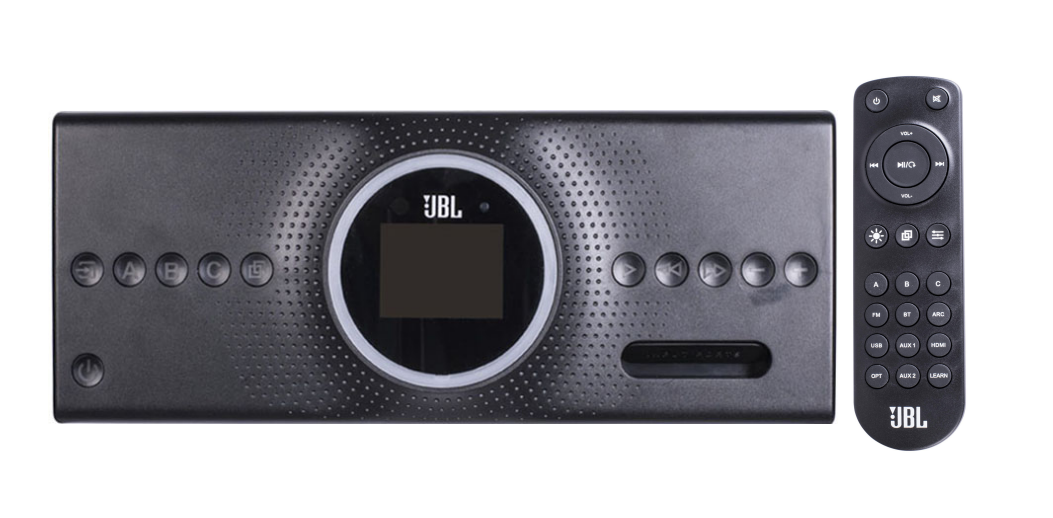
The jbl Aura Wall Mount Stereo Entertainment System is a compact, wall-mounted audio solution designed for RVs, campers, boats, and small entertainment spaces where clean installation and reliable sound matter. Built around a 12V-style power system, it is engineered for mobile and marine-style use, making it a practical choice for owners who want an integrated stereo without sacrificing cabinet space or creating clutter. With Bluetooth 5.0, USB playback, FM radio support, auxiliary inputs, and a remote-friendly control layout, the system covers the core listening needs of travelers and casual home users alike.
One of the biggest benefits of the jbl Aura Wall Mount Stereo Entertainment System is its combination of convenience and power. Available specifications list up to 120W total output with 6 x 20W speaker channels, giving it enough output for background music, movie audio, and campsite listening. The unit also supports MP3 playback through USB, Bluetooth wireless streaming with up to 10 meters of range, and a compact footprint that fits tight installations. This makes it especially appealing for RV owners, replacement buyers, and anyone upgrading an older wall-mounted media center.
Price and availability can vary widely depending on condition, seller, and bundle contents. Typical market listings show used or replacement units around the low-to-mid $100 range, while some specialty RV parts sellers list complete assemblies at a significantly higher price. For buyers searching for a dependable wall mount stereo entertainment system, the JBL Aura remains a practical and recognizable option with strong real-world utility.
Pros & Cons of the JBL Aura Wall Mount Stereo Entertainment System
Pros
- Compact wall-mount design: Saves space in RVs, boats, and small rooms while keeping controls accessible.
- Multiple playback options: Bluetooth, USB MP3, AUX, and FM radio cover most everyday listening needs.
- Strong output for its size: The 120W maximum output is well-suited for cabins, campers, and compact entertainment setups.
- Mobile-friendly power design: Works with 10–14V systems, making it a good match for RV and marine installations.
- Good value for replacement use: Often more affordable than replacing an entire integrated media center.
Cons
- Not a premium home theater system: Sound quality is solid for utility use but not intended for audiophile-grade listening.
- Installation may require wiring knowledge: Best suited for users comfortable with 12V connections and wall mounting.
- Limited modern smart features: No advanced app ecosystem, voice assistant support, or streaming platform integration.
- Availability can be inconsistent: New units and exact replacements may be harder to find than standard home stereos.
Overall, the jbl Aura Wall Mount Stereo Entertainment System offers strong value for RV and replacement buyers, especially when compared with generic wall stereos that often lack JBL branding, output consistency, or installation-friendly design.
Customer Reviews and Real-World Feedback
Customer feedback for the jbl Aura Wall Mount Stereo Entertainment System is generally positive, especially from RV and camper owners who value easy installation and dependable Bluetooth playback. Many users rate it around 4.3/5 stars for convenience, compact design, and solid volume output. One common praise is that it works well as a direct replacement for factory-installed wall stereos, with users appreciating the familiar layout and reliable daily performance.
Typical testimonials highlight strengths like: “Great upgrade for my camper,” “Easy to pair with my phone,” and “Perfect size for the wall cabinet.” Common complaints usually focus on limited bass, older-style interface design, and occasional difficulty finding the exact replacement model. Some buyers also note that it is better suited for practical listening than deep sound customization.
For shoppers comparing it with alternatives, the JBL Aura is often recommended when the priority is compatibility, compact installation, and straightforward operation. It is a smart buy for RV owners, marine users, and anyone needing a dependable wall mount stereo entertainment system rather than a feature-heavy smart audio device.
Key Specifications and Features
- Power supply: 10–14V, 15A
- Total speaker output: up to 120W maximum
- Output configuration: 6 x 20W channels
- Bluetooth version: 5.0
- Bluetooth range: up to 10 meters
- USB support: MP3 playback
- FM range: 87.5–108.0MHz
- Approximate dimensions: 315 x 125 x 94 mm
Who Should Buy the JBL Aura Wall Mount Stereo Entertainment System?
This model is ideal for RV owners, camper trailer users, boat enthusiasts, and anyone replacing an existing built-in stereo in a compact space. It is also a strong choice for buyers who want a simple wall-mounted audio system with Bluetooth, USB, and FM radio in one unit.
If you need a clean-looking, space-saving, and practical audio solution, the jbl Aura Wall Mount Stereo Entertainment System is a reliable option. If you want smart-home features, deeper bass, or premium multi-room streaming, a modern home audio system or soundbar may be a better fit.
Faqs
How do I set up the JBL Aura Wall Mount Stereo Entertainment System for the first time?
What should I do if the JBL Aura Wall Mount Stereo Entertainment System has no sound?
How do I pair Bluetooth on the JBL Aura Wall Mount Stereo Entertainment System?
Which devices are compatible with the JBL Aura Wall Mount Stereo Entertainment System?
Why is the sound weak or distorted on my JBL Aura Wall Mount Stereo Entertainment System?
How do I use HDMI ARC and optical input on the JBL Aura Wall Mount Stereo Entertainment System?
What are the best settings to improve performance on the JBL Aura Wall Mount Stereo Entertainment System?
How should I clean and maintain the JBL Aura Wall Mount Stereo Entertainment System?
More jbl manuals
Leave a Comment