
Jbl EON700 Series PA Speakers User Manual
Content
JBL EON700 Series PA Speakers Manual Overview
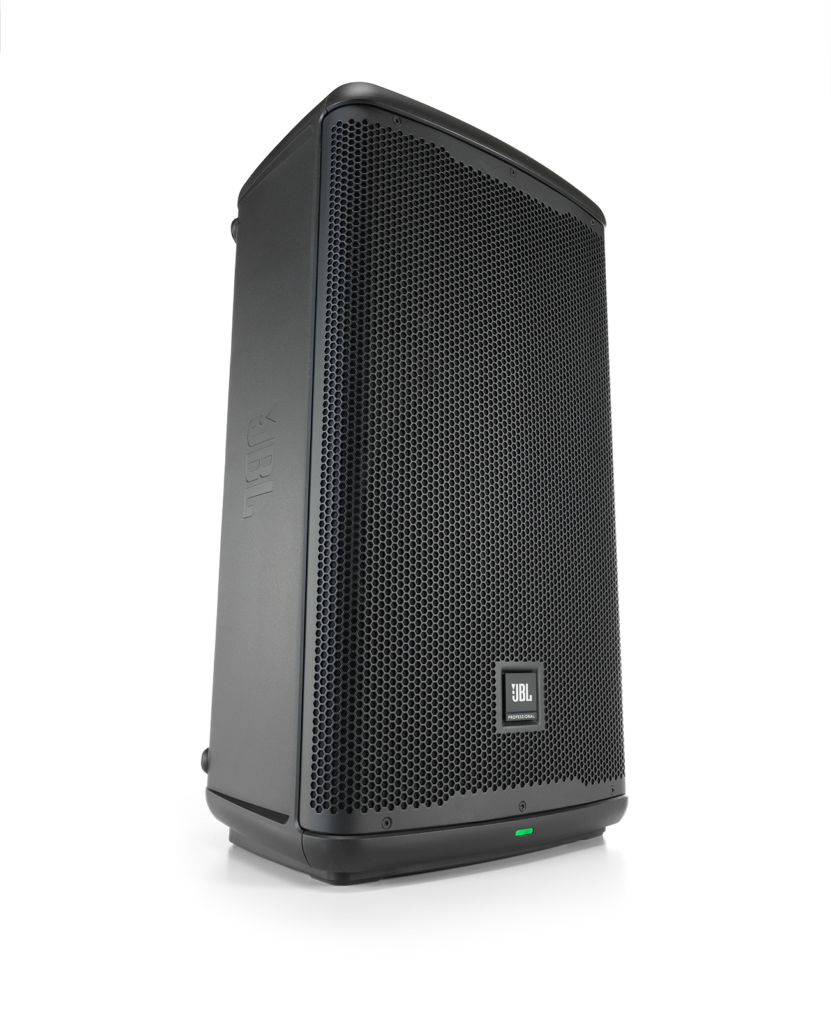
The JBL EON700 Series PA Speakers are a modern powered loudspeaker line built for dependable live sound, portable DJ setups, worship services, corporate events, and small to mid-size venues. Designed for users who need clear output, simple setup, and professional-grade reliability, the series combines high-efficiency Class D amplification with JBL’s DSP-driven sound shaping for consistent performance in real-world environments. The lineup includes powered loudspeakers and a matching subwoofer option, making it easy to build a flexible PA system that scales with the event.
One of the biggest advantages of the JBL EON700 Series PA Speakers is their balance of power and usability. The loudspeakers are rated at 1,300 watts, while the subwoofer reaches 1,500 watts, delivering strong headroom for vocals, music playback, and speech reinforcement. Users also benefit from Bluetooth connectivity, onboard digital controls, and a rugged enclosure designed for frequent transport. These features make the series especially appealing to mobile performers, rental companies, schools, and event production teams.
In terms of pricing, the JBL EON700 Series PA Speakers typically fall in the mid-range professional audio category, with entry models often starting around the lower hundreds and larger configurations costing more depending on the dealer and bundle. Availability is broad through authorized JBL retailers and major audio equipment stores, with stock varying by model and region. For buyers seeking a reliable powered PA speaker with strong output, user-friendly controls, and a trusted brand name, the EON700 Series remains a practical choice.
Troubleshooting JBL EON700 Series PA Speakers
If your JBL EON700 Series PA Speakers do not power on, first check the AC cable, outlet, and power switch. If there is sound distortion or the system sounds weak, reduce input gain, verify source levels, and confirm the speaker is not being driven into limit mode. The front-panel indicators help identify issues: a power LED confirms startup, a system limit indicator signals overload, and signal LEDs help show whether audio is reaching the unit.
Common problems include no audio output, Bluetooth pairing failures, intermittent signal, and protection limiting at high volume. For Bluetooth issues, forget the device, re-pair it, and keep the source within range. For clipping or harsh sound, lower the mixer output and avoid boosting low frequencies excessively. If a limit indicator stays active, the speaker may be receiving too much gain or too much low-end content. There are no widely used numeric error codes on the EON700 hardware, so troubleshooting is typically indicator-based rather than code-based.
Preventive care includes storing the speakers in a dry location, avoiding operation outside the recommended temperature range, and using quality cables with proper gain staging. JBL currently backs the EON700 Series with a 7-year warranty for the series, with battery-related coverage handled separately where applicable. For support in the United States, contact JBL Customer Service at (800) 336-4525 or (800) 8JBLPRO (800.852.5776). For written service inquiries, JBL Incorporated customer service is located at 8500 Balboa Boulevard, P.O. Box 2200, Northridge, California 91329.
Pros and Cons of JBL EON700 Series PA Speakers
Pros
- Powerful Class D amplification delivers strong output for live music, speeches, and mobile DJ work.
- Clear sound reproduction makes the JBL EON700 Series PA Speakers suitable for vocals and full-range playback.
- Built-in Bluetooth and DSP controls simplify setup and everyday use.
- Portable design supports frequent transport, quick setup, and small-team operation.
- Long warranty coverage improves confidence and value for money.
Cons
- Premium features place it above budget PA speaker alternatives.
- Users who need very deep bass may still want a dedicated subwoofer.
- Advanced sound tuning may require some learning for first-time owners.
- For fixed installations, heavier alternatives may offer more customization.
Compared with budget powered PA speakers, the JBL EON700 Series PA Speakers offer better build quality, more refined output, and stronger long-term support. Against higher-end touring systems, they may not match the most advanced processing or output scaling, but they deliver excellent value for most event users.
Customer Reviews for JBL EON700 Series PA Speakers
Customer feedback for the JBL EON700 Series PA Speakers is generally positive, with many users praising the sound clarity, reliable wireless convenience, and easy setup. A common rating pattern is around 4.5 out of 5 stars, especially from DJs, churches, and mobile presenters who value portability and strong vocal reproduction.
Typical praise includes comments like, “The sound is clean, loud, and easy to control,” and “Setup took minutes, and the Bluetooth connection was stable.” Common complaints focus on price, weight, and the fact that some buyers still prefer pairing the system with a subwoofer for larger rooms. Most users recommend the series for anyone who wants a professional powered PA speaker with dependable performance and broad use-case flexibility.
Faqs
How do I set up JBL EON700 Series PA Speakers for the first time at a live event?
Why is my JBL EON700 Series PA Speakers unit not producing sound, and how can I fix it?
Can I use JBL EON700 Series PA Speakers with Bluetooth audio and wireless control at the same time?
What EQ and DSP settings should I use on JBL EON700 Series PA Speakers for vocals and speeches?
How do I connect a subwoofer to JBL EON700 Series PA Speakers for better low-end performance?
What are the best placement tips for JBL EON700 Series PA Speakers in a small venue?
How do I update or manage JBL EON700 Series PA Speakers with the app?
How should I clean and maintain JBL EON700 Series PA Speakers for long-term reliability?
More jbl manuals
- Jbl Bar 800 7.1-Channel Soundbar System User Manual
- Jbl BAR 1300 Wireless Surround Soundbar User Manual
- Jbl Aura Wall Mount Stereo Entertainment System User Manual
- Jbl BAR 700 Soundbar with Subwoofer User Manual
- Jbl IRXIOO Series Portable PA Speakers IRX108-BT User Manual
- Jbl Quantum 810 Wireless Gaming Headset User Manual
Leave a Comment