
Jbl Quantum 810 Wireless Gaming Headset User Manual
Content
JBL Quantum 810 Wireless Gaming Headset Review and Product Manual
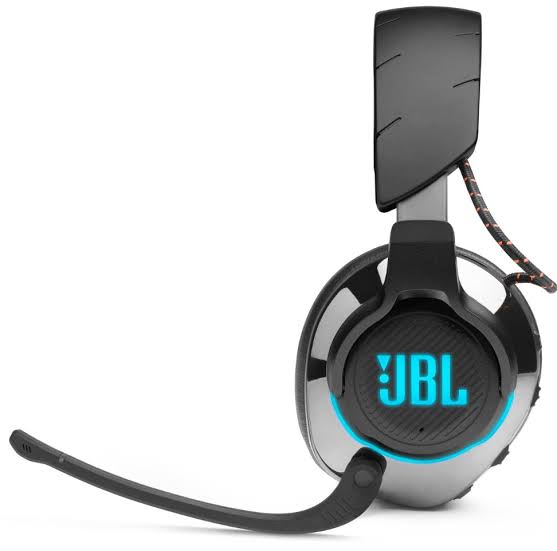
The JBL Quantum 810 Wireless Gaming Headset is a premium over-ear gaming headset built for players who want immersive sound, flexible connectivity, and long-lasting comfort. Designed for PC, PlayStation, Nintendo Switch, and mobile use, it combines 2.4GHz wireless, Bluetooth 5.2, and a 3.5mm wired connection in one versatile package. That makes it a strong choice for gamers who switch between platforms and want a single headset that can handle competitive matches, casual play, streaming, and everyday media use.
One of its biggest strengths is the audio experience. The headset features JBL QuantumSOUND Signature, 50mm drivers, and dual surround options, including JBL QuantumSURROUND and DTS Headphone:X 2.0 depending on platform and software support. It also includes active noise cancelling, a voice-focus boom microphone, and a game-chat balance dial, all of which are useful for online multiplayer and voice communication. Battery life is another highlight, with many listings and reviews placing playback in the 30 to 43 hour range depending on settings and usage. The headset also supports quick charging and can be used while charging, which is helpful for long sessions.
The JBL Quantum 810 Wireless Gaming Headset typically sits in the premium midrange to upper-midrange price band, with current market pricing often around $199.95 to $299.99 depending on region, retailer, and promotions. It is widely available through major electronics stores and online retailers, making it relatively easy to find. This headset is best suited for PC and console gamers who value wireless freedom, clear positional audio, and multi-device flexibility. It is especially appealing for users who want a feature-rich gaming headset without moving into ultra-expensive flagship territory.
Pros and Cons of the JBL Quantum 810 Wireless Gaming Headset
Pros
- Strong wireless flexibility with 2.4GHz, Bluetooth 5.2, and wired 3.5mm support for use across PC, console, and mobile devices.
- Immersive gaming audio with large 50mm drivers and surround sound support that improves directional cues in shooters and action games.
- Active noise cancelling helps reduce background distractions during gaming, commuting, or working from home.
- Long battery life makes it practical for extended sessions, with many users reporting all-day use without frequent charging.
- Comfortable memory foam ear cushions and a padded headband make it easier to wear for several hours at a time.
- Useful controls such as microphone mute, game-chat balance, and software customization improve convenience for serious players.
Cons
- Heavier than some competing wireless gaming headsets, which may matter during very long sessions.
- Premium pricing may be harder to justify if you only need basic stereo sound and a simple microphone.
- Best surround features are more effective on PC, so console users may not get the full software experience.
- Some alternatives, such as more affordable wireless gaming headsets, offer decent performance at a lower cost but with fewer premium features.
For value for money, the JBL Quantum 810 Wireless Gaming Headset makes the most sense for users who will actually use its ANC, multi-platform connectivity, and spatial audio tools. If you mainly need a casual headset for occasional play, a cheaper model may be a better buy. If you want a more premium all-rounder than budget headsets but do not want to pay flagship prices, the Quantum 810 remains a compelling option.
Customer Reviews and User Feedback
Overall customer sentiment for the JBL Quantum 810 Wireless Gaming Headset trends positive, with many users praising sound quality, battery life, and connectivity. A common theme in feedback is a star rating around 4 out of 5, especially from buyers who wanted a flexible headset for both gaming and everyday audio. One typical testimonial is: “The surround sound is excellent, and switching between Bluetooth and wireless is incredibly convenient.” Another frequent comment is: “Battery life is one of the best parts of this headset.”
Common complaints usually focus on the weight, the premium price, and occasional software learning curves. Some users note that the headset feels a bit bulky during marathon sessions, while others want more intuitive PC software controls. A few buyers also mention that the best audio tuning is achieved after adjusting settings in the companion software. For most purchasers, though, the combination of strong audio, ANC, and dual wireless support makes the headset feel worth recommending, especially if they play across multiple devices and want a more advanced gaming headset than basic entry-level models.
Key Features and Specifications
- Wireless connectivity: 2.4GHz USB wireless and Bluetooth 5.2
- Wired option: 3.5mm audio jack
- Drivers: 50mm dynamic drivers
- Audio features: JBL QuantumSOUND Signature, surround sound support, and active noise cancelling
- Microphone: Voice-focus boom mic with noise and echo suppression
- Battery life: Approximately 30 to 43 hours depending on settings and usage
- Charging: USB-C charging with play-and-charge support
- Compatibility: PC, PlayStation, Nintendo Switch, Mac, and mobile devices depending on connection method
- Software: JBL QuantumENGINE for EQ, RGB, and mic customization on supported systems
Who Should Buy the JBL Quantum 810 Wireless Gaming Headset?
This headset is a strong choice for competitive gamers, streamers, and multitaskers who want one headset for gaming, music, calls, and media. It is especially useful for players who move between PC, console, and Bluetooth devices and need a headset that can keep up. If you want a premium wireless gaming headset with ANC, rich audio, and practical controls, the JBL Quantum 810 Wireless Gaming Headset is an easy model to shortlist.
If your priority is the lowest possible price, simpler controls, or a lighter design, there are cheaper alternatives that may suit you better. But for users seeking a feature-packed wireless gaming headset with broad compatibility and strong performance, the Quantum 810 stands out as a well-rounded option.
Faqs
How do I set up the JBL Quantum 810 Wireless Gaming Headset for the first time on PC or console?
Why is my JBL Quantum 810 Wireless Gaming Headset not connecting through 2.4GHz or Bluetooth?
Can the JBL Quantum 810 Wireless Gaming Headset work with PS5, PS4, Xbox, Nintendo Switch, and mobile devices?
What should I do if the JBL Quantum 810 Wireless Gaming Headset microphone sounds too quiet or unclear?
How can I improve battery life on the JBL Quantum 810 Wireless Gaming Headset?
Does the JBL Quantum 810 Wireless Gaming Headset support active noise cancelling, and when should I use it?
Why is the sound delayed on my JBL Quantum 810 Wireless Gaming Headset, and how do I reduce latency?
How should I clean and maintain the JBL Quantum 810 Wireless Gaming Headset for long-term use?
More jbl manuals
Leave a Comment