
Jbl BAR 700 Soundbar with Subwoofer User Manual
Content
JBL BAR 700 Soundbar with Subwoofer: Complete Product Manual and Buying Guide
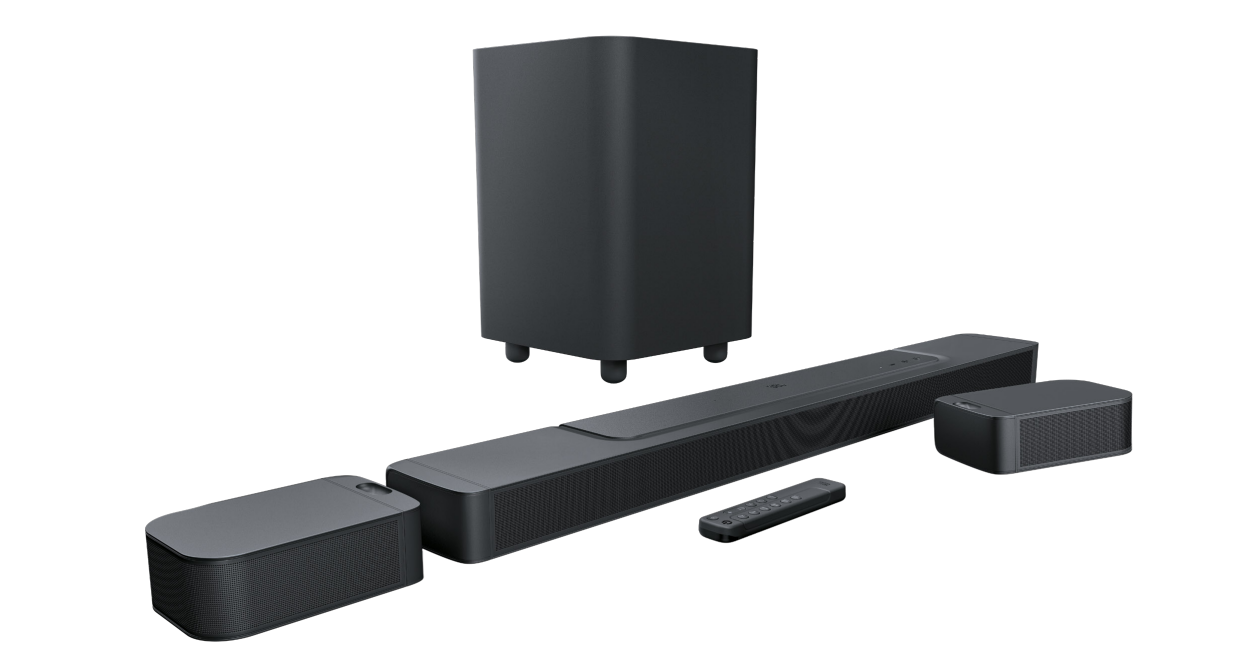
The JBL BAR 700 Soundbar with Subwoofer is a premium home theater audio system built for users who want cinematic sound without the complexity of a full receiver setup. It delivers 620W of total output power, detachable wireless surround speakers, and a 10-inch wireless subwoofer, making it a strong choice for movies, gaming, and music in medium to large living rooms. With Dolby Atmos support and JBL’s signature room-filling sound, this soundbar is designed to create a more immersive listening experience than standard 2.1 or 3.1 soundbars.
One of its biggest advantages is flexibility. The detachable surround speakers can be placed behind the listener for true rear-channel effects or reattached to the main bar when not in use. This makes the JBL BAR 700 Soundbar with Subwoofer especially appealing for users who want a clean setup during the week and a more theater-like experience on weekends. It also supports wireless subwoofer placement, reducing cable clutter and simplifying installation.
This model is a good fit for home theater enthusiasts, streaming fans, and gamers who want powerful bass and clearer dialogue. The estimated price range typically falls around the mid-premium segment, often near $600 to $900 depending on retailer, promotions, and availability. It is widely available through major electronics retailers and brand channels, though stock can vary by region. For buyers comparing it with alternatives, the JBL BAR 700 sits above entry-level soundbars in performance and features, while remaining more affordable than larger Dolby Atmos systems with rear satellites and multiple height channels.
Pros & Cons of the JBL BAR 700 Soundbar with Subwoofer
Pros
- Powerful 620W output: Delivers strong volume and dynamic range for movies, music, and sports.
- Detachable surround speakers: Offers real rear-channel flexibility for more convincing surround sound.
- 10-inch wireless subwoofer: Produces deep bass for action scenes, explosions, and low-end music.
- Dolby Atmos support: Helps create a more spacious, theater-style audio presentation.
- Clean wireless setup: Reduces cable clutter compared with traditional AV receiver systems.
- Strong value for money: A compelling option for users who want premium features without moving to a full surround package.
Cons
- Premium pricing: More expensive than basic soundbars, so it may not suit budget buyers.
- Large footprint: The soundbar and subwoofer require enough space for proper placement.
- Best results depend on setup: Rear speaker positioning matters for the most immersive sound.
- Not a full AV replacement: Serious audiophiles may still prefer a receiver-based speaker system.
Compared with simpler alternatives, the JBL BAR 700 Soundbar with Subwoofer offers a more complete home theater experience. It is a better fit than compact 2.1 soundbars for users who want true surround effects, but it is not as expansive as larger multi-speaker systems from JBL or competing brands.
Customer Reviews: What Buyers Say About the JBL BAR 700 Soundbar with Subwoofer
Customer feedback for the JBL BAR 700 Soundbar with Subwoofer is generally very positive, with many users praising its room-filling sound, strong bass, and easy wireless setup. A typical sentiment is: “The bass is powerful, the dialogue is clear, and the detachable speakers make movie night feel like a real theater experience.” Another common comment is that the system sounds significantly bigger than its size suggests.
Average user ratings are often around 4.4 to 4.6 out of 5 stars on major retail platforms, with buyers especially appreciating the surround performance and bass impact. Frequent complaints include occasional concerns about speaker placement, the need for fine-tuning sound modes, and the premium price. Some users also note that the best Atmos effect depends on room layout and seating position.
For shoppers who want a powerful wireless soundbar with subwoofer setup, this model is widely recommended. It is a strong buy for living rooms, gaming setups, and streaming-heavy households, especially if cinematic bass and detachable rear speakers are top priorities.
Faqs
How do I set up the JBL BAR 700 Soundbar with Subwoofer for the first time?
Why is my JBL BAR 700 Soundbar with Subwoofer not pairing with the subwoofer or surround speakers?
What is the best connection method for JBL BAR 700 Soundbar with Subwoofer: HDMI eARC or optical?
How can I fix no sound from my JBL BAR 700 Soundbar with Subwoofer?
Does the JBL BAR 700 Soundbar with Subwoofer work with Dolby Atmos and 4K HDR TVs?
How do I optimize bass on the JBL BAR 700 Soundbar with Subwoofer without making it overpowering?
What devices are compatible with the JBL BAR 700 Soundbar with Subwoofer for streaming music?
How should I clean and maintain the JBL BAR 700 Soundbar with Subwoofer?
More jbl manuals
Leave a Comment