
Jbl Party Box 710 User Manual
Content
JBL PartyBox 710 Product Manual and Buyer’s Guide
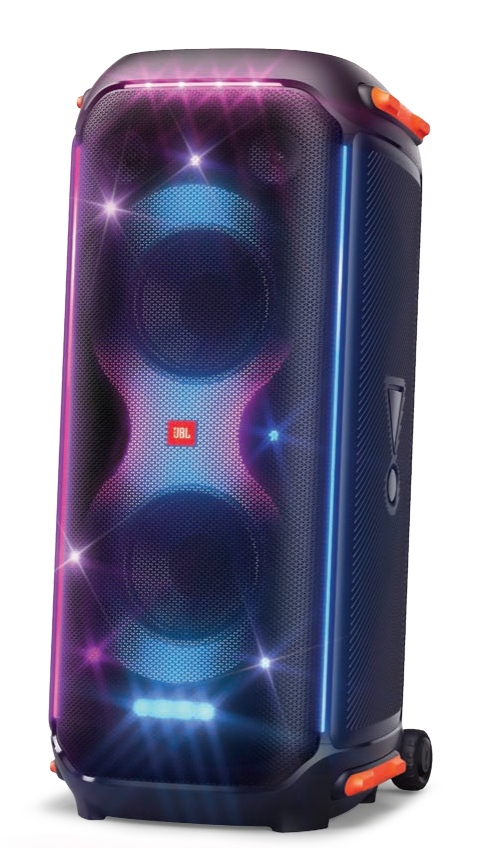
The JBL PartyBox 710 is a high-power party speaker built for users who want room-filling sound, bold bass, and an attention-grabbing light show in one large portable unit. With 800W RMS output, dual 8-inch woofers, dual 2.75-inch tweeters, and a frequency response of 35Hz to 20kHz, the JBL PartyBox 710 is designed to deliver club-style audio for backyard parties, indoor events, karaoke nights, and small venue gatherings. Its built-in RGB lighting, Bluetooth 5.1 connectivity, microphone and guitar inputs, and splash-proof design make it a versatile choice for entertainers and hosts who want both power and convenience.
This model is especially appealing to people planning frequent celebrations, DJs seeking a reliable party speaker, and anyone who values loud, punchy sound with easy wireless streaming. The built-in wheels and handle help with transport, but this is still a large speaker at 27.8 kg, so it works best as a semi-portable system rather than a grab-and-go speaker. The JBL PartyBox 710 typically sits in the premium consumer audio segment, with an estimated price range of about $700 to $850 depending on retailer, region, and seasonal promotions. Availability is generally strong through major electronics stores and online marketplaces, though stock may vary during peak holiday or party seasons.
Pros and Cons of JBL PartyBox 710 for Parties, Karaoke, and Events
Pros
- Massive 800W RMS output delivers loud, energetic sound that can cover large indoor rooms and outdoor social spaces.
- Deep bass performance is a standout feature, making it a strong fit for dance music, hip-hop, EDM, and party playlists.
- Built-in light effects add visual impact and make the speaker feel like a complete party centerpiece.
- Microphone and guitar inputs support karaoke sessions, live vocals, and casual performance use.
- Bluetooth 5.1 offers simple wireless pairing with phones, tablets, and laptops for fast setup.
- Wheels and a handle improve mobility compared with other speakers in the same size class.
- Good value for buyers who want one all-in-one party speaker instead of buying separate audio and lighting gear.
Cons
- At 61.3 lbs, it is heavy and not ideal for frequent lifting or travel without help.
- It requires AC power, so it is less flexible than battery-powered alternatives.
- The large footprint makes it less suitable for small apartments or tight storage spaces.
- Sound tuning favors excitement and bass impact more than studio-style neutrality.
- Compared with smaller alternatives like the JBL PartyBox 310, it offers more power but less everyday portability.
- For buyers wanting true stereo expansion or multi-room audio, a separate speaker system may be a better long-term choice.
Customer Reviews for JBL PartyBox 710: What Buyers Are Saying
Customer feedback for the JBL PartyBox 710 is generally very positive, with many users praising the speaker’s loud output, strong bass, and party-ready lighting. Common ratings trend around 4.5 out of 5 stars, especially from buyers who use it for backyard events, birthdays, and karaoke. One typical review summary is: “The sound is huge, and the bass shakes the room without distortion.” Another frequent comment is: “It feels expensive, but it replaces multiple pieces of party gear.”
Common complaints focus on weight, size, and the need for wall power. Some users also mention that it is overkill for casual everyday listening. If the goal is a premium party speaker with strong sound and visual effects, the JBL PartyBox 710 is often recommended. Buyers who need something lighter or battery-operated may prefer a smaller JBL model or a more portable rival. Overall, it is best suited to users who prioritize performance over convenience.
Quick Answer: Is JBL PartyBox 710 Worth It?
The JBL PartyBox 710 is worth buying if you want one of the loudest, most feature-rich party speakers in its class. It is a strong match for hosts, entertainers, and karaoke fans who want powerful sound, strong bass, and built-in lighting in a single package.
Key Specifications at a Glance
- Power output: 800W RMS
- Drivers: 2 x 8-inch woofers and 2 x 2.75-inch tweeters
- Frequency response: 35Hz to 20kHz
- Bluetooth: 5.1
- Dimensions: 15.70 x 35.60 x 17.20 inches
- Weight: 61.3 lbs
- Inputs: Mic, guitar, AUX, USB
- Power source: AC mains
Faqs
How do I set up JBL PartyBox 710 for the first time?
Why is my JBL PartyBox 710 not turning on?
How do I fix Bluetooth pairing problems on JBL PartyBox 710?
What inputs and connections does JBL PartyBox 710 support?
Can I use JBL PartyBox 710 with a microphone and guitar at the same time?
How do I get better bass and louder sound from JBL PartyBox 710?
Why is there no sound from my JBL PartyBox 710 even though it is powered on?
How should I clean and maintain JBL PartyBox 710 safely?
Tags
More jbl manuals
- Jbl Quantum 810 Wireless Gaming Headset User Manual
- Jbl Bar 2.1 Soundbar with Wireless Subwoofer User Manual
- Jbl BAR 700 Soundbar with Subwoofer User Manual
- Jbl Studio 6 Series Loudspeakers User Manual
- Jbl BAR 1300 Wireless Surround Soundbar User Manual
- Jbl Partybox Stage 320 Portable Speaker User Manual
Leave a Comment