
Jbl Partybox Stage 320 Portable Speaker User Manual
Content
JBL PartyBox Stage 320 Portable Speaker Review and Product Manual
Introduction
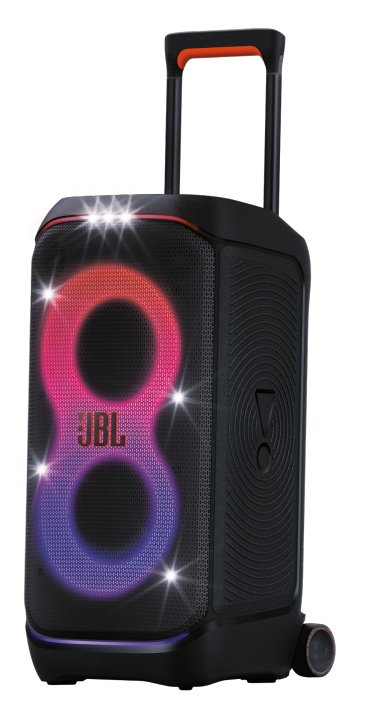
The JBL PartyBox Stage 320 Portable Speaker is a powerful Bluetooth party speaker built for users who want loud sound, strong bass, and easy mobility in one large all-in-one design. With 240W of output, JBL Pro Sound, a 2-way speaker layout, and an 18-hour rated battery life, it is designed to fill backyards, garages, patios, and event spaces with room-shaking audio. The built-in telescopic handle and sturdy wheels make it much easier to move than many large party speakers, while the IPX4 splash-resistant design adds peace of mind for outdoor use. The dynamic lightshow, Auracast support, dual microphone and guitar inputs, and fast charging features also make it a flexible option for karaoke nights, live performances, house parties, and small community events.
The jbl Partybox Stage 320 Portable Speaker is aimed at people who want more than a basic wireless speaker. It suits hosts, DJs, performers, content creators, and anyone looking for a portable party speaker with big sound and simple controls. In current market listings, the estimated price range is typically around $499 to $599, with occasional discounts depending on the retailer and region. Availability is generally strong through major electronics stores, online marketplaces, and JBL’s own sales channels, though pricing can vary by color and stock levels. For buyers comparing it with smaller portable speakers, the value comes from its combination of high output, battery life, rugged handling, and versatile input options.
Pros & Cons
Pros
- Powerful 240W sound: Delivers loud, full-bodied audio that works well for medium to large gatherings.
- Portable for its size: Wheels and a telescopic handle make transport easier than lifting a heavy box speaker.
- Long battery life: Up to 18 hours of playback is excellent for all-day events and extended parties.
- Party-ready features: Lightshow effects, Bass Boost, Auracast, and microphone/guitar inputs add real event value.
- Outdoor-friendly build: IPX4 splash resistance helps it handle poolside use, patios, and light rain.
Cons
- Large and heavy: At roughly 16.5 kg, it is portable, but not lightweight.
- Premium pricing: It costs more than compact Bluetooth speakers and some smaller party speakers.
- Best for bigger spaces: It may be overkill for casual desktop or solo listening.
- Not fully waterproof: IPX4 protects against splashes, not immersion.
For value for money, the jbl PartyBox Stage 320 Portable Speaker makes the most sense if you need genuine party-level output rather than casual everyday audio. Compared with smaller alternatives, it offers far more volume, bass, and event features, but buyers focused on portability and lower cost may prefer a compact JBL Charge, Flip, or smaller PartyBox model.
Customer Reviews
Customer feedback for the jbl PartyBox Stage 320 Portable Speaker is generally very positive, with many users praising its loudness, strong bass, and easy setup. Typical ratings cluster around 4.5 to 5 stars, especially from buyers using it for backyard parties, karaoke, and outdoor gatherings. One common testimonial theme is that the speaker “sounds much bigger than expected” and “turns any space into a party.”
Frequently mentioned complaints include the weight, the large footprint, and the premium price. Some users also note that while the battery life is strong, actual runtime depends heavily on volume and lighting use. A few buyers mention that it is not ideal for small apartments because the bass and output can be overwhelming. Overall, most recommendations are strong for party hosts and performers, while casual listeners are often advised to consider a smaller Bluetooth speaker instead.
Quick Specs and Buying Advice
- Power output: 240W
- Battery life: Up to 18 hours
- Water resistance: IPX4 splash resistant
- Connectivity: Bluetooth 5.4, AUX, USB, microphone and guitar inputs
- Portability: Wheels and telescopic handle
- Best use cases: Parties, karaoke, outdoor events, live performance support
If you want a portable party speaker with big sound, practical mobility, and flexible connectivity, the jbl PartyBox Stage 320 Portable Speaker is a strong choice. It is especially appealing for users who value performance, lighting effects, and event-ready features over ultra-compact convenience.
Faqs
How do I set up jbl Partybox Stage 320 Portable Speaker for the first time?
Why is my jbl Partybox Stage 320 Portable Speaker not connecting to Bluetooth?
What features of jbl Partybox Stage 320 Portable Speaker matter most for home parties and outdoor use?
Can jbl Partybox Stage 320 Portable Speaker work with a microphone or guitar?
How do I improve bass and sound quality on jbl Partybox Stage 320 Portable Speaker?
What should I do if jbl Partybox Stage 320 Portable Speaker keeps cutting out during playback?
How do I charge and maintain the battery in jbl Partybox Stage 320 Portable Speaker?
How do I clean and store jbl Partybox Stage 320 Portable Speaker safely?
More jbl manuals
Leave a Comment