
Jbl Quantum TWS Air Wireless Earbuds User Manual
Content
JBL Quantum TWS Air Wireless Earbuds: Full Product Manual and Buyer Guide
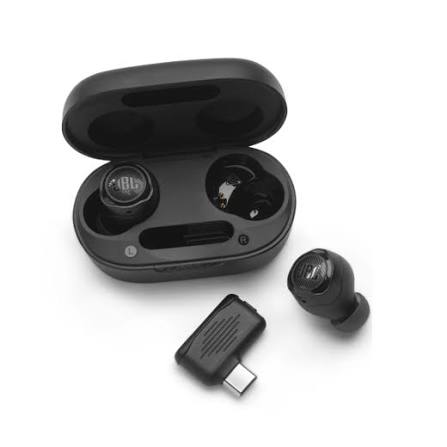
Introduction: What the JBL Quantum TWS Air Wireless Earbuds Offer
The JBL Quantum TWS Air Wireless Earbuds are true wireless gaming earbuds built for players who want low-latency wireless audio without the bulk of over-ear headphones. Designed for multi-platform use, they support both Bluetooth 5.2 and a 2.4GHz USB-C wireless connection, making them a flexible choice for PC, PlayStation, Nintendo Switch, and mobile gaming. The earbuds use 6.8mm drivers and JBL QuantumSURROUND technology to deliver detailed sound with strong directional awareness, which is especially useful in competitive games where footsteps, reloads, and ambient cues matter.
One of the biggest advantages of the JBL Quantum TWS Air Wireless Earbuds is their portability. The compact charging case, lightweight design, and included ear tip sizes help create a comfortable fit for long sessions and travel. They also include Ambient Aware and TalkThru modes, giving users more control when they need to hear surroundings or speak without removing the earbuds. Four beamforming microphones support clearer voice chat and calls, which adds value for both gaming and everyday use.
These earbuds are best suited for gamers, commuters, and users who want a single pair of earbuds for music, calls, and gaming. At launch and in recent market coverage, the estimated price range has typically sat around $99.95 to $109.95, with availability varying by region and retailer. In some markets, the product is still listed through JBL channels and major electronics sellers, though stock levels may fluctuate. For buyers looking for a versatile gaming earbud under the premium headset price tier, the JBL Quantum TWS Air Wireless Earbuds remain a compelling option.
Pros and Cons of JBL Quantum TWS Air Wireless Earbuds
The JBL Quantum TWS Air Wireless Earbuds stand out for their low-latency connection, comfortable fit, and gaming-focused feature set. They are a practical alternative to larger wireless gaming headsets, especially for users who want portability and fast setup. Compared with other gaming earbuds in this price range, they offer strong platform compatibility and a useful USB-C dongle for more stable wireless performance on supported devices.
- Pros: Low-latency 2.4GHz wireless connection for gaming on PC and consoles.
- Pros: Bluetooth 5.2 support for phones, tablets, and casual listening.
- Pros: Compact, lightweight design that is easier to carry than a full headset.
- Pros: Four microphones improve voice chat clarity compared with many budget earbuds.
- Pros: Ambient Aware and TalkThru modes add convenience for daily use.
- Pros: Good value for money if you want gaming features without paying premium headset prices.
- Cons: Battery life is modest versus some non-gaming earbuds, with shorter runtime when gaming over wireless.
- Cons: No active noise cancellation, which may matter in noisy environments.
- Cons: Sound tuning leans toward gaming, so audiophile listeners may prefer more neutral alternatives.
- Cons: Some users may find the case and controls less premium than higher-priced rivals.
- Cons: If pure music quality is the priority, alternatives from Sony, Samsung, or Anker may offer stronger all-round value.
Customer Reviews: What Buyers Usually Like and Dislike
Customer feedback for the JBL Quantum TWS Air Wireless Earbuds is generally positive, with many users praising the convenience, sound clarity, and gaming performance. Typical ratings cluster around 4 out of 5 stars, with comments often highlighting the reliable wireless connection and the strong value for the price. One common sentiment is that the earbuds are “surprisingly good for gaming” and feel more responsive than standard Bluetooth earbuds when used with the dongle.
Frequent praise includes the comfortable fit, easy pairing, and clear chat performance. Common complaints usually focus on battery life, the lack of ANC, and sound isolation that depends heavily on the ear tip seal. Some users also note that the earbuds perform best in gaming and casual listening, while serious music listeners may want a more refined audio profile. A typical buyer recommendation is to choose them if gaming latency, portability, and cross-device support matter more than maximum battery life or noise cancellation. For users who want a wireless gaming earbud under $100 to $110, the JBL Quantum TWS Air Wireless Earbuds remain a strong purchase option.
Quick Specifications for JBL Quantum TWS Air Wireless Earbuds
- Connectivity: Bluetooth 5.2 and 2.4GHz USB-C wireless dongle
- Drivers: 6.8mm dynamic drivers
- Battery life: Up to 8 hours in the earbuds and up to 24 hours total with the case, depending on usage
- Water resistance: IPX4
- Microphones: 4 beamforming microphones
- Features: Ambient Aware, TalkThru, QuantumSURROUND, low-latency gaming mode
- Best for: Gaming, calls, commuting, and portable everyday listening
Should You Buy the JBL Quantum TWS Air Wireless Earbuds?
If you want true wireless gaming earbuds with strong connectivity, useful voice features, and a travel-friendly design, the JBL Quantum TWS Air Wireless Earbuds are an easy recommendation. They deliver a balanced mix of gaming utility and everyday convenience, making them ideal for players who switch between PC, console, and mobile devices. If your priority is maximum battery life, active noise cancellation, or a more music-focused sound signature, alternatives may suit you better. For most buyers seeking a dependable gaming earbud in the sub-$110 range, these earbuds offer a solid mix of performance, comfort, and flexibility.
Faqs
How do I set up JBL Quantum TWS Air Wireless Earbuds for the first time on a phone or gaming device?
Why are my JBL Quantum TWS Air Wireless Earbuds not connecting, and how can I fix pairing problems?
How do I get the best gaming audio and low-latency performance from JBL Quantum TWS Air Wireless Earbuds?
Are JBL Quantum TWS Air Wireless Earbuds compatible with PC, Nintendo Switch, PlayStation, and mobile devices?
Why does the microphone sound quiet on JBL Quantum TWS Air Wireless Earbuds during voice chat?
How can I improve battery life on JBL Quantum TWS Air Wireless Earbuds during long gaming sessions?
What should I do if one JBL Quantum TWS Air Wireless Earbud stops playing sound or sounds weaker than the other?
How do I clean and maintain JBL Quantum TWS Air Wireless Earbuds without damaging them?
More jbl manuals
Leave a Comment