
Jbl Partybox 310 Portable Speaker User Manual
Content
JBL PartyBox 310 Portable Speaker: Complete Product Manual and Buying Guide
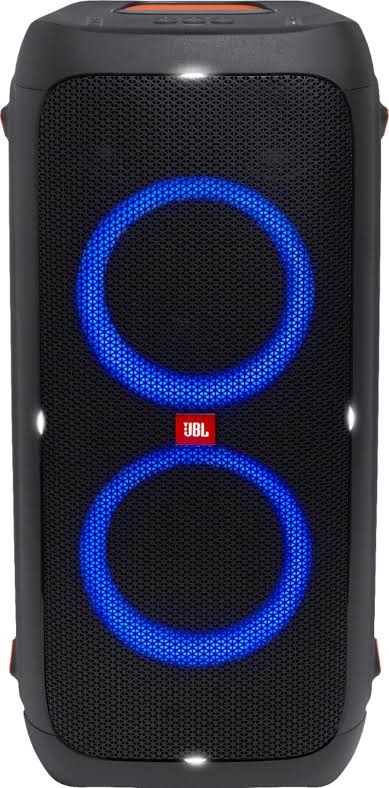
The JBL PartyBox 310 Portable Speaker is a high-output party speaker built for users who want powerful sound, animated light effects, and true portability in one package. With 240W RMS output, two 6.5-inch woofers, two 2.5-inch tweeters, and a frequency response of 45 Hz to 20 kHz, it delivers strong bass, clear vocals, and enough volume for indoor events, backyard gatherings, and medium-sized parties. The built-in rechargeable battery offers up to 18 hours of playtime, while Bluetooth 5.1, USB playback, and microphone or guitar support make it a flexible all-in-one entertainment system.
This speaker is best suited for party hosts, DJs, families, event organizers, and anyone looking for a Bluetooth party speaker with a light show and rugged transport features. Its IPX4 splash resistance, telescoping handle, and wheels make it easier to move than many large boombox-style alternatives. It also includes JBL's signature sound tuning, which emphasizes punchy bass and energetic playback for dance music, pop, hip-hop, and karaoke setups. In most retail markets, the JBL PartyBox 310 Portable Speaker typically falls in the mid-to-premium price range, often around $400 to $600 depending on availability, promotions, and region. It remains widely available through major electronics retailers and online marketplaces, though stock can vary due to demand and seasonal sales.
Pros and Cons of the JBL PartyBox 310 Portable Speaker
Pros
- Powerful 240W RMS output produces room-filling sound with strong bass and clean high frequencies.
- Long battery life of up to 18 hours supports all-day events without constant recharging.
- Built-in light show adds visual energy for parties, karaoke nights, and outdoor gatherings.
- Wheels and a telescoping handle improve portability for a speaker of this size.
- Bluetooth 5.1, USB playback, and input support make it versatile for multiple setups.
- Good value for users who want a loud party speaker instead of a compact Bluetooth speaker or soundbar.
Cons
- Large and heavy at 38.4 lbs, so it is not ideal for casual carry-around use.
- Best performance comes at higher volumes, which may be overkill for small apartments or quiet listening.
- Water resistance is only splash-rated, so it is not designed for full weather exposure.
- Compared with newer premium alternatives, it may lack more advanced app features or smarter tuning options.
For buyers comparing options, the JBL PartyBox 310 Portable Speaker offers a stronger “party-first” experience than smaller portable Bluetooth speakers, while remaining easier to move than many larger PA-style systems. It is especially appealing if light effects, microphone support, and battery-powered performance matter more than ultra-compact design.
Customer Reviews for the JBL PartyBox 310 Portable Speaker
Customer feedback for the JBL PartyBox 310 Portable Speaker is overwhelmingly positive, with major retailers showing ratings around 4.9 out of 5 stars from thousands of reviews. Users frequently praise the loud sound, deep bass, long battery life, and impressive light effects, especially for karaoke, backyard parties, and family events. A common positive comment is that it feels “worth the money” for anyone who wants big sound in a portable format.
Common complaints usually focus on its size, weight, and price, with some buyers noting that it is too large for everyday casual use. A few users also mention that certain devices or setups may require adjustment for the best connection or balance. Overall, it is strongly recommended for people who want a reliable Bluetooth party speaker with powerful sound and easy transport features.
- Average user rating: 4.9/5 stars
- Typical praise: loud volume, strong bass, long battery life, fun lighting
- Typical complaint: heavy design and premium price
- Best for: parties, karaoke, outdoor entertainment, and mobile DJ use
Key Specifications of the JBL PartyBox 310 Portable Speaker
- Output power: 240W RMS
- Drivers: 2 x 6.5-inch woofers and 2 x 2.5-inch tweeters
- Frequency response: 45 Hz to 20 kHz
- Bluetooth version: 5.1
- Battery life: up to 18 hours
- Charging time: under 3.5 hours
- Weight: 38.4 lbs
- Dimensions: 27 x 12.8 x 14.5 inches
- Special features: built-in light show, splash resistance, wheels, telescoping handle, USB playback
Who Should Buy the JBL PartyBox 310 Portable Speaker?
The JBL PartyBox 310 Portable Speaker is an excellent choice for users who want a loud, battery-powered party speaker that can handle music, karaoke, and light entertainment with minimal setup. It is a strong fit for event hosts, content creators, small event businesses, and households that regularly host gatherings. If portability, visual effects, and powerful JBL Pro Sound are top priorities, this speaker delivers a compelling balance of performance and convenience.
Faqs
How do I set up the JBL PartyBox 310 Portable Speaker for the first time?
Why is my JBL PartyBox 310 Portable Speaker not pairing with Bluetooth?
Can the JBL PartyBox 310 Portable Speaker run on battery and AC power at the same time?
How long does the JBL PartyBox 310 Portable Speaker battery last and how can I optimize playback time?
What devices are compatible with the JBL PartyBox 310 Portable Speaker?
How do I get better bass and louder sound from the JBL PartyBox 310 Portable Speaker?
What should I do if the JBL PartyBox 310 Portable Speaker sound cuts out or skips during playback?
How should I clean and maintain the JBL PartyBox 310 Portable Speaker for long-term use?
More jbl manuals
Leave a Comment