
Jbl CHARGE 5 WI-FI SE Portable speaker User Manual
Content
JBL Charge 5 Wi-Fi SE Portable Speaker Manual
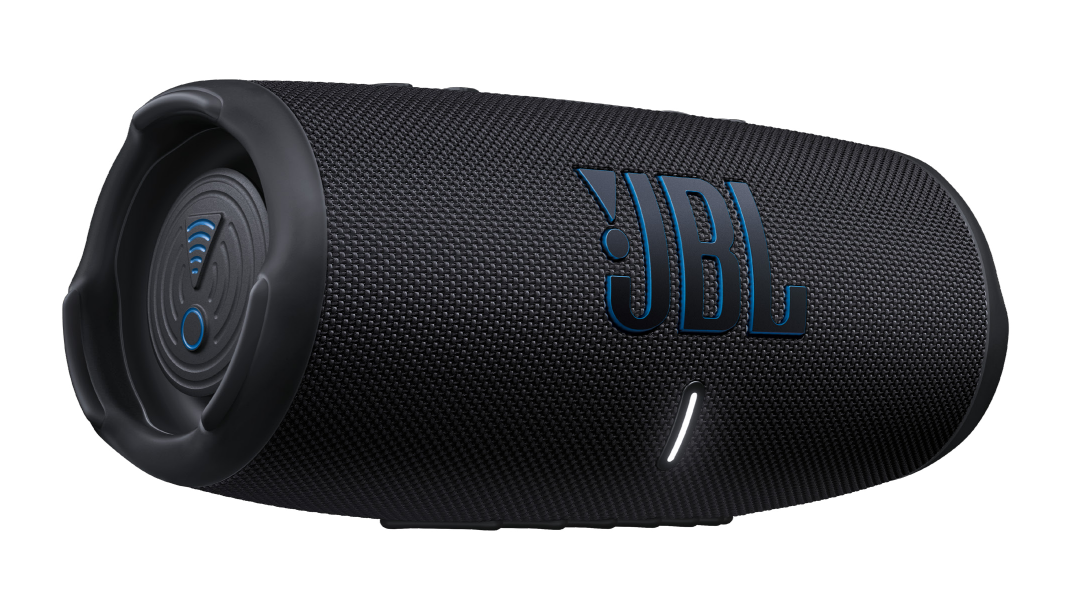
Introduction: JBL Charge 5 Wi-Fi SE Portable Speaker Overview
The jbl CHARGE 5 WI-FI SE Portable speaker is a premium portable Wi-Fi and Bluetooth speaker built for listeners who want powerful sound, flexible streaming, and outdoor-ready durability. It delivers JBL Original Pro Sound with a 53 mm x 93 mm woofer, a 20 mm tweeter, and a combined 40 W RMS output for rich bass and clear highs. With Wi-Fi streaming support for services like AirPlay, Chromecast built-in, Alexa Multi-Room Music, and Spotify Connect, this model is designed for seamless home and on-the-go playback.
This speaker is ideal for users who want one device for backyard parties, poolside gatherings, travel, and everyday room-to-room listening. Its IP68 waterproof and dustproof rating makes it suitable for harsh environments, while the built-in power bank lets you charge a phone or small device during long sessions. The battery offers up to 20 hours of playtime, and a full charge takes about 6 hours using a 5 V/3 A charger. The jbl CHARGE 5 WI-FI SE Portable speaker typically falls in the midrange premium category, with estimated pricing often around $130 to $250 depending on region, retailer, and promotions. Availability is generally strongest through JBL, major electronics stores, and selected warehouse clubs, though stock can vary by market. For buyers comparing portable Bluetooth speakers, this model stands out for its Wi-Fi flexibility, rugged build, and strong sound output.
Setup Guide: How to Set Up JBL Charge 5 Wi-Fi SE Portable Speaker
Start by fully charging the speaker with the included USB-C connection or a compatible 5 V/3 A power adapter. Once powered, press the power button and wait for the indicator light to confirm startup. For Bluetooth use, open your phone or tablet’s Bluetooth settings, select the speaker from the list, and confirm pairing. For Wi-Fi setup, install the JBL app or the supported streaming service app, then follow the on-screen instructions to connect the speaker to your wireless network.
You can choose between Bluetooth for quick portable use and Wi-Fi for higher stability and multi-room streaming. If your network supports it, use 5 GHz Wi-Fi for lower interference, or 2.4 GHz for better range in larger homes. After setup, test audio playback at low volume before increasing output. If the speaker does not appear, restart both the speaker and your phone, forget old Bluetooth pairings, or move closer to the router during Wi-Fi configuration.
Keep the unit away from open flames, direct heat, and submerged water beyond its rated protection. Avoid charging it near wet surfaces, and only use certified cables and power adapters to reduce the risk of damage.
Troubleshooting: Common JBL Charge 5 Wi-Fi SE Problems and Fixes
If the speaker will not power on, charge it for at least 30 minutes and try a different USB-C cable or adapter. If Bluetooth pairing fails, clear the speaker from your device list, restart both devices, and reconnect from scratch. For Wi-Fi issues, check router compatibility, confirm the password is correct, and make sure the speaker is within range of the network signal.
Common problems include no sound, intermittent dropouts, and app connection failures. For no sound, raise the volume on both the speaker and source device, and verify the correct input is selected. For dropouts, reduce interference by moving away from microwaves, thick walls, or crowded wireless channels. If the speaker becomes unresponsive, perform a reset by following the hardware reset sequence in the user guide.
There are no widely used public error codes for everyday consumer troubleshooting, so most fixes focus on connectivity, battery, or firmware resets. Prevent problems by keeping firmware updated, avoiding deep battery drain, and cleaning the USB ports regularly. For warranty support, check JBL’s official support channels, the retailer’s return policy, or the product registration portal. If you need help, contact JBL customer support through the JBL support website or the service number listed in your region’s warranty documentation.
Pros & Cons: Is the JBL Charge 5 Wi-Fi SE Worth It?
Pros
- Strong sound performance with deep bass and clear treble, suitable for both indoor and outdoor listening.
- Dual connectivity with Wi-Fi and Bluetooth gives more flexibility than a standard Bluetooth portable speaker.
- IP68 waterproof and dustproof protection makes it a strong choice for travel, beach use, and poolside parties.
- Up to 20 hours of battery life supports long listening sessions without frequent charging.
- Built-in power bank function adds practical value for charging phones on the go.
- Works with popular streaming ecosystems, including AirPlay, Chromecast built-in, Spotify Connect, and Alexa Multi-Room Music.
Cons
- Premium pricing may feel high compared with simpler Bluetooth-only alternatives.
- Sound quality is excellent for size, but larger home speakers can still deliver wider stereo separation.
- Wi-Fi setup can take longer than basic Bluetooth pairing.
- Best value depends on whether you will actually use the Wi-Fi streaming features.
For value for money, this model is strongest for users who want one portable speaker that doubles as a home streaming speaker. Compared with alternatives like the standard JBL Charge 5 or other midrange portable speakers, the Wi-Fi SE adds more versatility, but casual listeners who only need Bluetooth may prefer a lower-cost option.
Customer Reviews: What Buyers Say About JBL Charge 5 Wi-Fi SE
Customer feedback is generally positive, with many users praising the punchy bass, loud output, and rugged build quality. Common ratings often land around 4 to 5 stars for sound and durability. A frequent comment is that the speaker “sounds much bigger than it looks,” especially at outdoor gatherings.
Some buyers mention complaints about the higher price and the extra setup steps needed for Wi-Fi streaming. Others note that the unit is excellent for portability but less ideal for users who want full stereo separation from a single speaker. The most repeated praise centers on battery life, waterproof design, and reliable wireless switching between Wi-Fi and Bluetooth.
Recommended for buyers who want a premium portable Wi-Fi and Bluetooth speaker with strong everyday usability. Less ideal for users who want the cheapest possible portable speaker or a full home theater replacement.
Final Verdict
The jbl CHARGE 5 WI-FI SE Portable speaker is a well-rounded option for anyone seeking durable construction, long battery life, and flexible wireless streaming in one compact device. It is especially appealing to travelers, outdoor hosts, and music fans who want strong sound without sacrificing portability.
Faqs
How do I set up the jbl CHARGE 5 WI-FI SE Portable speaker for the first time?
Why is my jbl CHARGE 5 WI-FI SE Portable speaker not connecting to Wi-Fi or Bluetooth?
Can the jbl CHARGE 5 WI-FI SE Portable speaker work with iPhone, Android, and smart home apps?
What should I do if the jbl CHARGE 5 WI-FI SE Portable speaker sounds distorted or too quiet?
How can I improve battery life on the jbl CHARGE 5 WI-FI SE Portable speaker during long listening sessions?
Is the jbl CHARGE 5 WI-FI SE Portable speaker safe to use outdoors, and how should I protect it?
How do I update firmware on the jbl CHARGE 5 WI-FI SE Portable speaker?
How should I clean and maintain the jbl CHARGE 5 WI-FI SE Portable speaker for long-term use?
More jbl manuals
Leave a Comment