
Jbl L75ms Integrated Music System User Manual
Content
JBL L75ms Integrated Music System: Complete Product Manual and Buying Guide
Introduction: What Is the JBL L75ms Integrated Music System?
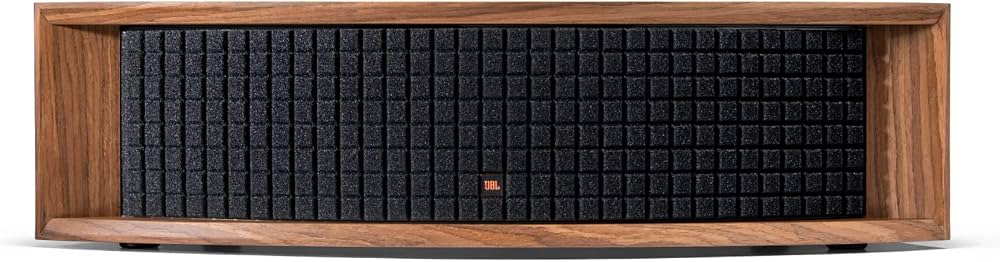
The JBL L75ms Integrated Music System is a premium all-in-one wireless speaker built for listeners who want classic design, serious power, and flexible connectivity in one cabinet. Inspired by JBL’s retro loudspeaker heritage, it combines a walnut-style enclosure, Quadrex-style grille, and modern streaming features to create a music system that looks as refined as it sounds. With 350 watts of total amplification, dual 5.25-inch woofers, dedicated tweeters, and a center channel driver, the JBL L75ms Integrated Music System delivers room-filling sound with strong bass, clear vocals, and detailed high frequencies.
This system is designed for audiophiles, design-conscious buyers, vinyl listeners, and home users who want a high-quality stereo solution without separate components. It works especially well in living rooms, media rooms, and listening spaces where users want quick setup, HDMI ARC for TV audio, phono input for turntables, and wireless streaming through Wi-Fi and Bluetooth. The built-in support for high-resolution playback makes it a strong option for users who stream lossless or near-lossless music.
Estimated pricing typically falls around $1,500 USD, though street prices and regional availability can vary depending on retailer and finish. The JBL L75ms Integrated Music System is widely positioned as a premium lifestyle audio product, making it appealing to buyers who want both performance and visual impact in a single unit.
Key Features and Specifications
- 350W RMS total power output for impactful home listening
- Dual 5.25-inch Pure Pulp cone woofers for deep, controlled bass
- Dedicated 4-inch center driver for clearer vocals and midrange presence
- Two 1-inch aluminum dome tweeters for crisp treble detail
- Wi-Fi streaming, Bluetooth 4.2, HDMI ARC, Ethernet, phono MM, and 3.5mm AUX inputs
- Up to 32-bit/192 kHz audio support for high-resolution playback
- Frequency response rated at 45 Hz to 25 kHz
- Maximum output of 106 dB at 1 meter
- Subwoofer output with auto-sense and high-pass filter engagement
Pros and Cons of the JBL L75ms Integrated Music System
Pros
- Powerful, room-filling sound: The 350W amplifier section gives the system enough headroom for larger living rooms and lively listening sessions.
- Excellent connectivity: HDMI ARC, phono input, Wi-Fi, Bluetooth, and Ethernet make it easy to connect a TV, turntable, or streaming service.
- Premium retro design: The walnut cabinet and vintage-inspired look stand out more than typical wireless speakers.
- High-resolution playback: Support for up to 32-bit/192 kHz makes it attractive to detail-oriented listeners.
- Flexible placement: Built-in sound controls and placement compensation help the system adapt to different rooms.
Cons
- Premium price tag: Around $1,500 puts it in competition with separate hi-fi systems and strong alternatives from Sonos, KEF, and Naim.
- Large footprint: This is not a compact bookshelf speaker, so it needs dedicated space.
- Bluetooth 4.2 is dated: Wireless connectivity is solid, but not the newest standard available.
- Best for style-conscious buyers: Those who want a minimal black-box speaker may prefer more understated competitors.
For value for money, the JBL L75ms Integrated Music System is strongest for buyers who want premium looks, physical inputs, and built-in streaming in one device. Compared with compact wireless speakers, it offers more scale and presence. Compared with traditional hi-fi separates, it is simpler to install but less upgradeable.
Customer Reviews: What Buyers Commonly Say
Customer feedback for the JBL L75ms Integrated Music System is generally very positive, with many owners rating it around 4.5 out of 5 stars for sound quality, design, and ease of setup. One common praise is that it sounds bigger than expected, with strong bass and clean vocals that work well for music and TV use. Many listeners also appreciate the turntable-ready phono input and the convenience of HDMI ARC for everyday use.
Common complaints usually focus on price, size, and the lack of some newer wireless conveniences found in competing products. A few users also mention that room placement matters, especially if the system is used in smaller or echo-prone spaces. Typical testimonial themes include comments such as “beautiful design, fantastic sound,” and “the perfect all-in-one system for vinyl and streaming.”
Purchase recommendation: the JBL L75ms Integrated Music System is a strong buy for anyone seeking a premium all-in-one music system with classic styling, excellent versatility, and powerful sound. It is especially appealing for users who want one speaker system to handle records, streaming, and television audio without extra components.
Who Should Buy the JBL L75ms Integrated Music System?
- Vinyl listeners who want a built-in phono stage
- Streaming users who want Wi-Fi and Bluetooth in one device
- Home theater users looking for a stylish TV audio solution with HDMI ARC
- Buyers who prefer a premium tabletop or media-room speaker with a vintage aesthetic
- Anyone comparing all-in-one speakers against Sonos, KEF, or traditional stereo separates
Setup and Usage Tips
- Place the speaker on a sturdy surface with enough breathing room around the cabinet.
- Use HDMI ARC for the simplest TV connection and automatic volume control.
- Connect a turntable directly to the phono input for the cleanest vinyl setup.
- Use Wi-Fi streaming for the best convenience and highest-quality digital playback.
- Add a subwoofer if you want even deeper low-end performance in a larger room.
Final Verdict
The JBL L75ms Integrated Music System is a polished premium speaker system that blends retro design, strong amplification, and broad connectivity into a single package. It is not the cheapest option in the category, but it delivers a convincing mix of style, power, and practicality for music lovers who want an elegant all-in-one solution. For the right buyer, it offers a compelling balance of performance and convenience that makes everyday listening feel special.
Faqs
How do I set up the jbl L75ms Integrated Music System for the first time?
What should I do if the jbl L75ms Integrated Music System has no sound?
Which devices are compatible with the jbl L75ms Integrated Music System?
How can I improve the sound quality of the jbl L75ms Integrated Music System in my room?
Why is the jbl L75ms Integrated Music System not connecting over Bluetooth?
Can I use the jbl L75ms Integrated Music System with a turntable and home theater setup at the same time?
What maintenance does the jbl L75ms Integrated Music System need to stay in good condition?
How do I troubleshoot weak bass or uneven sound on the jbl L75ms Integrated Music System?
More jbl manuals
Leave a Comment