
Jbl On Tour Portable Music Box User Manual
Content
JBL On Tour Portable Music Box: Complete Product Manual and Buying Guide
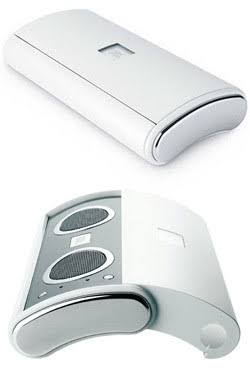
Introduction
The JBL On Tour Portable Music Box is a compact portable speaker system designed for listeners who want bigger sound from a small, travel-friendly device. Known for its foldable, slim-body design and stereo output, it works well with laptops, MP3 players, smartphones with a 3.5 mm output, and other portable audio sources. Its appeal comes from a simple formula: easy setup, lightweight construction, and surprisingly full sound for a speaker in this size class.
This portable speaker is especially useful for students, frequent travelers, office users, and anyone who wants a quick audio upgrade for music, podcasts, or presentations. The JBL On Tour Portable Music Box is also a practical choice for desktop listening because it uses a standard mini-stereo connection and does not require complicated software or advanced configuration. Many users appreciate its clear mids, portable footprint, and plug-and-play convenience.
In terms of market positioning, this model typically appears as a legacy or used/refurbished product rather than a brand-new retail item. Estimated pricing usually falls in the budget-to-midrange secondhand category, depending on condition, accessories, and seller. Availability is most common through resale marketplaces, refurbished audio sellers, and older stock listings. For shoppers seeking a simple portable speaker with classic JBL styling, the jbl On Tour Portable Music Box remains a recognizable option with enduring appeal.
Specifications: JBL On Tour Portable Music Box Technical Details
- Audio output: Stereo portable speaker system with two-channel playback.
- Drivers: 1-inch full-range transducers, designed for compact desktop and travel use.
- Amplifier power: 3 watts RMS per channel on the original On Tour version.
- Frequency response: 100 Hz to 20 kHz for music, voice, and general media playback.
- Signal-to-noise ratio: Greater than 80 dB for cleaner listening at moderate volume.
- Input: 3.5 mm stereo mini-jack for universal wired connectivity.
- Power: AC-powered with wide-voltage support on many versions, making it suitable for travel use.
- Battery support: AAA battery compatibility on some versions for portable operation.
- Dimensions: Approximately 6.75 x 3.5 x 1.5 inches, depending on revision.
- Weight: About 1.1 pounds, making it easy to pack in a bag.
Compared with modern Bluetooth mini speakers, the JBL On Tour Portable Music Box focuses on wired reliability instead of wireless convenience. It is closer in purpose to compact travel speakers from the same era than to newer smart speakers. Its strengths are simplicity, portability, and compatibility, while newer alternatives usually offer wireless pairing, built-in batteries, and stronger bass response.
Setup Guide: How to Use JBL On Tour Portable Music Box
Setting up the JBL On Tour Portable Music Box is straightforward and usually takes only a few minutes. First, place the speaker on a stable surface and unfold or open the unit if your version uses a sliding design. Next, connect the included power adapter or insert fresh batteries if your model supports battery operation. Then plug the 3.5 mm audio cable into your music source, such as a laptop, smartphone adapter, or MP3 player.
After connecting, increase the source volume gradually and use the speaker controls to adjust output. For best results, keep the device at medium volume levels to reduce distortion and improve clarity. If you hear no sound, confirm that the audio cable is seated properly, the correct playback device is selected, and the source volume is not muted. If the sound is weak, try a different cable or test another audio source.
Safety precautions: Avoid exposing the unit to moisture, keep ventilation openings clear, and do not use damaged power adapters. Disconnect the speaker during storms or when not in use for long periods. Because this is a wired portable speaker, it is best used with compatible audio devices rather than charging-intensive setups.
Troubleshooting: Common JBL On Tour Problems and Fixes
If the speaker produces no sound, check the source device first. Make sure the headphone jack is active, the volume is turned up, and the cable is firmly connected. If one channel is missing, test another cable or audio source to rule out a faulty connection. Static noise or intermittent playback usually points to a loose plug, dirty connector, or damaged cable.
- No power: Verify AC power, batteries, and adapter condition.
- Low volume: Increase both source and speaker volume gradually.
- Distortion: Lower the input level and avoid max volume settings.
- Uneven stereo sound: Reconnect the 3.5 mm plug and test another device.
- Portability issues: Check battery contacts and replace old batteries if needed.
This model does not commonly use digital error codes, so most problems are connection or power related. Preventive care includes storing the speaker in a dry place, keeping the cable untangled, and avoiding rough handling of the foldable body. Warranty coverage depends on seller and condition because many units are now legacy products. For support, users should contact the original seller, refurbished audio marketplace, or JBL/Harman customer support through the official support channels for product documentation and service guidance.
Pros & Cons of JBL On Tour Portable Music Box
Pros
- Highly portable: Compact enough for backpacks, laptop bags, and travel cases.
- Simple setup: Plug-and-play wired audio means no pairing or app installation.
- Clear sound for voice and casual music: Good for podcasts, video calls, and background listening.
- Reliable connectivity: A standard 3.5 mm input works with many older and newer devices.
- Good value on the used market: Often affordable compared with modern branded speakers.
Cons
- No modern Bluetooth on original versions: Less convenient than newer wireless speakers.
- Limited bass: Best for mids and highs rather than deep low-end performance.
- Older design: Not ideal if you want USB-C charging, smart features, or app controls.
- Condition varies widely: Used units may need new cables, batteries, or adapters.
Overall, the JBL On Tour Portable Music Box offers solid value if you want a small wired speaker for travel or desktop use. Compared with newer portable speakers, it wins on simplicity and compatibility but loses on wireless freedom and bass output.
Customer Reviews: What Buyers Commonly Say
Typical user feedback for the JBL On Tour Portable Music Box is mixed to positive, with many owners praising its portability and easy setup. A common rating pattern is around 4 out of 5 stars for users who value convenience and compact size. One frequent comment is that it sounds better than expected for its size, especially for speech, streaming video, and casual listening.
Positive testimonials often mention its sturdy design and reliable wired connection. Common complaints focus on limited bass, older input standards, and the possibility of wear in secondhand units. Buyers who want wireless streaming or louder room-filling sound often prefer newer Bluetooth speakers. Customers who mainly need a small desktop or travel speaker usually recommend it as a practical purchase, especially when found at a good price.
Final Verdict
The jbl On Tour Portable Music Box remains a useful compact speaker for users who prioritize portability, wired simplicity, and dependable everyday sound. It is best suited for travelers, students, and home office setups where space is limited and quick setup matters most. If you want a classic portable speaker with easy compatibility and no learning curve, this model is still worth considering.
Faqs
How do I set up JBL On Tour Portable Music Box for the first time?
Why is my JBL On Tour Portable Music Box not producing sound even though it is powered on?
What devices are compatible with JBL On Tour Portable Music Box?
How long do batteries last in JBL On Tour Portable Music Box?
Can I use JBL On Tour Portable Music Box while it is plugged into AC power?
Why does my JBL On Tour Portable Music Box sound distorted or too quiet?
How do I clean and maintain JBL On Tour Portable Music Box safely?
What should I do if JBL On Tour Portable Music Box keeps turning off or not waking up properly?
More jbl manuals
Leave a Comment