
Jbl E40BT Synchros Headphone User Manual
Content
JBL Synchros E40BT Product Manual and Guide
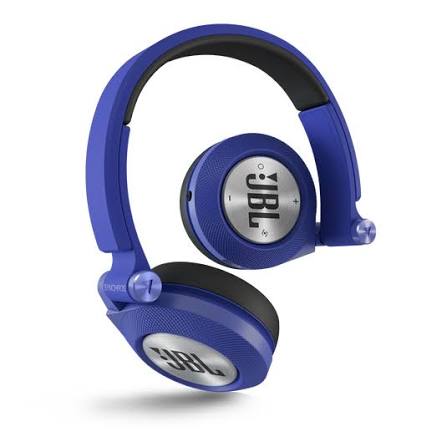
Introduction to the JBL E40BT Synchros Bluetooth On-Ear Headphones
The JBL E40BT Synchros is a wireless on-ear headphone built for listeners who want a simple mix of portability, everyday comfort, and JBL’s familiar bass-forward sound. With 40 mm drivers, Bluetooth 3.0 connectivity, and a wired backup option through the 3.5 mm jack, it works well for commuting, casual listening, calls, and laptop use. The design is lightweight at about 205 g, making the JBL E40BT Synchros easy to wear for long sessions without feeling bulky.
One of its strongest selling points is versatility. Users can switch between Bluetooth listening and passive wired playback when the battery runs low, which makes it practical for travel and office use. The built-in microphone also supports hands-free calling, while the on-ear form factor keeps the headphones compact enough for daily carry. Battery life is rated at up to 16 hours of music playback and around 24 hours of talk time, which remains competitive for a model in this class.
The JBL E40BT Synchros typically falls in the budget-to-midrange category today, with availability mostly through third-party marketplaces and older stock listings. Depending on condition and seller, prices can vary widely, often landing in the approximate $30 to $100 range. For users who want an affordable wireless headphone with a recognizable brand name and strong everyday utility, the JBL E40BT Synchros remains a solid option.
Specifications for JBL E40BT Synchros Wireless Headphones
- Driver size: 40 mm dynamic drivers for a fuller on-ear sound profile
- Frequency response: 20 Hz to 22 kHz
- Impedance: 32 ohms
- Maximum SPL: 114 dB to 115 dB at 30 mW
- Power input: 30 mW rated input
- Connectivity: Bluetooth 3.0 with A2DP, AVRCP, HFP, and HSP support
- Wireless range: Standard Bluetooth operating band at 2.402 to 2.480 GHz
- Battery: Lithium-polymer battery, approximately 610 mAh
- Playback time: Up to 16 hours of music playback
- Talk time: Up to 24 hours
- Weight: About 205 g
- Wired option: 3.5 mm audio jack for passive listening
- Microphone sensitivity: -42 dBV/Pa at 1 kHz
Compared with similar wireless on-ear headphones, the JBL E40BT Synchros stands out for its combination of Bluetooth and wired flexibility rather than premium extras such as active noise cancellation or modern USB-C charging. Against newer models, it feels more basic, but the sound output, battery life, and portability still make it useful for everyday listening.
Pros and Cons of JBL E40BT Synchros
Pros
- Compact and lightweight design that is easy to carry for travel and commuting
- 40 mm drivers deliver energetic sound with noticeable bass emphasis
- Bluetooth and wired modes provide useful backup when the battery is depleted
- Strong battery life for casual daily use, with up to 16 hours of playback
- Built-in microphone supports phone calls and voice chat
- Good value for buyers seeking an affordable wireless headphone with brand recognition
Cons
- Bluetooth 3.0 is outdated compared with modern wireless standards
- No active noise cancellation, so outside noise remains audible
- On-ear fit may feel tight during longer sessions for some users
- Sound signature leans bass-heavy and may not suit listeners wanting a neutral profile
- Older availability means condition and included accessories can vary by seller
For value for money, the JBL E40BT Synchros works best for buyers who prioritize simple wireless convenience and a lively sound over modern premium features. If comparing alternatives, newer JBL headphones or competing budget Bluetooth models may offer better codec support, faster charging, and improved comfort.
Customer Reviews and User Feedback on JBL E40BT Synchros
Overall user feedback for the JBL E40BT Synchros trends positive, with many listeners giving it around 4 out of 5 stars for sound quality and portability. Buyers often praise the punchy bass, reliable wireless pairing, and the option to keep listening through the cable when the battery is empty.
Common complaints include the dated Bluetooth version, limited noise isolation, and a fit that can feel snug after extended use. Some users also note that real-world battery life may be lower than the advertised maximum depending on volume levels and usage patterns.
- “Great everyday headphones for commuting and casual music listening.”
- “Bass is strong and fun, but the earcups can get uncomfortable over time.”
- “Battery life is good enough for a full workday, and wired mode is a helpful backup.”
The JBL E40BT Synchros is best recommended for budget-conscious buyers, students, and commuters who want a straightforward wireless headphone with simple controls and dependable sound. If comfort, modern wireless features, or noise cancellation are top priorities, a newer alternative may be the better purchase.
Faqs
How do I set up JBL E40BT Synchros for the first time with Bluetooth?
Why is my JBL E40BT Synchros not pairing or connecting to my phone?
What should I do if JBL E40BT Synchros has low volume or weak sound quality?
Can JBL E40BT Synchros work with laptops, tablets, and smart TVs?
How can I improve battery life on JBL E40BT Synchros during daily use?
What does the JBL E40BT Synchros control button do during calls and music playback?
How do I clean and maintain JBL E40BT Synchros without damaging the headphones?
Why does my JBL E40BT Synchros keep disconnecting, and how can I fix it?
Tags
More jbl manuals
Leave a Comment