
Jbl Quantum 610 Wireless Gaming Headset User Manual
Content
JBL Quantum 610 Wireless Gaming Headset Review and Product Manual
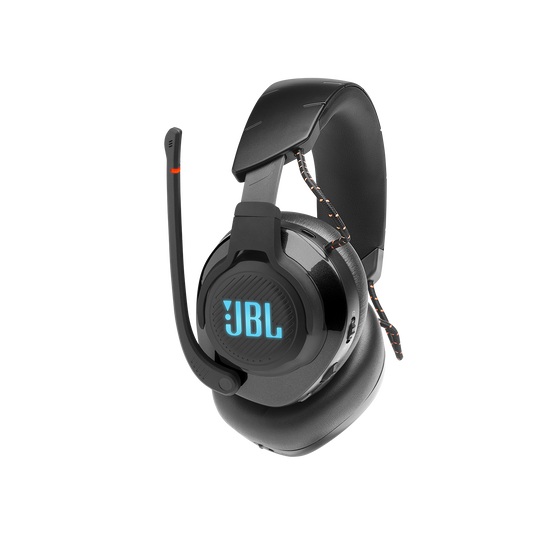
Introduction: JBL Quantum 610 Wireless Gaming Headset Overview
The JBL Quantum 610 Wireless Gaming Headset is built for players who want reliable wireless performance, long battery life, and immersive game audio without moving into a premium flagship price tier. Designed around JBL’s gaming-focused sound tuning, it uses 50 mm dynamic drivers and a 2.4 GHz USB wireless connection to deliver low-latency audio for fast-paced gaming, streaming, and everyday media use. The headset also supports wired use through a 3.5 mm cable, making it flexible across PC, PlayStation, Xbox compatibility via wired or dongle-based setups, Nintendo Switch, and other devices that support the connection type.
One of the strongest selling points is its balance of features and practicality. The Quantum 610 includes a boom microphone with a unidirectional pickup pattern, game/chat balance controls, and up to 40 hours of battery life with RGB lighting turned off. That makes it especially appealing for marathon gaming sessions, remote work, and voice chat with friends. The over-ear design and synthetic leather ear cushions are intended to provide comfort during long use, while the lightweight wireless transmitter setup keeps lag to a minimum for competitive play.
In the current market, the JBL Quantum 610 Wireless Gaming Headset typically sits in the mid-range price segment, with availability commonly around the $110 to $165 range depending on retailer, color, and promotions. It is a strong fit for gamers who want a dependable wireless gaming headset with surround-sound features, long battery life, and solid cross-platform versatility.
Specifications: JBL Quantum 610 Wireless Gaming Headset Technical Details
- Driver size: 50 mm dynamic drivers
- Frequency response: 20 Hz to 20 kHz
- Microphone frequency response: 100 Hz to 10 kHz
- Impedance: 32 ohms
- Sensitivity: 100 dB SPL at 1 kHz / 1 mW
- Maximum SPL: 95 dB
- Maximum input power: 30 mW
- Microphone sensitivity: -40 dBV/Pa at 1 kHz
- Microphone pickup pattern: Unidirectional
- Wireless connection: 2.4 GHz USB wireless transmitter
- Battery: 3.7V 1000 mAh lithium-ion battery
- Charging time: About 3 hours
- Battery life: Up to 40 hours with RGB lighting off
- Weight: 357 g
In real-world use, the headset’s 40-hour battery life is competitive for the wireless gaming headset class, especially compared with many similar mid-range models that often land closer to 20 to 30 hours. The 2.4 GHz connection is the key feature for low-latency gaming, while the 3.5 mm cable adds backup flexibility. Compared with similarly priced alternatives, the Quantum 610 stands out for longer battery life and stronger gaming-focused features, though some rivals may offer lighter builds or more polished app support.
Pros and Cons: Is the JBL Quantum 610 Wireless Gaming Headset Worth It?
- Pros: Strong 2.4 GHz wireless performance for low-latency gaming and stable headset connectivity.
- Pros: Long battery life, with up to 40 hours of use when RGB lighting is off.
- Pros: 50 mm drivers provide powerful bass and energetic sound for action games, shooters, and cinematic titles.
- Pros: Works in both wireless and wired modes, which improves compatibility across devices.
- Pros: Built-in boom mic and chat/game balance controls make team communication easier.
- Cons: The 357 g weight may feel bulky during extended sessions compared with lighter gaming headsets.
- Cons: Some users may find the sound profile more bass-forward than neutral for music listening.
- Cons: Wireless use depends on the USB dongle, so portability is less convenient than Bluetooth headsets.
- Cons: Premium competitors may offer better software customization or more refined microphone clarity.
For value for money, the JBL Quantum 610 Wireless Gaming Headset is a solid choice if gaming performance matters more than ultra-light comfort or studio-style audio accuracy. It is especially appealing for players who want a dependable wireless gaming headset with a long battery and easy multi-platform use. If comparing alternatives, lighter models may be better for all-day wear, while higher-end headsets can deliver stronger spatial audio tuning and more advanced companion software.
Customer Reviews: What Buyers Say About the JBL Quantum 610 Wireless Gaming Headset
Typical user feedback is generally positive, with many buyers rating the headset around 4 out of 5 stars for sound quality, wireless stability, and battery life. Gamers often praise the immersive bass, reliable 2.4 GHz connection, and the convenience of the flip-up microphone for team chat. A common theme in testimonials is that the headset feels “made for gaming first,” especially in shooters and action games where positional audio and low latency matter most.
- Praise: “Great wireless range and the sound feels energetic in games.”
- Praise: “Battery life is excellent, and I can use it for multiple sessions before charging.”
- Complaint: “It feels a little heavy after long wear.”
- Complaint: “The mic is good for voice chat but not as clean as a standalone microphone.”
- Complaint: “The dongle-based wireless setup is less convenient than Bluetooth for travel.”
For most buyers, this headset is best for PC and console gamers who want dependable wireless audio, strong battery life, and a feature set built around gameplay rather than casual listening. If comfort weight and mic perfection are top priorities, comparing it with lighter or more premium wireless gaming headsets is recommended.
Faqs
How do I set up the JBL Quantum 610 Wireless Gaming Headset for first-time use?
What should I do if my JBL Quantum 610 Wireless Gaming Headset is not connecting to the USB dongle?
Is the JBL Quantum 610 Wireless Gaming Headset compatible with PC, PS5, PS4, and Mac?
How long does the JBL Quantum 610 Wireless Gaming Headset battery last on a full charge?
How do I fix low sound, crackling, or audio delay on the JBL Quantum 610 Wireless Gaming Headset?
What makes the JBL Quantum 610 Wireless Gaming Headset good for gaming voice chat?
How do I get the best sound quality from the JBL Quantum 610 Wireless Gaming Headset?
How should I clean and maintain the JBL Quantum 610 Wireless Gaming Headset?
More jbl manuals
Leave a Comment