
Jbl L42ms Integrated Music System User Manual
Content
JBL L42ms Integrated Music System: A Compact Retro Stereo with Modern Streaming Power
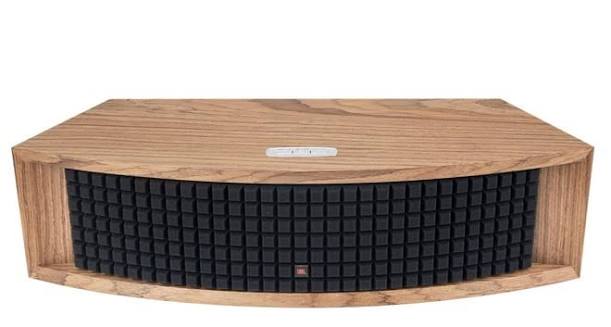
The JBL L42ms Integrated Music System blends classic JBL styling with a fully modern all-in-one audio experience. Designed for users who want high-quality stereo sound without the clutter of a separate amplifier and multiple components, it delivers 200W of Class D power, a stereo-configured four-channel amplification design, and support for today’s most popular wireless and wired sources. The result is a premium compact system that works equally well for music streaming, desktop listening, and TV audio through HDMI ARC.
The jbl L42ms Integrated Music System is especially appealing to listeners who value convenience, design, and strong audio performance in one enclosure. It supports Apple AirPlay 2, Google Chromecast, Bluetooth, Wi-Fi streaming, Ethernet, and app-based control, making it a flexible choice for modern homes. With a reported frequency response of 55Hz to 25kHz and a maximum SPL of 102dB at 1m, it offers enough scale for small to medium living spaces while maintaining detailed, room-filling sound.
Target buyers include music lovers, apartment dwellers, home-office users, and anyone seeking a stylish alternative to a soundbar or traditional hi-fi stack. It also suits retro-design enthusiasts because of its vintage-inspired cabinet and grille. Pricing generally sits around $999 to $1,099 in the US, about £999 in the UK, and roughly AU$2499 in Australia, with availability through major audio retailers and JBL’s own channels. For buyers who want premium sound and fewer boxes, the jbl L42ms Integrated Music System is a compelling option.
Pros and Cons of the JBL L42ms Integrated Music System
Pros
- Strong all-in-one convenience: built-in amplification, streaming, and multiple inputs reduce the need for extra gear.
- Impressive wireless versatility: AirPlay 2, Chromecast, Bluetooth, and streaming-service support make setup easy for most users.
- Excellent sound balance for its size: the stereo layout and angled drivers create a wide, engaging soundstage.
- Useful TV integration: HDMI ARC makes it a practical alternative to many compact soundbars.
- Premium build and design: the retro JBL look stands out in modern living spaces.
Cons
- Premium price: at around $999 to $1,099, it is not a budget purchase.
- No optical or coaxial input: some users may miss these legacy digital connections.
- Best value depends on use case: dedicated hi-fi separates may offer more upgrade flexibility for enthusiasts.
- Large footprint for a single speaker: it still needs meaningful shelf or cabinet space.
For buyers comparing it with compact soundbars or traditional bookshelf-speaker systems, the jbl L42ms Integrated Music System offers stronger design appeal and simpler operation, but separates may deliver better expandability for the same money.
Customer Reviews: What Buyers Say About the JBL L42ms
Customer feedback is generally very positive, with many owners praising the sound quality, stereo imaging, and ease of setup. Typical ratings hover around 4.5 out of 5 stars for users who want an elegant streaming speaker that also performs well with TV audio.
Common praise includes the rich, lively presentation, the wide soundstage, and the convenience of AirPlay 2 and Chromecast. One frequent comment is that it feels more like a small hi-fi system than a typical wireless speaker. A representative testimonial would be: “Beautiful design, powerful sound, and far better stereo separation than I expected.”
Common complaints focus on the price, the lack of optical input, and the need to rely on the app or HDMI ARC for some setups. Some users also note that the bass is strong for the size but may not satisfy those wanting deep subwoofer-level impact without adding a sub.
Purchase recommendation: choose the jbl L42ms Integrated Music System if you want premium all-in-one sound, easy streaming, and a stylish cabinet. If you need the most upgradeable hi-fi path or the lowest cost per feature, consider separate speakers and an amplifier instead.
Key Features and Specifications at a Glance
- 200W RMS total Class D power
- 4-channel amplification with 75W per woofer and 25W per tweeter
- Frequency response: 55Hz to 25kHz
- Maximum SPL: 102dB at 1m
- Wireless support: Wi-Fi, Apple AirPlay 2, Google Chromecast, Bluetooth
- Wired inputs: HDMI ARC, RCA, 3.5mm, Ethernet, USB
- Available in retro-inspired finishes including black and walnut
Final Verdict: Is the JBL L42ms Worth It?
The jbl L42ms Integrated Music System is a well-executed premium music system that combines vintage-inspired design with genuinely modern functionality. It is best suited to users who want a single, elegant audio component that can handle music streaming, casual listening, and TV sound with minimal setup. While the asking price is high, the feature set, build quality, and sonic performance make it a strong choice for buyers seeking convenience without sacrificing audio quality.
Faqs
How do I set up the jbl L42ms Integrated Music System for the first time?
Why is my jbl L42ms Integrated Music System not connecting to Wi‑Fi or Bluetooth?
What devices are compatible with the jbl L42ms Integrated Music System?
How do I get the best sound quality from the jbl L42ms Integrated Music System?
What should I do if the jbl L42ms Integrated Music System has no sound but it is powered on?
Can I use the jbl L42ms Integrated Music System as a TV speaker without a separate receiver?
How do I maintain and clean the jbl L42ms Integrated Music System safely?
What are the most common setup mistakes with the jbl L42ms Integrated Music System?
Tags
More jbl manuals
Leave a Comment