
Jbl Bar 2.1 Soundbar with Wireless Subwoofer User Manual
Content
JBL Bar 2.1 Soundbar with Wireless Subwoofer Review and User Manual Overview
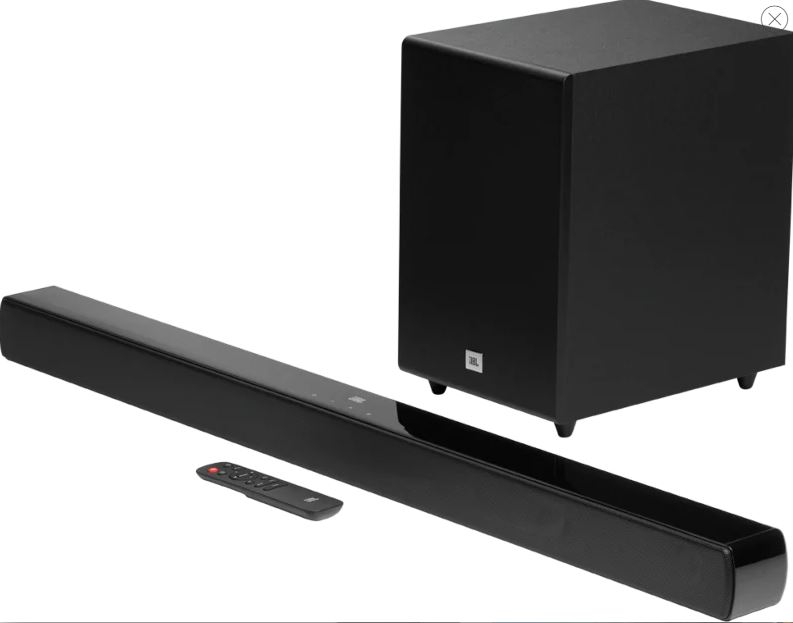
The jbl Bar 2.1 Soundbar with Wireless Subwoofer is a compact home audio upgrade designed for people who want bigger TV sound without a complicated setup. It combines a slim soundbar with a dedicated wireless subwoofer, delivering fuller dialogue, stronger bass, and a more cinematic experience for movies, sports, and gaming. With a total maximum output of 300W, HDMI ARC support, optical input, Bluetooth connectivity, and a wireless subwoofer that automatically pairs with the bar, it offers a practical balance of performance and convenience.
This model is especially appealing to apartment owners, casual movie watchers, and anyone replacing weak built-in TV speakers. The system is easy to place, quick to connect, and simple to control with a TV remote or the included remote. The 6.5-inch subwoofer adds deep bass impact for action scenes and music playback, while the soundbar’s driver layout helps keep voices clear and present. For everyday use, it works well with smart TVs, streaming devices, game consoles, and Bluetooth-enabled phones or tablets.
As of current market listings, the price range typically falls around $210 to $300, though discounts and retailer promotions can push it lower or higher depending on stock. Availability remains good through major electronics retailers and online marketplaces, and the model is still a strong value choice for shoppers searching for an affordable wireless soundbar with subwoofer. The jbl Bar 2.1 Soundbar with Wireless Subwoofer remains popular because it delivers a simple setup, noticeable bass improvement, and dependable everyday performance without stepping into premium pricing.
Pros and Cons of the JBL Bar 2.1 Soundbar with Wireless Subwoofer
Pros
- Powerful bass for the price: The wireless 6.5-inch subwoofer adds real low-end impact, making action movies and music feel more immersive.
- Simple setup: HDMI ARC and optical connections make installation straightforward for most modern TVs.
- Clean dialogue: Voices are clear enough for late-night viewing and everyday TV watching.
- Wireless convenience: The subwoofer connects without a long cable run, which keeps the room tidy.
- Good value for money: It competes well against entry-level alternatives from Sony, Polk, and Vizio when bass performance is the top priority.
- Flexible connectivity: Bluetooth streaming is useful for casual music playback from phones and tablets.
Cons
- Not ideal for audiophiles: Soundstage width and channel separation are limited compared with premium Dolby Atmos soundbars.
- Basic feature set: It lacks advanced room calibration and higher-end surround processing found in newer alternatives.
- Music performance is average: The bass is strong, but detail and stereo imaging can feel modest for critical listening.
- Best for smaller to mid-size rooms: Larger living rooms may benefit from a more powerful multi-speaker system.
If the priority is simple, punchy audio at a fair price, the jbl Bar 2.1 Soundbar with Wireless Subwoofer is a smart buy. If surround immersion, app control, or virtual Atmos matters more, newer premium bars may be better alternatives.
Customer Reviews and Real-World Feedback
Customer feedback for the jbl Bar 2.1 Soundbar with Wireless Subwoofer is generally positive, with many buyers highlighting easy setup, strong bass, and a noticeable upgrade over TV speakers. Typical ratings from retail listings fall around 4.2 to 4.3 out of 5 stars.
- Positive review: “Great bass and clear sound for movies. Setup took only a few minutes.”
- Positive review: “Perfect for my living room TV. The wireless subwoofer makes a big difference.”
- Common complaint: “Music sounds good, but I expected a wider surround effect.”
- Common complaint: “It can be a little bass-heavy in small rooms unless adjusted carefully.”
Most buyers recommend it for users who want an affordable soundbar with wireless subwoofer support and easy everyday use. If your main goal is clearer dialogue, stronger movie bass, and a clean setup, this model is a safe purchase. If you need advanced surround sound or premium streaming features, consider a newer Atmos-enabled soundbar instead.
Key Features and Technical Highlights
- 2.1-channel soundbar system with wireless subwoofer
- Total maximum output: 300W
- 6.5-inch down-firing subwoofer driver
- Bluetooth 4.2 for wireless music streaming
- HDMI ARC, optical input, USB, and analog input support
- Frequency response: 40Hz to 20kHz
- Max range for Bluetooth: up to 10 meters in typical use
Who Should Buy the JBL Bar 2.1 Soundbar with Wireless Subwoofer?
This soundbar is best for users who want a simple home theater upgrade, strong bass, and easy connectivity without paying for premium extras. It suits movie fans, sports viewers, casual gamers, and families looking for a reliable TV audio solution. The jbl Bar 2.1 Soundbar with Wireless Subwoofer is also a solid option for shoppers comparing affordable soundbars with wireless subwoofers and wanting better low-end performance than most budget bars can deliver.
Faqs
How do I set up the JBL Bar 2.1 Soundbar with Wireless Subwoofer for the first time?
Why is my JBL Bar 2.1 Soundbar with Wireless Subwoofer not producing sound from the subwoofer?
Can the JBL Bar 2.1 Soundbar with Wireless Subwoofer connect to a TV using HDMI ARC?
How do I fix Bluetooth pairing problems on the JBL Bar 2.1 Soundbar with Wireless Subwoofer?
What audio sources are compatible with the JBL Bar 2.1 Soundbar with Wireless Subwoofer?
How can I get deeper bass from the JBL Bar 2.1 Soundbar with Wireless Subwoofer without distortion?
What should I do if the JBL Bar 2.1 Soundbar with Wireless Subwoofer keeps disconnecting?
How do I clean and maintain the JBL Bar 2.1 Soundbar with Wireless Subwoofer safely?
More jbl manuals
Leave a Comment