
Jbl Bar 800 7.1-Channel Soundbar System User Manual
Content
JBL Bar 800 7.1-Channel Soundbar System Review and Manual
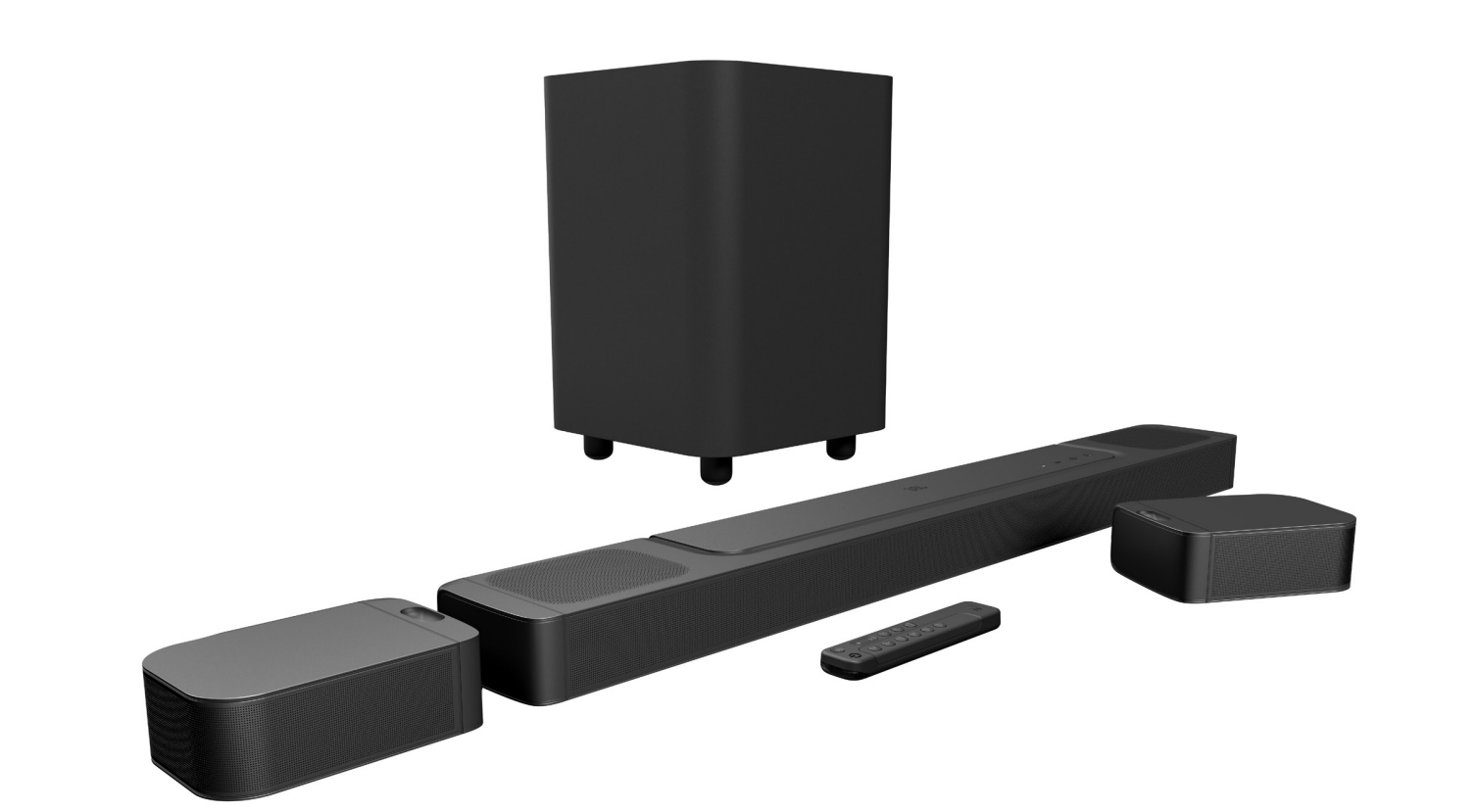
The JBL Bar 800 7.1-Channel Soundbar System is a premium home theater soundbar designed for users who want cinematic audio without the complexity of a full receiver-based setup. With detachable wireless rear speakers, Dolby Atmos support, and a powerful wireless subwoofer, it delivers a true surround sound experience for movies, sports, gaming, and streaming. The system is built for living rooms where flexibility matters: keep the rear speakers attached for a sleek all-in-one soundbar, or detach them for wider surround separation when watching action films or playing console games.
One of the biggest advantages of the JBL Bar 800 7.1-Channel Soundbar System is its balance between convenience and performance. The unit delivers up to 720W of total output, including a 10-inch wireless subwoofer for deep bass and dedicated up-firing drivers for height effects. It also supports HDMI eARC, optical input, Bluetooth, Wi-Fi streaming, AirPlay 2, Chromecast, and Spotify Connect, making it a versatile choice for modern TV setups. The soundbar itself is wide and substantial, so it suits medium to large rooms best.
This model is a strong fit for buyers who want premium sound without running wires across the room. It is especially appealing to movie fans, gamers, and households that stream content from multiple devices. The estimated price range typically falls in the upper mid-range to premium segment, often around $700 to $1,000 depending on availability, promotions, and regional pricing. The JBL Bar 800 7.1-Channel Soundbar System is widely available through major electronics retailers and online stores, though stock can vary because of demand and regional distribution.
Pros and Cons of the JBL Bar 800 7.1-Channel Soundbar System
Pros
- Detachable wireless rear speakers create a more immersive surround effect than standard soundbars.
- Powerful 720W output and a 10-inch wireless subwoofer deliver strong bass and room-filling volume.
- Dolby Atmos support adds height effects that improve movie and gaming soundtracks.
- HDMI eARC, optical input, Bluetooth, Wi-Fi, AirPlay 2, and Chromecast provide excellent connectivity.
- Flexible design works well for both clean everyday listening and full theater-style sessions.
- Strong value for users who want a premium wireless surround system without buying separate AV components.
Cons
- The soundbar is large, so it may overwhelm smaller TV stands or compact rooms.
- Rear speakers need charging and occasional placement attention, which adds a little maintenance.
- Setup can feel slightly more involved than a basic soundbar, especially for first-time users.
- Some alternatives, such as the JBL Bar 1000 or Sonos Arc with surrounds, may offer more advanced features at a higher price.
- Value for money is strong, but buyers seeking the cheapest soundbar option will find simpler systems more affordable.
Overall, the JBL Bar 800 7.1-Channel Soundbar System offers a compelling mix of performance and flexibility. Compared with lower-cost soundbars, it delivers a much more convincing surround experience. Compared with higher-end alternatives, it may not offer the same level of expansion or refinement, but it remains an excellent middle ground for most home theater users.
Customer Reviews: What Users Say About the JBL Bar 800 7.1-Channel Soundbar System
Customer feedback is generally very positive, with many users praising the powerful bass, clear dialogue, and easy wireless surround setup. A common sentiment is that the system makes movies feel dramatically bigger, especially when the rear speakers are detached and positioned behind the listening area. Typical ratings are around 4.5 to 5 stars from satisfied buyers.
Frequent compliments include the strong Dolby Atmos effect, impressive soundstage, and simple Bluetooth and app connectivity. One satisfied owner described it as “the easiest way to get real cinema sound at home without running cables everywhere.” Common complaints focus on the size of the main soundbar, the need to manage speaker battery charging, and occasional setup learning curves. Some users also note that the system performs best when placed carefully in a medium or large room.
For most buyers, this is a recommended purchase if surround sound and convenience matter more than a minimal footprint. It is especially suitable for streaming movies, sports nights, and console gaming. Users who want a compact unit or the absolute lowest price may want to compare it with smaller 5.1 soundbars, but the JBL Bar 800 7.1-Channel Soundbar System remains a standout choice for immersive wireless home audio.
JBL Bar 800 7.1-Channel Soundbar System Features at a Glance
- 7.1-channel surround sound system with detachable wireless rear speakers
- Dolby Atmos support for height-based audio effects
- 720W total peak power output for strong home theater performance
- 10-inch wireless subwoofer for deep, impactful bass
- HDMI eARC, optical input, Bluetooth, Wi-Fi, AirPlay 2, Chromecast, and Spotify Connect
- Designed for movies, gaming, music streaming, and everyday TV listening
Is the JBL Bar 800 7.1-Channel Soundbar System Worth It?
If you want a premium soundbar that delivers real surround sound without a complicated setup, the JBL Bar 800 7.1-Channel Soundbar System is one of the strongest options in its class. Its detachable rear speakers, powerful subwoofer, and broad connectivity make it a smart upgrade for users moving beyond basic TV speakers. For home theater fans who value convenience, punchy bass, and immersive sound, it offers excellent performance and solid long-term value.
Faqs
How do I set up the JBL Bar 800 7.1-Channel Soundbar System for the first time?
What should I do if my JBL Bar 800 7.1-Channel Soundbar System has no sound?
How do I pair Bluetooth devices with the JBL Bar 800 7.1-Channel Soundbar System?
Why are the detachable rear speakers on my JBL Bar 800 7.1-Channel Soundbar System not connecting properly?
Does the JBL Bar 800 7.1-Channel Soundbar System work with HDMI eARC and optical input?
How can I improve dialogue clarity on the JBL Bar 800 7.1-Channel Soundbar System?
What is the best way to calibrate the JBL Bar 800 7.1-Channel Soundbar System for my room?
How should I clean and maintain the JBL Bar 800 7.1-Channel Soundbar System?
More jbl manuals
- Jbl Aura Wall Mount Stereo Entertainment System User Manual
- Jbl EON700 Series PA Speakers User Manual
- Jbl IRXIOO Series Portable PA Speakers IRX108-BT User Manual
- Jbl BAR 1300 Wireless Surround Soundbar User Manual
- Jbl MA310 5.1-channel AV Receiver User Manual
- Jbl BAR 700 Soundbar with Subwoofer User Manual
Leave a Comment