
Jbl MA310 5.1-channel AV Receiver User Manual
Content
JBL MA310 5.1-Channel AV Receiver Review and User Manual Guide
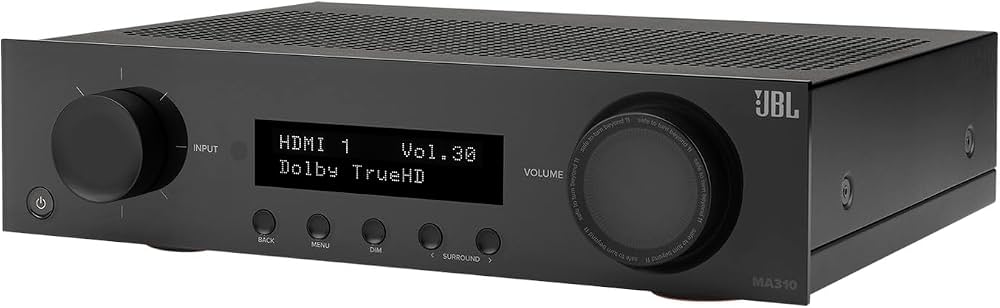
Introduction: Why the JBL MA310 5.1-Channel AV Receiver Stands Out
The JBL MA310 5.1-channel AV receiver is a compact, feature-focused home theater receiver designed for users who want straightforward performance, modern connectivity, and reliable 4K support without paying for premium extras they may never use. Built around a 5.2-channel architecture, it delivers a clean setup for a classic surround sound system with support for Dolby Digital and DTS playback, plus HDMI 2.0 inputs with HDCP 2.2 for 4K/60Hz video passthrough. It is a strong fit for living rooms, media rooms, and apartment setups where simplicity and value matter just as much as sound quality.
One of the biggest advantages of the JBL MA310 5.1-channel AV Receiver is its balanced feature set. It includes four HDMI inputs, one HDMI output with ARC, Bluetooth 5.1 for wireless music streaming, one optical input, one coaxial input, two RCA analog inputs, and dual subwoofer outputs. The built-in EZ Set EQ is especially useful for quick room calibration, making setup easier for first-time buyers and casual home theater owners. With 60W RMS at 8 ohms and 100W RMS at 4 ohms, it is best suited for efficient bookshelf speakers and compact floor-standing speakers.
Estimated price typically falls in the midrange AV receiver category, often around the $400 to $600 range depending on retailer, color, and current promotions. Availability is generally good through major electronics stores, audio specialists, and online marketplaces. For buyers searching for a practical 5.1 channel AV receiver for TV, movies, and music streaming, the JBL MA310 is a compelling option.
Pros & Cons of the JBL MA310 5.1-Channel AV Receiver
Pros
- Simple, modern connectivity: Four HDMI 2.0 inputs, HDMI ARC, optical, coaxial, RCA, Bluetooth, and USB playback make it easy to connect TVs, consoles, streaming devices, and legacy sources.
- Good value for a home theater starter system: It offers core AV receiver features without pushing users into a higher price bracket.
- Useful room tuning: EZ Set EQ helps improve sound balance quickly, especially in small or medium rooms.
- Compact design: The chassis is manageable at about 17 inches wide and 11.3 pounds, so it fits most media cabinets.
- Solid everyday performance: It works well with efficient speakers for movies, TV dialogue, and casual music listening.
Cons
- No immersive audio formats: This is a 5.2-channel receiver, so it does not support Dolby Atmos or DTS:X, unlike higher-end alternatives.
- Limited advanced networking: There is no built-in Wi-Fi or Ethernet for streaming apps or multi-room features.
- Modest power output: It is not the best choice for large, demanding speakers or very big rooms.
- Basic feature set compared with rivals: Competing models from Yamaha, Denon, and Sony may offer more sound modes, streaming options, or advanced room correction at similar prices.
For buyers focused on core performance and simplicity, the JBL MA310 5.1-channel AV Receiver delivers strong value for money. If advanced wireless streaming, immersive formats, or more calibration tools are priorities, a competing AVR may be a better long-term investment.
Customer Reviews: What Owners Say About the JBL MA310 5.1-Channel AV Receiver
Customer feedback for the JBL MA310 5.1-channel AV Receiver is generally positive, with many users giving it around 4 out of 5 stars for ease of use, clean setup, and dependable performance. Buyers often praise the receiver’s straightforward HDMI layout, Bluetooth streaming, and clear dialogue in movies and TV shows. A common compliment is that it “does exactly what a home theater receiver should do” without overwhelming beginners with unnecessary features.
Frequent complaints focus on the lack of Wi-Fi, the absence of immersive audio codecs, and the limited number of analog inputs. Some users also mention that the power output is best suited to efficient speakers rather than high-demand models. Still, many owners recommend it for first-time home theater setups, bedroom systems, and budget-conscious buyers who want a simple AV receiver with 4K support. In short, the JBL MA310 5.1-channel AV Receiver is widely seen as a practical purchase for users who value reliability over premium extras.
Key Features and Technical Specifications
- 5.2-channel AV receiver design
- 4 HDMI 2.0 inputs with HDCP 2.2 support
- 1 HDMI output with ARC
- Supports 4K/60Hz Ultra HD video pass-through
- Bluetooth 5.1 wireless audio streaming
- 1 optical input and 1 coaxial input
- 2 stereo RCA analog inputs
- Dual subwoofer outputs
- 60W RMS at 8 ohms, 100W RMS at 4 ohms
- EZ Set EQ room calibration
- Pure Direct mode for cleaner listening
- Compact size for easier cabinet placement
Setup Tips for Best Results
- Connect the TV to the HDMI ARC output first for the simplest audio return setup.
- Use efficient bookshelf or tower speakers to get the best performance from the amplifier section.
- Place the center speaker at ear level or as close as possible for clearer dialogue.
- Run EZ Set EQ after placing your speakers to improve balance and tonal consistency.
- Use both subwoofer outputs only if your subwoofers support dual connections or if your room benefits from bass distribution.
Frequently Asked Questions
Is the JBL MA310 good for movies?
Yes, it is a good choice for movies in a 5.1 setup, especially if you want clear dialogue and simple HDMI switching.
Does the JBL MA310 support Dolby Atmos?
No, it is a 5.2-channel receiver and does not support Dolby Atmos or DTS:X.
Is the JBL MA310 good for gaming?
Yes, it works well for gaming displays and consoles that use 4K/60Hz HDMI connections.
What size room is it best for?
It is best suited for small to medium rooms where efficient speakers can fill the space without needing extreme power.
Faqs
How do I set up the JBL MA310 5.1-channel AV Receiver for the first time?
What speakers and subwoofer connections work best with the JBL MA310 5.1-channel AV Receiver?
Does the JBL MA310 5.1-channel AV Receiver support 4K TVs, HDR, and ARC?
Why is my JBL MA310 5.1-channel AV Receiver not producing sound from all speakers?
How do I get the best surround sound performance from the JBL MA310 5.1-channel AV Receiver?
Can I stream music wirelessly on the JBL MA310 5.1-channel AV Receiver with Bluetooth?
What should I do if the JBL MA310 5.1-channel AV Receiver keeps cutting out or losing HDMI signal?
How should I maintain and clean the JBL MA310 5.1-channel AV Receiver?
More jbl manuals
- Jbl Eon One Compact PA Speaker System User Manual
- Jbl IRXIOO Series Portable PA Speakers IRX108-BT User Manual
- Jbl Control X Wireless Portable Speakers User Manual
- Jbl Aura Wall Mount Stereo Entertainment System User Manual
- Jbl PARTYBOX 710 Portable Speaker User Manual
- Jbl Bar 800 7.1-Channel Soundbar System User Manual
Leave a Comment