
Jbl Control X Wireless Portable Speakers User Manual
Content
JBL Control X Wireless Portable Speakers: Product Manual and Buyer Guide
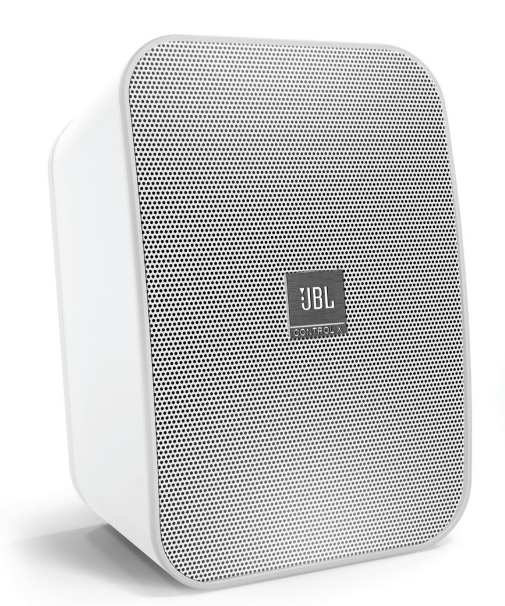
The JBL Control X Wireless Portable Speakers are compact wireless stereo speakers designed to deliver powerful sound in a small, flexible form factor. Built for users who want easy Bluetooth streaming, solid wireless stereo separation, and the option to use battery power, this model blends home-audio performance with portable convenience. Each speaker features 30W RMS output in AC mode, Bluetooth 2.1 connectivity, a lithium-ion battery, and a rated wireless range of up to 10 meters from the source, making it a practical choice for bedrooms, offices, patios, and small entertainment spaces.
One of the biggest advantages of the JBL Control X Wireless Portable Speakers is their expandable wireless stereo setup. The pair can be used without cables between the left and right speakers, and the system supports up to 30 meters between the primary and secondary speaker units. That makes them appealing for users who want a cleaner setup than traditional bookshelf speakers. The speakers also offer a quick charge time of about 2.4 hours and up to 4 hours of playback, depending on volume and content. For buyers searching for a compact wireless speaker pair with JBL’s sound signature, this model remains attractive even though it is an older product.
These speakers are best suited for casual listeners, apartment dwellers, desktop audio users, and anyone looking for a portable stereo speaker system for music, podcasts, and small gatherings. Typical pricing can vary widely by seller and region, but the estimated price range is usually around $200 to $270 depending on stock, condition, and marketplace availability. Availability is often limited because this is not a mainstream current-generation model, so shoppers may need to check official channels, authorized retailers, or resale platforms.
Troubleshooting JBL Control X Wireless Portable Speakers
If the speakers do not pair, start by turning both units off and back on, then make sure Bluetooth is enabled on the source device and within range. If audio cuts out, reduce distance, remove nearby wireless interference, and confirm the battery is charged. If one speaker is silent, verify the master and secondary speaker roles and re-establish the wireless link between the units. For weak sound, check source volume, device EQ settings, and audio output mode.
Common issues may appear as connection or pairing failures rather than formal error codes. There are no widely documented user-facing numeric error codes for this model, so fixes usually involve resetting the connection, recharging the battery, and checking the power source. Preventive care includes keeping firmware-related source devices updated, avoiding over-discharge, and storing the speakers in a dry location. Clean the charging contacts and connectors periodically to maintain reliable power and Bluetooth performance.
Warranty coverage depends on the region and reseller, but JBL commonly offers a one-year warranty for powered speakers in many markets. For help, contact JBL Support through the official customer service portal or regional support line. In the United States, warranty service information lists support phone access through JBL customer service, with warranty request assistance available online.
Pros and Cons of JBL Control X Wireless Portable Speakers
Pros
- Compact wireless stereo design with no cable needed between speakers.
- Strong output for the size, with 30W RMS per channel in AC mode.
- Portable power option with a built-in rechargeable battery.
- Good for small rooms, desks, and casual indoor-outdoor listening.
- Expandable setup appeals to users who want flexible placement.
Cons
- Battery life is limited to about 4 hours, which is modest for portable use.
- Bluetooth 2.1 is older than current wireless standards.
- Availability can be inconsistent, making the product harder to buy new.
- Not ideal for users who want deep bass or large-room coverage.
- Alternatives like newer Bluetooth bookshelf speakers may offer longer battery life and modern codecs.
For value for money, the JBL Control X Wireless Portable Speakers make sense if you want a compact stereo pair with reliable JBL sound and flexible placement. Compared with newer wireless speakers, however, buyers may prefer modern alternatives for stronger battery life, USB charging, or advanced Bluetooth features.
Customer Reviews for JBL Control X Wireless Portable Speakers
Customer feedback is generally positive, with many users rating the system around 4 out of 5 stars for sound quality, design, and convenience. Reviewers often praise the clear stereo separation, solid build, and room-filling sound from a small cabinet. One common testimonial theme is that the speakers are “surprisingly powerful for their size” and work well in home offices or smaller living spaces.
Frequent complaints focus on the short battery life, older Bluetooth platform, and the weight of the speakers, which makes them less ideal for frequent carrying. Some users also mention mild background noise during Bluetooth playback or wish for a longer wireless range. Overall, the JBL Control X Wireless Portable Speakers are a good recommendation for buyers who value sound quality and compact stereo performance over ultra-long portability.
Quick Answer: Are JBL Control X Wireless Portable Speakers Worth It?
Yes, if you want a compact wireless stereo speaker pair with strong sound, flexible placement, and JBL branding, they are still a worthwhile option. They are less compelling for buyers who need long battery life, modern Bluetooth features, or easy retail availability.
Faqs
How do I set up JBL Control X Wireless Portable Speakers for the first time?
Why is my JBL Control X Wireless Portable Speakers pair not connecting to Bluetooth?
Can JBL Control X Wireless Portable Speakers work without a cable between the left and right speakers?
What devices are compatible with JBL Control X Wireless Portable Speakers?
How far can JBL Control X Wireless Portable Speakers be placed from each other?
Why does one JBL Control X Wireless Portable Speakers unit sound louder than the other?
How do I get better bass and sound quality from JBL Control X Wireless Portable Speakers?
How should I maintain and care for JBL Control X Wireless Portable Speakers?
More jbl manuals
Leave a Comment