
Jbl PARTYBOX 710 Portable Speaker User Manual
Content
JBL PARTYBOX 710 Portable Speaker: Complete Product Manual and Buying Guide
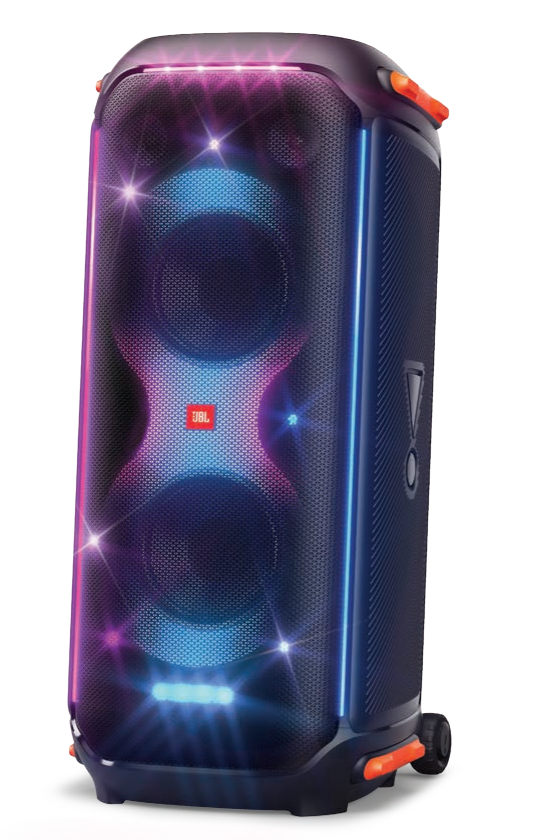
The jbl PARTYBOX 710 Portable Speaker is built for users who want stadium-level sound, bold lighting effects, and simple plug-and-play party performance in one oversized party speaker. With 800W RMS output, dual 8-inch woofers, dual tweeters, and JBL’s signature bass-heavy tuning, it delivers powerful sound that fills large indoor spaces, backyard events, and celebration venues with ease.
This model is best suited for party hosts, DJs, event organizers, and home users who want a high-impact Bluetooth speaker for music playback, karaoke, and live microphone or guitar input. Its built-in light show adds visual energy, while Bluetooth 5.1 and multiple wired inputs make it flexible for different setups. The jbl PARTYBOX 710 Portable Speaker is also a strong fit for users who prioritize volume and presence over portability, since it runs on AC power and is not designed for battery use.
In terms of pricing, the JBL PartyBox 710 typically sits in the premium party speaker category, with a price range of about $650 to $800 depending on region, retailer, and seasonal discounts. Availability is generally strong through JBL’s official store and major electronics retailers, though stock can vary because of demand. For buyers comparing large party speakers, this model stands out for its scale, sound pressure, and entertainment-focused features.
Pros & Cons of the JBL PartyBox 710 Portable Speaker
Pros
- Huge 800W RMS sound output: Ideal for large rooms, patios, and event spaces where smaller Bluetooth speakers would struggle.
- Deep bass and wide frequency response: The 35Hz to 20kHz range gives music strong low-end energy, especially for EDM, hip-hop, and party playlists.
- Built-in light show: The LED lighting adds an instant party atmosphere and can sync well with energetic music.
- Mic and guitar inputs: Useful for karaoke nights, announcements, and small live performances.
- Bluetooth 5.1 and USB playback support: Offers stable wireless streaming plus flexible media options.
Cons
- Heavy and bulky: At 27.8 kg, it is far less portable than typical wireless speakers.
- No battery operation: It must stay plugged in, which limits outdoor use without power access.
- Premium price: It offers strong value for large-party use, but casual listeners may find cheaper alternatives more practical.
- Overkill for small rooms: In apartments or compact spaces, the power may be more than most users need.
Compared with alternatives, the jbl PARTYBOX 710 Portable Speaker is best seen as a high-output party system rather than a simple portable speaker. If you want battery-powered convenience, smaller options in the JBL PartyBox line or competing portable PA-style speakers may be a better fit. For buyers focused on sound impact and event-level performance, the value for money is strong.
Customer Reviews of the JBL PARTYBOX 710 Portable Speaker
Customer feedback for the jbl PARTYBOX 710 Portable Speaker is generally very positive, with many owners rating it around 4.6 out of 5 stars for sound power, bass, and party lighting. Reviewers often praise the “room-filling sound” and say it transforms gatherings with minimal setup.
Common compliments include strong bass response, easy Bluetooth pairing, and the useful mic and guitar inputs for karaoke and hosting. Many users also like the bright lighting effects, describing them as a major upgrade over standard speakers.
Frequent complaints focus on the weight, lack of battery, and the space required to store or move it. Some buyers also note that the speaker is best used at moderate-to-high volume, since its size makes it less ideal for quiet everyday listening.
Typical testimonials include: “Amazing for house parties,” “The bass hits hard,” and “Not truly portable, but worth it for the sound.” This model is a strong purchase recommendation for users who want a premium party speaker and have access to AC power.
JBL PartyBox 710 Portable Speaker: Key Specs and Features
- Output power: 800W RMS
- Drivers: 2 x 8-inch woofers and 2 x 2.75-inch tweeters
- Bluetooth: 5.1
- Frequency response: 35Hz to 20kHz
- Power source: AC only
- Inputs: Mic, guitar, aux, Bluetooth, and USB playback support
- Dimensions: 39.9 x 90.5 x 43.6 cm
- Weight: 27.8 kg
- Special feature: Built-in party lights and splash-resistant design
Who Should Buy the JBL PARTYBOX 710 Portable Speaker?
The jbl PARTYBOX 710 Portable Speaker is a smart choice for anyone planning regular parties, karaoke sessions, backyard events, or small live performances. It is especially useful for users who want high-volume output, bass-heavy sound, and a dramatic visual effect without needing external speakers or an amplifier.
If portability, battery life, and compact size matter most, this is not the best match. If power, presence, and entertainment value are the priorities, it is one of the most capable party speakers in its class.
Faqs
How do I set up the jbl PARTYBOX 710 Portable Speaker for the first time?
Why is my jbl PARTYBOX 710 Portable Speaker not connecting to Bluetooth?
Can I use a microphone or guitar with the jbl PARTYBOX 710 Portable Speaker?
What devices are compatible with the jbl PARTYBOX 710 Portable Speaker?
How can I get the best bass and sound quality from the jbl PARTYBOX 710 Portable Speaker?
Why is the audio cutting out or sounding distorted on my jbl PARTYBOX 710 Portable Speaker?
How do I clean and maintain the jbl PARTYBOX 710 Portable Speaker safely?
How do I fix the light show or controls if the jbl PARTYBOX 710 Portable Speaker is not responding properly?
More jbl manuals
Leave a Comment