
Jbl Pure Bass Headphones J55 User Manual
Content
JBL Pure Bass Headphones J55 Manual and Product Guide
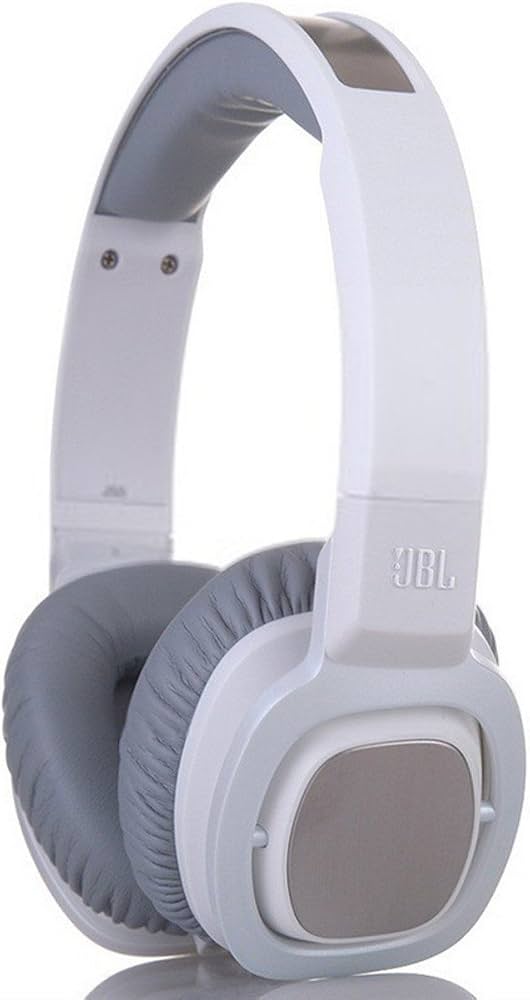
The JBL Pure Bass Headphones J55 are wired on-ear headphones built for listeners who want punchy bass, clear mids, and simple plug-and-play use. Featuring 40 mm drivers, a closed-back design, and a 3.5 mm gold-plated connector, the JBL Pure Bass Headphones J55 deliver a balanced everyday listening experience for music, podcasts, calls, and travel. Their Pure Bass tuning is designed to emphasize low-end impact without overwhelming the rest of the sound, making them a strong fit for pop, hip-hop, EDM, and casual home listening.
One of the biggest advantages of the JBL Pure Bass Headphones J55 is the detachable flat cable, which helps reduce tangling and makes replacement easier if the cable wears out. The on-ear fit keeps the headphones compact and portable, while the closed acoustic system helps limit sound leakage and improves focus in noisy environments. Depending on the market and seller, the J55 has typically been priced in the budget-to-midrange segment, with availability now mostly limited to remaining stock, older retail listings, and third-party marketplaces. This makes them especially appealing to buyers looking for affordable wired headphones with a recognizable brand name and a bass-forward sound signature.
These headphones are best suited for students, commuters, office users, and anyone who prefers a straightforward wired connection over Bluetooth charging or wireless pairing. If you want a simple pair of on-ear headphones with reliable build quality, the JBL Pure Bass Headphones J55 remain a practical choice.
Troubleshooting JBL Pure Bass Headphones J55
If the JBL Pure Bass Headphones J55 stop working properly, start with the cable and 3.5 mm plug, since loose connections are the most common cause of audio issues. If sound drops out in one ear, test the headphones on another device and inspect the detachable cable for bends, cuts, or a partially seated connector. If the sound is distorted or weak, clean the headphone jack and confirm the source device volume and equalizer settings are normal.
Common issues include no sound, crackling audio, and intermittent playback. While the J55 does not use digital error codes, users sometimes mistake poor connection symptoms for an error. In practice, “code-like” failures usually mean a physical connection problem, not a software fault. Fixes include reconnecting the cable, using a different 3.5 mm port, replacing a damaged cable, and avoiding excessive pulling on the wire.
To prevent damage, store the headphones in a case, avoid sharp bends in the cable, and keep the plugs clean and dry. Warranty coverage depends on the seller and region, so check the purchase invoice and product documentation. For help, use JBL Support through the official support portal or contact the retailer where the headphones were purchased. If the model is still under warranty, request repair or replacement rather than attempting internal disassembly.
Pros and Cons of JBL Pure Bass Headphones J55
Pros
- Strong bass response with JBL Pure Bass tuning, which works well for modern music styles and casual listening.
- 40 mm drivers provide fuller sound than many entry-level on-ear headphones.
- Detachable flat cable improves convenience and helps reduce tangling.
- Closed-back on-ear design offers better isolation than open designs in busy environments.
- Good value for money if found at a discounted price or in remaining inventory.
Cons
- Wired-only design may feel outdated for users who prefer Bluetooth headphones.
- On-ear fit can become less comfortable during long listening sessions.
- Bass emphasis may be too strong for listeners who prefer a neutral sound profile.
- Availability can be limited because the model is older and may no longer be widely stocked.
- No advanced features such as active noise cancellation or app-based sound controls.
Compared with newer wireless alternatives, the JBL Pure Bass Headphones J55 offer fewer features but a simpler user experience. They are a solid option for buyers who want dependable wired performance instead of extra technology.
Customer Reviews of JBL Pure Bass Headphones J55
Typical customer feedback for the JBL Pure Bass Headphones J55 is positive, especially from listeners who enjoy strong bass and easy everyday use. Many users rate them around 4 out of 5 stars for sound quality, comfort, and portability. Common praise includes “great bass for the price,” “easy to carry,” and “simple to connect with any device that has a headphone jack.”
Frequent complaints focus on the on-ear fit, which some users find tight during long sessions, and the wired design, which may not suit modern smartphone users without a headphone adapter. A few reviews also mention that the bass-heavy tuning is not ideal for classical or acoustic music. Overall, the J55 is often recommended for budget-conscious buyers who want durable wired headphones with a lively sound signature.
For users who prioritize convenience, wireless models may be a better choice. For listeners who want affordable sound with a recognizable JBL bass profile, the JBL Pure Bass Headphones J55 remain a worthwhile pick.
Faqs
How do I set up JBL Pure Bass Headphones J55 for the first time?
Why is one side of my JBL Pure Bass Headphones J55 not working?
Can JBL Pure Bass Headphones J55 work with phones, laptops, and gaming controllers?
What does the 180-degree rotating earcup feature on JBL Pure Bass Headphones J55 do?
How can I get deeper bass and clearer sound from JBL Pure Bass Headphones J55?
Why do my JBL Pure Bass Headphones J55 sound distorted at high volume?
How do I clean and maintain JBL Pure Bass Headphones J55 without damaging them?
What should I do if the detachable cable on my JBL Pure Bass Headphones J55 keeps disconnecting?
More jbl manuals
- Jbl BASSPRO-GO Subwoofer & Portable Speaker User Manual
- Jbl PARTYBOX 710 Portable Speaker User Manual
- Jbl BAR-300MK 25.0-Channel Soundbar User Manual
- Jbl Control X Wireless Portable Speakers User Manual
- Jbl QUANTUMTWSBLK Wireless Gaming Earbuds User Manual
- Jbl Eon One Compact PA Speaker System User Manual
Leave a Comment