
Jbl QUANTUMTWSBLK Wireless Gaming Earbuds User Manual
Content
JBL Quantum TWS Wireless Gaming Earbuds: Product Manual and Guide
Introduction
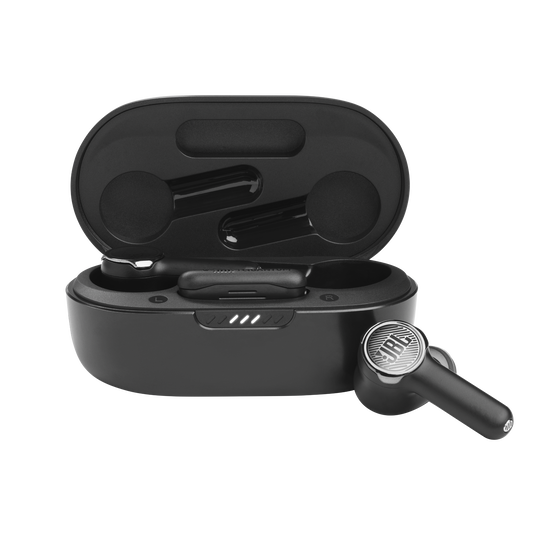
The JBL Quantum TWS wireless gaming earbuds are designed for players who want low-latency audio, true wireless freedom, and versatile device compatibility in one compact package. Built for gaming on the go, these earbuds combine Bluetooth 5.2 connectivity with a dedicated 2.4GHz USB-C dongle, giving users flexible switching between mobile, PC, console, and tablet devices. For gamers who need clear positional sound, reliable wireless performance, and a portable form factor, the jbl QUANTUMTWSBLK Wireless Gaming Earbuds deliver a balanced mix of convenience and performance.
Key benefits include adaptive and hybrid active noise cancellation, a gaming-focused dual-connection setup, and support for the JBL Headphones app for sound customization. The earbuds are especially well suited for mobile gamers, commuters, streamers, and anyone who wants a single pair of earbuds for gaming, calls, and everyday listening. They also appeal to users who prefer a lightweight alternative to full-size gaming headsets without giving up wireless flexibility.
Estimated pricing generally falls in the mid-range wireless gaming earbud category, often around $100 to $150 depending on region, promotions, and stock availability. Availability may vary by market, but the product is commonly found through JBL’s official store and major electronics retailers. The jbl QUANTUMTWSBLK Wireless Gaming Earbuds stand out for their gaming-first wireless design, making them a practical choice for users who want portable audio without sacrificing responsiveness.
Specifications
- Driver size: 10 mm dynamic drivers for strong bass and clear game audio.
- Frequency response: 20 Hz to 20 kHz for full-range sound reproduction.
- Impedance: 16 ohms for efficient power handling from mobile and gaming devices.
- Sensitivity: 106 dB SPL at 1 kHz/1 mW for high output with minimal amplification.
- Maximum SPL: 93 dB for controlled listening levels.
- Microphone sensitivity: -38 dBV/Pa at 1 kHz for voice chat and calls.
- Bluetooth version: 5.2 with A2DP, AVRCP, and HFP profile support.
- Wireless options: Bluetooth and 2.4GHz USB-C dongle for low-latency gaming.
- Earbud battery: 51 mAh lithium-ion polymer per earbud.
- Charging case battery: 340 mAh lithium-ion polymer.
- Battery life: up to 8 hours with Bluetooth and ANC off, with shorter playtimes when ANC is enabled.
- Weight: approximately 5.5 g per earbud, 42.4 g for the charging case.
Compared with standard true wireless earbuds, these gaming earbuds prioritize latency reduction and dual-device flexibility over audiophile tuning. Against similar gaming earbuds, the jbl QUANTUMTWSBLK Wireless Gaming Earbuds offer a strong combination of ANC, dongle support, and app control, making them a more complete option for mixed entertainment and gaming use.
Setup Guide
Start by fully charging the earbuds and the charging case using the included USB cable. Once charged, remove both earbuds from the case and confirm that pairing mode activates automatically. If pairing does not begin, press and hold the pairing controls until the LED indicators signal Bluetooth discovery mode.
For Bluetooth setup, open your device’s wireless settings, select the earbuds, and confirm the connection. For gaming use, plug the USB-C dongle into a compatible PC, Mac, PlayStation, Nintendo Switch, or supported mobile device. The dongle is ideal when you want lower latency than Bluetooth for gaming sessions.
After connection, use the JBL Headphones app to adjust EQ settings, noise cancellation, and ambient sound options. Test audio and microphone performance before long gaming sessions to ensure stable voice chat and game sound balance. If the earbuds fail to pair, reset them by returning them to the case, closing the lid, and repeating the pairing process.
Safety precautions include avoiding exposure to moisture, extreme heat, and prolonged charging in hot environments. Do not use damaged cables or force the earbuds into incompatible ports. Keep volume at safe listening levels to protect hearing during extended use.
Troubleshooting
One common issue is unstable Bluetooth pairing. To fix this, remove the earbuds from your device list, reset the earbuds, and pair again from scratch. If audio cuts out during gaming, switch from Bluetooth to the 2.4GHz dongle for a more stable low-latency connection.
If one earbud does not charge, clean the charging contacts and make sure the earbuds sit correctly in the case. If microphone quality is poor, check that the correct input device is selected in your operating system or game settings. Low volume can often be resolved by checking both device volume and app-based EQ settings.
Common preventive measures include keeping firmware updated through the JBL app, charging the case regularly, and storing the earbuds in the case when not in use. There are no widely used public error codes for this model, so most issues are resolved through reset, re-pairing, or device setting changes.
For warranty support, contact JBL through the official JBL support channel or your retailer’s customer service desk. Support options typically include product troubleshooting, warranty claims, and replacement guidance based on your region.
Pros & Cons
Pros
- Low-latency gaming performance with the included wireless dongle.
- Dual connectivity gives flexibility across PC, console, and mobile devices.
- Active noise cancellation helps block distractions in busy environments.
- Compact and lightweight design is more portable than over-ear headsets.
- JBL app support adds useful customization for gaming and music.
Cons
- Battery life is shorter when ANC is enabled.
- Earbud fit may not suit every user for long sessions.
- Wireless gaming earphones like these can feel less immersive than full-size headsets.
- Premium features may place them above budget alternatives in price.
Overall value for money is strong if portability and gaming flexibility matter most. Compared with standard true wireless earbuds, the jbl QUANTUMTWSBLK Wireless Gaming Earbuds are better suited to players who want a true gaming feature set. Compared with larger gaming headsets, they trade some immersion for comfort and convenience.
Customer Reviews
Customer feedback for the jbl QUANTUMTWSBLK Wireless Gaming Earbuds is generally positive, with many users praising the convenience of the dual wireless setup and the clarity of in-game audio. Typical ratings trend around 4 out of 5 stars, especially among mobile and console players who value portability.
Common praise includes solid sound quality, useful ANC, and the freedom to switch between gaming and casual listening. Frequent complaints focus on battery life when noise cancelling is active and occasional fit concerns for smaller ears. Many users recommend them for travel, everyday use, and casual competitive gaming rather than marathon esports sessions.
Sample user-style feedback often highlights the following: “Great for PS5 and phone gaming without cables,” and “Sound is punchy, but I wish the battery lasted longer with ANC on.” For shoppers who prioritize compact design and flexible connectivity, these earbuds are often recommended as a strong mid-range buy.
Frequently Asked Questions
Are these earbuds good for gaming?
Yes, they are built for gaming with a dedicated 2.4GHz dongle that helps reduce latency.
Can they be used with phones and tablets?
Yes, they support Bluetooth 5.2, making them compatible with most Bluetooth-enabled smartphones and tablets.
Do they support app controls?
Yes, the JBL Headphones app can be used for sound and feature adjustments.
Are they better than regular wireless earbuds for gaming?
Yes, they are better suited for gaming thanks to the dongle, voice chat support, and gaming-oriented tuning.
Faqs
How do I set up jbl QUANTUMTWSBLK Wireless Gaming Earbuds for the first time on PC or console?
What should I do if my jbl QUANTUMTWSBLK Wireless Gaming Earbuds will not connect to the USB dongle?
How do I fix audio lag or sync problems on jbl QUANTUMTWSBLK Wireless Gaming Earbuds?
Are jbl QUANTUMTWSBLK Wireless Gaming Earbuds compatible with PC, PS5, Switch, and mobile devices?
How do I get the best gaming sound and lowest latency from jbl QUANTUMTWSBLK Wireless Gaming Earbuds?
Why does one earbud on jbl QUANTUMTWSBLK Wireless Gaming Earbuds lose connection or sound weaker than the other?
How long does the battery last on jbl QUANTUMTWSBLK Wireless Gaming Earbuds, and how can I extend it?
How should I clean and maintain jbl QUANTUMTWSBLK Wireless Gaming Earbuds for long-term use?
More jbl manuals
Leave a Comment