
Jbl Wave-Buds-BLK Wireless Earbuds User Manual
Content
jbl Wave-Buds-BLK Wireless Earbuds: Complete Product Manual
Introduction
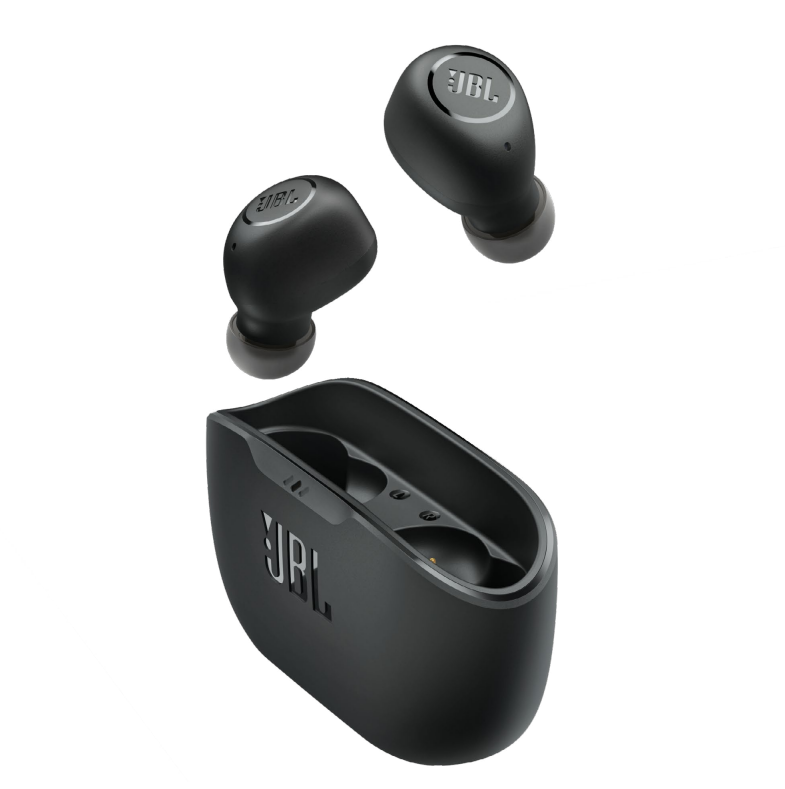
The jbl Wave-Buds-BLK Wireless Earbuds are compact true wireless earbuds designed for users who want dependable everyday sound, easy portability, and a simple, no-fuss listening experience. Built around JBL’s signature Deep Bass tuning, these earbuds deliver a lively audio profile that works well for music, podcasts, calls, and video streaming. Their lightweight design and oval-shaped sound tube help create a secure, comfortable fit for long listening sessions, making them a practical choice for commuting, workouts, study time, and remote work.
One of the biggest advantages of the jbl Wave-Buds-BLK Wireless Earbuds is battery performance. With up to 8 hours of playback in the earbuds and an additional 24 hours from the charging case, they are built for all-day use without constant recharging. A quick 10-minute charge can provide around 2 hours of listening time, which is especially useful when you are in a hurry. The earbuds also include IP54 water and dust resistance, making them suitable for light exercise and everyday outdoor use.
This model is aimed at budget-conscious buyers who want reliable Bluetooth earbuds without paying premium prices. It is a strong fit for students, office users, casual listeners, and travelers who need wireless convenience and strong battery life. In most markets, the estimated price range is typically around $40 to $80, depending on region, retailer, and seasonal discounts. The jbl Wave-Buds-BLK Wireless Earbuds are widely available through electronics stores, online marketplaces, and JBL-authorized retailers.
Specifications
- Product type: True wireless in-ear earbuds
- Bluetooth version: 5.2 for stable wireless connectivity and efficient power use
- Driver size: 8 mm dynamic drivers for JBL Deep Bass sound
- Frequency response: 20 Hz to 20 kHz
- Impedance: 16 ohms
- Sensitivity: 100 dB SPL at 1 kHz
- Battery life: Up to 8 hours in the earbuds, up to 32 hours total with case
- Fast charging: 10 minutes of charging for about 2 hours of playback
- Charging time: About 2 hours from empty
- Water resistance: IP54 on earbuds, IPX2 on charging case
- Microphone: Built-in mic for calls and voice commands
- Controls: Touch controls for playback, calls, and assistant access
- Weight: Lightweight earbuds with a compact charging case for easy carry
Compared with similarly priced wireless earbuds, the jbl Wave-Buds-BLK Wireless Earbuds stand out for stronger bass tuning, longer battery life, and better sweat resistance than many entry-level models. They are not aimed at premium active noise cancellation, but they deliver a balanced feature set for everyday use and value-focused buyers.
Setup Guide
Setting up the jbl Wave-Buds-BLK Wireless Earbuds is straightforward. First, fully charge the case using the included USB-C cable. Then remove both earbuds from the case to enter pairing mode automatically. On your phone, tablet, or laptop, open Bluetooth settings, search for available devices, and select the earbuds to connect.
After pairing, you can customize usage depending on your device. On supported smartphones, you can manage touch controls, audio playback, and call functions directly from the earbuds. If the connection does not appear, place the earbuds back in the case, close the lid for a few seconds, and try again. For best performance, keep the earbuds within about 10 meters of the connected device and avoid heavy interference from walls or crowded wireless environments.
Safety precautions are important during setup and daily use. Avoid exposing the earbuds or case to excessive moisture, high heat, or direct sunlight for long periods. Do not charge the device with damaged cables or unapproved adapters. If the earbuds are worn during exercise, wipe them dry after use to preserve the charging contacts and water resistance.
Troubleshooting
If one earbud does not connect, return both earbuds to the case, close the lid, and reconnect from Bluetooth settings. If audio sounds low or unbalanced, clean the ear tips and speaker mesh gently with a dry, soft cloth. Poor battery life is often caused by frequent high-volume listening or incomplete charging, so make sure the case is fully charged before use.
If Bluetooth keeps dropping, move closer to the source device and remove possible interference from other wireless products. If touch controls respond unpredictably, ensure your fingers are dry and clean and reset the earbuds by disconnecting them and pairing again. If the charging case does not power the earbuds, check the cable, charging port, and contact points for debris.
There are no widely used public error codes for this model, but persistent issues usually point to pairing, charging, or contact-cleaning problems. For prevention, store the earbuds in the case when not in use, keep firmware and device software updated when possible, and charge regularly rather than letting the battery fully drain. Warranty coverage and repair support are typically handled through JBL customer service or the retailer where the earbuds were purchased. Support is usually available through the official JBL help channels, authorized service centers, and retailer support desks.
Pros & Cons
Pros
- Strong bass-forward sound that suits pop, hip-hop, streaming, and casual listening
- Excellent battery life for the price, with up to 32 total hours using the case
- Fast charging is useful for busy users who need quick top-ups
- Compact, lightweight design for commuting and daily carry
- IP54 water and dust resistance adds confidence for workouts and outdoor use
- Good value for money compared with many entry-level true wireless earbuds
Cons
- No advanced active noise cancellation, which may disappoint frequent travelers
- Sound tuning favors bass, so audiophiles may prefer a flatter alternative
- Touch controls can take time to learn and may be sensitive for some users
- Call quality is serviceable rather than premium in noisy environments
- Case resistance is limited, so it should not be exposed to heavy moisture
For buyers comparing alternatives, these earbuds are stronger than many low-cost rivals on battery life and brand consistency, but premium models from Sony, Apple, or Samsung will usually offer better ANC, app features, and call performance.
Customer Reviews
User feedback for the jbl Wave-Buds-BLK Wireless Earbuds is generally positive, with many buyers giving them around 4 to 4.5 out of 5 stars. Customers frequently praise the battery life, comfortable fit, and punchy bass sound. A common comment is that they feel reliable for everyday listening and travel.
Typical complaints focus on the lack of noise cancelation and the fact that bass-heavy tuning may not suit every listener. Some users also mention that touch controls require a short adjustment period. One frequent testimonial style summary is: “Great battery life and strong sound for the price.” Another common sentiment is: “Perfect for commuting and casual use, but not for premium studio listening.”
These earbuds are a smart recommendation for buyers who want affordable wireless convenience, long playback, and a trusted audio brand. If your priority is noise isolation or high-end calling features, a more advanced model may be a better fit.
Faqs
How do I set up jbl Wave-Buds-BLK Wireless Earbuds for the first time?
Why are my jbl Wave-Buds-BLK Wireless Earbuds not connecting to Bluetooth?
Can I use jbl Wave-Buds-BLK Wireless Earbuds with Android and iPhone devices?
How do I improve bass and sound quality on jbl Wave-Buds-BLK Wireless Earbuds?
What should I do if one jbl Wave-Buds-BLK Wireless Earbuds side is quieter than the other?
Are jbl Wave-Buds-BLK Wireless Earbuds good for workouts and outdoor use?
How long does the battery last on jbl Wave-Buds-BLK Wireless Earbuds, and how can I make it last longer?
How should I clean and maintain jbl Wave-Buds-BLK Wireless Earbuds safely?
More jbl manuals
Leave a Comment