
Jbl TUNE-BUDS-BLKAM Earbuds User Manual
Content
jbl TUNE-BUDS-BLKAM Earbuds Review and Product Manual
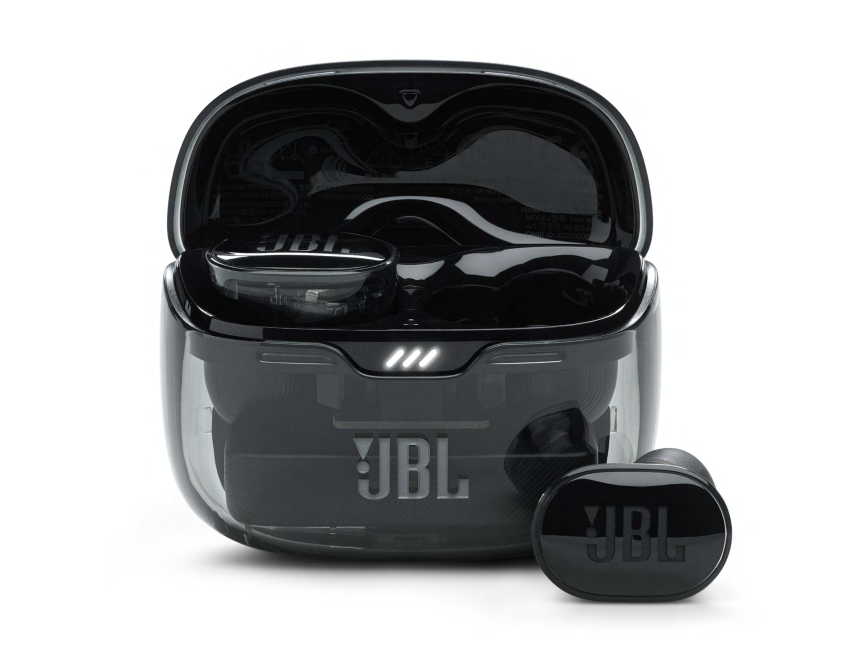
Introduction to JBL TUNE-BUDS-BLKAM Earbuds
The jbl TUNE-BUDS-BLKAM Earbuds are true wireless noise-cancelling earbuds designed for listeners who want strong bass, reliable Bluetooth connectivity, and all-day battery life in a compact everyday format. Built around JBL Pure Bass Sound and active noise cancelling, they are a strong fit for commuting, workouts, office calls, and casual music listening. The black finish gives them a clean, understated look that suits both professional and lifestyle use.
These earbuds are aimed at users who want an affordable alternative to premium ANC models without giving up modern features such as Bluetooth 5.3, multi-microphone calling, IP54-style resistance, and fast USB-C charging. They are especially useful for students, office workers, frequent travelers, and anyone who needs wireless earbuds for music, podcasts, and hands-free calls throughout the day.
Typical pricing for the jbl TUNE-BUDS-BLKAM Earbuds generally falls in the budget-to-midrange category, usually around $60 to $100 depending on retailer, promotions, and availability. Stock is commonly found through major electronics retailers and online marketplaces, with seasonal discounts often lowering the price further. If you want true wireless earbuds with balanced features, strong bass performance, and dependable battery life, this model remains a practical and popular choice.
Specifications: JBL Tune Buds Technical Details and Key Features
- Driver size: 10 mm dynamic drivers for full-range sound and punchy bass
- Frequency response: 20 Hz to 20 kHz for standard wireless audio playback
- Impedance: 32 ohms
- Sensitivity: 101 dB at 1 kHz for efficient output
- Bluetooth version: 5.3 for stable, modern wireless pairing
- Microphones: 4-mic setup for clearer voice pickup during calls
- Noise cancelling: Active noise cancelling support for reducing background noise
- Battery life: Up to 12 hours in the earbuds and up to 48 hours total with the charging case
- Charging: USB-C fast charging for convenient top-ups
- Water and dust resistance: IP54-style protection for daily use
- Weight: Lightweight earbuds with a compact charging case for portability
- Wireless profiles: A2DP, AVRCP, HFP, and DID support for broad device compatibility
Compared with similar wireless earbuds in the same class, the jbl TUNE-BUDS-BLKAM Earbuds stand out for stronger battery endurance and more bass-forward sound than many entry-level alternatives. They are best suited to users who value battery life, call quality, and JBL’s signature audio tuning over ultra-compact styling or advanced premium features.
Setup Guide: How to Pair JBL TUNE-BUDS-BLKAM Earbuds
Start by fully charging the earbuds and case with the included USB-C cable. Open the charging case, remove the earbuds, and allow them to enter pairing mode automatically. On your phone, tablet, or laptop, open Bluetooth settings and select the earbuds from the available devices list. Once connected, the earbuds should remember your device for future use.
For best results, install the companion app if available in your region to access firmware updates, touch-control settings, and sound customization. You can usually adjust ANC behavior, voice assistant shortcuts, and call preferences from supported app menus. If the connection fails, place both earbuds back in the case, close the lid, wait a few seconds, and try pairing again.
Safety precautions matter during setup. Keep the earbuds away from water during charging, avoid forcing the earbuds into the case, and do not use damaged cables or chargers. If one earbud does not connect, clean the charging contacts gently and confirm both buds are fully seated before retrying.
Troubleshooting JBL Tune Buds: Common Problems and Fixes
If the earbuds do not power on, check whether the case has enough charge and verify that the earbuds are seated correctly. If Bluetooth pairing fails, remove the earbuds from your device’s saved list, restart Bluetooth, and pair again from scratch. If audio cuts out, keep the phone closer to the earbuds and reduce interference from other wireless devices.
Common sound issues often come from dirty charging contacts, low battery, or an uneven fit. Clean the earbud stems and case contacts with a dry cloth, then recharge fully. If one side is quieter than the other, reset the earbuds and test with a different audio source. There are no widely used public error codes for normal consumer troubleshooting, so most fixes rely on pairing resets, app updates, and battery checks.
To prevent future problems, store the earbuds in the case when not in use, avoid extreme heat, and update firmware when available. Warranty coverage is usually handled through the retailer or JBL support channels, depending on region. For help, use the official JBL support website, retailer customer service, or the product warranty card included with purchase.
Pros & Cons of JBL TUNE-BUDS-BLKAM Earbuds
Pros
- Strong battery life with up to 48 hours total playback
- JBL Pure Bass Sound delivers energetic low-end performance
- Bluetooth 5.3 improves connection stability and efficiency
- 4-mic calling helps improve voice clarity during meetings and calls
- Noise cancelling adds value at a competitive price
- Good everyday portability and water resistance for commuting and workouts
Cons
- ANC performance is solid but not as advanced as premium flagship earbuds
- Sound tuning may feel bass-heavy for users who prefer a neutral profile
- The fit may require trying different ear tip sizes for best comfort
- Some alternatives offer more advanced app features or spatial audio tools
Overall, the jbl TUNE-BUDS-BLKAM Earbuds offer good value for money if you want dependable wireless audio without paying flagship prices. Compared with similarly priced earbuds from Sony, Anker, or Samsung entry-level models, JBL’s bass tuning and battery life are the main advantages.
Customer Reviews: What Users Say About JBL TUNE-BUDS-BLKAM Earbuds
Customer feedback is generally positive, with many users giving the earbuds around 4 out of 5 stars for battery life, sound quality, and easy Bluetooth pairing. One common praise is the strong bass response, which many listeners enjoy for pop, hip-hop, and streaming audio. Another recurring compliment is the long battery life, especially for travel and full workdays.
Common complaints usually involve fit preferences, ANC expectations, and the need to fine-tune the ear tips for a secure seal. Some users also note that call quality is good for everyday use but not always class-leading in noisy environments. A frequent recommendation is to buy them if you want reliable everyday earbuds with bass-forward sound and long battery life, but choose a more premium model if you need top-tier noise cancellation.
Faqs
How do I set up jbl TUNE-BUDS-BLKAM Earbuds for the first time?
Why are my jbl TUNE-BUDS-BLKAM Earbuds not pairing with my phone?
How do I improve sound quality and bass on jbl TUNE-BUDS-BLKAM Earbuds?
Do jbl TUNE-BUDS-BLKAM Earbuds work with iPhone, Android, and laptops?
How does Active Noise Cancelling work on jbl TUNE-BUDS-BLKAM Earbuds?
What should I do if jbl TUNE-BUDS-BLKAM Earbuds have low volume or one earbud sounds quieter?
How long does the battery last on jbl TUNE-BUDS-BLKAM Earbuds and how can I charge them faster?
How should I clean and maintain jbl TUNE-BUDS-BLKAM Earbuds for long-term use?
More jbl manuals
Leave a Comment