
Jbl Bar 2.0 All-In-One Soundbar MK2 User Manual
Content
jbl Bar 2.0 All-In-One Soundbar MK2: Compact TV Audio Upgrade for Everyday Home Entertainment
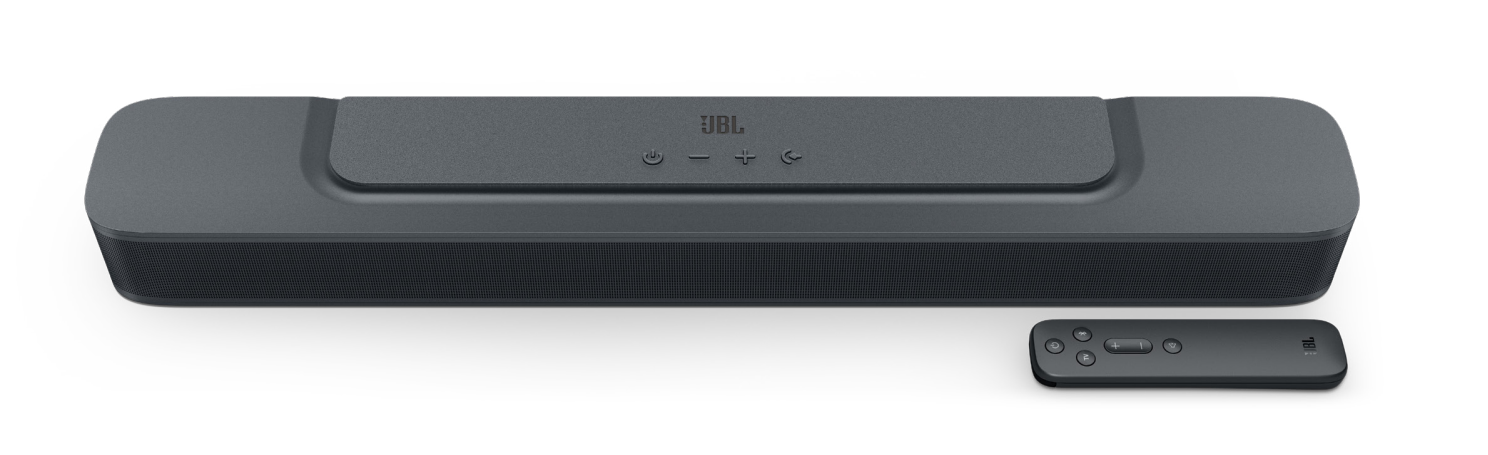
The jbl Bar 2.0 All-In-One Soundbar MK2 is a compact 2.0-channel soundbar built for users who want clearer dialogue, fuller TV sound, and a simple setup without a separate subwoofer. With 80W total output, dual racetrack drivers, Bluetooth 4.2 streaming, HDMI ARC, optical input, and USB playback support in the US version, it is designed to improve everyday viewing, gaming, and music playback in small to medium-sized rooms. Its slim profile also makes it a strong fit for apartments, bedrooms, dorms, and secondary living spaces where space matters as much as sound quality.
This soundbar is especially appealing to buyers who want an affordable home audio upgrade without the complexity of a multi-speaker system. It suits streamers, casual movie watchers, sports fans, and anyone using a modern TV with limited built-in speaker performance. The JBL soundbar also stands out for its easy wall-mountable design, low standby power, and broad compatibility with most TVs through HDMI ARC or optical connection.
In today’s market, the estimated price range is typically around $130 to $220 depending on the retailer, region, and promotional discounts. Availability is generally strong through major electronics stores, JBL’s official channels, and online marketplaces. For shoppers comparing soundbars for TV, the jbl Bar 2.0 All-In-One Soundbar MK2 offers a balanced mix of value, convenience, and reliable brand recognition.
Detailed Specifications and Key Features
- Channel configuration: 2.0-channel all-in-one soundbar
- Total speaker output: 80W maximum at 1% THD
- Soundbar output: 2 x 40W
- Drivers: 2 x racetrack drivers
- Frequency response: 70Hz - 20KHz
- Connectivity: HDMI ARC, optical input, Bluetooth, USB
- Bluetooth version: 4.2
- Bluetooth profiles: A2DP V1.3, AVRCP V1.5
- Power supply: 100 - 240V AC, 50/60Hz
- Standby power: less than 0.5W
- Operating temperature: 0°C - 45°C
- Dimensions: 614 x 56 x 90 mm
- USB playback: available in US version; service-only in some other regions
- Supported USB formats: MP3 and WAV
Compared with basic TV speakers, this compact JBL soundbar delivers a much wider soundstage and stronger mids for speech clarity. Against larger soundbars with dedicated subwoofers, it trades deep bass for a simpler footprint and easier setup, making it a practical choice for smaller rooms and budget-conscious buyers.
Setup Guide: How to Install and Connect the Soundbar
Start by placing the soundbar directly below your TV or mounting it on the wall using compatible brackets. Make sure the front of the bar is unobstructed so the racetrack drivers can project sound clearly. Keep the unit away from heat sources, moisture, and enclosed spaces that could block ventilation.
For the fastest connection, use HDMI ARC if your TV supports it. Connect the HDMI cable to the ARC-labeled port on both devices, then enable ARC and external speaker output in your TV settings. If ARC is not available, use the optical cable and set the TV audio output to optical or digital sound out. Power on the soundbar, then use the remote or source button to select the correct input.
To pair via Bluetooth, switch to Bluetooth mode on the soundbar, then select it from your phone, tablet, or laptop. If pairing fails, turn Bluetooth off and back on, remove old pairings, and move the device closer to the soundbar. For safer operation, avoid placing cables under pressure, do not cover the vents, and disconnect the device during thunderstorms or long periods of non-use.
Troubleshooting Common JBL Soundbar Problems
If there is no sound, first confirm the TV is set to external speakers and the correct input is selected on the soundbar. Check that the HDMI ARC or optical cable is firmly seated, and test with another cable if needed. If Bluetooth audio cuts out, reduce distance, remove interference from other wireless devices, and re-pair the source device.
If volume is too low, review the TV audio menu and disable any restrictive sound modes or volume normalization settings. If the unit will not power on, verify the outlet, power cable, and power strip. For USB playback issues, remember that USB audio support may be limited by region and only available in the US version.
Common preventive steps include keeping firmware-compatible devices updated, using quality cables, and cleaning the soundbar’s surface and ports regularly. Warranty terms vary by region, so buyers should check the original purchase documentation. For help, contact JBL support through the official customer support channels, retailer service desk, or authorized repair center listed in the product documentation.
Pros and Cons of the jbl Bar 2.0 All-In-One Soundbar MK2
Pros
- Compact all-in-one design saves space and reduces cable clutter
- Clearer dialogue performance than built-in TV speakers
- Easy setup with HDMI ARC, optical, and Bluetooth connectivity
- Low standby power makes it energy-efficient for everyday use
- Strong value for money for small to medium rooms
- Wall-mountable design adds flexibility for modern living spaces
Cons
- No dedicated subwoofer, so deep bass is limited
- Not ideal for large rooms or home theater enthusiasts seeking surround sound
- Bluetooth 4.2 is reliable but not the newest wireless standard
- USB playback support depends on regional version
For budget buyers who mainly want better TV audio, the jbl Bar 2.0 All-In-One Soundbar MK2 delivers excellent value. Compared with 2.1-channel alternatives, it is less powerful in bass but easier to place and simpler to use.
Customer Reviews and Real-World User Feedback
Typical customer ratings for compact JBL soundbars like this model trend around 4 out of 5 stars, with praise centered on easy setup, improved speech clarity, and a clean design that blends into most living rooms. Many users appreciate that it works well for movies, news, and streaming without requiring a separate subwoofer.
Common complaints usually focus on limited bass response, which is expected from an all-in-one 2.0-channel soundbar. Some users also mention that it is best suited to smaller rooms rather than large open spaces. A frequent recommendation is to pair it with a TV that supports HDMI ARC for the most seamless day-to-day experience.
Buyer testimonial style feedback often sounds like this: “Perfect for my bedroom TV” and “Much clearer than my TV speakers.” For shoppers searching for a straightforward, affordable soundbar for TV, the jbl Bar 2.0 All-In-One Soundbar MK2 remains a dependable choice with broad appeal.
Faqs
How do I set up jbl Bar 2.0 All-In-One Soundbar MK2 for the first time with HDMI ARC?
Why is my jbl Bar 2.0 All-In-One Soundbar MK2 not producing sound from the TV?
Does the jbl Bar 2.0 All-In-One Soundbar MK2 support Bluetooth music streaming from a phone or tablet?
What sound features make jbl Bar 2.0 All-In-One Soundbar MK2 different from a basic TV speaker?
Can jbl Bar 2.0 All-In-One Soundbar MK2 work with any TV, and what connections are required?
How do I get the best audio quality from jbl Bar 2.0 All-In-One Soundbar MK2 for movies and TV?
What should I do if the Bluetooth connection on jbl Bar 2.0 All-In-One Soundbar MK2 keeps dropping?
How should I clean and maintain jbl Bar 2.0 All-In-One Soundbar MK2 for long-term use?
More jbl manuals
Leave a Comment