
Jbl DOLBY-ATMOS BAR 9.1 True Wireless Surround System User Manual
Content
jbl DOLBY-ATMOS BAR 9.1 True Wireless Surround System: Complete Product Manual and Buyer’s Guide
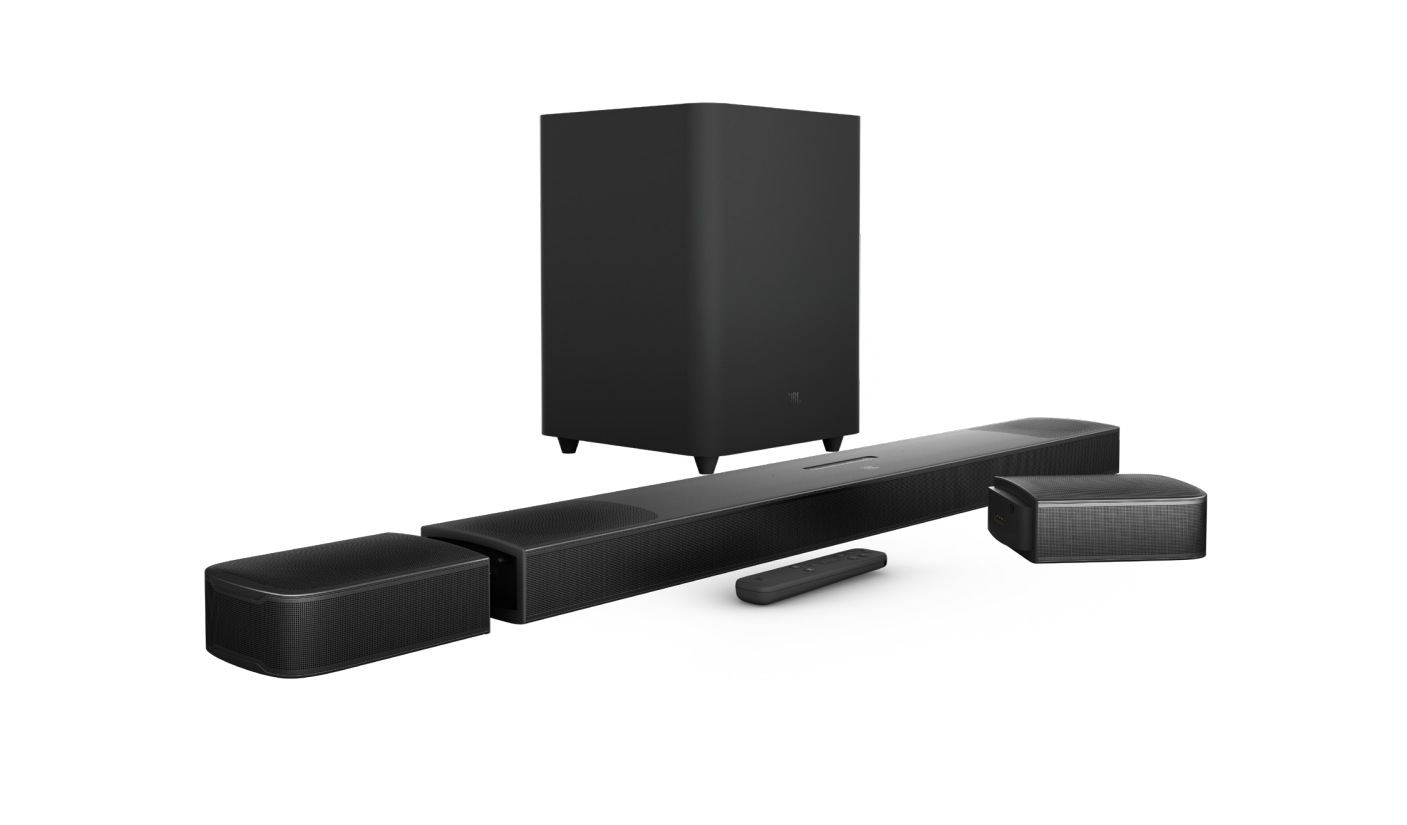
Introduction to the JBL Bar 9.1 True Wireless Surround System
The jbl DOLBY-ATMOS BAR 9.1 True Wireless Surround System is a premium home theater soundbar built for listeners who want cinema-style immersion without the clutter of wired rear speakers. Its standout design includes detachable battery-powered surround speakers that can be placed behind the couch for true multi-directional sound, then docked back into the bar when not in use. With Dolby Atmos and DTS:X support, the system is designed to create a spacious 3D sound field for movies, streaming, sports, and gaming.
This model is a strong fit for home theater enthusiasts, apartment users who want a clean setup, and families looking for an all-in-one audio upgrade for large TVs. It delivers powerful bass, clear dialogue, and impressive height effects, making it especially effective for action films and immersive console gaming. Connectivity is another advantage, with HDMI eARC, HDMI input, Bluetooth, Wi-Fi, Chromecast built-in, and AirPlay 2 support for modern smart-home use.
The estimated price range is typically in the premium soundbar category, often found around the mid-to-high hundreds depending on retailer, condition, and availability. Availability may vary by region, and stock can be limited because this is an older flagship model that still appears through major electronics retailers and marketplace listings. For users searching for a powerful Dolby Atmos soundbar with wireless rear speakers, the jbl DOLBY-ATMOS BAR 9.1 True Wireless Surround System remains a compelling option.
Specifications for JBL Bar 9.1 True Wireless Surround System
- Sound system: 5.1.4-channel configuration for layered surround audio
- Total output power: 820W maximum for room-filling performance
- Main soundbar output: 400W maximum
- Detachable surround speakers: 2 x 60W maximum
- Subwoofer output: 300W maximum with a 10-inch driver
- Frequency response: 34Hz to 20kHz for deep bass and clear highs
- Maximum sound pressure level: 103dB for dynamic movie playback
- Connectivity: HDMI eARC, HDMI in, optical input, Bluetooth, Wi-Fi, USB
- Streaming support: Chromecast built-in and AirPlay 2 for easy wireless playback
- Bluetooth version: 4.2 with A2DP and AVRCP support
- Wireless surround speakers with rechargeable batteries and quick dock design
- Soundbar dimensions: 884 x 62 x 120 mm
- Subwoofer dimensions: 305 x 440 x 305 mm
- Compared with similar products, it stands out for detachable rear speakers and stronger flexibility than many single-bar Dolby Atmos systems
Performance-wise, the system is known for strong bass impact and convincing height effects, especially when paired with Dolby Atmos content. Compared with many competitors in the same class, it offers a more flexible surround experience because the rear channels are truly wireless and removable. That makes it a practical alternative to systems that require permanent rear wiring or separate speaker stands.
Setup Guide for JBL Bar 9.1 Dolby Atmos Soundbar
Start by placing the soundbar directly below the TV, ideally centered and unobstructed. Position the subwoofer near the front wall or in a corner for stronger bass response. Charge the detachable rear speakers in the soundbar until fully powered, then remove them and place them behind or beside the seating area for surround playback.
Connect the soundbar to the TV using the HDMI eARC port for the best audio quality. If eARC is not available, use the optical input as a fallback. For streaming from mobile devices, enable Bluetooth, Chromecast built-in, or AirPlay 2 depending on your phone or tablet. Use the remote to switch between sound modes, adjust bass, and balance speaker levels.
If audio is missing, confirm that the TV’s audio output is set to HDMI ARC/eARC and that CEC is enabled. If the rear speakers do not connect, return them to the bar for charging and re-dock them after a few minutes. Safety tip: keep the subwoofer ventilated and avoid placing the bar in front of sensors or inside a closed cabinet.
Troubleshooting Common JBL Bar 9.1 Problems
Common issues include no sound, weak bass, Bluetooth dropouts, and rear speakers not charging. If there is no sound, check the HDMI cable, TV audio settings, and soundbar input source. If bass is underwhelming, move the subwoofer closer to a corner or reduce interference from walls and furniture.
For wireless problems, reconnect Bluetooth by forgetting the device and pairing again. If the detachable speakers stop working, dock them in the soundbar until the battery indicator shows charging. Reset the system if settings become unstable or if audio becomes out of sync. There are no widely used consumer-facing error codes on this model, so most fixes rely on power cycling, firmware checks, and connection resets.
To prevent problems, keep firmware updated when available, use high-quality HDMI cables, and avoid placing the subwoofer too close to Wi-Fi routers. Warranty coverage depends on region and seller, so check your purchase documentation. For support, contact JBL customer care, the retailer, or an authorized service center for repair and replacement assistance.
Pros and Cons of the JBL Bar 9.1 True Wireless Surround System
Pros
- True wireless rear speakers create a more authentic surround sound experience
- Strong 820W output delivers powerful movie and music playback
- Dolby Atmos and DTS:X support improve immersion with compatible content
- Built-in Chromecast and AirPlay 2 simplify streaming from smart devices
- Excellent for users who want a premium home theater soundbar without running cables
- Good value for buyers who want high-end features without moving to a full AV receiver setup
Cons
- Premium pricing may be high for budget-focused shoppers
- Rear speakers require periodic docking for charging
- Older Bluetooth and hardware generation may trail newer flagship bars in some features
- Large subwoofer needs space and careful placement
- Some alternatives offer newer voice assistant integration or more advanced HDMI features
Overall, the jbl DOLBY-ATMOS BAR 9.1 True Wireless Surround System offers excellent value for users who prioritize immersive audio and cable-free rear channels. Compared with simpler soundbars, it is more versatile and cinematic. Compared with newer premium competitors, it remains attractive for its detachable speaker design and balanced performance.
Customer Reviews and User Feedback
Average user sentiment for the JBL Bar 9.1 often falls around 4 out of 5 stars, with many buyers praising the powerful bass, clean dialogue, and real surround effect. Reviewers frequently describe the detachable speakers as the feature that makes the system feel unique and worth the purchase.
Common praise includes “movie nights feel like a real theater,” “setup was easier than expected,” and “the wireless rear speakers make a huge difference.” Common complaints usually mention battery management, occasional connection hiccups, and the need for enough space to get the best subwoofer performance. Buyers who want a premium Dolby Atmos soundbar with real rear channels often recommend it strongly, especially for living rooms and media rooms.
If your priority is immersive sound and a clean setup, this model is still a smart recommendation. If you want the newest feature set or a smaller footprint, comparing it with newer flagship soundbars is a good idea before buying.
Frequently Asked Questions
Is the JBL Bar 9.1 good for Dolby Atmos movies?
Yes. It is designed to reproduce Dolby Atmos content with height effects and wide surround imaging, making it especially effective for streaming movies and action scenes.
Can the rear speakers be used wirelessly?
Yes. The detachable surround speakers operate wirelessly and can be docked into the bar for charging when not in use.
Does it work with smart TVs?
Yes. It works well with modern smart TVs through HDMI eARC or ARC, and also supports Bluetooth and wireless streaming platforms.
Who should buy this soundbar?
It is best for users who want a premium home theater soundbar, strong bass, and genuine surround sound without installing a full speaker system.
Faqs
How do I set up the jbl DOLBY-ATMOS BAR 9.1 True Wireless Surround System for the first time?
Why is my jbl DOLBY-ATMOS BAR 9.1 True Wireless Surround System not producing surround sound?
How do I connect the jbl DOLBY-ATMOS BAR 9.1 True Wireless Surround System to a TV for Dolby Atmos?
How long do the detachable rear speakers last on the jbl DOLBY-ATMOS BAR 9.1 True Wireless Surround System?
What should I do if the subwoofer on the jbl DOLBY-ATMOS BAR 9.1 True Wireless Surround System sounds weak or boomy?
Is the jbl DOLBY-ATMOS BAR 9.1 True Wireless Surround System compatible with smart TVs, gaming consoles, and streaming devices?
How can I improve sound quality on the jbl DOLBY-ATMOS BAR 9.1 True Wireless Surround System?
How do I clean and maintain the jbl DOLBY-ATMOS BAR 9.1 True Wireless Surround System?
More jbl manuals
Leave a Comment