
Jbl FREEBLKBT Wireless In-Ear Earbuds User Manual
Content
JBL FREEBLKBT Wireless In-Ear Earbuds Review and User Manual
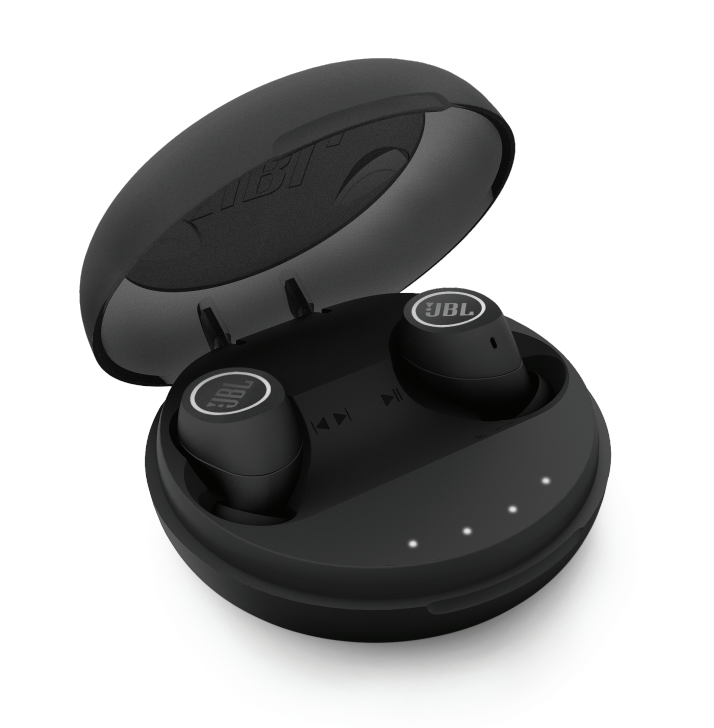
The jbl FREEBLKBT Wireless In-Ear Earbuds are designed for users who want true wireless freedom, a secure in-ear fit, and everyday convenience in a compact black finish. Built around JBL’s lightweight true wireless design, these earbuds are well suited for commuting, workouts, hands-free calls, casual listening, and travel. They deliver a balanced mix of portability and practicality, with splash resistance, a charging case, and Bluetooth connectivity that makes them easy to pair with phones, tablets, and computers.
One of the biggest advantages of the jbl FREEBLKBT Wireless In-Ear Earbuds is their straightforward user experience. The right earbud can enter pairing mode quickly, while the left earbud connects automatically for stereo playback. This makes setup simple even for first-time wireless audio users. The earbuds also include an IPX5 splash-resistant rating, which adds confidence during workouts or light rain. Battery life is estimated at up to 4 hours per charge, with additional backup power from the charging case for extended listening sessions. A compact carrying case, quick start guide, extra ear tips, and warranty card are typically included, making the package ready to use out of the box.
These earbuds are a strong option for buyers who want affordable true wireless earbuds with recognizable brand support. They generally fall in the entry-level to mid-range price bracket, often around the budget-friendly wireless earbuds category depending on retailer availability and region. If you want a simple, portable, and gym-friendly pair of earbuds with classic JBL tuning, this model remains an appealing choice.
Specifications for jbl FREEBLKBT Wireless In-Ear Earbuds
- Model: JBL Free | JBLFREEBLKBT
- Type: True wireless in-ear earbuds
- Wearing style: In-ear, binaural
- Color: Black
- Bluetooth version: 4.2
- Bluetooth profiles: A2DP, AVRCP, HFP, HSP
- Frequency range: 2.402 to 2.48 GHz
- Driver size: 5.6 mm dynamic drivers
- Frequency response: 10 Hz to 22 kHz
- Battery capacity: 85 mAh lithium polymer battery per earbud
- Playback time: Up to 4 hours on earbuds
- Charging time: About 2 hours
- Charging case battery: Approximately 1,500 mAh
- Water resistance: IPX5 splash resistance
- Weight: 99 g total package weight
In performance terms, the JBL Free earbuds are comparable to other early-generation true wireless earbuds, but they stand out with a dedicated charging case and solid Bluetooth profile support. Compared with newer wireless earbuds, battery life and Bluetooth version are more modest, yet they remain practical for users who value simplicity over advanced features like active noise cancelling or wireless charging.
Setup Guide for JBL FREEBLKBT Wireless In-Ear Earbuds
Start by fully charging the earbuds and the charging case before first use. Remove the right earbud from the case first, since it typically enters pairing mode automatically. Open the Bluetooth menu on your phone, tablet, or computer, then select the earbuds from the available device list. Once the right earbud is connected, remove the left earbud so it can sync for stereo sound.
For the best fit, try the included ear tips and gel sleeves until the earbuds feel secure and comfortable. A proper seal improves bass response and reduces outside noise. If the earbuds do not pair automatically, power them off, then press and hold both buttons for several seconds to re-enter pairing mode. If only one earbud connects, reset the connection and pair again from scratch.
Safety tips: avoid using the earbuds at very high volume for long periods, keep them away from excessive moisture beyond the IPX5 rating, and do not charge them with damaged cables or adapters. If the earbuds feel loose during exercise, stop and refit them before continuing.
Troubleshooting JBL FREEBLKBT Wireless In-Ear Earbuds
- Problem: Earbuds will not pair. Fix: Reset Bluetooth on your device, power the earbuds off, then hold both buttons to re-enter pairing mode. Remove old pairing records if needed.
- Problem: Left earbud does not connect. Fix: Re-pair the right earbud first, then place the left earbud back in sync by removing it from the case and letting it reconnect.
- Problem: Audio cuts out. Fix: Move closer to the source device, avoid interference, and make sure the earbuds are charged.
- Problem: Battery drains quickly. Fix: Reduce volume, recharge the case fully, and store the earbuds properly after use.
- Problem: No sound from one side. Fix: Check Bluetooth settings, confirm both earbuds are charged, and repeat the pairing process.
There are no widely used public error codes for this model, so most issues are resolved through reset and re-pairing steps. Preventive care includes regular charging, cleaning the charging contacts, and keeping the earbuds in the case when not in use. For warranty help and support, contact JBL support through the official support line, live help channels, or the product’s warranty documentation included in the box.
Pros and Cons of jbl FREEBLKBT Wireless In-Ear Earbuds
Pros
- True wireless design with no cable clutter, ideal for commuting and workouts.
- IPX5 splash resistance makes them suitable for gym sessions and light outdoor use.
- Easy initial pairing and simple one-earbud-at-a-time setup.
- Compact charging case improves portability and everyday convenience.
- JBL signature sound adds enjoyable bass and general listening balance for music and podcasts.
Cons
- Battery life is limited compared with newer wireless earbuds.
- Bluetooth 4.2 is older than modern wireless standards.
- No advanced features such as active noise cancellation or app-based tuning.
- Fit may vary depending on ear shape, so some users may need to test different ear tips.
- Better value alternatives exist if you want longer battery life or extra features.
Overall, the jbl FREEBLKBT Wireless In-Ear Earbuds offer solid value for users who want a simple, recognizable brand, and dependable everyday performance without paying for premium extras. They compete well against basic true wireless models, though newer alternatives usually provide stronger battery life and more modern connectivity.
Customer Reviews of JBL FREEBLKBT Wireless In-Ear Earbuds
Customer feedback is generally positive, with many users giving the earbuds around 4 out of 5 stars for comfort, portability, and easy setup. A common praise is the secure fit for walking, gym use, and daily commutes. One frequent comment is that the sound is enjoyable for casual listening, especially for bass-forward music.
Common complaints include shorter battery life than modern rivals, occasional pairing hiccups, and the lack of advanced features found on newer earbuds. Some buyers mention that the charging case and battery performance are good for short trips, but not ideal for long travel days. Overall, these earbuds are a good purchase for users who want affordable true wireless earbuds from a trusted audio brand and can live with older wireless technology.
Faqs
How do I set up jbl FREEBLKBT Wireless In-Ear Earbuds for the first time?
What should I do if jbl FREEBLKBT Wireless In-Ear Earbuds are not pairing or reconnecting?
Why do jbl FREEBLKBT Wireless In-Ear Earbuds only play sound in one ear during calls or music?
Are jbl FREEBLKBT Wireless In-Ear Earbuds compatible with iPhone, Android, and laptops?
How long does the battery last on jbl FREEBLKBT Wireless In-Ear Earbuds?
Do jbl FREEBLKBT Wireless In-Ear Earbuds have call controls and voice assistant support?
How can I improve the fit and sound quality of jbl FREEBLKBT Wireless In-Ear Earbuds?
How should I clean and care for jbl FREEBLKBT Wireless In-Ear Earbuds to extend their lifespan?
More jbl manuals
- Jbl Bar 3.1 4K Ultra HD Home Theater Soundbar System User Manual
- Jbl DOLBY-ATMOS BAR 9.1 True Wireless Surround System User Manual
- Jbl AUTHENTICS 300 Smart Home Speaker User Manual
- Jbl Bar 2.0 All-In-One Soundbar MK2 User Manual
- Jbl CINEMA SB400 Soundbar Speaker User Manual
- Jbl TUNE-BUDS-BLKAM Earbuds User Manual
Leave a Comment