
Jbl AUTHENTICS 300 Smart Home Speaker User Manual
Content
JBL Authentics 300 Smart Home Speaker: Complete Product Manual
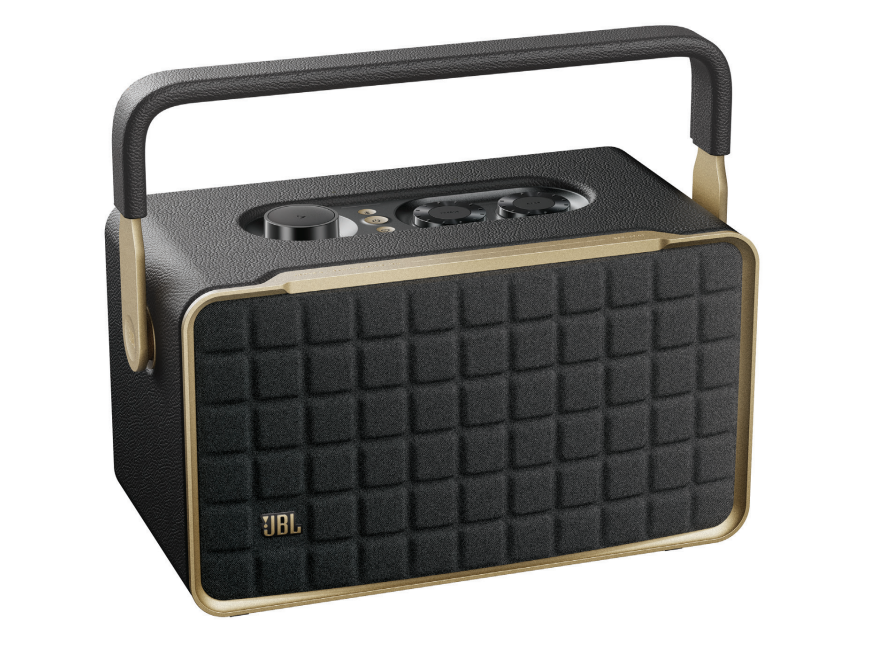
Introduction
The JBL Authentics 300 Smart Home Speaker blends retro styling with modern smart-speaker convenience, making it a standout choice for users who want premium sound, voice control, and flexible connectivity in one portable unit. Designed for home listening, casual entertaining, and room-to-room audio, it combines Wi-Fi streaming, Bluetooth, Ethernet, and USB playback support with built-in smart assistant integration. For households that want a stylish speaker that can move from the living room to the kitchen or patio, this model offers an appealing balance of power and portability.
With a rated 100W output, dual tweeters, and a 5.25-inch woofer, the JBL Authentics 300 delivers full-bodied sound with clear highs and strong mids, while its built-in battery adds up to 8 hours of playback for flexible placement. It is a strong fit for music lovers, smart-home users, and buyers who want a premium wireless speaker with both Alexa and Google Assistant support. The speaker is typically priced in the premium midrange, with an estimated retail range of about $400 to $450, depending on sales and region. Availability is generally broad through JBL, major electronics retailers, and online marketplaces.
As a smart home speaker, it is especially useful for streaming playlists, controlling compatible smart devices, and handling everyday audio needs with a polished design that looks equally at home on a shelf or countertop. The JBL Authentics 300 Smart Home Speaker is a compelling option if you want style, portability, and powerful sound in a single package.
Specifications
- Total speaker power output: 100W maximum at 1% THD
- Drivers: 2 x 25mm tweeters and 1 x 5.25-inch woofer
- Frequency response: 45Hz to 20kHz
- Battery: 3.6V, 4800mAh lithium battery
- Battery life: Up to 8 hours, depending on volume and audio content
- Charging time: Less than 3.5 hours
- Connectivity: Wi-Fi, Bluetooth, Ethernet, audio input, and USB playback on U.S. versions
- Power input: 100-240V AC, 50/60Hz
- Network standby power: Less than 2.0W
- Operating temperature: 0°C to 45°C
- Dimensions: 342 x 195.6 x 180.3 mm
Compared with smaller smart speakers, the JBL Authentics 300 Smart Home Speaker offers noticeably stronger output, deeper bass, and more versatile audio connections. Against similarly priced portable smart speakers, it stands out for its dual-assistant support, retro-inspired design, and room-filling sound. It is best positioned for users who want more than a basic voice assistant speaker and prefer a more premium home audio experience.
Setup Guide: How to Set Up the JBL Authentics 300 Smart Home Speaker
Start by placing the speaker on a stable, level surface with enough space around the rear and sides for airflow. Connect the power cable and switch the speaker on. Use the companion app to complete initial setup, then connect the speaker to your Wi-Fi network or pair it by Bluetooth if you prefer a direct wireless connection. For the best smart-home experience, sign in to your preferred voice assistant account and follow the prompts to enable voice control and streaming services.
For wired playback, connect a compatible audio source to the auxiliary input or Ethernet port if you want a more stable network connection. If you use USB playback, confirm that your region supports that feature, since USB playback is available on the U.S. version and service-only on some other versions. Adjust sound settings in the app to fine-tune bass, treble, and assistant preferences.
Troubleshooting during setup usually involves checking Wi-Fi credentials, verifying that Bluetooth is enabled on your phone, and making sure the speaker is within range of your router. Avoid placing the speaker near heat sources, moisture, or obstructed vents. Do not use the unit outdoors in wet conditions, and disconnect it before cleaning.
Troubleshooting
If the speaker will not power on, confirm the power cable is seated correctly and the outlet is active. If Bluetooth pairing fails, remove the speaker from your phone’s paired devices list, restart both devices, and try again. If Wi-Fi streaming is unstable, move the speaker closer to the router, switch to Ethernet, or reduce interference from other wireless devices.
- No sound: Check volume, source selection, and app output settings.
- Weak bass: Move the speaker away from corners or walls and adjust EQ settings.
- Voice assistant not responding: Recheck account linking and microphone permissions.
- Intermittent dropouts: Restart the speaker and update the app and firmware.
There are no commonly used public error codes tied to everyday use, so most issues are resolved through reset, firmware updates, or network checks. To prevent problems, keep the device updated, avoid overloading it with improper power sources, and use approved charging and audio accessories. Warranty support is usually handled through JBL’s customer support channels and authorized retailers, with phone, chat, and online help options available depending on region.
Pros and Cons
Pros
- Powerful 100W sound with clear highs and solid bass
- Portable design with built-in battery for flexible placement
- Wi-Fi, Bluetooth, Ethernet, and USB connectivity
- Dual voice assistant support for smart-home convenience
- Retro styling that works well in modern interiors
Cons
- Premium price compared with basic smart speakers
- Battery life is solid but not class-leading
- Best results require app setup and smart-account configuration
- Heavier and larger than compact desktop speakers
For buyers comparing it with smaller alternatives, the JBL Authentics 300 Smart Home Speaker offers better sound quality and broader connectivity, but at a higher cost. It delivers strong value for users who want a design-focused smart speaker with serious audio performance rather than a budget voice assistant.
Customer Reviews
Customer feedback is generally positive, with many users praising the speaker’s rich sound, attractive retro design, and easy streaming options. Common compliments include strong volume output, good vocal clarity, and the convenience of using it as both a portable speaker and a smart home hub. Typical ratings cluster around 4 out of 5 stars, with many buyers recommending it for living rooms, bedrooms, and home offices.
Frequent complaints focus on the premium price, the weight of the unit, and battery life that may feel short for all-day portable use. Some users also mention that setup can take a few minutes if multiple assistants and services are being linked at once. For shoppers who want a stylish, high-quality wireless speaker with smart features, it remains a strong buy, especially if sound quality matters more than budget pricing.
Faqs
How do I set up the JBL Authentics 300 Smart Home Speaker for the first time?
Why won’t my JBL Authentics 300 Smart Home Speaker connect to Wi-Fi?
Can I use the JBL Authentics 300 Smart Home Speaker without the JBL One app?
What streaming and smart home features does the JBL Authentics 300 Smart Home Speaker support?
How do I pair Bluetooth devices to the JBL Authentics 300 Smart Home Speaker?
How can I get better sound quality from the JBL Authentics 300 Smart Home Speaker?
What should I do if the JBL Authentics 300 Smart Home Speaker has no sound?
How do I maintain and clean the JBL Authentics 300 Smart Home Speaker safely?
More jbl manuals
- Jbl DOLBY-ATMOS BAR 9.1 True Wireless Surround System User Manual
- Jbl Bar 2.0 All-In-One Soundbar MK2 User Manual
- Jbl Bar 3.1 4K Ultra HD Home Theater Soundbar System User Manual
- Jbl CINEMA SB400 Soundbar Speaker User Manual
- Jbl FREEBLKBT Wireless In-Ear Earbuds User Manual
- Jbl TUNE-BUDS-BLKAM Earbuds User Manual
Leave a Comment