
Jbl Bar 3.1 4K Ultra HD Home Theater Soundbar System User Manual
Content
Introduction
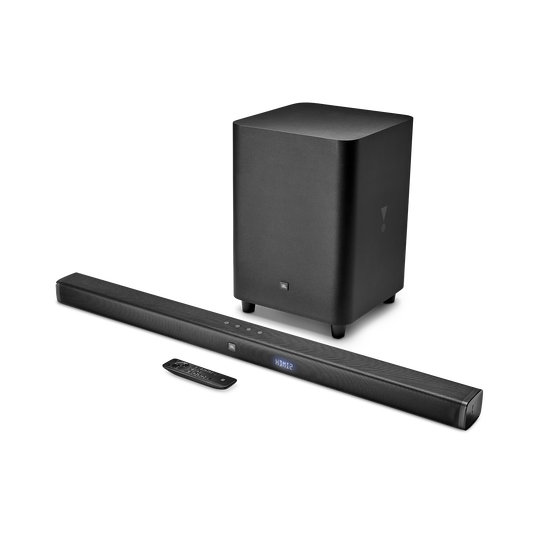
The JBL Bar 3.1 4K Ultra HD Home Theater Soundbar System is a powerful 3.1-channel soundbar package built for users who want cleaner TV audio, deeper bass, and a more cinematic home entertainment experience. With a total output of 450W, a dedicated wireless subwoofer, and JBL’s signature voice clarity, this soundbar is designed to improve everything from movie dialogue to sports broadcasts and gaming sessions. The system also supports 4K passthrough through multiple HDMI inputs, making it a practical choice for modern entertainment setups.
This JBL Bar 3.1 4K Ultra HD Home Theater Soundbar System is ideal for living rooms, media rooms, and apartment setups where full surround speakers may not be practical. It offers strong value for users who want a simple all-in-one solution with immersive sound, Bluetooth streaming, and flexible connectivity. The wireless subwoofer adds impactful low-end response without requiring extra cables across the room, while the slim soundbar design fits neatly under most TVs.
Typical pricing for this model has generally appeared in the mid-range home theater category, often around the $400 to $600 range depending on condition, seller, and availability. Because this is an older model, availability is now more limited and is commonly found through third-party retailers, refurbished listings, or marketplace sellers rather than major new-stock channels.
Specifications for JBL Bar 3.1 4K Ultra HD Home Theater Soundbar System
- Total system power output: 450W
- Soundbar power: 150W
- Wireless subwoofer power: 300W
- Soundbar drivers: 6 x 2.25-inch racetrack drivers, 3 x 1.25-inch tweeters
- Subwoofer driver: 10-inch woofer
- Frequency response: 35Hz to 20kHz
- Maximum sound pressure level: 103dB
- HDMI inputs: 3
- HDMI output: 1 with Audio Return Channel
- HDCP support: 2.2
- Audio inputs: analog, optical, Bluetooth, USB
- Bluetooth version: 4.2
- Soundbar dimensions: 40 x 2.3 x 3 inches
- Subwoofer dimensions: 16 x 12 x 12 inches
- Soundbar weight: 2.3 kg
- Subwoofer weight: 12.1 kg
Compared with smaller 2.1-channel soundbars, this model delivers better dialogue separation and a wider front soundstage thanks to the extra center-channel presence. Against newer premium soundbars, it may lack advanced object-based audio formats, but it still offers strong performance for users focused on clear TV sound, bass impact, and simple 4K-friendly connectivity.
Setup Guide for JBL Bar 3.1 4K Ultra HD Home Theater Soundbar System
Start by placing the soundbar below your TV on a stable surface or wall-mounting it at ear level. Position the wireless subwoofer near the front of the room for balanced bass response, ideally with a clear line of sight to the listening area.
- Connect the soundbar to the TV using HDMI ARC for the best audio performance.
- If HDMI ARC is unavailable, use the optical input as an alternative.
- Plug in the subwoofer and power on both devices.
- Select the correct TV audio output in the settings menu.
- Pair Bluetooth devices by selecting Bluetooth mode on the soundbar and connecting from your phone or tablet.
For best results, disable the TV speakers after connecting the soundbar and set the TV audio format to PCM or Auto if needed. Avoid blocking the subwoofer vents and keep the unit away from heat sources or moisture. If there is no sound, recheck the HDMI ARC setting, confirm the TV volume is not muted, and restart both devices.
Troubleshooting the JBL Bar 3.1 Soundbar System
Common problems with the JBL Bar 3.1 include no audio output, weak bass, Bluetooth pairing failures, or intermittent HDMI ARC behavior. Most issues can be solved with simple connection checks and input changes.
- No sound: confirm the correct input source and verify HDMI ARC or optical connections.
- Bluetooth not pairing: delete the soundbar from the phone’s Bluetooth list and pair again.
- Weak subwoofer output: move the subwoofer closer to the listening position and ensure it is powered on.
- Sound delay: switch the TV audio mode to PCM or adjust lip-sync settings in the TV menu.
- Interference or dropouts: keep the subwoofer away from Wi-Fi routers and thick walls.
If the unit becomes unresponsive, perform a power cycle by unplugging both components for a few minutes. This model does not rely on widely used consumer-facing error codes, so troubleshooting usually centers on source selection, cable quality, and device reset steps. For support, use JBL’s official customer service channels and check warranty coverage through the retailer or manufacturer.
Pros & Cons of JBL Bar 3.1 4K Ultra HD Home Theater Soundbar System
Pros
- Powerful 450W output delivers room-filling sound for movies, games, and sports.
- Wireless 10-inch subwoofer adds strong, cinematic bass without messy cables.
- Clear dialogue performance makes voices easier to understand at lower volumes.
- Multiple HDMI inputs improve compatibility with game consoles, streaming devices, and TVs.
- Solid value for users who want a home theater soundbar without a full speaker system.
Cons
- Older Bluetooth 4.2 standard is less advanced than newer models.
- Lacks newer immersive audio formats found in modern premium soundbars.
- Availability is limited because this is no longer a current flagship model.
- Subwoofer placement matters, so room layout can affect bass consistency.
For buyers comparing alternatives, the JBL Bar 3.1 is a strong choice if bass and simplicity matter more than advanced surround features. It offers better low-end impact than many entry-level soundbars while remaining easier to set up than full multi-speaker systems.
Customer Reviews of JBL Bar 3.1 4K Ultra HD Home Theater Soundbar System
Customer feedback for the JBL Bar 3.1 commonly highlights strong bass, clear vocals, and easy daily use. Many owners rate it around 4.3 out of 5 stars for overall performance and value. Users often praise the wireless subwoofer for making action movies and music sound fuller and more dynamic.
Typical testimonials include comments such as “dialogue is much clearer than my TV speakers” and “the bass is impressive for the price.” Common complaints mention the age of the connectivity standard, limited smart features, and the fact that it is harder to find new today. Overall, the product is frequently recommended for shoppers who want a dependable soundbar upgrade with simple setup and strong TV audio performance.
Faqs
How do I set up the JBL Bar 3.1 4K Ultra HD Home Theater Soundbar System for the first time?
Why is my JBL Bar 3.1 4K Ultra HD Home Theater Soundbar System not producing sound from the TV?
How do I pair or re-pair the wireless subwoofer on the JBL Bar 3.1 4K Ultra HD Home Theater Soundbar System?
Which TVs and devices are compatible with the JBL Bar 3.1 4K Ultra HD Home Theater Soundbar System?
How can I improve bass and dialogue clarity on the JBL Bar 3.1 4K Ultra HD Home Theater Soundbar System?
What should I do if Bluetooth on the JBL Bar 3.1 4K Ultra HD Home Theater Soundbar System keeps disconnecting?
How do I reset the JBL Bar 3.1 4K Ultra HD Home Theater Soundbar System when settings or sound problems persist?
How should I clean and maintain the JBL Bar 3.1 4K Ultra HD Home Theater Soundbar System for long-term reliability?
Leave a Comment