
Jbl PARTYBOX 1000 Speaker User Manual
Content
JBL PartyBox 1000 Speaker: Complete Product Manual and Buying Guide
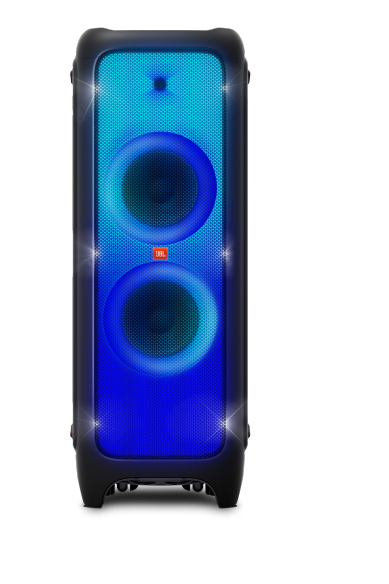
Introduction to the JBL PartyBox 1000 Speaker
The JBL PartyBox 1000 speaker is a flagship party powerhouse designed for users who want room-filling sound, club-style lighting, and hands-on performance features in one massive system. Built for large gatherings, home events, karaoke nights, and DJ-style entertainment, this speaker blends deep bass, clear vocals, and energetic LED lighting to create a true event centerpiece. The combination of a 12-inch down-firing woofer, dual 7-inch mid-range drivers, and a compression driver delivers a powerful audio profile that stands out in both indoor and outdoor environments.
One of the biggest advantages of the JBL PartyBox 1000 Speaker is its versatility. It supports Bluetooth streaming, USB playback, RCA input/output, and 3.5 mm aux connectivity, making it easy to connect phones, laptops, mixers, and media players. It also includes microphone and guitar inputs with volume control, which makes it ideal for karaoke, live performances, and emcee duties. The DJ pad and air gesture wristband add interactive control for users who want a more engaging party experience.
This model is best suited for event hosts, entertainers, and audio enthusiasts who need high output rather than a compact portable speaker. Typical availability is through JBL and major electronics retailers, with an estimated price range of roughly $700 to $1,000 depending on region, retailer, and stock conditions. If you are looking for a premium large-format party speaker, the JBL PartyBox 1000 speaker remains one of the most feature-rich options in its category.
Specifications of the JBL PartyBox 1000 Speaker
The JBL PartyBox 1000 speaker combines professional-style audio hardware with party-focused features for high-impact performance. Here are the key specifications and capabilities:
- Power input: 100–240V AC, 50/60Hz
- Power consumption: 150W
- Frequency response: 30Hz–20kHz (-6dB)
- Drivers: 1 x 12-inch down-firing woofer, 2 x 7-inch mid-range drivers, 1 x compression driver
- Input terminals: RCA L/R, USB port, 3.5 mm aux-in, microphone/guitar input with volume control
- Wireless connectivity: Bluetooth
- Output terminals: RCA L/R
- TWS support: Connect up to 2 party speakers wirelessly
- Product dimensions: 397 x 390 x 1050 mm
- Weight: 34.7 kg
Compared with smaller PartyBox models, the JBL PartyBox 1000 Speaker offers substantially stronger output, more physical presence, and enhanced performance features such as DJ pad control and larger driver configuration. It is less portable than the PartyBox 310 or PartyBox 710, but it delivers a more dramatic full-size party experience. For users prioritizing deep bass and stage-like volume, this model sits near the top of JBL’s consumer party speaker lineup.
Setup Guide for the JBL PartyBox 1000 Speaker
Setting up the JBL PartyBox 1000 speaker is straightforward, but its size and power requirements mean careful placement is important. Start by positioning the speaker on a flat, stable surface with enough ventilation around the rear and sides. Because this is a large speaker, avoid placing it on soft carpets or uneven floors that could reduce stability.
- Connect the speaker to a grounded AC power outlet using the included power cable.
- Power it on and wait for the lighting and audio system to initialize.
- Enable Bluetooth on your phone, tablet, or laptop and select the PartyBox 1000 from the device list.
- For wired playback, connect RCA, 3.5 mm aux, USB, microphone, or guitar sources as needed.
- Adjust the volume levels separately for music, microphone, and guitar inputs to avoid distortion.
- Use the DJ pad and light controls to customize party effects.
If pairing fails, turn Bluetooth off and on again, clear previously saved devices, or move closer to the speaker. For safety, keep the unit away from water, heat sources, and obstructed airflow. Never lift the speaker by cables or panels, and use two people when moving it due to its 34.7 kg weight.
Troubleshooting the JBL PartyBox 1000 Speaker
Most issues with the JBL PartyBox 1000 speaker are related to pairing, input selection, power, or volume settings. Here are the most common problems and solutions:
- No sound: Check the input source, raise the master volume, and confirm the connected device is not muted.
- Bluetooth not pairing: Remove the speaker from your device’s saved list, restart both devices, and try again within close range.
- Distorted audio: Lower the volume on both the speaker and the connected device, especially when using microphone or guitar input.
- Lighting not working: Verify that lighting effects are enabled in the control panel and that the speaker is not in a reduced-power state.
- USB playback issues: Reformat the drive to a compatible file system and make sure audio files are in supported formats.
There are no widely used user-facing error codes for this model, so most fixes depend on resetting connections and checking signal paths. To prevent issues, keep firmware-related features updated where applicable, avoid overdriving the inputs, and store the speaker in a dry environment. For warranty support, contact JBL customer service or the authorized retailer where the product was purchased. Support is typically available through JBL’s official website, regional service centers, and online help channels.
Pros and Cons of the JBL PartyBox 1000 Speaker
Pros
- Massive sound output that easily fills large rooms and event spaces
- Deep bass performance from the 12-inch down-firing woofer
- Mic and guitar inputs make it excellent for karaoke and live hosting
- Bluetooth, USB, aux, and RCA connectivity offer flexible playback options
- DJ pad and air gesture control add a fun, interactive party element
- Premium lighting effects improve the overall event atmosphere
Cons
- Very heavy and not practical for frequent transport
- Large footprint requires significant storage space
- Higher price than smaller party speakers
- Best suited for home events or semi-stationary setups rather than travel
- May be more powerful than needed for casual everyday listening
In terms of value for money, the JBL PartyBox 1000 speaker makes sense for buyers who want a premium entertainment system rather than a portable Bluetooth speaker. Compared with smaller alternatives, it offers stronger bass, more volume, and more control features, but it is less convenient to move and store.
Customer Reviews and User Feedback
Customer feedback for the JBL PartyBox 1000 speaker is generally very positive, with many users rating it around 4.6 out of 5 stars for sound quality, bass, and party performance. Buyers frequently praise its “concert-like” volume, flashy lighting, and strong low-end response. One common testimonial theme is that the speaker “turns any gathering into an event,” especially for karaoke and house parties.
Common complaints usually focus on the speaker’s weight, size, and premium price. Some users also mention that it is overkill for small rooms. Despite these concerns, most reviewers recommend it for anyone who wants a high-impact home party speaker with serious sound output. If you need a large-format JBL party speaker with premium features and bold audio performance, this model is a strong choice.
Faqs
How do I set up the jbl PARTYBOX 1000 Speaker for the first time?
Why is my jbl PARTYBOX 1000 Speaker not connecting to Bluetooth?
Can I connect a microphone or guitar to the jbl PARTYBOX 1000 Speaker?
What devices are compatible with the jbl PARTYBOX 1000 Speaker?
How can I get deeper bass from the jbl PARTYBOX 1000 Speaker?
Why does the jbl PARTYBOX 1000 Speaker sound distorted at high volume?
How do I clean and maintain the jbl PARTYBOX 1000 Speaker safely?
Does the jbl PARTYBOX 1000 Speaker support multi-speaker pairing or TWS setup?
More jbl manuals
Leave a Comment