
How to Pair: Jbl Cinema SB510 Speakers User Manual
Content
JBL Cinema SB510 Speakers

Introduction
The JBL Cinema SB510 Speakers redefine home audio with their all-in-one, 3.1 channel soundbar and built-in subwoofer, offering 200 watts of powerful Dolby Audio and deep, room-filling bass. Designed for those who demand crystal-clear dialogue and immersive entertainment, the SB510 combines sleek, low-profile aesthetics with a hassle-free setup—perfect for small to medium-sized living spaces where simplicity and quality matter most.
Key benefits include a dedicated center channel for superior voice clarity—ensuring you never miss a word in movies or TV shows—and a built-in subwoofer that delivers impactful bass without extra boxes or cables. Connectivity is a breeze with HDMI ARC, optical input, Bluetooth 5.3 for wireless streaming, and USB playback, making the SB510 a versatile hub for all your audio needs.
The JBL Cinema SB510 stands out for its ease of use, compact design, and value-driven performance. It’s an ideal upgrade for viewers who want to enhance their TV’s sound, gamers seeking a more dynamic audio experience, and music lovers looking for a wireless, all-in-one speaker system. With an estimated price range that positions it as a budget-friendly, mid-range soundbar, the SB510 is widely available through major electronics retailers and online stores, offering accessible premium audio for everyday users.
Synonyms and related keywords: JBL SB510 soundbar, wireless home theater speaker, Dolby Audio soundbar, compact soundbar with subwoofer, best budget soundbar for TV, easy setup sound system, Bluetooth soundbar for home.
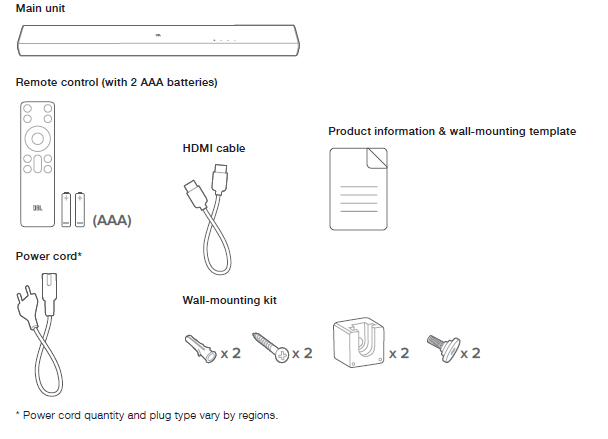
WHAT’S IN THE BOX
PRODUCT OVERVIEW
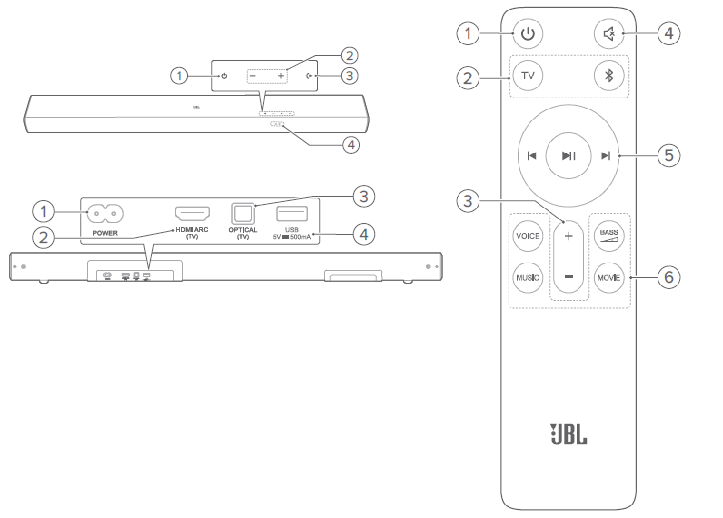
PRODUCT SPECIFICATIONS
General specification
- Model: CINEMA SB510
- Sound system: 3.1 channel
- Power supply: 100 - 240 V AC, ~ 50/60 Hz
- Total speaker power output (Max @THD 1%): 200 W
- Soundbar output power (Max @THD 1%): 150 W
- Subwoofer output power (Max. @THD 1%): 50 W
- Soundbar transducer: 3x (45 x 80) mm racetrack drivers
- Subwoofer transducer: 1x (70 x 88) mm, built-in subwoofer
- Standby power: < 0.5 W
- Operating temperature: 0°C - 45 °C
HDMI specification
- HDMI ARC (Audio Return Channel): 1
- HDMI HDCP version: 1.4
Audio specification
- Frequency response: 55 Hz - 20 kHz (- -10 dB)
- Audio inputs: 1 Optical, Bluetooth,, and USB (USB playback is available in the US version. For other versions, USB is for Service only.)
USB specification
- USB port: Type A
- USB rating: 5 V DC, 0.5 A
- Supporting file formats: mp3
- MP3 codec: MPEG 1 Layer 2/3, MPEG 2 Layer 3, MPEG 2.5 Layer 3
- MP3 sampling rate: 16 - 48 kHz
- MP3 bitrate:
- MPEG 1 Layer 1: 32 kbps - 448 kbps;
- MPEG 1 Layer 2: 32 kbps - 384 kbps;
- MPEG 1 Layer 3: 32 kbps - 320 kbps;
- MPEG 2/2.5 Layer 1: 32 kbps - 256 kbps; MPEG 2/2.5 Layer 2/3: 8 kbps - 160 kbps
Wireless specification
- Bluetooth version: 5.3
- Bluetooth profile: A2DP 1.3, AVRCP 1.6
- Bluetooth transmitter frequency range: 2400 MHz - 2483.5 MHz
- Bluetooth Max. transmitting power: <10 dBm (EIRP)
- Bluetooth modulation: GFSK, π/4 DQPSK, 8DPSK
Dimensions
- Soundbar dimensions (W x H x D): 950 x 67 x 105 mm / 37.4” x 2.6” x 4.1”
- Soundbar weight: 3.5 kg / 7.7 lbs
- Packaging dimensions (W x H x D):1112 x 116 x 164 mm / 43.8” x 4.6” x 6.5”
- Packaging weight: 5.0 kg / 11.0 lbs
TROUBLESHOOTING
Never try to repair the product yourself. If you have problems using this product, check the following before you request services.
System
The unit will not turn on.
- Check if the power cord is plugged into the power and the soundbar.
The soundbar has no response to button pressing.
- Restore the soundbar to factory settings (See “8. RESTORE FACTORY SETTINGS”).
Sound
No sound from the soundbar
- Make sure that the soundbar is not muted.
- Select the correct audio input source on the remote control.
- Connect the soundbar to your TV or other devices properly.
- Restore the soundbar to its factory settings by holding and on the soundbar for more than 10 seconds.
Distorted sound or echo
- If you play audio from your TV through the soundbar, make sure that your TV is muted or the built-in TV speaker is disabled.
Bluetooth
A device cannot be connected to the soundbar.
- Check if you have enabled Bluetooth on the device.
- If the soundbar has been paired with another Bluetooth device, reset Bluetooth (see “5.2.3 Connect to another Bluetooth device”).
Poor audio quality from a connected Bluetooth device
- The Bluetooth reception is poor. Move the source device closer to the soundbar, or remove any obstacle between the source device and the soundbar.
The connected Bluetooth device connects and disconnects constantly.
- The Bluetooth reception is poor. Move the source device closer to the soundbar, or remove any obstacle between the source device and the soundbar.
- For some Bluetooth devices, the Bluetooth connection can be deactivated automatically to save power. This does not indicate any malfunction of the soundbar.
Remote control
The remote control does not work.
- Check if the batteries are drained. If so, replace them with new ones.
- Reduce the distance and angle between the remote control and the main unit.
Failed to complete the TV remote control learning.
- Check if you are using an infra-red TV remote control. The IR learning is not supported by a Bluetooth TV remote control.
Pros & Cons of the JBL Cinema SB510 Speakers
Advantages
- Superior Sound Quality: Delivers 200W of Dolby Audio with crisp highs, clear mids, and deep bass from the built-in subwoofer, creating an immersive experience for movies, music, and games.
- Clear Dialogue: The dedicated center channel ensures voices remain distinct and easy to understand, even during action-packed scenes.
- Simple Setup: One-cable HDMI ARC connection and additional optical input make installation quick and clutter-free.
- Wireless Convenience: Bluetooth 5.3 allows seamless streaming from smartphones, tablets, and laptops.
- Compact Design: Slim profile fits easily under TVs and in tight spaces, without sacrificing sound quality.
- Great Value: Offers premium features at a competitive price point, making it an attractive option for budget-conscious buyers.
Limitations
- Limited Sound Customization: Lacks advanced equalizer settings or sound modes found in higher-end models.
- No Separate Subwoofer: While the built-in subwoofer delivers decent bass, it may not satisfy audiophiles seeking thunderous, room-shaking low frequencies.
- Basic Remote: The included remote is functional but lacks advanced features or backlighting.
- HDMI Version: Uses HDMI ARC (not eARC), which may limit compatibility with the latest audio formats on some devices.
- Not for Large Rooms: Best suited for small to medium-sized spaces; larger rooms may require a more powerful system.
Compared to alternatives, the JBL Cinema SB510 Speakers offer a compelling mix of performance, convenience, and affordability—ideal for users seeking a straightforward upgrade from TV speakers without the complexity of a full home theater system.
Customer Reviews and Feedback for JBL Cinema SB510 Speakers
Users consistently praise the JBL Cinema SB510 for its easy setup, clear dialogue, and surprisingly powerful bass for its size. Many highlight the convenience of wireless Bluetooth streaming and the clean, minimalist design that blends well with modern decor. Star ratings typically fall in the 4 to 4.5 out of 5 range, with particular appreciation for the value it delivers at its price point.
Common praises include the soundbar’s ability to transform TV audio, making movies and shows much more enjoyable, and the lack of extra wires thanks to the built-in subwoofer. However, some users note that the bass, while decent, doesn’t match a standalone subwoofer, and a few express a desire for more sound customization options. The remote is described as basic but effective.
Purchase recommendations emphasize the JBL Cinema SB510 as a smart choice for first-time soundbar buyers, small apartments, or anyone seeking a hassle-free audio upgrade. For those with larger rooms or a desire for advanced sound tweaking, considering higher-end models may be worthwhile. Overall, the SB510 is celebrated for delivering big sound in a small, affordable package—making it a favorite among budget-conscious consumers looking for quality and simplicity.
Faqs
How do I set up jbl Cinema SB510 Speakers for the first time?
What should I do if jbl Cinema SB510 Speakers is not working properly?
Can I use jbl Cinema SB510 Speakers with my smart TV?
How often should I maintain jbl Cinema SB510 Speakers?
What are the key features that make jbl Cinema SB510 Speakers different?
Can I customize the sound settings on jbl Cinema SB510 Speakers?
Are jbl Cinema SB510 Speakers compatible with gaming consoles?
How do I optimize the performance of jbl Cinema SB510 Speakers?
More jbl manuals
- Setup & Features: Jbl TT350 Classic - Turntable Owner Manual
- How to Use: Jbl Xtreme 4 Speakers User Manual
- How to Use: Jbl IRX100 Series Portable Powered PA Loudspeakers User Manual
- How to Setup: Jbl Go 4 Speakers User Manual
- Setup & Features: Jbl PRX825 Dual 15" Two-Way Full-Range Main System with Wi-Fi User Manual
- How to Pair: Jbl Clip 5 Speakers User Manual
Leave a Comment