
How to Use: Jbl Xtreme 4 Speakers User Manual
Content
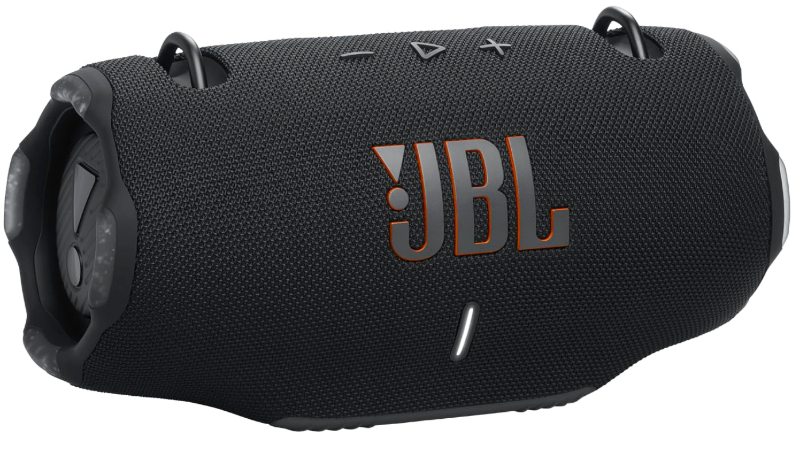
JBL Xtreme 4 Speakers
Introduction
The JBL Xtreme 4 Speakers are designed for music lovers who crave powerful, immersive sound in a rugged, portable package. Engineered with four active drivers—two 0.75" tweeters and two 2.75" woofers—plus dual side-firing passive radiators, this Bluetooth speaker delivers room-filling audio with deep bass and crisp highs, whether you're indoors or outdoors. The built-in amplifier pumps out up to 100 watts (AC mode) or 70 watts (battery mode), ensuring your music stays loud and clear all day.
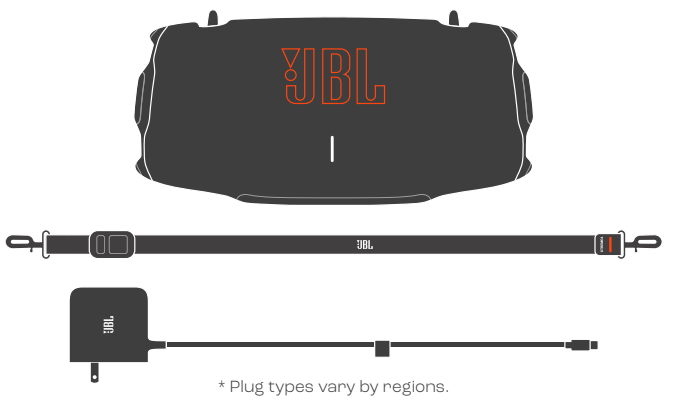
Key benefits include an IP67 waterproof and dustproof rating, making the JBL Xtreme 4 ideal for pool parties, beach trips, or hiking adventures. The speaker offers up to 24 hours of playtime, extendable to 30 hours with Playtime Boost, and features a convenient, adjustable shoulder strap with a built-in bottle opener for ultimate portability]. AI Sound Boost technology analyzes audio in real time, optimizing sound quality and minimizing distortion even at maximum volume. Multi-speaker connectivity via Auracast and PartyBoost lets you pair multiple JBL Xtreme 4 Speakers or other compatible devices for an even bigger sound experience.
The JBL Xtreme 4 is perfect for anyone who values durability, long battery life, and powerful sound—whether you're hosting a backyard party, heading to the beach, or just enjoying music at home. Available in multiple colors and with a replaceable battery option, it's a versatile choice for active lifestyles]. The estimated price ranges from mid to high-tier for portable Bluetooth speakers, reflecting their premium features and build quality. The JBL Xtreme 4 Speakers are widely available from major electronics retailers and the official JBL website.
WHAT’S IN THE BOX
BLUETOOTH PAIRING
CHARGING
POWERBANK
TECH SPEC
- Transducers:
- x 70 mm woofer / 2 x 2.75",
- 2 x 20 mm tweeter/ 2 x 0.75"
- Output power:
- 2 x 30 W RMS woofer +
- 2 x 20 W RMS tweeter (AC power mode)
- 2x 20 W RMS woofer +
- 2 x 15W RMS tweeter (Battery mode)
- Power input:
- 5V/ 9V/ 12V / 15 V/ 20V, 3 A
- Frequency response:
- 45 Hz - 20 kHz
- Signal-to-noise ratio:
- > 80 dB
- Battery type:
- Li-ion polymer 68 Wh (equivalent to 7.2 V / 9444 mAh)
- Battery charge time:
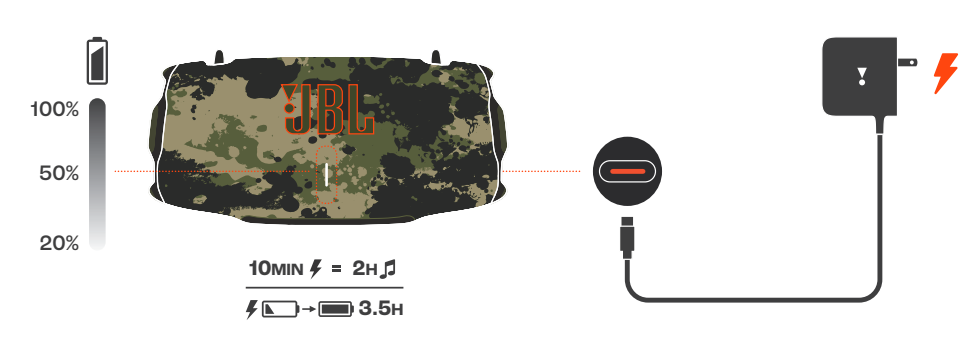
- 3.5 hours (20V / 3 A)
- Music play time:
- up to 24 hours (dependent on volume level and audio content)
- Connection ports:
- USB-C (in / out)
- Cable type:
- PD adaptor (plug type varies by region)
- Cable length:
- 1500mm / 59"
- USB-C charge out:
- 5V / 3A, 9V / 2A, 11V / 2A
- Bluetooth® version:
- 5.3
- Bluetooth" profile:
- A2DP 1.4, AVRCP 1.6
- Bluetooth® transmitter modulation:
- GFSK, 1/4 DOPSK, 8DPSK
- Bluetooth® transmitter frequency range:
- 2400 MHz - 2483.5 MHz
- Bluetooth® transmitter power:
- < 15 dBm (EIRP)|
- 2.4GHz SRD frequency range:
- 2407 MHz ~ 2475 MHz
- SRD transmitter power:
- < 15 dBm (EIRP)
- Product dimensions (W x H x D):
- 297 × 149 × 141 mm / 11.69" x 5.87" × 5.55°
- Net weight:
- 2.1 kg / 4.63 Ibs
- Packaging dimensions (Wx H x D):
- 325 × 218 × 173 mm / 12.8" x 8.6" x 6.9"
- Gross weight:
- 3.27 kg / 7.2 Ibs
- Maximum operation temperature:
- 45 °C
Troubleshooting Common Issues with JBL Xtreme 4 Speakers
Even the best Bluetooth speakers can encounter issues. Here’s how to resolve common problems with your JBL Xtreme 4 Speakers:
Connection Problems
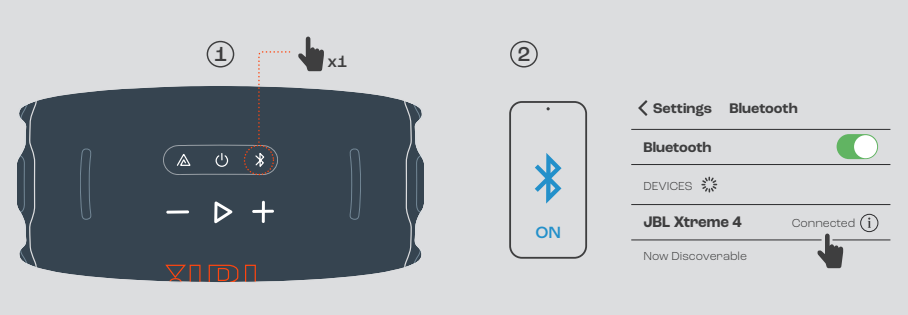
If the speaker won’t connect to your device, ensure Bluetooth is enabled and the speaker is in pairing mode (press the Bluetooth button). Move devices closer and remove any obstacles. If issues persist, reset the speaker by holding the power and volume down buttons for 10 seconds[4].
Audio Distortion or Low Volume
Check the volume on both your device and the speaker. If sound is distorted, reduce the volume or enable AI Sound Boost for optimized performance[1][5]. Ensure the speaker is charged and not in Playtime Boost mode, which may reduce bass for extended battery life[5].
Battery Not Charging
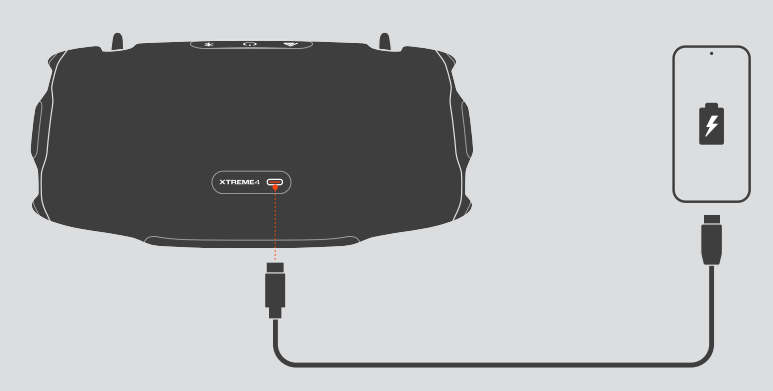
Use the supplied USB-C cable and a compatible charger. If the battery doesn’t charge, inspect the cable and port for damage. The speaker can also charge devices via USB-C, so ensure it’s not in power bank mode[5]. For persistent issues, try a different charger or cable.
Preventive Measures
Avoid exposing the speaker to extreme temperatures, and rinse it with fresh water after saltwater or pool use. Regularly update the firmware via the JBL Portable app for optimal performance.
Warranty and Support
The JBL Xtreme 4 Speakers come with a standard manufacturer’s warranty. For warranty claims or further assistance, contact JBL customer support through their official website or local service centers. Always keep your proof of purchase for warranty service.
Pros & Cons of JBL Xtreme 4 Speakers
Pros
- Powerful, Room-Filling Sound: Delivers deep bass and clear highs with four active drivers and dual passive radiators, ideal for parties and outdoor use.
- Long Battery Life: Up to 24 hours of playtime, extendable to 30 hours with Playtime Boost—perfect for all-day adventures.
- Rugged and Portable: IP67 waterproof and dustproof rating, durable build, and a convenient shoulder strap with bottle opener make it great for travel and outdoor activities.
- Multi-Speaker Connectivity: Pair multiple JBL Xtreme 4 Speakers or compatible devices using Auracast and PartyBoost for a bigger, louder sound.
- Smart Features: AI Sound Boost optimizes audio quality and reduces distortion at high volumes.
- Replaceable Battery: Unique for its class, the battery can be swapped out for extended use.
Cons
- Price: Positioned in the premium segment, which may not suit budget-conscious buyers.
- Sound Staging: While treble is crisp, the sound is still largely mono-directional compared to true stereo systems.
- Playtime Boost Trade-Off: Extending battery life with Playtime Boost can reduce bass impact, making the sound leaner.
- Weight: Slightly heavier than some competitors, though the strap helps with portability.
For the price, the JBL Xtreme 4 Speakers offer excellent value for users seeking robust, feature-rich portable audio. Compared to alternatives, it stands out for its battery life, durability, and multi-speaker capabilities.
Customer Reviews and Testimonials
User feedback for the JBL Xtreme 4 Speakers highlights several consistent themes. Many owners praise the speaker’s powerful bass, long battery life, and rugged design, noting it performs exceptionally well at outdoor gatherings and parties. The convenience of the replaceable battery and the shoulder strap are also frequently mentioned as standout features.
Common complaints include the premium price point and the fact that, while sound is immersive, it doesn’t fully replicate a true stereo experience. Some users mention that activating Playtime Boost sacrifices bass for extra hours of playback, which may not suit all listeners. Star ratings from major retailers and review sites typically average 4.5 out of 5, reflecting high satisfaction with build quality and sound performance.
Testimonials often recommend the JBL Xtreme 4 Speakers for anyone needing a durable, loud, and long-lasting portable speaker. If you frequently host events, enjoy outdoor activities, or simply want reliable audio on the go, this speaker is a strong purchase choice. However, audiophiles seeking precise stereo imaging may want to consider alternative options.
Faqs
How do I set up jbl Xtreme 4 Speakers for the first time?
What should I do if my jbl Xtreme 4 Speakers are not working properly?
Can I use jbl Xtreme 4 Speakers with Apple devices?
How often should I maintain jbl Xtreme 4 Speakers?
What are the key features that make jbl Xtreme 4 Speakers different?
How do I optimize the sound quality of jbl Xtreme 4 Speakers?
Can I connect multiple jbl Xtreme 4 Speakers together?
How do I extend the battery life of my jbl Xtreme 4 Speakers?
More jbl manuals
- How to Pair: Jbl Cinema SB510 Speakers User Manual
- How to Setup: Jbl Go 4 Speakers User Manual
- Setup & Features: Jbl TT350 Classic - Turntable Owner Manual
- How to Pair: Jbl Clip 5 Speakers User Manual
- How to Use: Jbl IRX100 Series Portable Powered PA Loudspeakers User Manual
- How to Pair: Jbl Horizon 3 Speakers User Manual
Leave a Comment