
How to Pair: Jbl Clip 5 Speakers User Manual
Content
JBL Clip 5 Speakers
Introduction
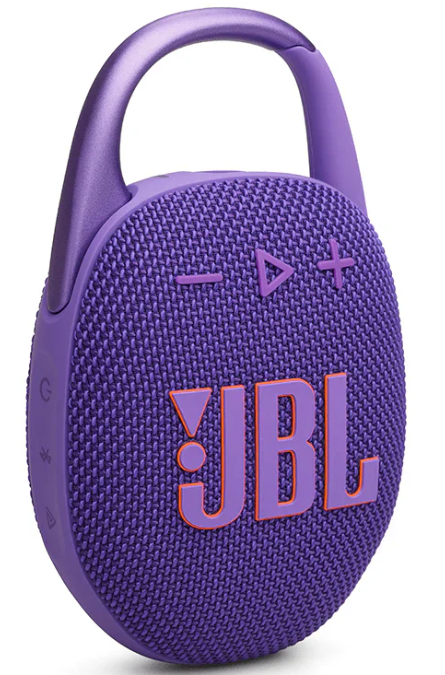
The JBL Clip 5 Speakers are designed for users seeking a compact, durable, and high-quality portable Bluetooth speaker. With its ultra-portable form factor, the Clip 5 is small enough to fit in one hand, featuring a rugged, IP67-certified waterproof and dustproof design, making it ideal for outdoor enthusiasts, travelers, and everyday use. The integrated carabiner with a redesigned, wider opening allows you to easily clip the speaker onto backpacks, belts, or bicycles, enhancing convenience for active lifestyles.
Equipped with a 45mm driver and a passive radiator, the JBL Clip 5 delivers punchy JBL Pro Sound with a rated output power of 7W RMS, producing clear audio and balanced bass for its size. It supports Bluetooth 5.3 connectivity with multipoint capability, allowing connection to two devices simultaneously, and features an EQ customization option via the JBL app for personalized sound tuning. On a single charge, users enjoy up to 12 hours of continuous playback, suitable for day trips, hikes, and extended outdoor activities.
The JBL Clip 5 is competitively priced at around $70–$80 USD and is widely available through major retailers and online marketplaces, offered in several vibrant colors. This speaker is particularly attractive to young adventurers, commuters, and casual listeners who want a durable, high-fidelity speaker that’s easy to carry and resilient against the elements, making it a versatile companion for music lovers on the move.
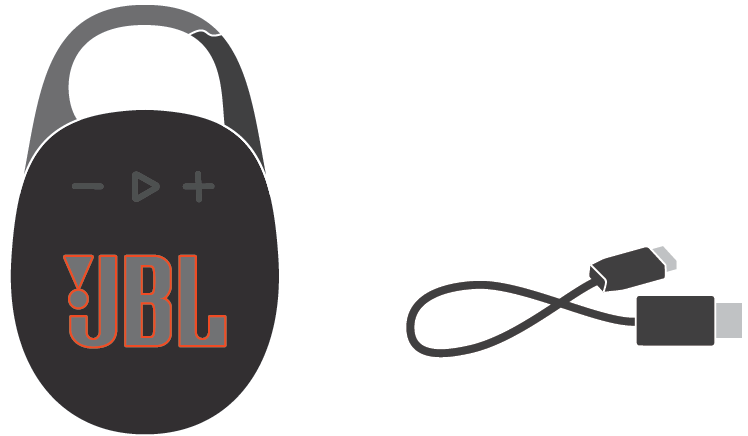
WHAT’S IN THE BOX
Specification
- Transducer: 45 mm / 1.75"
- Output power: 7 W RMS
- Frequency response: 95 Hz – 20 kHz
- Signal-to-noise ratio: > 85 dB
- Battery type: Lithium-ion polymer 5.32 Wh (equivalent to 3.8 V / 1400 mAh)
- Battery charge time: 3 hours (5 V / 1 A)
- Music playtime: up to 12 hours (varies by volume level and audio content)
- Bluetooth® version: 5.3
- Bluetooth® profile: A2DP V1.4, AVRCP V1.6
- Bluetooth® transmitter frequency range: 2400 – 2483.5 MHz
- Bluetooth® transmitter power: ≤ 10 dBm (EIRP)
- Bluetooth® transmitter modulation: GFSK, π/4 DQPSK, 8DPSK
- Product dimensions (W x H x D): 86.30 x 134.50 x 46.0 mm / 3.4" x 5.3" x 1.8"
- Net weight: 0.285 kg / 0.628 lbs
- Packaging dimensions (W x H x D): 100.5 x 148 x 59 mm / 3.9" x 5.8" x 2.3"
- Gross weight: 0.39 kg / 0.86 lbs
- Maximum operation temperature: 45 °C
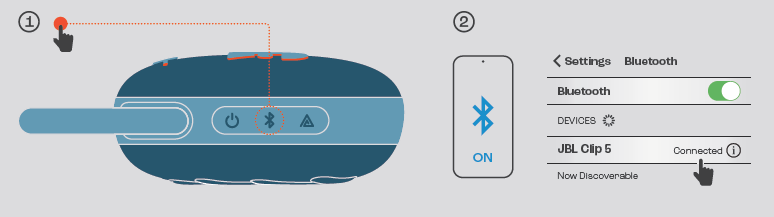
BLUETOOTH PAIRING
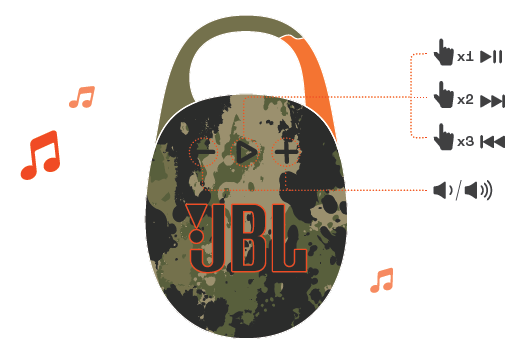
PLAY
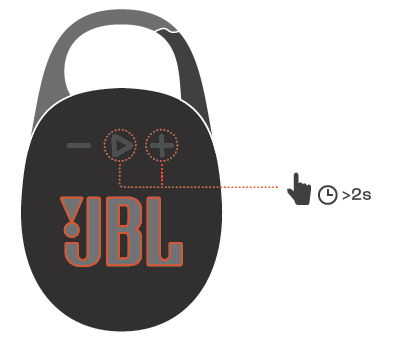
FACTORY RESET
Troubleshooting Your JBL Clip 5 Speakers: Common Issues and Fixes
Despite its reliability, users may encounter occasional issues with the JBL Clip 5 Speakers. Common problems include difficulty pairing, intermittent audio, or reduced battery life. If the speaker fails to pair, ensure Bluetooth is enabled on your device and the speaker is in pairing mode (indicated by a blinking light). Restarting both devices often resolves connectivity issues.
Audio dropouts can result from signal interference or device distance exceeding the Bluetooth range (up to 10 meters). Keep the speaker and device closer and avoid obstacles. For battery issues, verify the speaker is fully charged using the USB-C charger; a charging indicator light confirms power status. If the battery depletes faster than expected, lower the volume or disable “Playtime Boost” to extend battery life.
The JBL Clip 5 does not display error codes, but resetting the speaker can fix persistent issues: press and hold the power button for 10 seconds until it powers off, then turn it on again. Preventive measures include avoiding exposure to extreme temperatures (above 45°C) and ensuring the charging port stays clean and dry.
JBL offers a limited warranty covering manufacturing defects, and customer support is available via their official website or authorized service centers. For assistance, contact JBL Support through their online portal or call their helpline, ensuring your product serial number and purchase details are ready to expedite service.
Pros & Cons of JBL Clip 5 Speakers: A Balanced Overview
Pros
- Exceptional Portability: Lightweight (285g) and compact (86 x 134 x 46 mm) with a handy carabiner clip, perfect for outdoor and on-the-go use.
- Durable Design: IP67 waterproof and dustproof certification safeguards against water immersion and debris.
- Strong Audio Performance: 7W RMS output with a 45mm driver delivers clear mids and punchy bass, enhanced by JBL Pro Sound tuning.
- Bluetooth 5.3 with Multipoint: Connects to two devices simultaneously, allowing seamless switching between sources.
- Customizable EQ: Through the JBL app, users can adjust sound profiles for personalized listening.
- Long Battery Life: Up to 12 hours of playback on a single charge, supporting extended use.
Cons
- Volume Limitations: Not very loud at maximum volume; audio compression and shrill treble can occur near volume limits.
- Stereo Playback Restrictions: Stereo sound is only possible by pairing two identical JBL Clip 5 units; multi-speaker Auracast connections default to mono.
- Battery Life Variability: High volume usage reduces battery life to around 6 hours despite the 12-hour rating at moderate levels.
- No Voice Assistant Support: Lacks integration with digital assistants like Siri or Google Assistant.
- Limited Charging Options: Uses USB-C but does not support fast charging.
Compared to alternatives like the JBL Clip 4 or other compact speakers, the Clip 5 offers notable improvements in driver size, sound quality, and connectivity features, making it a strong value for money in the ultra-portable speaker segment.
Customer Reviews of JBL Clip 5 Speakers: Real User Insights
Users generally praise the JBL Clip 5 Speakers for their portability, robust build, and surprisingly rich sound. Many highlight the convenience of the carabiner and the speaker’s ability to endure rough outdoor conditions due to its IP67 rating. The Bluetooth multipoint feature is appreciated for effortless device switching during social gatherings.
Star ratings typically average around 4 to 4.5 out of 5, with positive testimonials noting the clear midrange and dependable battery life at moderate volume levels. However, some reviewers mention the speaker's limited loudness and occasional treble harshness at max volume as downsides. Common complaints include the inability to achieve true stereo sound without a second Clip 5 and the defaulting of EQ settings when using Auracast mode.
Overall, most customers recommend the JBL Clip 5 for casual listeners and outdoor users who value durability and portability over maximum volume, endorsing it as an excellent companion for hiking, commuting, and everyday background music.
Faqs
How do I set up JBL Clip 5 Speakers for the first time?
What should I do if my JBL Clip 5 Speakers is not working properly?
Can I use JBL Clip 5 Speakers with multiple devices simultaneously?
How often should I maintain my JBL Clip 5 Speakers?
What are the key features that make JBL Clip 5 Speakers different?
Can I pair JBL Clip 5 Speakers with other JBL speakers for a larger sound system?
How do I optimize the sound quality of my JBL Clip 5 Speakers?
Are JBL Clip 5 Speakers compatible with all Bluetooth devices?
More jbl manuals
Leave a Comment