
How to Pair: Jbl Horizon 3 Speakers User Manual
Content
JBL Horizon 3 Speakers
Introduction
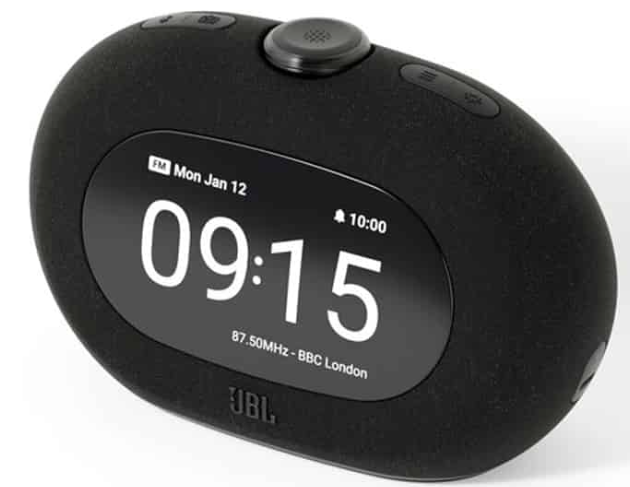
Welcome to the world of elevated audio and smart living with the JBL Horizon 3 Speakers. Designed for those who demand both style and substance, the JBL Horizon 3 is more than just a speaker—it’s a multifunctional bedside companion that transforms your daily routines. Whether you’re waking up, winding down, or simply enjoying music, this device delivers powerful JBL Pro sound through dual 1.5" full-range transducers and dual passive radiators for rich, room-filling audio[1][3][4].
The JBL Horizon 3 stands out with its customizable ambient lighting and nature sounds, which help regulate sleep patterns and create the perfect atmosphere for relaxation[2][3]. Its sunrise alarm gradually brightens your room, mimicking a natural dawn for a gentler wake-up experience. The device also features Bluetooth 5.3 and Auracast technology for seamless wireless streaming and multi-speaker connectivity, as well as DAB/DAB+/FM radio for traditional listening[3][4].
With an easy-read display, large rotary knob, and intuitive controls, the JBL Horizon 3 is accessible for all users. It also includes a USB-C charging port to keep your devices powered overnight, and the JBL ONE app lets you personalize alarms, EQ, and lighting from your smartphone[2][6]. Built with sustainability in mind, the speaker grille uses 100% recycled polyester, and the frame is made from at least 85% recycled materials[6].
Ideal for tech-savvy individuals, light sleepers, and anyone seeking a stylish, feature-rich audio solution, the JBL Horizon 3 is available globally from May 2025 at an estimated price of €139.99[2]. Whether you’re upgrading your bedroom or looking for a thoughtful gift, the JBL Horizon 3 Speakers are designed to elevate every moment of your day.
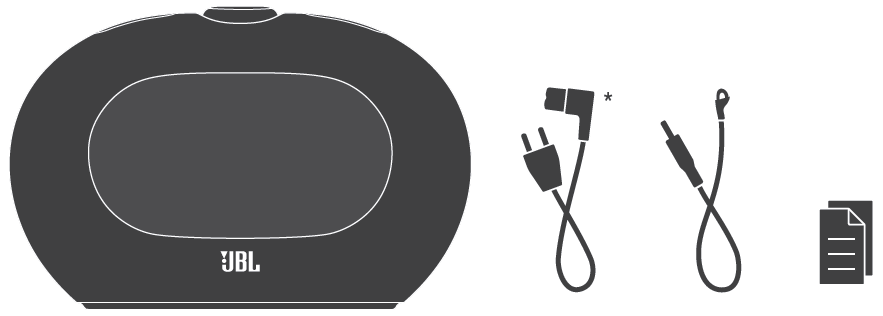
WHAT’S IN THE BOX
Specification
- Transducer: 2 x 1.5" (full range)
- Rated output power: 2 x 5 W RMS
- Power supply: 100 – 240 V AC, ~50/60 Hz
- Frequency response: 65 Hz – 20 kHz (-6 dB)
- Signal-to-noise ratio: > 80 dB
- Backup battery: 210 mAh CR2032
- USB charge out: 5 V 3 A (maximum)
- USB port: USB-C
- Bluetooth® version: 5.3
- Bluetooth® profile: A2DP V1.4, AVRCP V1.6
- Bluetooth® transmitter frequency range: 2.400 – 2.4835 GHz
- Bluetooth® transmitter power: ≤ 10 dBm (EIRP)
- Bluetooth® transmitter modulation: GFSK, π/4 DQPSK, 8DPSK
- DAB tuning range: 174.928 MHz – 239.200 MHz (Band-III)
- FM tuning range: 87.5 MHz – 108 MHz (varies by country)
- Product dimensions (W x H x D): 209 x 137 x 83 mm / 8.2" x 5.4" x 3.3"
- Product weight: 0.78 kg / 1.73 lbs
- Packaging dimensions (W x H x D): 225 x 142 x 160 mm / 8.9" x 5.6" x 6.3"
- Packaging weight: 1.36 kg / 3 lbs
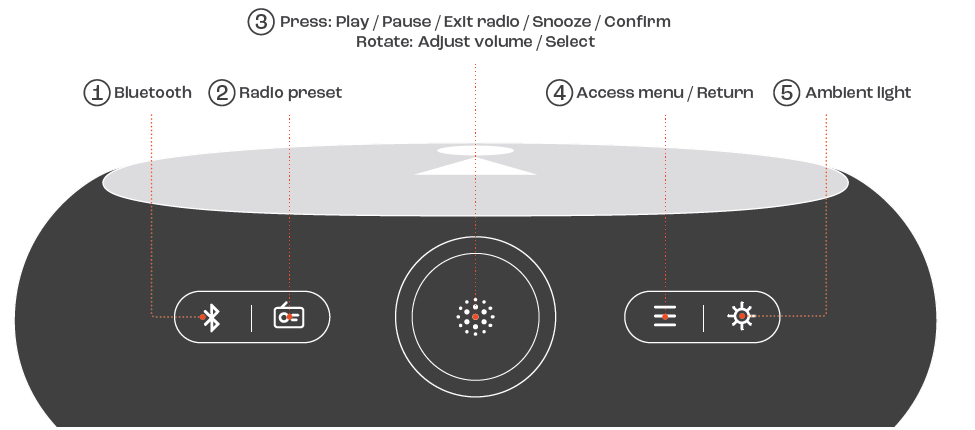
BUTTON CONTROL
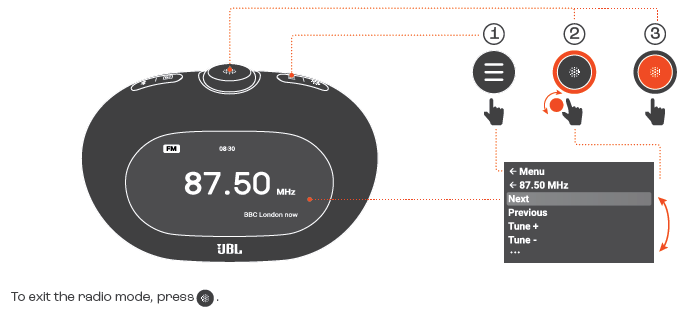
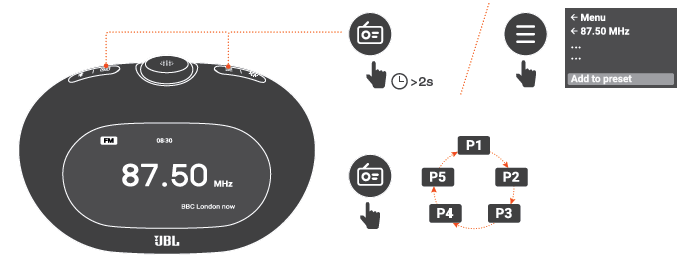
RADIO TUNING
RADIO PRESET
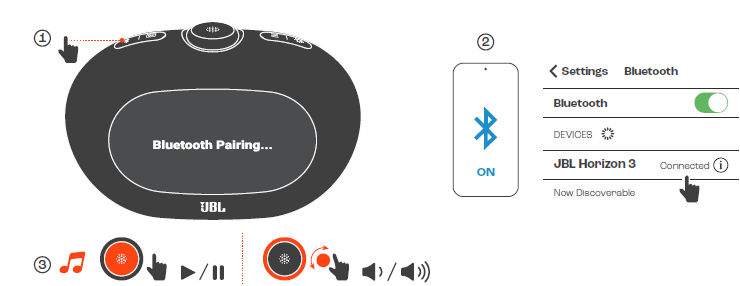
BLUETOOTH
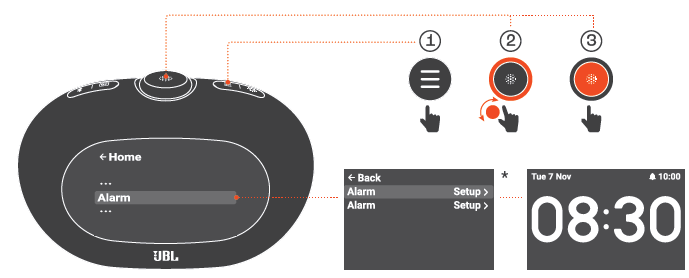
ALARM SETTING
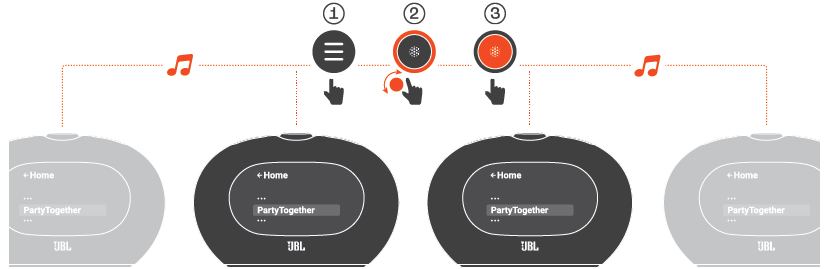
MULTI-SPEAKER CONNECTION
JBL Horizon 3 Speakers Troubleshooting Guide
Even the best devices can encounter issues. Here’s how to troubleshoot common problems with your JBL Horizon 3 Speakers, along with preventive tips and support options.
Common Problems and Solutions
- Bluetooth Connection Issues: If your device won’t connect, ensure Bluetooth is enabled on both the speaker and your phone. Restart both devices and move them closer together. Avoid interference from other wireless devices.
- No Sound or Distorted Audio: Check the volume on both the speaker and your source device. Ensure the speaker is not muted. If sound is distorted, try a different audio source to isolate the issue.
- Alarm Not Working: Verify the alarm is set correctly in the JBL ONE app or on the device. Ensure the speaker is plugged in, as alarms may not function on battery backup alone.
- Display Issues: If the screen is unreadable, adjust the brightness using the dedicated control. If the problem persists, reset the device via the app.
- USB Charging Problems: Use a certified USB-C cable. The port supports up to 5V/3A output—ensure your device is compatible[4].
Error Codes and Fixes
The JBL Horizon 3 does not display complex error codes. Most issues can be resolved by restarting the device or resetting via the JBL ONE app. For persistent problems, consult the user manual or contact JBL support.
Preventive Measures
- Keep firmware updated via the JBL ONE app.
- Avoid exposing the speaker to extreme temperatures or moisture.
- Use only original accessories for charging and connectivity.
Warranty and Support
JBL Horizon 3 comes with a standard manufacturer’s warranty. For warranty claims or technical support, visit the official JBL website or contact customer service via the provided channels. Always keep your proof of purchase for warranty purposes.
Contact Information
For further assistance, visit JBL’s official support page or use the contact form on their website. You can also reach out to the retailer where you purchased your JBL Horizon 3 Speakers.
JBL Horizon 3 Speakers Pros and Cons
Advantages
- Superior Sound Quality: Delivers JBL’s signature stereo sound with deep bass, clear mids, and crisp highs, thanks to dual 1.5" transducers and passive radiators[1][3].
- Customizable Lighting: Adjustable ambient light and color temperature enhance sleep and wake-up routines, with a sunrise alarm for gentle mornings[2][6].
- Versatile Connectivity: Bluetooth 5.3, Auracast for multi-room audio, DAB/DAB+/FM radio, and USB-C charging for devices[3][4].
- Intuitive Controls: Large rotary knob and soft-touch buttons make operation easy, even when half-asleep[2][6].
- Sustainable Design: Speaker grille and frame use recycled materials, appealing to eco-conscious buyers[6].
- App Integration: The JBL ONE app allows for personalized settings, alarms, and EQ adjustments[2][6].
Disadvantages
- No Battery Operation: Alarms and main functions require AC power; the backup battery is only for clock retention[4].
- Limited Portability: Designed as a bedside unit, not for travel or outdoor use.
- App Dependency: Some advanced features require smartphone app access, which may inconvenience users without smartphones.
- Price Point: While feature-rich, the €139.99 price may be higher than basic alarm clocks, though competitive for its category[2].
Value for Money
The JBL Horizon 3 Speakers offer excellent value for users seeking a premium, multifunctional bedside audio system. Compared to basic alarm clocks or standard Bluetooth speakers, it stands out with its combination of sound quality, smart features, and sustainable design. For those prioritizing sleep quality, convenience, and aesthetics, the JBL Horizon 3 is a compelling choice.
JBL Horizon 3 Speakers Customer Reviews
Early adopters and reviewers praise the JBL Horizon 3 for its immersive sound, customizable lighting, and seamless integration into daily routines. Many highlight the sunrise alarm and nature sounds as game-changers for sleep quality, noting how the gradual light and soothing audio make waking up less jarring[2][5]. The easy-to-use controls and app connectivity are frequently mentioned as standout features, especially for tech-savvy users.
Common compliments include the speaker’s stylish design, clear display, and the convenience of device charging. However, some users mention the lack of battery operation for alarms as a drawback, and a few note that the app could offer more customization options. Star ratings average around 4.5 out of 5, reflecting high satisfaction with performance and design.
Testimonials often recommend the JBL Horizon 3 for anyone upgrading their bedroom tech or seeking a thoughtful gift. If you value sound quality, smart features, and sustainability, the JBL Horizon 3 Speakers are a top contender in their category.
Faqs
How do I set up the JBL Horizon 3 Speakers for the first time?
What should I do if the JBL Horizon 3 Speakers are not connecting via Bluetooth?
Can the JBL Horizon 3 Speakers charge my phone while playing music?
How do I customize the ambient lighting and alarms on the JBL Horizon 3 Speakers?
What audio features make JBL Horizon 3 Speakers suitable for bedrooms?
Are JBL Horizon 3 Speakers compatible with multiple devices and streaming options?
What are common troubleshooting steps if the JBL Horizon 3 Speakers display is not responding?
How should I clean and maintain my JBL Horizon 3 Speakers to ensure longevity?
More jbl manuals
Leave a Comment