
How to Pair: Jbl PartyBox 720 Speakers User Manual
Content
JBL PartyBox 720 Speakers
Introduction
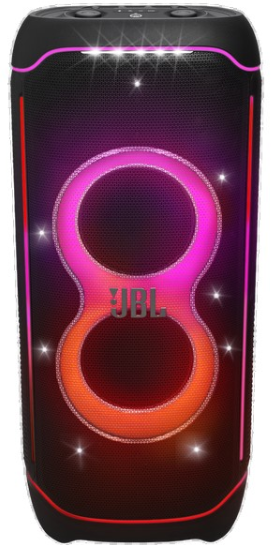
The JBL PartyBox 720 Speakers represent the pinnacle of portable party audio technology, delivering an unmatched blend of powerful sound, dynamic lighting, and versatile connectivity for any celebration. Designed for music lovers, DJs, event hosts, and party enthusiasts, this speaker offers superior JBL Pro Sound with 800 watts RMS power, precise deep bass, and a frequency range of 32 Hz to 20 kHz, ensuring crystal-clear audio performance that fills large indoor or outdoor spaces.
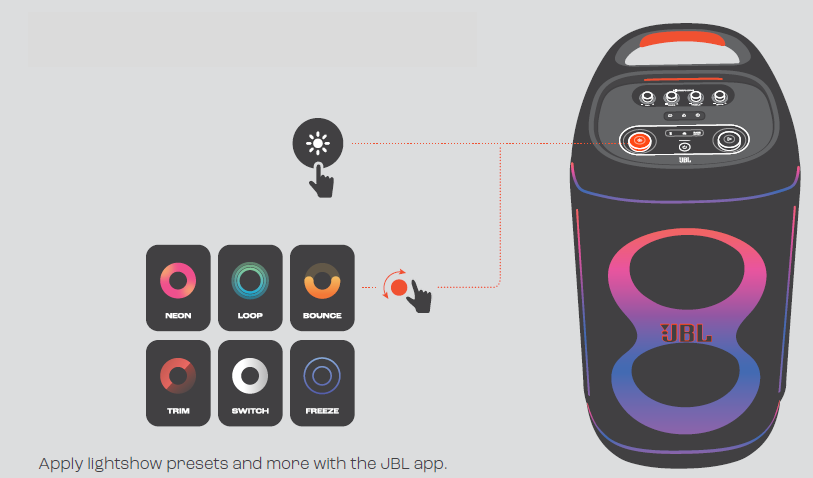
One of the standout features is its futuristic lightshow, featuring starry lights, flowing trails, and pulsing strobes that synchronize perfectly with your music to create an immersive party atmosphere. The PartyBox 720 also boasts a splashproof IPX4 rating, making it ideal for poolside gatherings and outdoor events. Its ergonomic integrated handle and wide sturdy wheels provide easy mobility despite its robust build, while swappable batteries (sold separately) allow up to 15 hours of continuous playtime, perfect for off-the-grid parties.
Connectivity options are extensive, including Bluetooth for seamless wireless streaming, two XLR inputs for mic and guitar connections, and USB ports for added flexibility. The JBL PartyBox app enhances control by enabling users to customize audio settings and light effects. Available globally, the estimated price range for the JBL PartyBox 720 generally falls between $700 and $900, reflecting its premium performance and features.
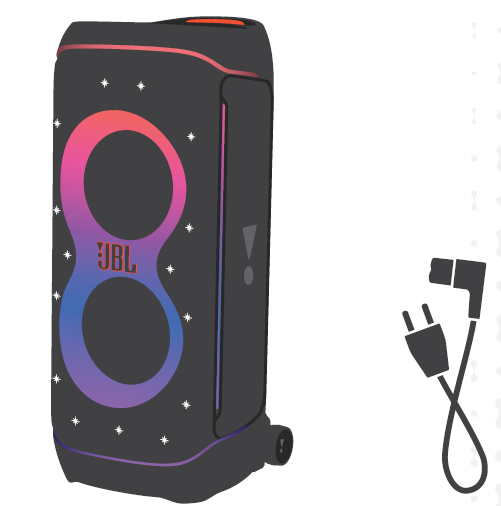
WHAT’S IN THE BOX
Specification
- Transducer: 2 x 9 inch (243 mm) woofers, 2 x 1.25 inch (30 mm) dome tweeters
- Output power: 800 W RMS (IEC60268)
- Power input: 100 – 240 V ~ 50 / 60 Hz
- Frequency response: 32 Hz – 20 kHz
- Signal-to-noise ratio: > 80 dB
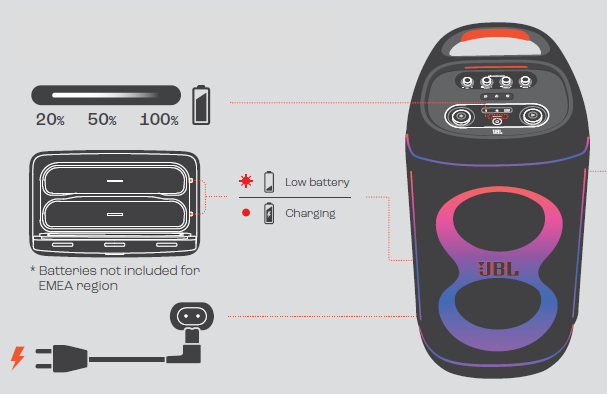
- Battery type: (Batteries not included for EMEA region) 2 x JBL BATTERY 600 (Li-ion 99.02 Wh (equivalent to 21.6 V / 4584 mAh))
- Battery charge time: 3 hours (speaker off mode)
- Music play time: up to 15 hours (varies by volume level and audio content)
- Cable type: AC power cable (type varies by region)
- Cable length: 2.0 m / 6.6 ft
- USB-C charge out: PDO (5 V / 3 A, 9 V / 3 A, 15 V / 2 A, 20 V / 1.5 A max), PPS (5 - 11 V / 2.7 A, 5 - 16 V / 1.85 A)
- USB format: FAT16, FAT32
- Supported formats (not available for EMEA region): .MP3, .WAV, .FLAC
- Bluetooth® version: 5.4
- Bluetooth® profile: A2DP V1.4, AVRCP V1.6
- Bluetooth® transmitter frequency range: 2.4 GHz - 2.4835 GHz
- Bluetooth® transmitter power: ≤ 18 dBm (EIRP)
- Bluetooth® transmitter modulation: GFSK, π/4 DQPSK, 8DPSK
- Input sensitivity:
- Aux-In: 250 mV RMS (3.5 mm connector)
- Mic-In: 20 mV RMS
- Guitar-In / Line-In: 100 mV RMS
- Bluetooth / USB input: -12 dBFS
- Product dimensions (W x H x D): 416 x 942 x 406 mm / 16.38" x 37.1" x 16.0"
- Net weight: 31 kg / 68.3 lbs
- Packaging dimensions (W x H x D): 491 x 1027 x 468 mm / 19.33" x 40.43" x 18.43"
- Gross weight: 34.9 kg / 76.9 lbs
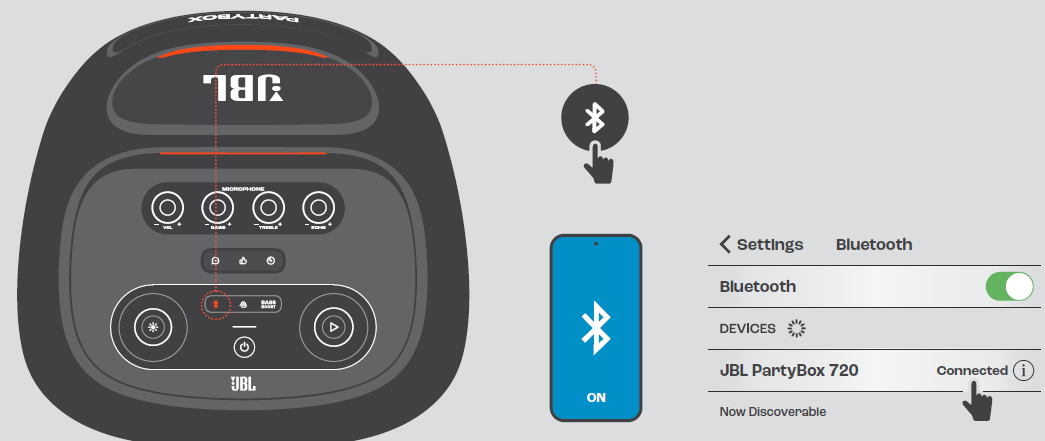
BLUETOOTH PAIRING
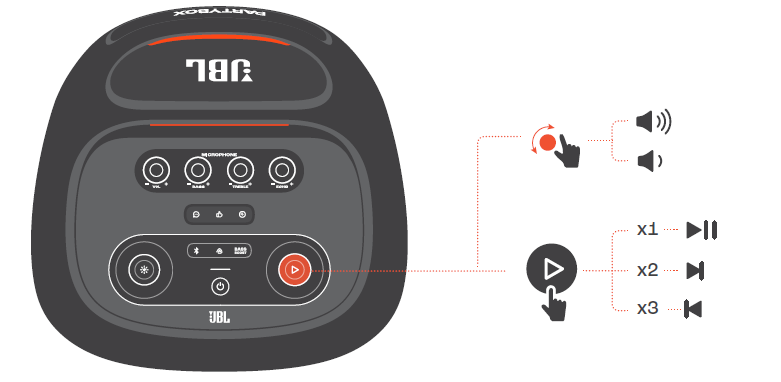
PLAY
LIGHTSHOW
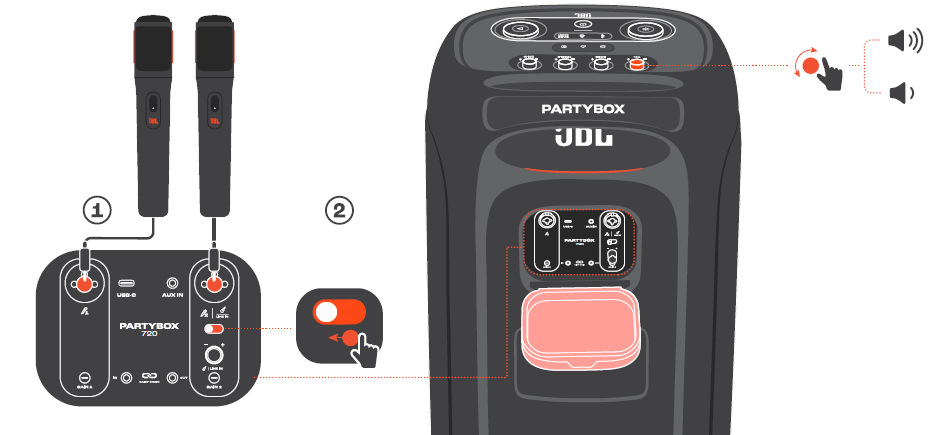
MICROPHONE
CHARGING
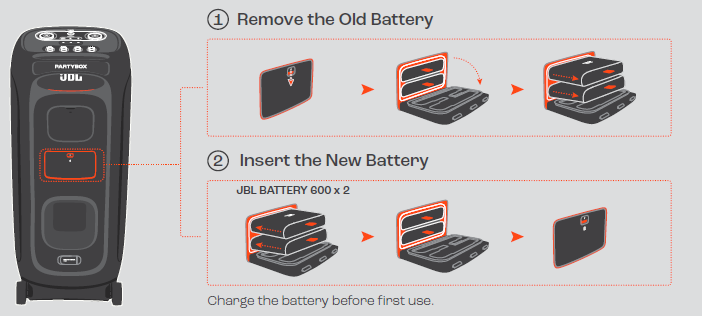
BATTERY REPLACEMENT
Troubleshooting JBL PartyBox 720 Speakers
Common issues and solutions for the JBL PartyBox 720 include:
- No power: Check battery charge or AC connection. Replace or recharge batteries as needed.
- Bluetooth connection fails: Ensure the speaker is in pairing mode, clear previous Bluetooth pairings on your device, and reposition for a better signal.
- Distorted sound: Lower the volume or adjust equalizer settings via the JBL app.
- No sound from mic or guitar input: Verify cables are securely connected; test inputs with another device.
- Lightshow not syncing: Restart the speaker and check app settings for synchronization.
Error codes: The speaker does not display error codes but uses indicator lights to signal battery or connection status.
Preventive measures: Regularly update firmware, avoid overcharging batteries, and keep the speaker clean and dry.
Warranty & support: JBL offers a standard one-year warranty. For further assistance, contact JBL customer support via their official website or authorized service centers.
Pros & Cons of JBL PartyBox 720 Speakers
Pros
- Exceptional Sound Quality: 800W RMS delivers clear, powerful audio with deep bass ideal for large gatherings.
- Innovative Lightshow: Synchronized multi-effect lighting enhances party ambiance.
- Portability: Ergonomic handle and wide wheels make transportation easier despite the speaker's size.
- Long Battery Life: Up to 15 hours of playback with swappable battery options extends party duration.
- Versatile Connectivity: Bluetooth, USB, dual XLR inputs, and multi-speaker wireless linking via Auracast™.
Cons
- Weight & Size: At over 68 lbs, not ideal for frequent solo transport.
- Battery Sold Separately: Additional purchase needed for swappable batteries to maximize portability.
- Price Point: Premium features come with a higher price compared to smaller party speakers.
- Limited Mid-Range Drivers: Focusing on tweeters and woofers might affect mid-frequency clarity for some audio profiles.
Compared to alternatives like the JBL PartyBox 310 or 1000, the 720 strikes a balance between portability and power, outperforming smaller models in sound and battery life without the bulk of the 1000.
Customer Reviews of JBL PartyBox 720 Speakers
The JBL PartyBox 720 Speakers have received overwhelmingly positive feedback from users praising their loud, crisp sound and spectacular lightshow. Many note the speaker’s ability to energize large events, with star ratings commonly at 4.5 to 5 stars.
Users appreciate the ease of pairing multiple speakers via Auracast™ and the durability of the splashproof design. Common praises include the long battery life and intuitive controls through the JBL app.
Some customers mention the speaker’s weight as a drawback but acknowledge the sturdy wheels and handle ease mobility. A few highlight the extra cost for swappable batteries as a minor inconvenience.
Overall, the JBL PartyBox 720 is recommended for anyone seeking a professional-quality, portable party speaker that delivers both powerful audio and a vibrant light experience.
Faqs
How do I set up my JBL PartyBox 720 Speakers for the first time?
What should I do if my JBL PartyBox 720 Speakers are not connecting via Bluetooth?
Can I connect two JBL PartyBox 720 Speakers for stereo sound?
What are the main features of the JBL PartyBox 720 Speakers that enhance party experiences?
Are JBL PartyBox 720 Speakers compatible with DJ equipment and microphones?
How can I maintain and care for my JBL PartyBox 720 Speakers to ensure longevity?
Can multiple JBL PartyBox 720 Speakers be wirelessly linked for bigger sound?
What should I do if the lightshow on my JBL PartyBox 720 Speakers is not working correctly?
More jbl manuals
Leave a Comment