
How to Pair: Jbl Grip Speaker User Manual
Content
JBL Grip Speaker
Introduction
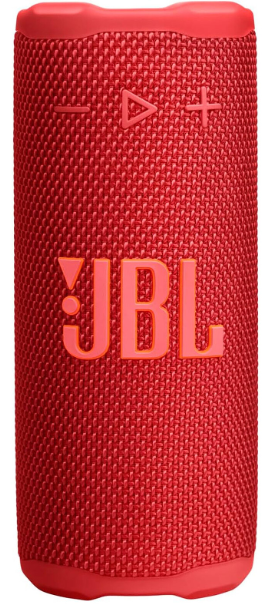
The JBL Grip Speaker is an ultra-portable Bluetooth speaker designed to deliver bold JBL Pro Sound in a compact, ergonomic form. Inspired by the size and shape of a seltzer can, the Grip combines powerful audio performance with a rugged, adventure-ready design perfect for users on the go. Whether you're beachside, hiking, or relaxing at home, this speaker adapts seamlessly to your lifestyle.
Key benefits include a punchy 16W racetrack woofer with AI Sound Boost technology that enhances bass and sound clarity without distortion, delivering rich lows and crisp highs across a frequency range of 70Hz to 20kHz. Its built-in ambient lighting with customizable themes adds an immersive mood setting to any environment, controllable via the JBL Portable app. For durability, the Grip boasts an industry-leading IP68 rating, making it waterproof, dustproof, and drop-proof—ideal for outdoor enthusiasts and active users.
Targeted at music lovers who demand portability without sacrificing sound quality, the JBL Grip Speaker suits solo listeners, small gatherings, and group adventures. Its integrated rope loop allows easy attachment to backpacks, bikes, or kayaks, enhancing mobility.
The speaker offers up to 14 hours of playtime, with an additional 2 hours through Playtime Boost, ensuring long-lasting entertainment. Using Auracast™, users can stereo pair two Grips or connect multiple JBL Auracast-enabled speakers for an expansive sound experience. The estimated price range falls between $120 and $150, with availability across major electronics retailers and online stores as of late 2025.
WHAT’S IN THE BOX

Specificaation
- Transducers: 43 x 80 mm full range
- Output power: 16 W RMS
- Frequency response: 70 Hz - 20 kHz (-6 dB)
- Signal-to-noise ratio: > 80 dB (A-Weighted)
- Battery type: Li-ion 10.01 Wh(equivalent to 3.85 V / 2600 mAh)
- Battery charge time: 3 hours (5 V / 3 A)
- Music play time: up to 14 hours (dependent on volume level and audio content)
- Maximum operation temperature: 45 °C
- Bluetooth® version: 5.4
- Bluetooth® profile: A2DP 1.4, AVRCP 1.6
- Bluetooth® transmitter frequency range: 2400 MHz - 2483.5 MHz
- Bluetooth® transmitter power: ≤ 12 dBm (EIRP)
- Bluetooth® transmitter modulation: GFSK, π/4 DQPSK, 8DPSK
- Product dimensions (W x H x D): 64 x 152.5 x 65.2 mm / 2.52 x 6 x 2.56"
- Net weight: 0.385 kg / 0.849 lbs
- Packaging dimensions (W x H x D): 80 x 165 x 90 mm / 3.15 x 6.5 x 3.54"
- Gross weight: 0.523 kg / 1.15 lbs
BLUETOOTH PAIRING
PLAY
FACTORY RESET
Setup Guide for the JBL Grip Speaker: Get Started Quickly
Setting up your JBL Grip Speaker is straightforward:
- Power On: Press and hold the power button on the side panel until the ambient light turns on.
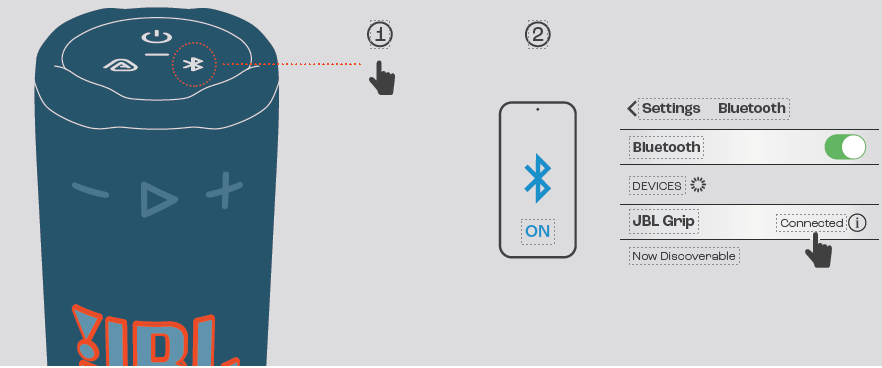
- Bluetooth Pairing: Activate Bluetooth on your device, then press the Bluetooth button on the speaker. Select "JBL Grip" from the device list.
- Customize Ambient Light: Use the JBL Portable app available for iOS and Android to adjust light colors, brightness, and themes to match your mood.
- Multi-Speaker Connection: For stereo sound, pair two JBL Grip speakers via Auracast™ in the app. You can also connect multiple compatible JBL speakers for surround sound.
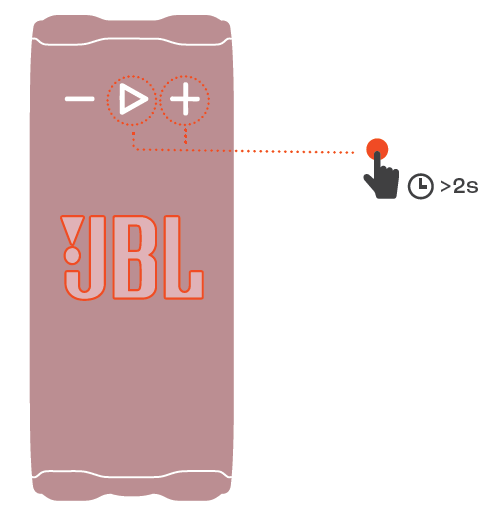
Troubleshooting Tips: If pairing fails, reset the speaker by holding the power and Bluetooth buttons simultaneously for 5 seconds. Ensure your device’s Bluetooth is up to date and within 10 meters of the speaker.
Safety Precautions: Avoid submerging the speaker deeper than 1 meter for extended periods despite its IP68 rating. Do not expose the speaker to extreme temperatures or attempt to open the enclosure.
Troubleshooting Common Issues with the JBL Grip Speaker
Here are solutions for typical problems encountered with the JBL Grip Speaker:
- No Sound: Check volume levels on both the speaker and connected device. Ensure Bluetooth is properly paired. Try restarting both devices.
- Bluetooth Connection Drops: Keep devices within 10 meters and clear obstacles. Reset the speaker’s Bluetooth by pressing the reset combination.
- Battery Not Charging: Use the original AC power cable and charger. Inspect ports for debris. If charging issues persist, contact customer support.
- Error Codes: The JBL Grip does not display specific error codes; general malfunctions are addressed via reset or firmware update through the JBL Portable app.
Preventive tips include keeping the speaker clean and dry, avoiding drops beyond the specified 1-meter limit, and regularly updating the firmware via the app.
The JBL Grip comes with a manufacturer’s warranty covering defects for one year. For additional support, contact JBL customer service through their official website or the JBL Portable app's help section.
Pros & Cons of the JBL Grip Speaker
- Pros:
- Compact and ergonomic design ideal for portability
- Powerful 16W JBL Pro Sound with AI Sound Boost for enhanced bass
- Industry-leading IP68 rating ensures waterproof, dustproof, and drop-proof durability
- Customizable ambient lighting to suit different moods and settings
- Up to 14 hours of battery life with extended Playtime Boost
- Multi-speaker support via Auracast™ for expansive soundscapes
- Cons:
- Limited bass depth compared to larger JBL speakers like the Flip 7
- Ambient light customization requires the JBL Portable app, which may add setup steps
- Price is slightly higher than some entry-level portable speakers
- No built-in microphone for calls or voice assistants
Compared to alternatives such as the JBL Flip series, the Grip excels in compactness and durability but trades off some audio power and features like voice assistant integration. However, for users prioritizing mobility and rugged use, the Grip offers excellent value for money.
Customer Reviews of the JBL Grip Speaker
Users widely praise the JBL Grip Speaker for its bold sound quality and portability. Many highlight the convenience of the rope loop and the vibrant ambient lighting as unique features enhancing outdoor and casual use. The average star rating across popular retail sites is approximately 4.5 out of 5.
Common compliments include the speaker’s robust build, impressive battery life, and seamless Bluetooth connectivity. Some users note minor drawbacks such as the absence of a built-in microphone and the need to use the JBL Portable app for light customization as slight inconveniences.
Overall, customers recommend the JBL Grip for those seeking a durable, stylish, and versatile portable speaker that performs well in diverse environments, from solo listening sessions to group gatherings.
Faqs
How do I set up the JBL Grip Speaker for the first time?
What should I do if my JBL Grip Speaker is not connecting via Bluetooth?
Can I use the JBL Grip Speaker with multiple devices or stereo pair it?
What are the main features of the JBL Grip Speaker that enhance its durability?
How long does the JBL Grip Speaker battery last, and can I extend the playtime?
How can I customize the ambient lighting on my JBL Grip Speaker?
What steps should I take to maintain and clean my JBL Grip Speaker?
Is the JBL Grip Speaker compatible with all smartphones and Bluetooth devices?
Tags
More jbl manuals
- How to Pair: Jbl Boombox 4 Speaker User Manual
- How To Use: Jbl Go Essential 2 Personalized Speaker User Manual
- How to Use: Jbl PartyBox 520 Speakers Setup Guide
- How to Use: Jbl Flip 7 Tomorrowland Speaker User Manual
- How to Pair: Jbl PartyBox 720 Speakers User Manual
- How to Pair: Jbl Speaker Charge 5 User Manual
Leave a Comment