
How to Use: Jbl Flip 7 Tomorrowland Speaker User Manual
Content
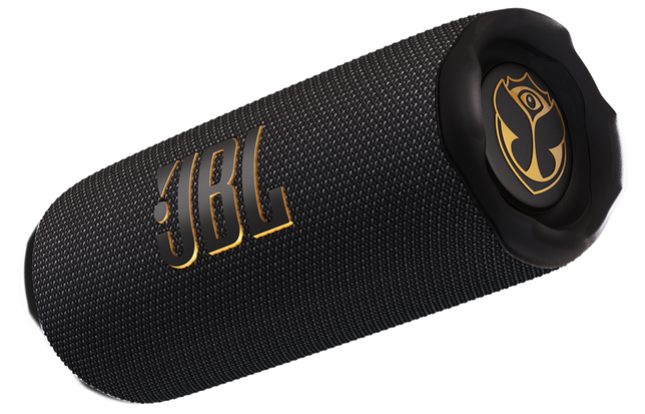
JBL Flip 7 Tomorrowland Speaker
Introduction
The JBL Flip 7 Tomorrowland Speaker is a special edition portable Bluetooth speaker designed in collaboration with the iconic Tomorrowland festival. Combining JBL's renowned audio technology with a unique, festival-inspired aesthetic, this speaker offers a powerful, immersive sound experience wrapped in a stylish, durable design. Featuring bold JBL Pro Sound enhanced by AI Sound Boost technology, it delivers clear mids, vibrant highs, and punchy bass, ideal for both casual listeners and audiophiles.
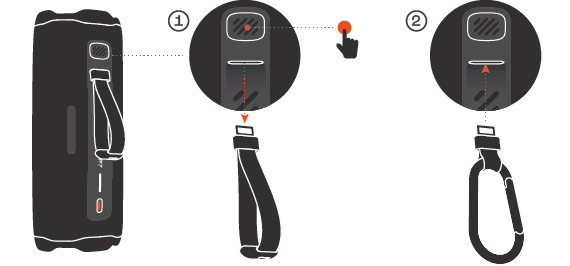
With up to 16 hours of battery life, the Flip 7 Tomorrowland ensures your music lasts from sunup to sundown without interruption. Its waterproof, dustproof, and drop-proof construction makes it perfect for outdoor adventures, beach parties, backyard gatherings, and everyday use. The speaker’s PushLock system allows for easy accessory interchangeability, enhancing customization and portability. The design incorporates polished metal effects and gold highlights specifically crafted to celebrate the Tomorrowland spirit.
Targeted at music lovers who want festival-level sound quality on the go, the JBL Flip 7 Tomorrowland is suitable for users who value durability, style, and high-performance audio in a compact package. It is available globally through the official Tomorrowland store and JBL outlets, with an estimated price range around €130-€150, maintaining the pricing of the standard Flip 7 model despite its exclusive design[1][5][6].
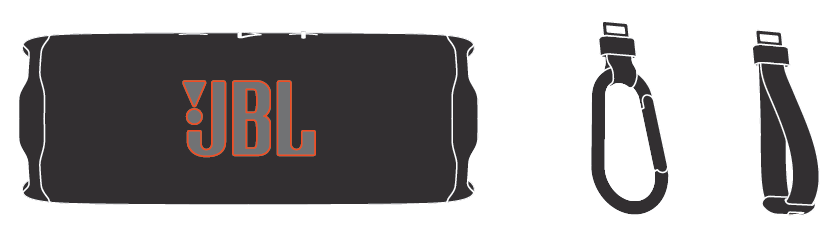
WHAT’S IN THE BOX
Specification
- Transducers: 45 x 80 mm woofer / 1.75 x 3",16 mm tweeter / 0.6"
- Output power: 25 W RMS for woofer,10 W RMS for tweeter
- Frequency response: 60 Hz - 20 kHz
- Signal-to-noise ratio: > 80 dB
- Battery type: Li-ion polymer 17.28 Wh (equivalent to 3.6 V / 4800 mAh)
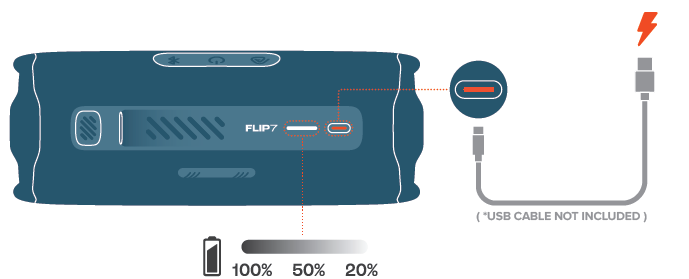
- Battery charge time: 2.5 hours (5 V / 3 A)
- Music play time: Up to 14 hours of playtime plus 2 hours with Playtime Boost (dependent on volume level and audio content)
- Maximum operation temperature: 45 °C
- Bluetooth® version: 5.4
- Bluetooth® profile: A2DP 1.4, AVRCP 1.6
- Bluetooth® transmitter frequency range: 2400 MHz - 2483.5 MHz
- Bluetooth® transmitter power: ≤ 14 dBm (EIRP)
- Bluetooth® transmitter modulation: GFSK, π/4 DQPSK, 8DPSK
- Product dimensions (W x H x D): 182.5 x 69.5 x 71.5 mm / 7.19 x 2.7 x 2.8"
- Net weight: 0.56 kg / 1.23 lbs
- Packaging dimensions (W x H x D): 211.5 x 109.5 x 92.5 mm /8.3 x 4.3 x 3.6"
- Gross weight: 0.826 kg / 1.82 lbs
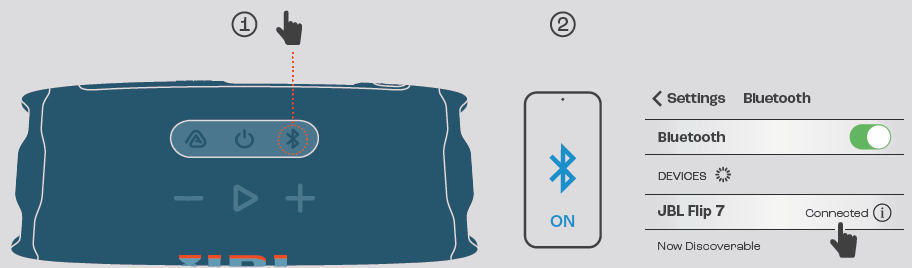
BLUETOOTH PAIRING
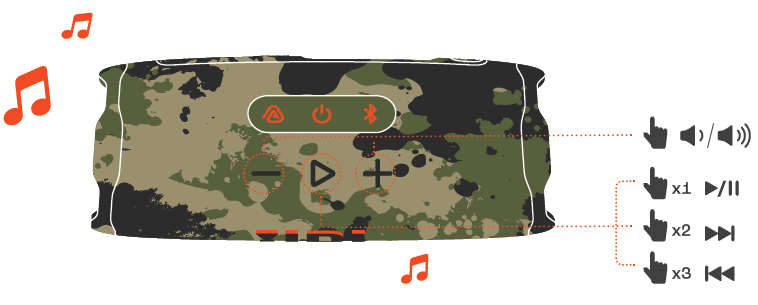
PLAY
CHARGING
INTERCHANGEABLE ACCESSORIES
Setup Guide for the JBL Flip 7 Tomorrowland Speaker
Setting up your JBL Flip 7 Tomorrowland Speaker is straightforward and user-friendly. Follow these steps to enjoy your music quickly:
- Charge the Speaker: Connect the speaker using the included USB-C cable to a power source until the battery is full (approximately 2.5 hours).
- Power On: Press the power button located on the side until the LED indicator lights up.
- Bluetooth Pairing: Activate Bluetooth on your device and press the Bluetooth button on the speaker to enter pairing mode. Select "JBL Flip 7" from your device’s list.
- Multi-Speaker Connection: Use the JBL Portable app to link multiple Flip 7 speakers for stereo or party mode using Auracast™ technology.
- Audio Settings: Customize sound profiles with the JBL Portable app’s seven-band equalizer to tailor the audio output to your preference.
If pairing fails, ensure the speaker is not connected to another device and is within range (up to 10 meters). Restart both the speaker and the device if needed. Always avoid exposure to extreme temperatures or submersion beyond waterproof rating limits. Use only manufacturer-approved chargers to prevent damage[1][3][6][7].
Troubleshooting Common Issues with the JBL Flip 7 Tomorrowland Speaker
Here are frequent problems users might encounter, along with effective solutions:
- No Sound or Distorted Audio: Check volume levels on both the speaker and the connected device. Re-pair Bluetooth connection or switch to USB-C audio for improved sound clarity and reduced latency.
- Bluetooth Not Pairing: Ensure the speaker is in pairing mode (LED blinking). Clear the Bluetooth cache on your device or reset the speaker by holding the power button for 10 seconds.
- Battery Drains Quickly: Avoid charging with non-certified cables. Turn off the speaker when not in use and disable features like PartyBoost if unused.
- App Connectivity Issues: Update the JBL Portable app to the latest version. Restart your smartphone and the speaker.
- Error Codes: The Flip 7 does not display error codes, but unresponsive behavior typically requires a factory reset—hold volume up and power buttons simultaneously for 10 seconds.
Preventive care includes avoiding water exposure beyond IP67 limits, keeping firmware updated via the JBL Portable app, and handling the speaker gently to maintain its drop-proof feature. The product comes with a standard 1-year warranty and customer support via official JBL channels and Tomorrowland store services[1][3][6].
Pros & Cons of the JBL Flip 7 Tomorrowland Speaker
- Pros:
- Exceptional audio quality with AI Sound Boost for enriched bass and clear mids
- Long-lasting 16-hour battery life for extended outdoor use
- Durable,, waterproof, dustproof, and drop-proof design ideal for festival and travel use
- Exclusive Tomorrowland design featuring premium metal and gold accents
- Customizable sound settings with a JBL Portable app
- Multi-speaker connectivity using Auracast™ for stereo or party mode
- Cons:
- Mono speaker requiring additional units for true stereo sound
- USB-C audio mode disables app-based settings during use
- Limited bass depth compared to larger, heavier speakers
- Latency over Bluetooth may affect low-latency gaming or video sync
Compared to its predecessors like the Flip 6 and competitors such as JBL Charge 6, the Flip 7 offers improved sound clarity and design enhancements, but lacks the full stereo output without pairing two units. Its value for money is strong, given the special edition features and robust build quality[2][3][4][5].
Customer Reviews of the JBL Flip 7 Tomorrowland Speaker
Users praise the JBL Flip 7 Tomorrowland Speaker for its excellent sound quality and festival-ready durability. Many highlight the long battery life and the unique,,e exclusive design as standout features. Positive reviews often mention the ease of use and the ability to customize sound profiles via the app.
Common complaints include the lack of true stereo output without pairing, occasional Bluetooth latency, and the somewhat shouty vocal tones at high volume without EQ adjustment. Star ratings average around 4.5 out of 5, reflecting strong overall satisfaction.
Many recommend the Flip 7 Tomorrowland edition for festival goers, beach users, and outdoor enthusiasts seeking a stylish, high-performance speaker. Some suggest pairing two units for immersive stereo sound to maximize the listening experience[1][2][5].
Faqs
How do I set up the JBL Flip 7 Tomorrowland Speaker for the first time?
What should I do if the JBL Flip 7 Tomorrowland Speaker is not connecting via Bluetooth?
Can I use the JBL Flip 7 Tomorrowland Speaker with multiple devices simultaneously?
How does the AI Sound Boost feature enhance the JBL Flip 7 Tomorrowland Speaker's audio?
What is the battery life of the JBL Flip 7 Tomorrowland Speaker, and how can I maximize it?
Is the JBL Flip 7 Tomorrowland Speaker waterproof and suitable for outdoor use?
How can I maintain and clean my JBL Flip 7 Tomorrowland Speaker to ensure longevity?
Why should I use USB-C audio mode on the JBL Flip 7 Tomorrowland Speaker instead of Bluetooth?
Leave a Comment