
How to Pair: Jbl Speaker Bar 800MK2 User Manual
Content
JBL Speaker Bar 800MK2
Introduction
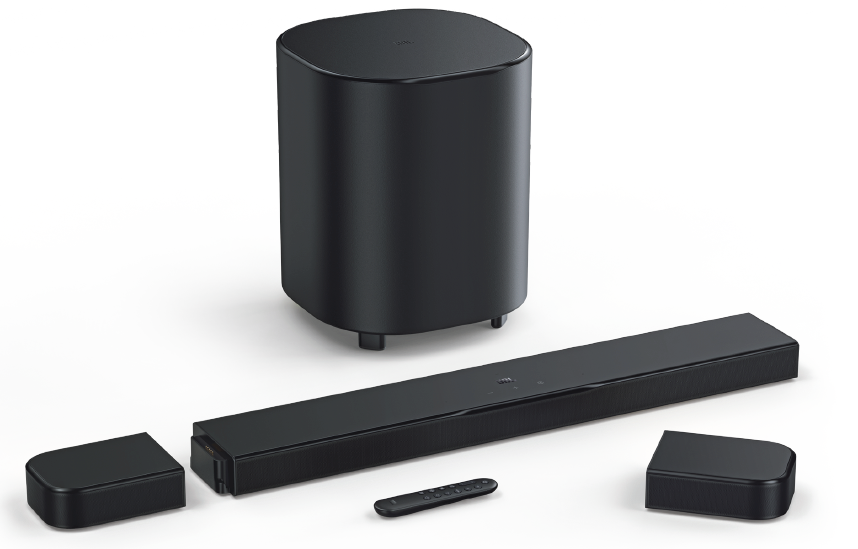
The JBL Speaker Bar 800MK2 is a state-of-the-art 7.1 channel soundbar system designed to bring immersive, cinematic-quality audio directly into your living room. Featuring detachable wireless surround speakers and a powerful 10-inch subwoofer, this soundbar delivers true surround sound with Dolby Atmos® spatial effects and MultiBeam™ 3.0 technology for a wide, room-filling soundstage. The detachable speakers are battery-powered with up to 10 hours of playtime, allowing flexible placement and clutter-free setup without compromising on the quality of surround sound.
Ideal for home cinema enthusiasts, gamers, and music lovers seeking a premium audio experience without the complexity of traditional wired speaker setups, the JBL Bar 800MK2 integrates seamlessly with modern TVs via HDMI eARC, supporting 4K Dolby Vision and HDR10+ passthrough for stunning audiovisual synergy. Its compatibility with popular streaming and casting platforms like AirPlay, Google Cast, and Spotify Connect further enhances its versatility as an entertainment hub.
Priced competitively in the high-end soundbar market, the JBL Speaker Bar 800MK2 typically falls within the $900 to $1,200 range, depending on the retailer and region. It is widely available at major electronics stores and online platforms as of mid-2025. This combination of advanced features, ease of use, and wireless convenience establishes the JBL Bar 800MK2 as a compelling choice for those upgrading their home sound systems.
WHAT’S IN THE BOX
Unpack the box carefully and ensure that the following parts are included. If any part is damaged or missing, do not use it and contact your retailer or customer service representative.
Soundbar

Detachable speakers (with rechargeable battery)
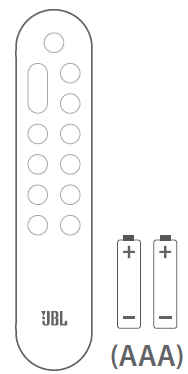
Remote control (with 2 AAA batteries)
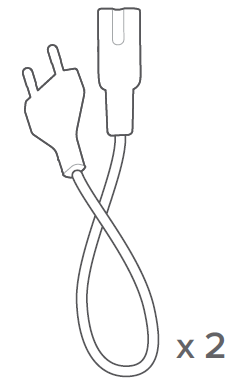
Power cord
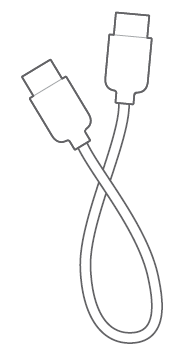
HDMI cable (1.2m/3.9ft)
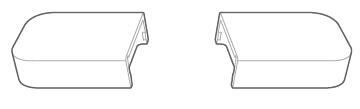
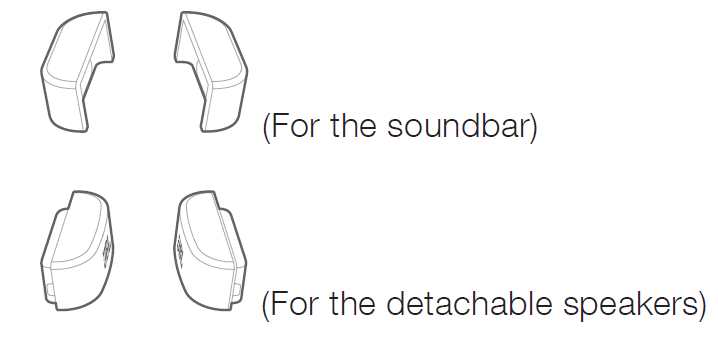
Side caps
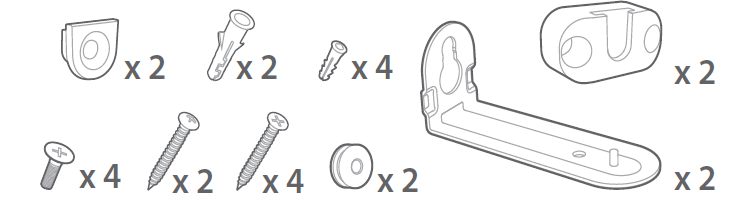
Wall-mounting kit
Product information & wall-mounting template

PRODUCT SPECIFICATIONS
General specification:
- Model:
- BAR 800MK2 (soundbar unit)
- BAR 800MK2 SURROUND (detachable speaker)
- BAR 800MK2 SUB (subwoofer unit)
- Sound system: 7.1 channel
- Power supply: 100 - 240 V AC, ~ 50/60 Hz
- Total speaker power output* (Max. @THD 1%): 780 W
- Soundbar output power** (Max. @THD 1%): 400 W
- Surround speaker output power*** (Max. @THD 1%): 2 x 40 W
- Subwoofer output power**** (Max. @THD 1%): 300 W
- Soundbar transducer: 6 x (44 x 80) mm racetrack drivers, 2 x 1" (25 mm) tweeters
- Surround speaker transducer: 2 x (44 x 90) mm racetrack drivers
- Subwoofer transducer: 10" (260 mm)
- Networked standby power: <2.0 W
- Operating temperature: 0 °C - 45 °C
- Lithium battery: 3.635 V, 3283 mAh
- Detachable surround speaker playtime: up to 10 hours (may vary according to content type and volume level)
HDMI specification
- HDMI video input: 1
- HDMI video output (with Enhanced Audio Return Channel, eARC): 1
- HDMI HDCP version: 2.3
- HDR pass through: HDR10+, Dolby Vision
Audio specification
- Frequency response: 35 Hz - 20 kHz (-6 dB)
- Audio inputs: Optical, Bluetooth, USB (USB playback is available in the US version. For other versions, USB is for Service only.)
USB specification
- USB port: Type A
- USB rating: 5 V DC, 0.5 A
- Supporting file formats: mp3
- MP3 codec: MPEG 1 Layer 2/3, MPEG 2 Layer 3, MPEG 2.5 Layer 3
- MP3 sampling rate: 16 - 48 kHz
- MP3 bitrate: 80 - 320 kbps
Wireless specification
- Bluetooth version: v5.3
- Bluetooth profile: A2DP v1.3, A VRCP v1.5
- Bluetooth transmitter frequency range: 2400 MHz - 2483.5 MHz
- Bluetooth transmitter power: <15 dBm (EIRP)
- Wi-Fi network: IEEE 802.11 a/b/g/n/ac/ax (2.4 GHz / 5 GHz)
- 2.4G Wi-Fi transmitter frequency range: 2412 - 2472 MHz (2.4 GHz ISM Band, USA 11 Channels, Europe and others 13 Channels)2.4G Wi-Fi transmitter power: <20 dBm (EIRP)
- 2.4G wireless transmitter frequency range: 2406 - 2474 MHz
- 2.4G wireless transmitter power: <10 dBm (EIRP)
- 5G Wi-Fi transmitter frequency range: 5.15 - 5.35 GHz, 5.470 - 5.725 GHz, 5.725 - 5.825 GHz
- 5G Wi-Fi transmitter power: 5.15 - 5.25 GHz <23 dBm, 5.25 - 5.35 GHz & 5.470 - 5.725 GHz <20 dBm, 5.725 - 5.825 GHz <14 dBm (EIRP)
Note: Band 5.6 - 5.64 GHz will be disabled when shipped to Australia / New Zealand.
Dimensions
- Total soundbar dimensions (W x H x D): 1163 x 52 x 128 mm / 45.8" x 2.0" x 5.0"
- Soundbar dimensions (W x H x D): 854 x 52 x 128 mm / 33.6" x 2.0" x 5.0"
- Detachable surround speaker dimensions (each) (W x H x D): 169 x 52 x 128 mm / 6.7" x 2.0" x 5.0"
- Subwoofer dimensions (W x H x D): 325 x 400 x 325 mm / 12.8" x 15.7" x 12.8"
- Soundbar weight: 5 kg / 11 lbs
- Detachable surround speaker weight (each): 0.7 kg / 1.6 lbs
- Subwoofer weight: 8.1 kg / 17.8 lbs
- Packaging dimensions (W x H x D): 980 x 398 x 495 mm / 38.58" x 15.67" x 19.49"
- Packaging weight: 20.8 kg / 45.9 lbs (EMEA/UK/AU/NZ);
- 18.08 kg / 41.4 lbs (Others)
- RMS @THD 1%: 390 W
- RMS @THD 1%: 200 W
- RMS @THD 1%: 2 x 20 W
- RMS @THD 1%: 150 W
IMPORTANT SAFETY INSTRUCTIONS
Verify Line Voltage Before Use
The JBL BAR 800MK2 (soundbar, detachable speakers, and subwoofer) has been designed for use with 100-240 volt, 50/60 Hz AC. Connection to a line voltage other than that for which your product is intended can create a safety and fire hazard and may damage the unit. If you have any questions about the voltage requirements for your specific model or about the line voltage in your area, contact your retailer or customer service representative before plugging the unit into a wall outlet.
Do Not Use Extension Cords
To avoid safety hazards, use only the power cord supplied with your unit. We do not recommend that extension cords be used with this product. As with all electrical devices, do not run power cords under rugs or carpets, or place heavy objects on them. Damaged power cords should be replaced immediately by an authorized service center with a cord that meets factory specifications.
Handle the AC Power Cord Gently
When disconnecting the power cord from an AC outlet, always pull the plug; never pull the cord. If you do not intend to use this speaker for any considerable length of time, disconnect the plug from the AC outlet.
Do Not Open the Cabinet
There are no user-serviceable components inside this product. Opening the cabinet may present a shock hazard, and any modification to the product will void your warranty. If water accidentally falls inside the unit, disconnect it from the AC power source immediately, and consult an authorized service center.
- To protect battery lifespan, fully charge at least once every 3 months. Battery life will vary due to usage patterns and environmental conditions.
- When using an external adapter, the output voltage/current of the external adapter should not exceed 5V/3A.
WARNING
DO NOT ATTEMPT TO OPEN, SERVICE, OR DISASSEMBLE THE BATTERY | DO NOT SHORT CIRCUIT | MAY EXPLODE IF DISPOSED OF IN FIRE | RISK OF EXPLOSION IF BATTERY IS REPLACED BY AN INCORRECT TYPE | DISPOSE OF OR RECYCLE USED BATTERIES ACCORDING TO THE INSTRUCTIONS
TROUBLESHOOTING
Never try to repair the product yourself. If you have problems using this product, check the following points before you request services.
System
The unit will not turn on.
- Check if the power cord is plugged into the power and the soundbar.
The soundbar has no response to button pressing.
- Restore the soundbar to factory settings (See “9. RESTORE FACTORY SETTINGS”).
Sound
No sound from the soundbar
- Make sure that the soundbar is not muted.
- Select the correct audio input source on the remote control.
- Connect the soundbar to your TV or other devices properly.
- Restore the soundbar to factory settings (See “9. RESTORE FACTORY SETTINGS”).
Distorted sound or echo
- If you play audio from your TV through the soundbar, make sure that your TV is muted or the built-in TV speaker is disabled.
Audio and video are not synchronized.
- Enable the audio sync function to synchronize audio and video (See “8.1 Audio sync”).
No height sound effects of Dolby Atmos
- If your TV supports HDMI ARC only, make sure that you have connected your digital device to the soundbar through the HDMI / HDMI IN connector on the soundbar (See “5.1.1 TV (HDMI eARC)”)
- Enjoy the sound effects of Dolby Atmos when you play movies from the TV / HDMI source. For audio streaming over Bluetooth or casting apps (enabled by Google Cast or AirPlay), Dolby Atmos is not supported.
Bluetooth
A device cannot be connected to the soundbar.
- Check if you have enabled Bluetooth on the device.
- If the soundbar has been paired with another Bluetooth device, reset Bluetooth (see “5.2.3 Connect to another Bluetooth device”).
- If your Bluetooth device has ever been paired with the soundbar, reset Bluetooth on the soundbar, unpair the soundbar from the Bluetooth device, and then pair the Bluetooth device with the soundbar again (see “5.2.3 Connect to another Bluetooth device”).
Poor audio quality from a connected Bluetooth device
- The Bluetooth reception is poor. Move the source device closer to the soundbar, or remove any obstacle between the source device and the soundbar.
The connected Bluetooth device connects and disconnects constantly.
- The Bluetooth reception is poor. Move the source device closer to the soundbar, or remove any obstacle between the source device and the soundbar.
Wi-Fi
Failed to connect to Wi-Fi.
- Make sure that Wi-Fi is turned on.
- Make sure that you have selected the right network and entered the correct password.
- Make sure that your router or modem is turned on and within the range.
- In your router settings, make sure that you have set the security type to WPA2 or auto.
- Make sure that your soundbar is connected to the same wireless LAN as your smartphone or tablet.
- If you have difficulties in setting up Wi-Fi, re-enter the Wi-Fi setup mode by holding and pressing the soundbar until “SETUP WIFI” is displayed.
Playback
AirPlay cannot find the soundbar as an AirPlay speaker for music streaming.
- On your Apple device, update the software to the latest version: iOS 13.4 and later, Mac OS 10.15.4 and later, or TV OS 14.3.
- Make sure that your Apple device has been connected to the same network as the soundbar.
- For a PC running iTunes for Windows, you can stream music from your PC to the soundbar through Bluetooth.
Music playback does not work smoothly when the sound source switches from Bluetooth to Google Cast or AirPlay.
- The quality of audio casting and playback is dependent on the traffic and coverage of the network that connects the soundbar and your casting devices, such as phones, tablets,, and PCs.
Music playback does not resume when the sound source switches from Bluetooth to TV / HDMI IN, and then back to Bluetooth.
- The music playback in the Bluetooth device stops when the sound source switches from Bluetooth to TV / HDMI IN. When you switch back to the Bluetooth source, start music playback in the Bluetooth device again.
Remote control
The remote control does not work.
- Check if the batteries are drained. If so, replace them with new ones.
- Reduce the distance and angle between the remote control and the main unit.
Failed to complete the TV remote control learning.
- Check if you are using an infra-red TV remote control. The IR learning is not supported by a Bluetooth TV remote control.
Low power standby mode
Failed to enter the low-power standby mode
- To enter the low power standby mode, when the detachable speakers are docked on the soundbar, hold the remote control for 10 seconds until “CEC 1” is displayed on the soundbar. Next, hold for another 10 seconds until “CEC 2” is displayed. After entering the “CEC 2” mode, the soundbar will switch to the standby mode while continuing to charge the detachable speakers. When the detachable speakers are fully charged after about 4 hours, the soundbar will automatically switch to the low power standby mode and stop charging the detachable speakers.
- To exit the low-power standby mode, unplug the power cord and then plug it in again.
Pros & Cons of the JBL Speaker Bar 800MK2
Pros
- Immersive 7.1 Surround Sound: The detachable wireless rear speakers create a true surround sound experience enhanced by Dolby Atmos® and MultiBeam™ 3.0, delivering rich, cinematic audio that outperforms many competitors.
- Wireless Convenience: Battery-powered surround speakers provide up to 10 hours of use on a single charge and recharge automatically when placed back on the soundbar, eliminating cable clutter.
- Powerful Bass Performance: The dedicated 10-inch wireless subwoofer delivers deep, punchy bass with 300W output, greatly enhancing movie soundtracks and gaming effects.
- Flexible Connectivity: HDMI eARC, HDMI input, optical digital input, and support for 4K Dolby Vision and HDR10+ passthrough ensure compatibility with a wide range of devices and high-quality video.
- Streaming Support: Integration with AirPlay, Google Cast, Spotify Connect, and the JBL One App offers seamless access to streaming music services and personalized sound settings.
Cons
- Price Point: At around $900-$1,200, the JBL Bar 800MK2 may be considered expensive compared to simpler soundbars, though it offers premium features accordingly.
- Room Calibration Limitations: While it includes sound calibration, some users report that fine-tuning for complex room acoustics may require manual adjustments for optimal performance.
- Surround Speaker Size: The detachable wireless speakers are relatively compact (700g), which may limit maximum loudness compared to larger, wired rear speakers in some competitive systems.
- Battery Life: Up to 10 hours is good,, but could require regular recharging for heavy daily use.
This soundbar offers excellent value for users seeking a wireless, high-power surround sound system that is easier to install and maintain than traditional home theater setups. Compared to alternatives like the Samsung HW-Q800C or Sonos Arc with subwoofer, the JBL Bar 800MK2 stands out with true detachable surrounds and top-tier Dolby Atmos support.
Customer Reviews & Feedback on the JBL Speaker Bar 800MK2
Users consistently praise the JBL Speaker Bar 800MK2 for its impressive surround sound performance, especially highlighting the immersive audio created by the detachable wireless speakers. Many reviews mention the deep, clear bass from the 10-inch subwoofer and the ease of setup without messy wiring. The soundbar often receives high star ratings, averaging around 4.5 out of 5 stars in multiple retail outlets.
Common compliments include the soundstage's width and clarity, the convenience of wireless rear speakers, and the integration with streaming services. Some users also appreciate the JBL One App for customizing equalizer settings.
On the downside, a few customers report that the initial room calibration could be improved for complex room layouts, and some find the battery life of the detachable speakers limiting for extended use without charging. A minority mentions the price as a potential barrier,, acknowledges the sound quality justifies the investment.
Overall, the JBL Bar 800MK2 is highly recommended for those wanting a premium, wireless surround sound experience that elevates both movie watching and music listening.
Faqs
How do I set up the JBL Speaker Bar 800MK2 for the first time?
Why is my JBL Speaker Bar 800MK2 not connecting via Bluetooth?
What are the key features that make the JBL Speaker Bar 800MK2 different?
Can I use the JBL Speaker Bar 800MK2 with my older TV?
How often should I update the firmware of my JBL Speaker Bar 800MK2?
What should I do if my JBL Speaker Bar 800MK2 is not producing sound?
Can I use the detachable speakers of the JBL Speaker Bar 800MK2 independently?
How do I maintain and clean the JBL Speaker Bar 800MK2?
More jbl manuals
Leave a Comment