
How to Pair: Jbl Speaker Charge 5 User Manual
Content
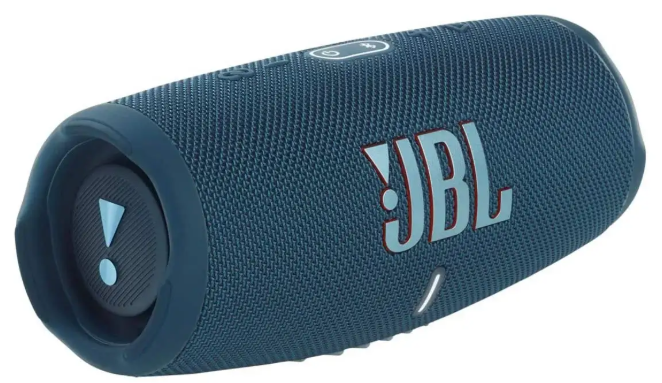
JBL Speaker Charge 5
Introduction
The JBL Speaker Charge 5 is a premium portable Bluetooth speaker designed to deliver powerful, clear, and immersive sound wherever you go. Featuring JBL Original Pro Sound with an optimized long excursion driver, a dedicated tweeter, and dual bass radiators, it produces rich audio with deep bass that outperforms many competitors in its size class. Its robust IP67 rating ensures it is both waterproof and dustproof, making it ideal for outdoor adventures, beach trips, poolside parties, and everyday use.
With up to 20 hours of continuous playback time, the Charge 5 supports long-lasting entertainment without frequent recharging. The integrated power bank function allows users to charge smartphones and other USB devices on the go. Equipped with the latest Bluetooth 5.1 technology and JBL PartyBoost, it enables seamless wireless connection to multiple compatible speakers for an amplified party experience.
Targeted at music enthusiasts, outdoor adventurers, and casual listeners who seek high-quality sound in a durable, portable package, the JBL Charge 5 suits diverse use cases—from hiking and camping to home and social gatherings. It is competitively priced, typically in the $150 to $180 range,, and widely available through major electronics retailers and online stores.
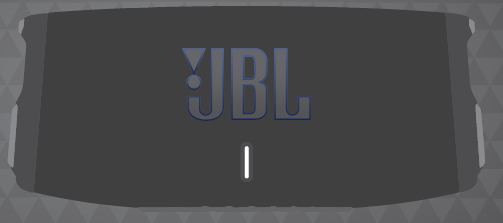
WHAT’S IN THE BOX
Specification
- Transducer: 53 x 93mm woofer, 20mm tweeter
- Rated output power: 30W RMS for woofer, 10W RMS for tweeter
- Frequency response: 60Hz - 20kHz
- Signal-to-noise ratio: > 80dB
- Battery type: Li-ion polymer 52Wh (equivalent to 3.69V/14100mAh)
- Battery charge time: 6 hours (5V/3A)
- Music play time: up to 20 hours (dependent on volume level and audio content)
- USB ports: USB Type A x1, USB Type C x1
- USB charge out: 5V/2A (maximum)
- Bluetooth version: 5.3
- Bluetooth profile: AVRCP 1.5 and A2DP 1.3
- Bluetooth transmitter frequency range: 2.4GHz-2.4835GHz
- Bluetooth transmitter power: <13dBm (EIRP)
- Bluetooth transmitter modulation: GFSK, π/4-DQPSK, 8DPSK
- 5G Wi-Fi transmitter frequency range: 5.15-5.35GHz, 5.470-5.725GHz,5.725-5.825GHz
- 5G Wi-Fi transmitter power: <23dBm
- 5G Wi-Fi modulation: OFDM (BPSK, QPSK, 16QAM, 64QAM, 256QAM, 1024QAM)
- 5G Wi-Fi network compatibility: 802.11a/n/ac/ax
- 2.4G Wi-Fi transmitter frequency range: 2.4GHz-2.4835GHz
- 2.4G Wi-Fi transmitter power: <20dBm
- 2.4G Wi-Fi modulation: DSSS (DBPSK, DQPSK, CCK),OFDM (BPSK, QPSK, 16QAM, 64QAM,256QAM, 1024QAM)
- 2.4G Wi-Fi network compatibility: 802.11 b/g/n/ax
- Product dimensions (W x H x D): 223 x 97 x 94mm/8.8 x 3.8 x 3.7"
- Net weight: 1.0kg/2.2lbs
- Packaging dimensions (W x H x D): 257 x 131 x 120mm/10.1 x 5.2 x 4.7"
- Gross weight: 1.7kg/3.7lbs
- Maximum operation temperature: 45°C
- Factory reset: To restore the factory settings, hold and for more than 10 seconds.
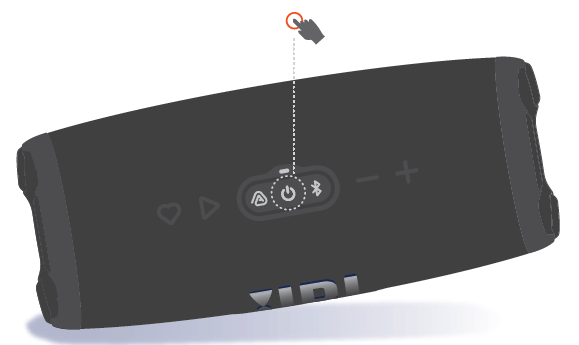
POWER ON
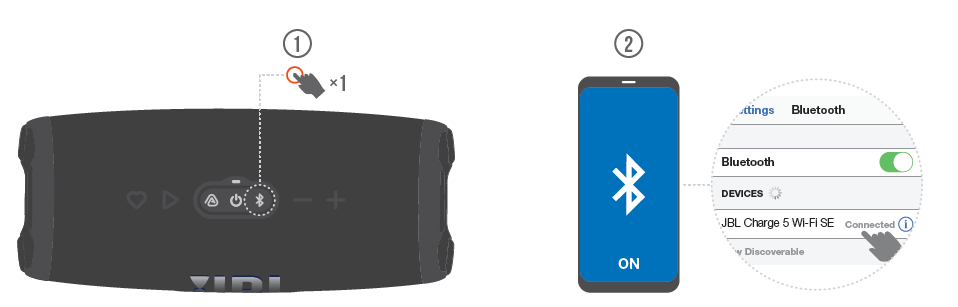
BLUETOOTH PAIRING
CHARGING
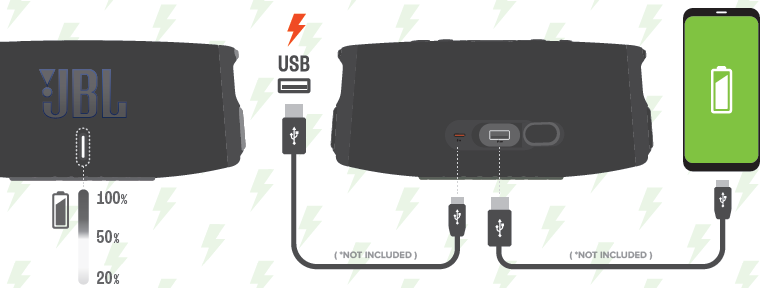
Setup Guide for the JBL Speaker Charge 5
Setting up your JBL Speaker Charge 5 is straightforward:
- Power on the speaker by pressing the power button located on the side.
- Activate Bluetooth on your smartphone, tablet, or computer.
- Search for available devices and select “JBL Charge 5” to pair.
- Once connected, you will hear an audiconfirmationio,,n and the Bluetooth indicator will stay solid.
For multi-speaker setups, press the PartyBoost button to connect other JBL PartyBoost-compatible speakers for synchronized audio playback. The speaker also supports USB Type-C charging with an input rated at 5V/2A.
Configuration options include toggling bass boost mode (for enhanced low frequencies) by pressing and holding the Bluetooth and volume down buttons simultaneously for about 10 seconds. To restore factory settings, hold the volume up and play buttons until the device powers off and reboots.
Safety tips: Avoid charging the speaker in wet conditions, and do not expose it to extreme temperatures to maximize battery life and device longevity.
Troubleshooting the JBL Speaker Charge 5
Common issues and solutions for the JBL Speaker Charge 5 include:
- No sound or distorted audio: Ensure the volume on both the speaker and source device is turned up. Re-pair the Bluetooth connection or restart the speaker.
- Bluetooth connectivity problems: Clear the pairing list by performing a factory reset (hold volume up + play buttons). Also, verify that the device is within 10 meters and that no significant interference is present.
- Battery not charging: Use the supplied USB-C cable and charger. Avoid third-party cables with insufficient power ratings.
- Error codes: The speaker does not display error codes visually but uses indicator lights and audio prompts. Consult the user manual for blinking light patterns that signal battery or connection issues.
Preventive measures include keeping firmware updated via the JBL Portable App and avoiding exposure to water during charging. JBL offers a standard one-year warranty covering manufacturing defects, and customer support is accessible via JBL’s official website or authorized dealers.
Pros & Cons of the JBL Speaker Charge 5
- Pros:
- Exceptional sound quality with powerful bass and clear mids thanks to the dedicated tweeter and bass radiators.
- IP67 waterproof and dustproof rating ensures durability in rugged environments.
- Long battery life—up to 20 hours of playback—for extended use without charging.
- Integrated power bank function to charge external devices via USB-C port.
- PartyBoost feature supports multi-speaker connectivity for a richer audio experience.
- Cons:
- Heavier and bulkier than some competitors, reducing ultra-portability.
- Does not support the Connect+ feature, limiting compatibility with older JBL speakers.
- No USB audio input, unlike some newer models.
- Higher price point compared to smaller portable speakers.
Compared to alternatives like the JBL Flip 6 or Flip 7, the Charge 5 offers superior bass and longer battery life but trades off portability. It provides excellent value for users prioritizing sound performance and ruggedness.
Customer Reviews of the JBL Speaker Charge 5
Users consistently praise the JBL Speaker Charge 5 for its robust sound output and impressive battery longevity. Many highlight the speaker’s ability to deliver clear vocals and rich bass outdoors, making it ideal for parties and travel. Common positive remarks include the effective waterproof design and the convenience of the built-in power bank.
On the downside, some users mention the speaker’s weight as a minor drawback for carrying on long hikes. A few report occasional Bluetooth pairing delays or latency with video content, although these issues are typically resolved by firmware updates.
Overall, the Charge 5 scores high ratings, often around 4.5 out of 5 stars, with many reviewers recommending it for buyers seeking a durable, high-performance Bluetooth speaker with excellent sound quality and battery life.
Faqs
How do I set up my jbl Speaker Charge 5 for the first time?
What should I do if my jbl Speaker Charge 5 is not charging properly?
Why is my jbl Speaker Charge 5 Bluetooth connection failing or not pairing?
How can I fix the issue if my jbl Speaker Charge 5 won't turn off?
What are the best practices to maintain and care for my jbl Speaker Charge 5?
Can I use the jbl Speaker Charge 5 with all Bluetooth-enabled devices?
Why does my jbl Speaker Charge 5 produce distorted or muffled sound, and how can I fix it?
How can I optimize the battery life of my jbl Speaker Charge 5 during use?
More jbl manuals
- How to Use: Jbl Flip 7 Tomorrowland Speaker User Manual
- How to Setup: Jbl Speaker Bar 1000MK2 User Manual
- How To Use: Jbl Go Essential 2 Personalized Speaker User Manual
- How to Pair: Jbl Speaker Bar 800MK2 User Manual
- How to Pair: Jbl Grip Speaker User Manual
- Setup & Pairing: Jbl Speaker Bar 500MK2 User Manual
Leave a Comment