
How to Setup: Jbl Speaker Bar 1000MK2 User Manual
Content
JBL Speaker Bar 1000MK2
Introduction
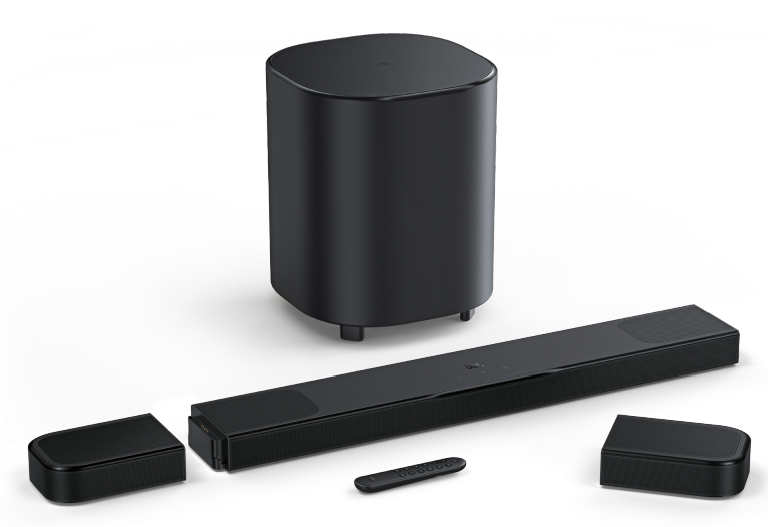
The JBL Speaker Bar 1000MK2 is a cutting-edge, 7.1.4-channel home theater system designed to deliver immersive audio experiences. This system includes a soundbar with detachable wireless rear speakers, a 10-inch wireless subwoofer, and supports Dolby Atmos and DTS:X technologies for true panoramic surround sound. With a maximum power output of 960W, it enhances movie nights, gaming sessions, and music listening with its advanced MultiBeam 3.0 technology and PureVoice 2.0 dialog enhancement. The system is ideal for home theater enthusiasts seeking a versatile setup that can easily adapt to different listening environments.
Targeted at audiophiles and families alike, the JBL Speaker Bar 1000MK2 offers a unique combination of performance and convenience. It is estimated to be priced in the premium range, typically available for around $1,000. The system is widely available at major electronics retailers and online platforms. Whether you're watching movies, playing games, or enjoying music, this system provides an engaging audio experience that fits seamlessly into any home setup.
WHAT’S IN THE BOX
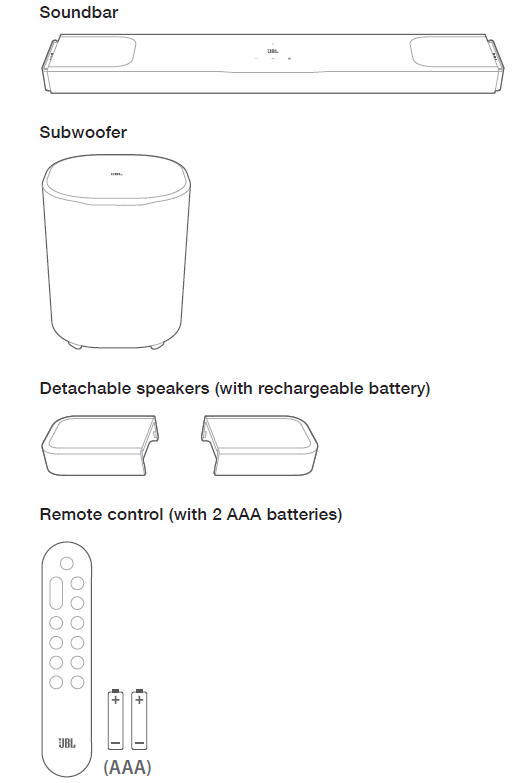
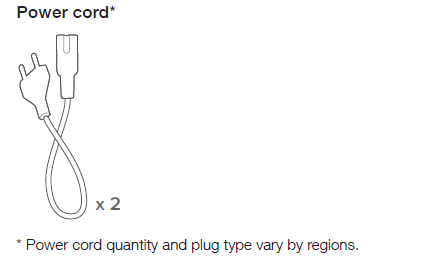
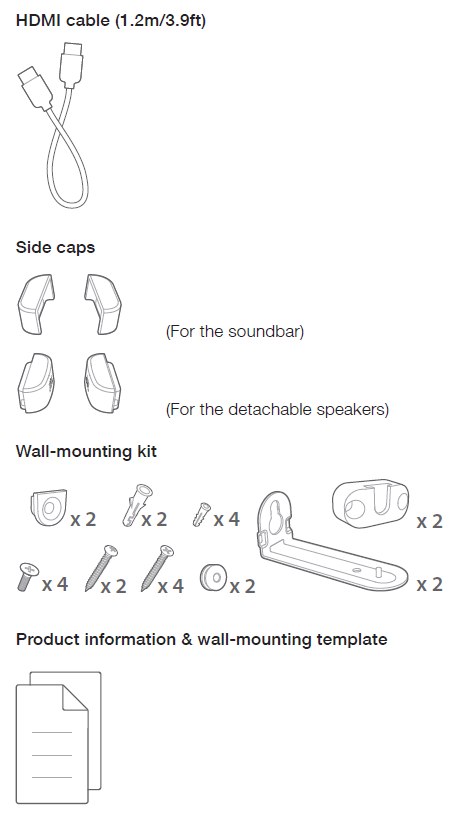
Unpack the box carefully and ensure that the following parts are included. If any part is damaged or missing, do not use it and contact your retailer or customer service representative.
SETUP
Connect the detachable rear speakers andsubwoofer
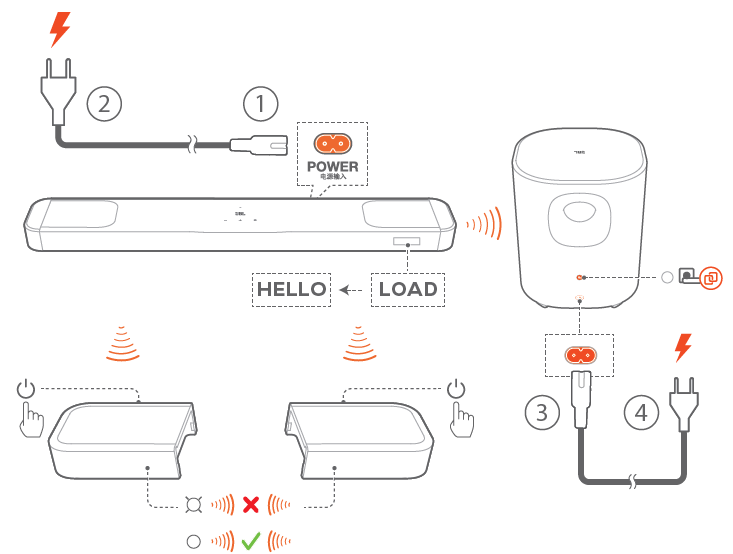
- Connect the soundbar to power by using the supplied power cord.
The screen on the soundbar shows “LOAD” and then, “HELLO”. - Do the following to start the connection:
- Connect the subwoofer to power by using the supplied power cord.
- The soundbar connects the subwoofer automatically.Connected:

- Dock the detachable speakers onto the soundbar, or press on the detachable speakers to fast re-connect to the soundbar.
- The soundbar connects the detachable speakers automatically.
Connected: The status indicator turns solid white ( ) on the detachable speakers.- NOTES:
- Use the supplied power cords only.
- Before connecting to power, make sure that you have completed all other connections (See “5.1 Connect with your TV and digital devices”).
- NOTES:
Charge the detachable speakers
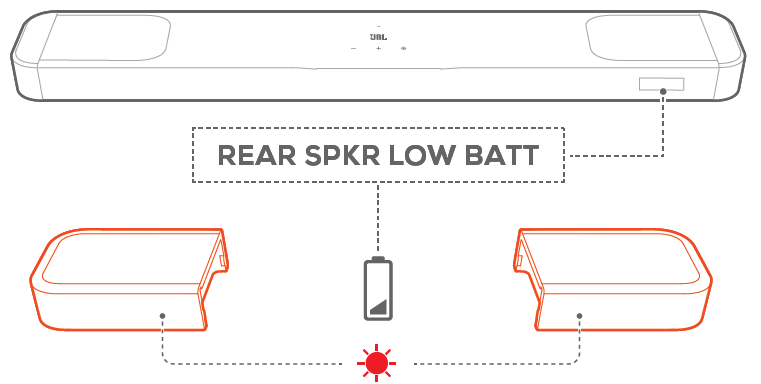
When the detachable surround speakers are out of battery, the wireless connection with the soundbar will be lost.
The first time you use the two detachable speakers, charge them for more than 3 hours to ensure sufficient battery power.
- When the battery power runs low, the status indicator flashes red on the detachable surround speakers and “REAR SPKR LOW BATT” is displayed on the soundbar.
- When the battery power runs out, “DOCK REAR SPKR” is displayed on the soundbar.
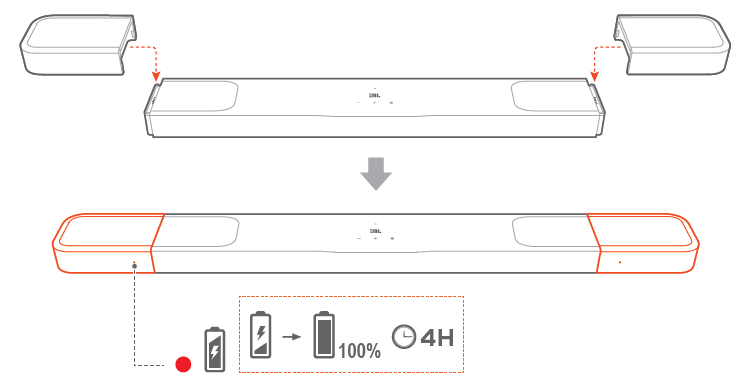
Charge by docking the detachable speakers
Charging starts when you dock the detachable speakers onto the soundbar.
- When the soundbar switches to standby mode, turns on; turns off when the detachable speakers are fully charged.
- It takes about 4 hours for the empty battery to be fully charged.
Charge through a USB cable
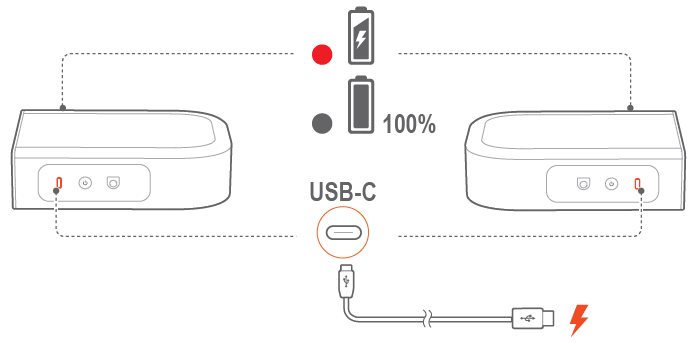
- Use a USB-C cable (not supplied) to connect the detachable speakers to power respectively.
- For the detachable speakers, the status indicator is used for status indication of both battery power and wireless connection (See “3.2 Detachable speakers”).
3D surround sound
Sound calibration
Optimize your 3D surround sound experience for your unique listening environment.
For sound calibration, make sure that:
- your room is quiet;
- the soundbar and the two detachable rear speakers are fully in sight of each other, without obstacles in between;
- the left and right rear speakers are properly placed, the L speaker on the left and the R speaker on the right.
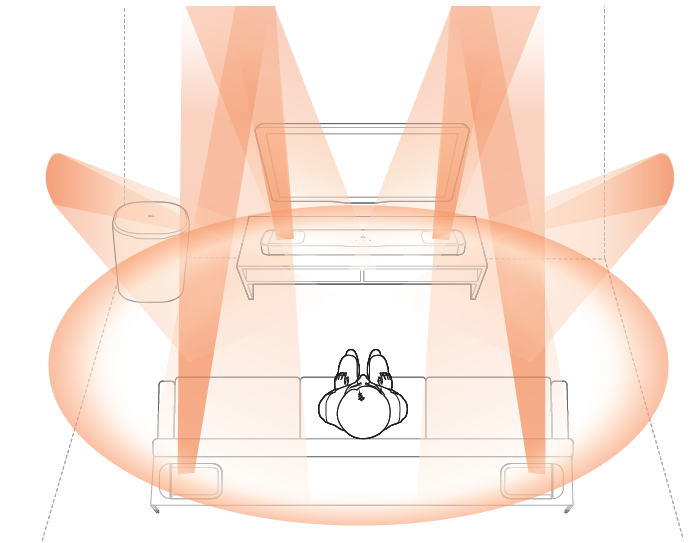
Calibrate the listening zone
- Place the detachable rear speakers beside your seating position.
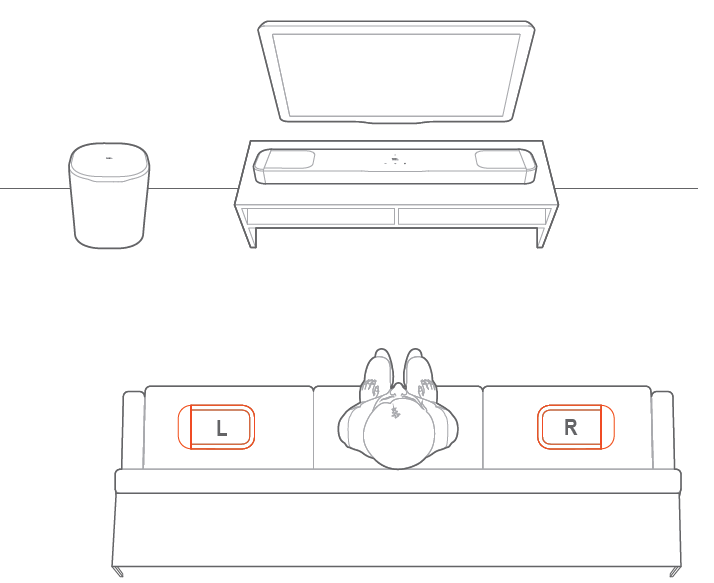
Make sure that the two detachable speakers have been connected to the soundbar (See “6.1 Connect the detachable rear speakers and subwoofer”).
On the remote control, press  / CALIBR to start calibration.
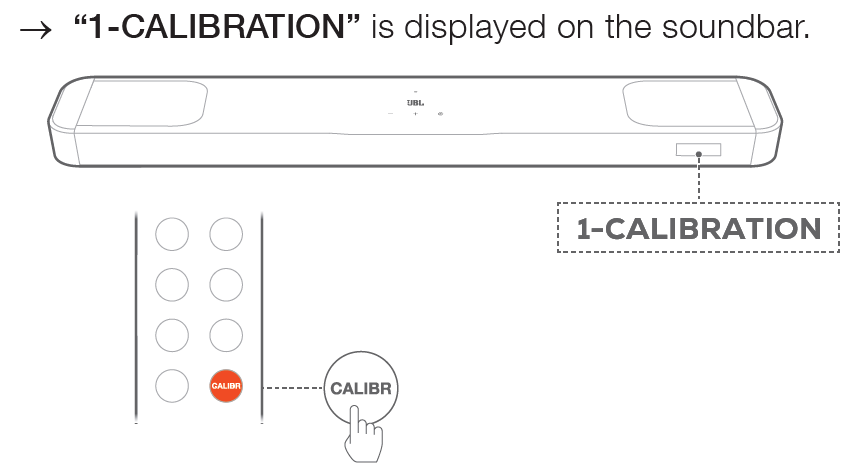
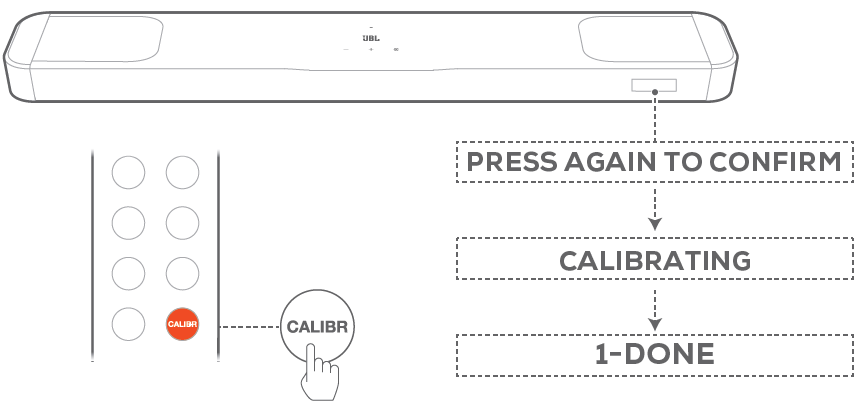
When “PRESS AGAIN TO CONFIRM” is displayed, press / CALIBR again.
- Countdown starts from 5 to 1.
- Calibration tone is heard. Audio calibration starts. “CALIBRATING”: Calibration in progress
“1-DONE”: Calibration of the listening zone is completed successfully
Calibrate the speaker position
- Place the detachable rear speakers in your desired location.
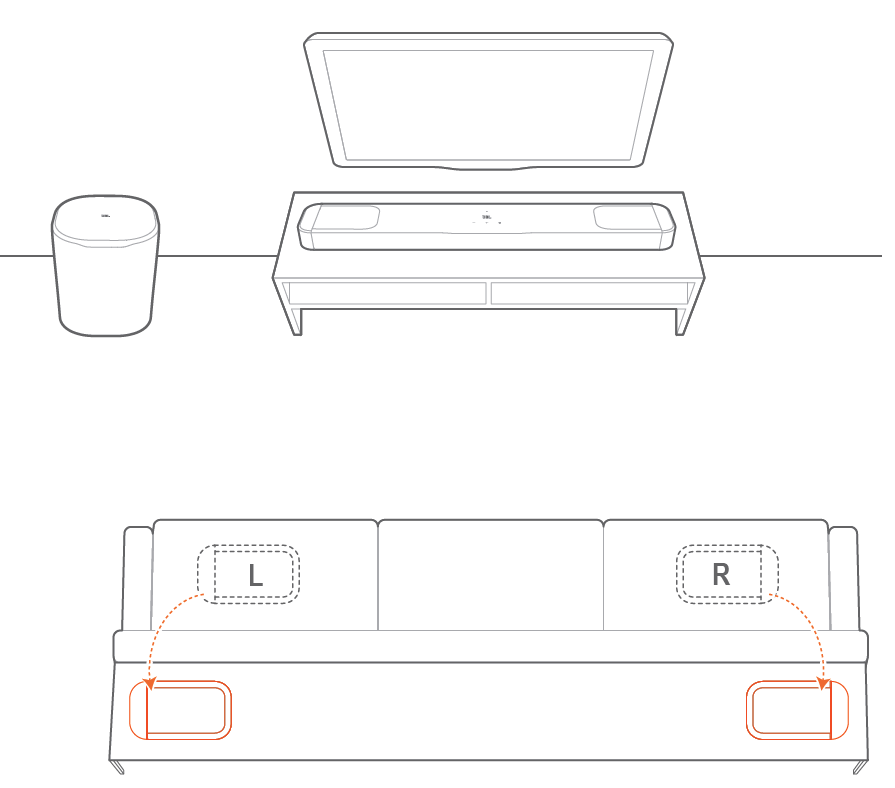
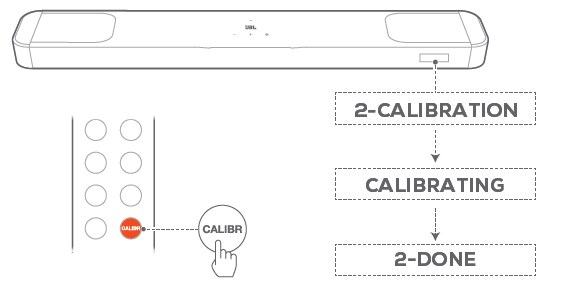
On the remote control, press / CALIBR.
- “2-CALIBRATION” is displayed on the soundbar.
- Countdown starts from 5 to 1.
- Calibration tone is heard. Audio calibration starts. “CALIBRATING”: Calibration in progress
- “2-DONE”: Calibration of the speaker position is completed successfully.
NOTES
- During sound calibration, all buttons on the remote control are disabled except
 for and / CALIBR.
 - During sound calibration, environmental sound will be recorded.
- Hold / CALIBR for 10 seconds, then press
 / recorded audio (for US version only).
Dolby Atmos / DTS:X
With Dolby Atmos or DTS:X, overhead audio distribution is provided for powerful 3D sound immersion.
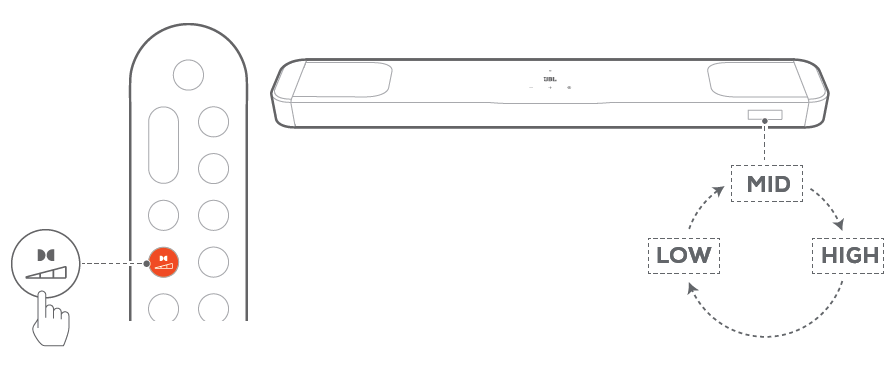
- To play the surround sound of Dolby Atmos or DTS:X, connect and play your Blu-ray player or streaming device as described under “5.1 Connect with your TV and digital devices”.
- To select suitable strength for Dolby Atmos or DTS:X, press
 on remote control to toggle between middle (default), high, or low.
NOTE:
- The Dolby Atmos or DTS:X sound effects are respectively applicableto Dolby or DTS:X audio content only.
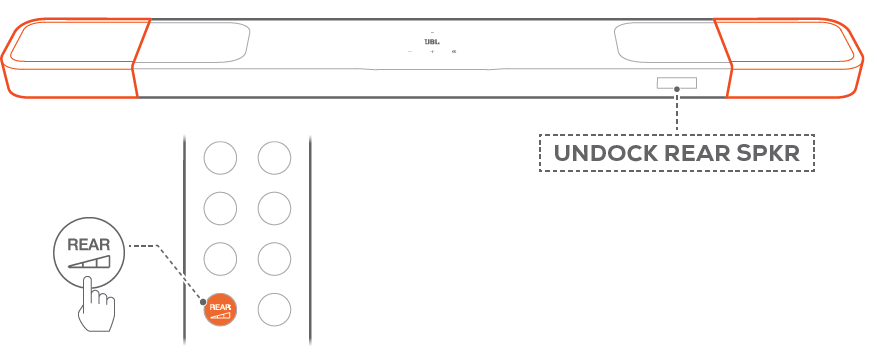
Rear adjustment
With both detachable rear speakers undocked, you can adjust the surround sound level.
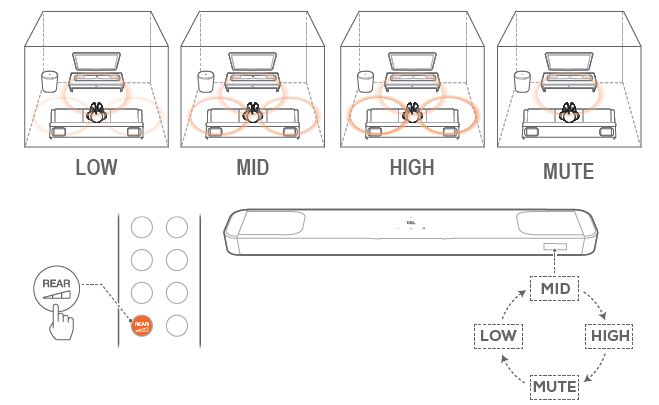
- Check that the soundbar and the detachable rear speakers are connected wirelessly (See “6.1 Connect the detachable rear speakers and subwoofer”).
- On the remote control, press
 to toggle between surround sound levels.
“MID”/“HIGH”/“MUTE”/“LOW” is displayed (Default: “MID”).
“UNDOCK REAR SPKR” is displayed if the detachable rear speakers have been docked onto the soundbar.
Bass adjustment
You can make bass adjustment as needed.
On the remote control, press / to toggle between bass levels.
- → “LVL1” to “LVL5” is displayed (Default: “LVL3”).
PRODUCT SPECIFICATIONS
General specification:
- Model: BAR 1000MK2 (soundbar unit)
BAR 1000MK2 SURROUND (detachable speaker) BAR 1000MK2 SUB (subwoofer unit) - Sound system: 7.1.4 channel
- Power supply: 100 - 240 V AC, ~ 50/60 Hz
- Total speaker power output* (Max. @THD 1%): 960 W
- Soundbar output power** (Max. @THD 1%): 500 W
- Surround speaker output power*** (Max. @THD 1%) 2 x 80 W
- Subwoofer output power**** (Max. @THD 1%): 300 W
- Soundbar transducer: 6 x (44 x 80) mm racetrack drivers, 2 x 1” (25 mm) tweeters, 2 x 2.75” (70 mm) up-firing full-range drivers
- Surround speaker transducer: 2 x (44 x 90) mm racetrack drivers, 2 x 2.75” (70 mm) up-firing full-range drivers
- Subwoofer transducer: 10” (260 mm)
- Networked standby power: <2.0 W
- Operating temperature: 0 °C - 45 °C
- Lithium battery: 3.635 V, 6600 mAh
- Detachable surround speaker playtime: up to 10 hours (may vary according to content type and volume level)
HDMI specification
- HDMI video input: 3
- HDMI video output (with Enhanced Audio Return Channel, eARC): 1
- HDMI HDCP version: 2.3
- HDR pass through: HDR10+, Dolby Vision
Audio specification
- Frequency response: 33 Hz - 20 kHz (-6 dB)
- Audio inputs: Optical, Bluetooth, USB (USB playback is available in US version. For other versions, USB is for Service only.)
USB specification
- USB port: Type A
- USB rating: 5 V DC, 0.5 A
- Supporting file formats: mp3
- MP3 codec: MPEG 1 Layer 2/3, MPEG 2 Layer 3, MPEG 2.5 Layer 3
- MP3 sampling rate: 16 - 48 kHz
- MP3 bitrate: 80 - 320 kbps
Wireless specification
- Bluetooth version: v5.3
- Bluetooth profile: A2DP v1.3, AVRCP v1.5
- Bluetooth transmitter frequency range 2400 MHz - 2483.5 MHz
- Bluetooth transmitter power: <15 dBm (EIRP)
- Wi-Fi network: IEEE 802.11 a/b/g/n/ac/ax (2.4 GHz / 5 GHz)
- 2.4G Wi-Fi transmitter frequency range: 2412 - 2472 MHz (2.4 GHz ISM Band, USA 11 Channels, Europe and others 13 Channels)
- 2.4G Wi-Fi transmitter power: <20 dBm (EIRP)
- 2.4G wireless transmitter frequency range 2406 - 2474 MHz
- 2.4G wireless transmitter power: <10 dBm (EIRP)
- 5G Wi-Fi transmitter frequency range: 5.15 - 5.35 GHz, 5.470 - 5.725 GHz, 5.725 - 5.825 GHz
- 5G Wi-Fi transmitter power: 5.15 - 5.25 GHz <23 dBm, 5.25 - 5.35 GHz & 5.470 - 5.725 GHz <20 dBm 5.725 - 5.825 GHz <14 dBm (EIRP)
- Note: Band 5.6 - 5.64 GHz will be disabled when shipped to Australia / New Zealand.
Dimensions
- Total soundbar dimensions (W x H x D): 1203 x 52 x 128 mm / 47.4” x 2.0” x 5.0”•
- Soundbar dimensions (W x H x D): 854 x 52 x 128 mm / 33.6” x 2.0” x 5.0”
- Detachable surround speaker dimensions (each) (W x H x D): 189 x 52 x 128 mm / 7.4” x 2.0” x 5.0”
- Subwoofer dimensions (W x H x D): 325 x 400 x 325 mm / 12.8” x 15.7” x 12.8”• Soundbar weight: 5.5 kg / 12.1 lbs
- Detachable surround speaker weight (each): 0.9 kg / 2 lbs
- Subwoofer weight: 9.1 kg / 20 lbs
- Packaging dimensions (W x H x D): 980 x 398 x 495 mm / 38.58” x 15.67” x 19.49”
- Packaging weight: 22.6 kg / 49.8 lbs (EMEA/UK/AU/NZ); 19.9 kg / 44.4 lbs (Others)
- RMS @THD 1%: 480 W
- RMS @THD 1%: 250 W
- RMS @THD 1%: 2 x 40 W
- RMS @THD 1%: 150 W
TROUBLESHOOTING
Never try to repair the product yourself. If you have problems using this product, check the following points before you request services.
System
The unit will not turn on.
- Check if the power cord is plugged into power and the soundbar.
The soundbar has no response to button pressing.
- Restore the soundbar to factory settings (See “9. RESTORE FACTORY SETTINGS”).
Sound
No sound from soundbar
- • Make sure that the soundbar is not muted.
• Select the correct audio input source on the remote control.
• Connect the soundbar to your TV or other devices properly.
• Restore the soundbar to factory settings (See “9. RESTORE FACTORY SETTINGS”).
Distorted sound or echo
- If you play audio from your TV through the soundbar, make sure that your TV is muted or the built-in TV speaker is disabled.
Audio and video are not synchronized.
- Enable the audio sync function to synchronize audio and video (See “8.1 Audio sync”).
No height sound effects of Dolby Atmos
- If your TV supports HDMI ARC only, make sure that you have connected your digital device to the soundbar through the HDMI (1/ 2 / 3) / HDMI IN (1/ 2/ 3) connector on the soundbar (See “5.1.2 TV (HDMI ARC)”)
- Enjoy the sound effects of Dolby Atmos when you play movies from the TV / HDMI source. For audio streaming over Bluetooth or casting apps (enabled by Google Cast or AirPlay), Dolby Atmos is not supported.
Bluetooth
A device cannot be connected with the soundbar.
- Check if you have enabled Bluetooth on the device.
- If the soundbar has been paired with another Bluetooth device, reset Bluetooth (see “5.2.3 Connect to another Bluetooth device”).
- If your Bluetooth device has ever been paired with the soundbar, reset Bluetooth on the soundbar, unpair the soundbar on the Bluetooth device, and then pair the Bluetooth device with the soundbar again (se“5.2.3 Connect to another Bluetooth device”).
Poor audio quality from a connected Bluetooth device
- The Bluetooth reception is poor. Move the source device closer to the soundbar, or remove any obstacle between the source device and the soundbar.
The connected Bluetooth device connects and disconnects constantly.
- The Bluetooth reception is poor. Move the source device closer to the soundbar, or remove any obstacle between the source device and the soundbar.
Wi-Fi
Failed to connect to Wi-Fi.
- Make sure that Wi-Fi is turned on.
- Make sure that you have selected the right network and entered the correct password.
- Make sure that your router or modem is turned on and within the range.
- In your router settings, make sure that you have set the security type to WPA2 or auto.
- Make sure that your soundbar is connected to the same wireless LAN as your smartphone or tablet.
- If you have difficulties in setting up Wi-Fi, re-enter the Wi-Fi setup mode by holding and on the soundbar until “SETUP WIFI” is displayed.
Playback
AirPlay cannot find the soundbar as an AirPlay speaker for music streaming.
- On your Apple device, update the software to the latest version: iOS 13.4 and later, Mac OS 10.15.4 and later, or TV OS 14.3.
- Make sure that your Apple device has been connected to the same network as the soundbar.
- For a PC running iTunes for Windows, you can stream music from your PC to the soundbar through Bluetooth.
Music playback does not work smoothly when the sound source switches from Bluetooth to Google Cast or AirPlay.
- The quality of audio casting and playback are dependent on the traffic and coverage of the network that connects the soundbar and your casting devices, such as phones, tablets and PCs.
Music playback does not resume when the sound source switches from Bluetooth to TV / HDMI IN, and then back to Bluetooth.
- The music playback in the Bluetooth device stops when the sound source switches from Bluetooth to TV / HDMI IN. When you switch back to the Bluetooth source, start music playback in the Bluetooth device again.
Remote control
The remote control does not work.
- Check if the batteries are drained. If so, replace them with new ones.
- Reduce the distance and angle between the remote control and the main unit.
Failed to complete the TV remote control learning.
- Check if you are using an infra-red TV remote control. The IR learning is not supported by a Bluetooth TV remote control.
Pros and Cons of the JBL Speaker Bar 1000MK2
Pros:
- Immersive Audio Experience: Offers true Dolby Atmos and DTS:X support for a cinematic sound environment.
- Detachable Rear Speakers: Wireless speakers can be placed anywhere in the room, providing real surround sound without cables.
- Powerful Performance: With a 960W max output and a 10-inch subwoofer, it delivers deep bass and clear highs.
- Smart Features: Includes MultiBeam 3.0 for a wide soundstage and PureVoice 2.0 for enhanced dialogue clarity.
Cons:
- Price Point: Priced in the premium range, which may be out of budget for some users.
- Power Consumption: Requires regular charging of the rear speakers to maintain functionality.
- Size and Weight: The soundbar and subwoofer are substantial, requiring dedicated space in the room.
Compared to alternatives, the JBL Speaker Bar 1000MK2 offers excellent value for money, providing a complete home theater setup with advanced features. However, its price and size may deter some potential buyers.
Customer Reviews and Feedback
Users generally praise the JBL Speaker Bar 1000MK2 for its immersive sound quality and versatility. Common praises include the system's ability to enhance movie nights with true surround sound and its ease of setup. However, some users mention that the rear speakers' battery life could be improved, and the system's overall cost might be prohibitive for some budgets.
On average, the system receives a 4.5-star rating, with testimonials highlighting its ability to transform home entertainment experiences. If you're looking for a premium soundbar system that offers a complete home theater experience, the JBL Speaker Bar 1000MK2 is a strong contender. However, it's important to consider the cost and space requirements before making a purchase.
Faqs
How do I set up the jbl Speaker Bar 1000MK2 for the first time with detachable speakers?
What should I do if the detachable rear speakers on my jbl Speaker Bar 1000MK2 are not charging?
Can the jbl Speaker Bar 1000MK2 be connected to any TV, and what connectivity options are available?
How do I perform a factory reset on the jbl Speaker Bar 1000MK2 if it’s unresponsive?
What features of the jbl Speaker Bar 1000MK2 enhance the surround sound experience?
How do I calibrate the audio on the jbl Speaker Bar 1000MK2 for optimal listening?
Are there any maintenance tips to ensure longevity of the jbl Speaker Bar 1000MK2 and its detachable speakers?
Can I control the jbl Speaker Bar 1000MK2 with voice commands or smart home devices?
More jbl manuals
- How to Pair: Jbl Speaker Charge 5 User Manual
- How to Pair: Jbl Speaker Bar 800MK2 User Manual
- How to Use: Jbl Flip 7 Tomorrowland Speaker User Manual
- Setup & Pairing: Jbl Speaker Bar 500MK2 User Manual
- How To Use: Jbl Go Essential 2 Personalized Speaker User Manual
- How to Setup: Jbl Speaker Bar 300MK2 User Guide
Leave a Comment