
How to Setup: Jbl Speaker Bar 300MK2 User Guide
Content
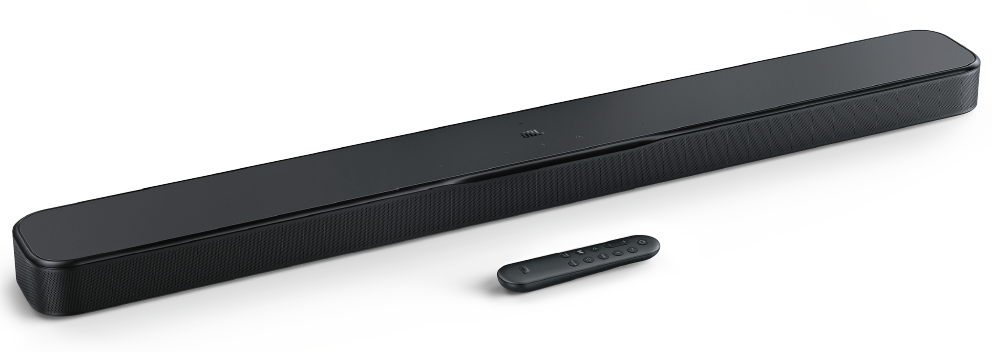
JBL Speaker Bar 300MK2
Introduction
The JBL Speaker Bar 300MK2 is a sophisticated 5.0-channel all-in-one soundbar designed to elevate your home entertainment experience with immersive cinematic sound. Delivering a powerful 450W total output, this soundbar features integrated bass drivers that eliminate the need for a separate subwoofer, making it an ideal choice for compact living spaces and easy setup. Equipped with Dolby Atmos® and JBL's MultiBeam™ 3.0 technology, it creates a wide, three-dimensional soundstage that fills your room with clear, immersive audio, including height effects for true surround sound.
Targeted at home cinema enthusiasts, gamers, and music lovers who seek high-quality audio without the complexity of multi-component systems, the JBL Bar 300MK2 boasts PureVoice 2.0 technology for crystal-clear dialogue, ensuring every word is crisp and intelligible. Its compatibility with all TV brands via HDMI eARC and 4K Dolby Vision passthrough makes it future-proof for modern video setups.
Available globally, the JBL Speaker Bar 300MK2 is priced approximately between $300 and $400, offering excellent value for its features and audio quality. Its compact design and smart features, including app-based sound customization through the JBL ONE App, make it a versatile soundbar suited for bedrooms, apartments, or cozy living rooms where space and sound quality both matter.
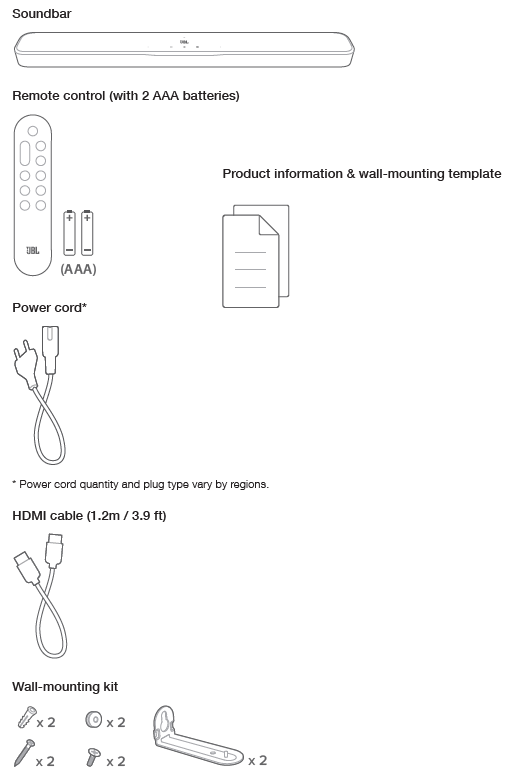
WHAT’S IN THE BOX
PRODUCT SPECIFICATIONS
General specification
- Model: BAR 300MK2
- Sound system: 5.0 channel
- Power supply: 100 - 240 V AC, ~ 50/60 Hz
- Total speaker power output (Max. @THD 1%): 450W
- Soundbar transducer: 5 x (42 x 80) mm racetrack drivers, 4 x 0.75" (20 mm) tweeters
- Networked standby power: <2.0 W
- Operating temperature: 0 °C - 45 °C
HDMI specification
- HDMI video input: 1
- HDMI video output (with Enhanced Audio Return Channel, eARC): 1
- HDMI HDCP version: 2.3
- HDR pass through: HDR10+, Dolby Vision
Audio specification
- Frequency response: 50 Hz - 20 kHz (-6 dB)
- Audio inputs: Optical, Bluetooth, USB (USB playback is available in the US version. For other versions, USB is for Service only.)
USB specification (Audio playback is for the US version only)
- USB port: Type A
- USB rating: 5 V DC, 0.5 A
- Supporting file format: MP3
- MP3 codec: MPEG 1 Layer 2/3, MPEG 2 Layer 3, MPEG 2.5 Layer 3
- MP3 sampling rate: 16 - 48 kHz
- MP3 bitrate: 80 - 320 kbps
Wireless specification
- Bluetooth version: v5.3
- Bluetooth profile: A2DP v1.3, AVRCP v1.5
- Bluetooth transmitter frequency range: 2400 MHz - 2483.5 MHz
- Bluetooth transmitter power: <15 dBm (EIRP)
- Wi-Fi network: IEEE 802.11 a/b/g/n/ac/ax (2.4 GHz / 5 GHz)
- 2.4G Wi-Fi transmitter frequency range: 2412 - 2472 MHz (2.4 GHz ISM Band, USA 11 Channels, Europe and others 13 Channels)
- 2.4G Wi-Fi transmitter power: <20 dBm (EIRP)
- 5G Wi-Fi transmitter frequency range: 5.15 - 5.35 GHz, 5.470 - 5.725 GHz, 5.725 - 5.825 GHz
- 5G Wi-Fi transmitter power: 5.15 - 5.25 GHz <23 dBm, 5.25 - 5.35 GHz & 5.470 - 5.725 GHz <20 dBm, 5.725 - 5.825 GHz <14 dBm (EIRP)
Note: Band 5.6 - 5.64 GHz will be disabled when shipped to Australia / New Zealand.
Dimensions
- Main soundbar dimensions (W x H x D): 940 x 50.5 x 104 mm / 37" x 2.0" x 4.1"
- Soundbar weight: 2.9 kg / 6.5 lbs
- Packaging dimensions (W x H x D):1180 x 120 x 160 mm / 46.5" x 4.7" x 6.3"
- Packaging weight: 4.8 kg / 10.6 lbs
- RMS @THD 1%: 225 W
PRODUCT OVERVIEW
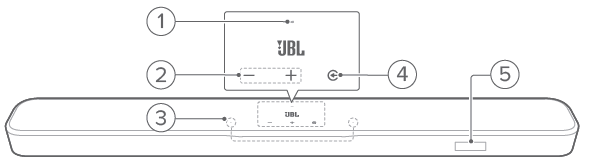
Front panel & Top panel
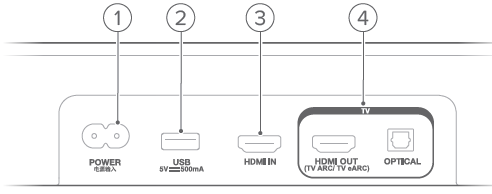
Back panel
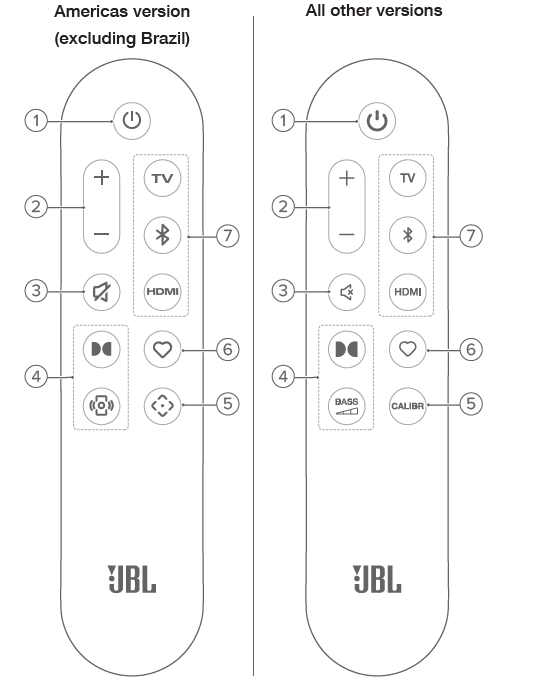
Americas version (excluding Brazil)
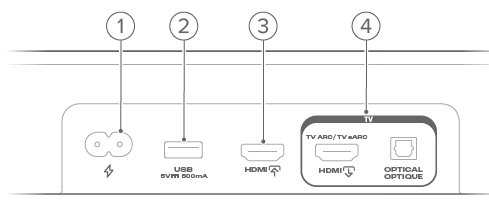
All other versions
Remote control
IMPORTANT SAFETY INSTRUCTIONS
Verify Line Voltage Before Use
The JBL BAR 300MK2 has been designed for use with 100-240 volt, 50/60 Hz AC. Connection to a line voltage other than that for which your product is intended can create a safety and fire hazard and may damage the unit. If you have any questions about the voltage requirements for your specific model or about the line voltage in your area, contact your retailer or customer service representative before plugging the unit into a wall outlet.
Do Not Use Extension Cords
To avoid safety hazards, use only the power cord supplied with your unit. We do not recommend that extension cords be used with this product. As with all electrical devices, do not run power cords under rugs or carpets, or place heavy objects on them. Damaged power cords should be replaced immediately by an authorized service center with a cord that meets factory specifications.
Handle the AC Power Cord Gently
When disconnecting the power cord from an AC outlet, always pull the plug; never pull the cord. If you do not intend to use this speaker for any considerable length of time, disconnect the plug from the AC outlet.
Do Not Open the Cabinet
There are no user-serviceable components inside this product. Opening the cabinet may present a shock hazard, and any modification to the product will void your warranty. If water accidentally falls inside the unit, disconnect it from the AC power source immediately, and consult an authorized service center.
TROUBLESHOOTING
Never try to repair the product yourself. If you have problems using this product, check the following points before you request services.
System
The unit will not turn on.
- Check if the power cord is plugged into the power and the soundbar.
The soundbar has no response to button presses.
- Restore the soundbar to factory settings (See “8.2 Factory reset”).
Sound
No sound from the soundbar
- Make sure that the soundbar is not muted.
- Select the correct audio input source on the remote control.
- Connect the soundbar to your TV or other devices properly
- Restore the soundbar to factory settings (See “8.2 Factory reset”).
Distorted sound or echo
- If you play audio from your TV through the soundbar, make sure that your TV is muted or the built-in TV speaker is disabled.
Audio and video are not synchronized.
- Enable the audio sync function to synchronize audio and video (See “8.1 Sound settings (Audio sync)”).
No height sound effects of Dolby Atmos
- If your TV supports HDMI ARC only, make sure that you have connected your digital device to the soundbar through the HDMI / HDMI IN connector on the soundbar (See “5.1.2 TV (HDMI ARC)”)
- Enjoy the sound effects of Dolby Atmos when you play movies from the TV / HDMI source. For audio streaming over Bluetooth or casting apps (enabled by Google Cast or AirPlay), Dolby Atmos is not supported.
Bluetooth
A device cannot be connected to the soundbar.
- Check if you have enabled Bluetooth on the device.
- If the soundbar has been paired with another Bluetooth device, reset Bluetooth (See “5.2.3 Connect to another Bluetooth device”).
- If your Bluetooth device has ever been paired with the soundbar, reset Bluetooth on the soundbar, unpair the soundbar from the Bluetooth device, and then pair the Bluetooth device with the soundbar again (See “5.2.3 Connect to another Bluetooth device”).
Poor audio quality from a connected Bluetooth device
- The Bluetooth reception is poor. Move the source device closer to the soundbar, or remove any obstacle between the source device and the soundbar.
The connected Bluetooth device connects and disconnects constantly.
- The Bluetooth reception is poor. Move the source device closer to the soundbar, or remove any obstacle between the source device and the soundbar.
Wi-Fi
Failed to connect to Wi-Fi
- Make sure that Wi-Fi is turned on.
- Make sure that you have selected the right network and entered the correct password.
- Make sure that your router or modem is turned on and within the range.
- In your router settings, make sure that you have set the security type to WPA2 or auto.
- Make sure that your soundbar is connected to the same wireless LAN as your smartphone or tablet.
- If you have difficulties in setting up Wi-Fi, re-enter the Wi-Fi setup mode by holding and on the soundbar until “SETUP WIFI” is displayed.
Playback
AirPlay cannot find the soundbar as an AirPlay speaker for music streaming.
- On your Apple device, update the software to the latest version: iOS 13.4 and later, macOS 10.15.4 and later, or tvOS 14.3.
- Make sure that your Apple device has been connected to the same network as the soundbar.
- For a PC running iTunes for Windows, you can stream music from your PC to the soundbar through Bluetooth.
Music playback does not work smoothly when the sound source switches from Bluetooth to Google Cast or AirPlay.
- The quality of audio casting and playback is dependent on the traffic and coverage of the network that connects the soundbar and your casting devices, such as phones, tablets, a nd PCs.
Music playback does not resume when the sound source switches from Bluetooth to TV / HDMI IN, and then back to Bluetooth.
- The music playback in the Bluetooth device stops when the sound source switches from Bluetooth to TV / HDMI IN. When you switch back to the Bluetooth source, start music playback in the Bluetooth device again.
Remote control
The remote control does not work.
- Check if the batteries are drained. If so, replace them with new ones.
- Reduce the distance and angle between the remote control and the main unit.
Failed to complete the TV remote control learning
- Check if you are using an infra-red TV remote control. The IR learning is not supported by a Bluetooth TV remote control.
Pros & Cons of the JBL Speaker Bar 300MK2
Pros:
- Powerful 450W Output: Delivers robust, room-filling sound without needing an external subwoofer, ideal for small to medium-sized rooms.
- Dolby Atmos & MultiBeam™ 3.0: Virtual surround sound with height effects provides a cinematic audio experience through digital processing.
- PureVoice 2.0 Technology: Enhances voice clarity, making dialogue easy to hear in movies and TV shows.
- Simple Setup & Compatibility: Works seamlessly with all TV brands via HDMI eARC and supports 4K Dolby Vision passthrough for uncompromised video quality.
- Integrated Bass Drivers: Eliminates the need for a separate subwoofer, ensuring bass is well-integrated and punchy within the soundbar’s profile.
- JBL ONE App Support: Allows personalized sound settings, streaming service access, and firmware updates.
Cons:
- No Dedicated Subwoofer: Though bass is solid, it lacks the visceral, chest-thumping impact offered by soundbars with separate subwoofers, which may affect action movie immersion.
- Limited HDMI Inputs: Only one HDMI input is available, which might require users to rely on an external switch for multiple devices.
- USB Playback Restricted: USB audio playback is available only in the US version, limiting media playback options elsewhere.
- Not Ideal for Large Rooms: Its 5.0 channel setup and integrated drivers suit smaller spaces better than expansive home theaters.
Customer Reviews and Feedback on the JBL Speaker Bar 300MK2
The JBL Speaker Bar 300MK2 enjoys generally positive reviews, averaging between 4.0 to 4.5 stars from verified users. Many customers praise its clear dialogue delivery and easy integration with smart TVs, highlighting the convenience of a single soundbar without a separate subwoofer. Users appreciate the crispness of vocals due to PureVoice 2.0 and the immersive effect created by Dolby Atmos virtualization.
Common compliments include its compact size, stylish design, and robust bass for a standalone soundbar. Several users recommend it for bedroom setups or apartments where space is limited but sound quality remains a priority.
However, some complaints focus on the lack of a dedicated subwoofer, noting that deep bass impact during intense action scenes or music playback is somewhat limited compared to multi-component systems. A few users mention that the single HDMI input can be restrictive, requiring additional accessories for multiple device connections.
Overall, the JBL Bar 300MK2 is highly recommended for those seeking a balance of simplicity, audio quality, and value, especially for casual home entertainment and music streaming.
More jbl manuals
Leave a Comment