
Pairing & Usage: Jbl Tour Pro 2 Earphones User Manual
Content
JBL Tour Pro 2 Earphones
Introduction
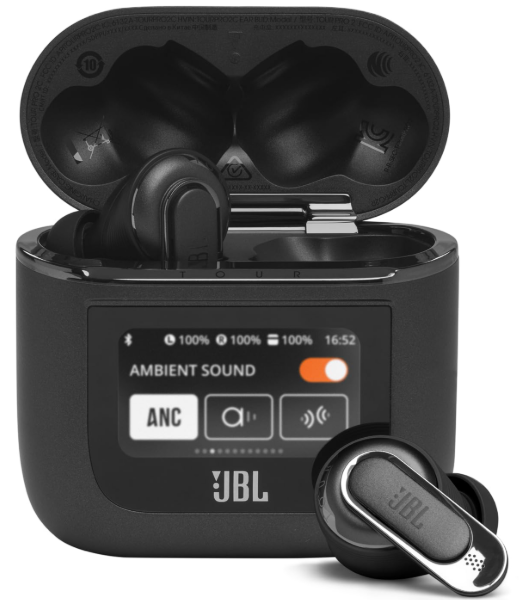
The JBL Tour Pro 2 Earphones deliver a premium true wireless audio experience, combining advanced technology with user-friendly features designed for audiophiles and everyday users alike. These earbuds are engineered for those seeking high-fidelity sound, adaptive noise cancellation, and smart controls, making them ideal for commuters, remote workers, fitness enthusiasts, and travelers.
Featuring JBL's Pro Sound with 10mm dynamic drivers, the Tour Pro 2 offers clear, powerful audio with deep bass and minimal distortion, even in noisy environments. The earbuds include True Adaptive Noise Cancelling technology that automatically adjusts the level of noise cancellation based on your surroundings using four dedicated noise-sensing microphones. Additionally, the Smart Ambient and TalkThru modes allow you to stay aware of your environment or amplify nearby voices without removing the earbuds.
The innovative Smart Charging Case includes a touchscreen display that lets you control settings, check battery status, and manage playback without needing your phone or the app. With Bluetooth 5.3 connectivity, these earbuds provide a stable and fast wireless experience, compatible with rapid pairing on Windows and Android devices. The JBL Tour Pro 2 also supports touch controls on the earbuds for intuitive operation.
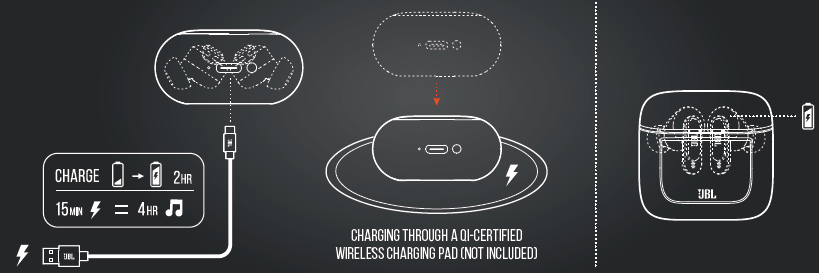
Offered in stylish black or champagne colors, these earbuds boast IPX5 water resistance for durability during workouts and outdoor use. The battery life ranges from 10 to 30 hours depending on ANC settings, with speed charging providing up to 4 hours of playback from just 15 minutes of charging. The JBL Tour Pro 2 typically retails around $249 and is widely available through JBL's official website and major electronics retailers worldwide.
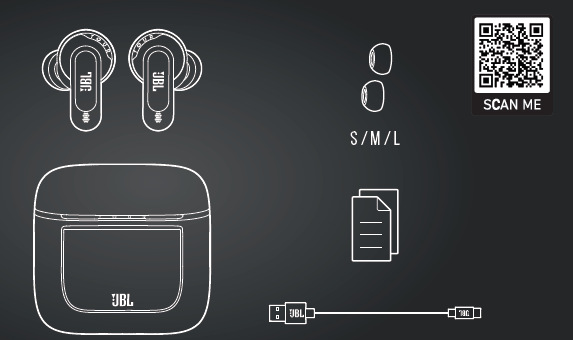
WHAT’S IN THE BOX
SPECIFICATION
- Model: TOUR PRO 2
- Driver size: 10 mm/ 0.394” Dynamic Driver
- Power supply: 5V 1A
- Earbud: 6.1 g per pc (12.2 g combined)/0.01345 lbs per pc (0.0269 lbs combined)
- Charging case: 73 g/ 0.1609 lbs
- Earbud battery type: Lithium-ion polymer (70 mAh/ 3.85 V)
- Charging case battery type: Lithium-ion polymer (850 mAh/ 3.8 V)
- Charging time: 2 hrs from empty
- Music playtime with BT on and ANC off: Up to 10 hrs
- Music playtime with BT on and ANC on: Up to 8 hrs
- Music playtime with BT on and True Adaptive ANC on: Up to 6 hrs
- Talk time with ANC off: Up to 6 hrs
- Talk time with ANC on: Up to 5.5 hrs
- Frequency response : 20 Hz - 20 kHz
- Impedance: 16 ohmsohms
- Sensitivity: 100 dB SPL@1 kHz
- Maximum SPL: 95 dB
- Microphone sensitivity: -38 dBV/Pa@1 kHz
- Bluetooth version (Earbud): 5.3
- Bluetooth version (Charging case): 5.1
- Bluetooth profile version: A2DP V1.3.2, AVRCP V1.6.2, HFP V1.7.2
- Bluetooth transmitter frequency range: 2.4 GHz - 2.4835 GHz
- Bluetooth transmitter power: <15 dBm (EIRP)
- Bluetooth transmitter modulation(Earbud): GFSK, π/4-DQPSK, 8-DPSK
- Bluetooth transmitter modulation(Charging case): GFSK
- Maximum operation temperature: 45 °C
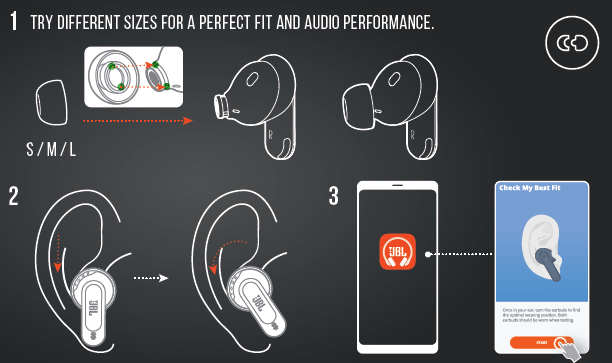
How to wear
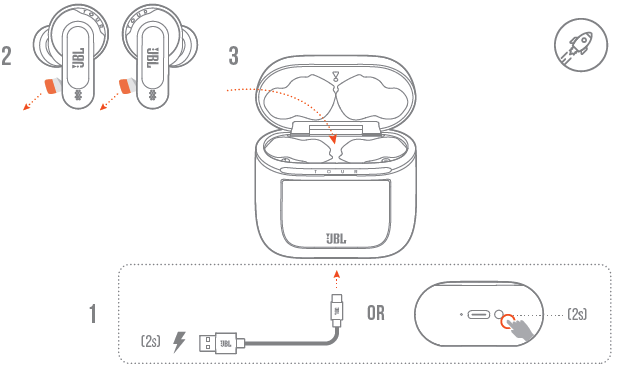
First-time use
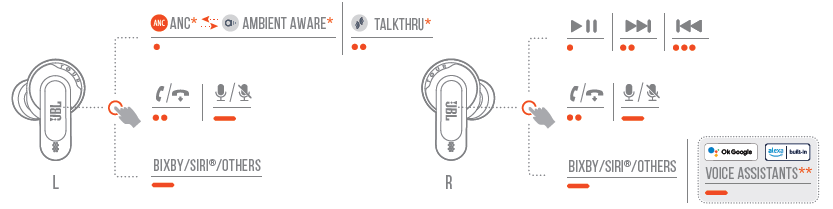
CONTROLS
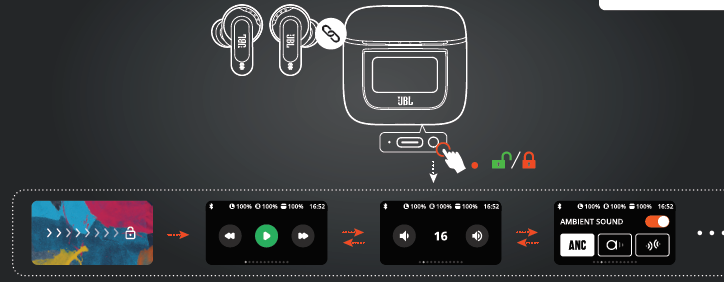
Charging
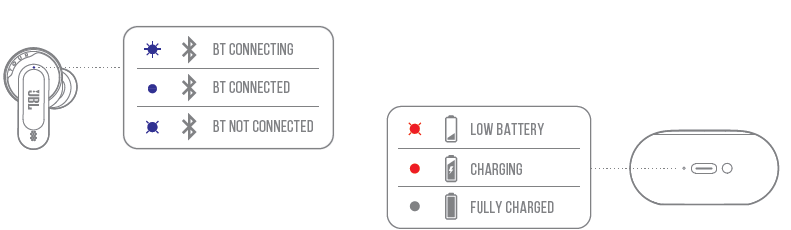
Led behaviors
Troubleshooting JBL Tour Pro 2 Earphones: Common Issues and Solutions
Users of the JBL Tour Pro 2 Earphones may encounter occasional issues such as pairing difficulties, audio dropouts, or unresponsive touch controls. Here are some common problems and fixes:
- Pairing Problems: Ensure Bluetooth 5.3 compatibility and that the earbuds are fully charged. Reset the earbuds by placing them in the charging case and holding down the case button for 10 seconds.
- Audio Dropouts or Distortion: Check for interference from other wireless devices. Reconnect the earbuds and update the firmware via the JBL Headphones app.
- Touch Controls Not Responding: Clean the earbuds’ touch surfaces gently. If the issue persists, restart the earbuds or reset them as above.
- Error Codes: While specific error codes are rare, the LED indicators on the case provide status alerts. Refer to the user manual for detailed LED meanings.
Preventive measures include keeping the earbuds and case clean, avoiding exposure to extreme temperatures, and updating software regularly. The JBL Tour Pro 2 comes with a standard manufacturer's warranty covering defects, and JBL offers customer support through their website, phone, and authorized service centers for troubleshooting assistance.
For warranty claims or technical support, contact JBL customer care via their official website or call the support hotline, generally available 24/7.
Pros & Cons of JBL Tour Pro 2 Earphones
Pros
- Superior Sound Quality: Pro Sound with 10mm drivers delivers rich bass and clear mids/highs, suitable for diverse music genres.
- Adaptive Noise Cancellation: True Adaptive ANC effectively reduces ambient noise and features modes like Smart Ambient and TalkThru for situational awareness.
- Innovative Smart Charging Case: Touchscreen controls on the case eliminate frequent phone use for settings adjustments, enhancing usability.
- Comfort and Durability: Lightweight earbuds with IPX5 water resistance make them ideal for workouts and outdoor activities.
- Long Battery Life & Speed Charging: Up to 30 hours of playback with ANC off and quick charging providing 4 hours from a 15-minute charge.
Cons
- Higher Price Point: At around $249, they are more expensive than some competitors offering similar features.
- No Advanced Codec Support: Lacks aptX or LDAC, which some rivals like Sony WF-1000XM5 offer for higher-resolution Bluetooth audio.
- Touch Controls Learning Curve: Fixed touch gestures may require time to master, and accidental touches can occur.
- Spatial Audio Limitations: While JBL supports immersive sound, spatial audio performance is less refined compared to premium Bose or Apple earbuds.
Customer Reviews of JBL Tour Pro 2 Earphones
Customers frequently praise the JBL Tour Pro 2 Earphones for their excellent noise cancellation and sound clarity, especially highlighting the deep bass and crisp vocals. Many users find the Smart Charging Case’s touchscreen a unique and convenient feature that enhances control without needing their phones.
Common complaints include the relatively high price and the complexity of touch controls, where some users report accidental gestures or a learning curve to operate all functions smoothly. A few reviews mention the absence of advanced Bluetooth codecs, which audiophiles miss for higher-resolution audio streaming.
Overall, the earbuds receive an average rating of approximately 4.5 out of 5 stars from verified buyers. Reviewers recommend the JBL Tour Pro 2 for users who prioritize ANC, battery life, and smart features, but suggest considering alternatives if you seek specific codec support or spatial audio enhancements.
Faqs
How do I set up my JBL Tour Pro 2 Earphones for the first time?
What should I do if my JBL Tour Pro 2 Earphones are not connecting to Bluetooth?
How do I use the Active Noise Cancellation (ANC) features on the JBL Tour Pro 2 Earphones?
Are JBL Tour Pro 2 Earphones compatible with both Android and iOS devices?
What can I do if the touch controls on my JBL Tour Pro 2 Earphones are not responding properly?
How can I maximize the battery life of my JBL Tour Pro 2 Earphones?
What maintenance tips should I follow to keep my JBL Tour Pro 2 Earphones in good condition?
How do the JBL Tour Pro 2 Earphones improve call quality in noisy environments?
More jbl manuals
- How to Pair: Jbl Live 770NC Headphones User Manual
- Setup & Pairing: Jbl Tour One M2 Headphone User Manual
- How to Setup: Jbl Speaker Bar 1300MK2 User Guide
- Pairing & Usage: Jbl Soundgear Sense Earphones User Manual
- How to Setup: Jbl Speaker Bar 300MK2 User Guide
- Pairing & Usage: Jbl Quantum TWS Air Earphones User Guide
Leave a Comment