
Pairing & Usage: Jbl Soundgear Sense Earphones User Manual
Content
JBL Soundgear Sense Earphones
Introduction
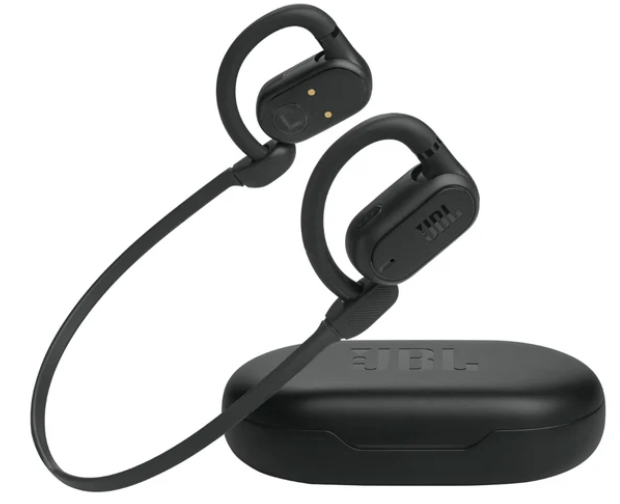
The JBL Soundgear Sense Earphones represent a pioneering advancement in open-ear audio technology, delivering the perfect balance between immersive sound and environmental awareness. Designed with JBL's innovative OpenSound Technology, these true wireless earbuds feature 16.2mm drivers with a unique bass-enhancing algorithm, providing punchy bass and crystal-clear sound without obstructing the ear canal. This open-ear design ensures you stay connected to your surroundings while enjoying your favorite music or calls, making them ideal for outdoor activities, office use, or casual urban exploration.
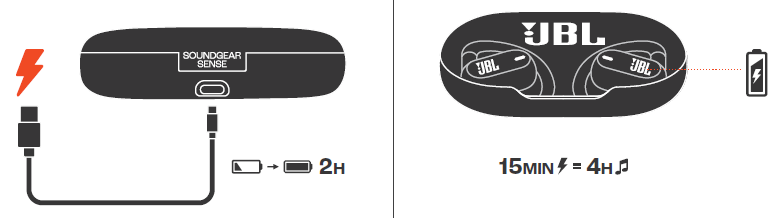
These earphones boast up to 24 hours of combined battery life—6 hours per charge plus 18 additional hours from the charging case—and support fast charging via USB Type-C, delivering 4 hours of playback from just a 15-minute charge. The earbuds are splash and dust resistant with an IP54 rating, perfect for active lifestyles. Equipped with four microphones, they provide crisp and clear voice calls even in windy environments. The flexible, adjustable ear hooks and optional detachable neckband ensure a secure, comfortable fit for extended wear.
Targeted at audiophiles and active users seeking both sound quality and situational awareness, the JBL Soundgear Sense Earphones are available globally through JBL’s official channels and authorized retailers. They are priced in the mid to upper range for premium true wireless open-ear headphones, typically around $150–$180. This combination of advanced features, comfort, and durability positions them as a unique option for those wanting to enjoy music without losing touch with the world around them.
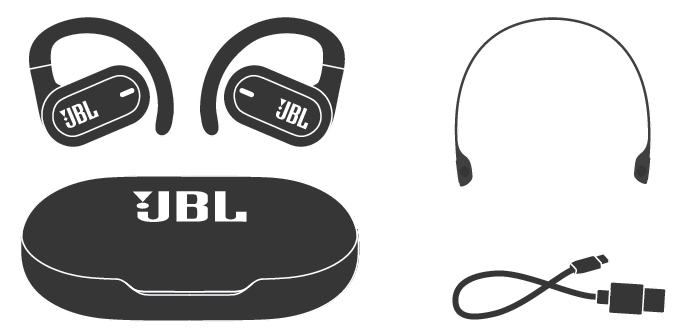
WHAT’S IN THE BOX
Specifcation
- Model: SOUNDGEAR SENSE
- Driver size: 16.2mm/ 0.638" Dynamic Driver
- Power supply: 5V 1A
- Earbud: 13.1 g per pc (26.2 g combined)/ 0.029 lbs per pc (0.058 lbs combined)
- Charging case: 69.5 g/ 0.153 lbs
- Neckband: 5.3 g/ 0.0117 lbs
- Earbud battery type: Lithium-ion battery (70 mAh/ 3.85 V)
- Charging case battery type: Lithium-ion battery (600 mAh/ 3.8 V)
- Charging time: 2 hrs from empty
- Music playtime with BT on: Up to 6 hrs
- Talk time: Up to 3.5 hrs
- Frequency response : 20 Hz – 20 kHz
- Impedance: 32 ohms
- Sensitivity: 112 dB SPL@1 kHz
- Maximum SPL: 90 dB
- Microphone sensitivity: -38 dBV/Pa@1 kHz
- Bluetooth version: 5.3
- Bluetooth profile version: HFP 1.8, A2DP 1.4, AVRCP 1.6.2
- Bluetooth transmitter frequency range: 2.4 GHz - 2.4835 GHz
- Bluetooth transmitter power: <10 dBm
- Bluetooth transmitter modulation: GFSK, π/4-DQPSK, 8DPSK
- Maximum operation temperature: 45 °C
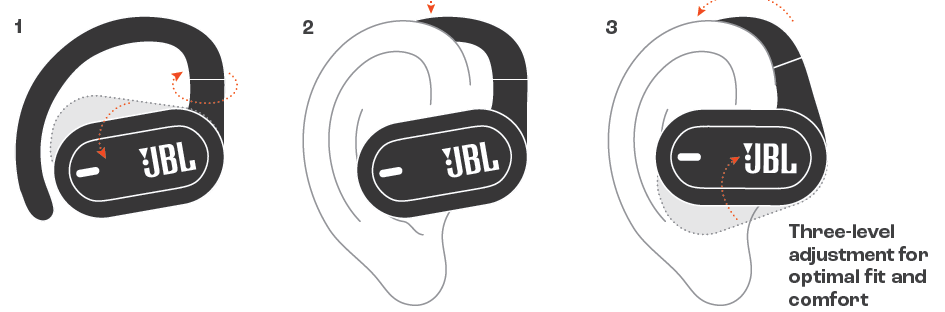
HOW TO WEAR
HOW TO WEAR (OPTIONAL)
.png)
CHARGING
LED BEHAVIORS

Troubleshooting Common Issues with JBL Soundgear Sense Earphones
Users occasionally experience common problems such as connectivity issues, low volume, or charging difficulties with the JBL Soundgear Sense Earphones. To resolve Bluetooth pairing problems, ensure the earbuds are fully charged, reboot your device, and reset the earbuds by holding the touch controls for 10 seconds. If sound is distorted or volume is low, check the earbud fit and adjust ear hooks for proper placement. Cleaning the earbuds and charging contacts regularly can prevent audio quality degradation.
Error codes are rare due to the earbuds’ simplicity, but if the device fails to power on, confirm the charging case has sufficient battery and the charging cable is functional. For persistent charging issues, try using a different USB Type-C cable and power source. Preventive measures include keeping firmware updated via the My JBL Headphones app and avoiding exposure to extreme temperatures or moisture beyond IP54 specifications.
The JBL Soundgear Sense comes with a limited warranty covering manufacturing defects, generally valid for one year from purchase. For support, users can contact JBL customer service through their website or call their regional helpline. Official support includes online troubleshooting guides and direct chat assistance.
Pros & Cons of JBL Soundgear Sense Earphones
Pros
- Innovative OpenSound Technology: Allows users to enjoy music while staying aware of ambient sounds, enhancing safety and versatility.
- Long Battery Life: Up to 24 hours total with fast charging capabilities for uninterrupted listening.
- Enhanced Sound Quality: Dual 16.2mm drivers and bass-enhancing algorithm deliver rich, dynamic audio.
- Comfortable & Secure Fit: Adjustable ear hooks and a detachable neckband provide customization for extended wear.
- Robust Build: IP54-rated splash and dust resistance suitable for active and outdoor use.
Cons
- Charging Case Size: Some users find the case bulkier than typical true wireless cases, limiting portability.
- Ergonomics: Ear hook design may cause discomfort for some users until ears adapt.
- Sound Leakage: Open-ear design means sound leaks slightly, which may be noticeable in very quiet environments.
- Price Point: Slightly higher than average true wireless earbuds, though justified by unique technology.
Compared to traditional in-ear or over-ear wireless earbuds, the JBL Soundgear Sense excels in situational awareness and comfort but may not fully isolate noise for users seeking complete audio immersion.
Customer Reviews of JBL Soundgear Sense Earphones
Customers praise the JBL Soundgear Sense Earphones for their innovative open-ear design, clear sound quality, and long battery life, often highlighting the convenience of hearing ambient sounds during workouts or commutes. Typical ratings range from 4 to 4.5 stars out of 5.
Common compliments include the crisp call quality enhanced by four microphones and the comfortable fit once users adjust to the ear hooks. Many users recommend these earphones for outdoor runners, cyclists, and office workers who value situational awareness.
On the downside, some users report initial ear discomfort and find the charging case somewhat bulky for daily carry. A few mention minor sound leakage, especially at higher volumes, which is inherent to the open-ear design. Despite these points, most reviewers consider the JBL Soundgear Sense a worthwhile investment for its unique blend of sound and openness.
Faqs
How do I set up and pair my JBL Soundgear Sense Earphones for the first time?
What should I do if my JBL Soundgear Sense Earphones are not connecting or pairing with my device?
How can I customize the touch controls on my JBL Soundgear Sense Earphones?
Are JBL Soundgear Sense Earphones compatible with both Android and iOS devices?
What are the key features of JBL Soundgear Sense Earphones that enhance audio and comfort?
How long does the battery last on JBL Soundgear Sense Earphones, and how do I charge them quickly?
How do I maintain and clean my JBL Soundgear Sense Earphones to ensure long-lasting performance?
Can I connect my JBL Soundgear Sense Earphones to multiple devices at once, and how does multipoint connection work?
More jbl manuals
- Setup & Pairing: Jbl Tour One M2 Headphone User Manual
- Pairing & Usage: Jbl Quantum TWS Air Earphones User Guide
- Pairing & Usage: Jbl Tour Pro 2 Earphones User Manual
- Usage & Pairing: Jbl Quantum 360X Wireless for XBOX Headphones User Manual
- How to Pair: Jbl Live 770NC Headphones User Manual
- Pairing: Jbl Quantum 360P Console Wireless Headphones Setup Guide
Leave a Comment