
Usage & Pairing: Jbl Quantum 360X Wireless for XBOX Headphones User Manual
Content
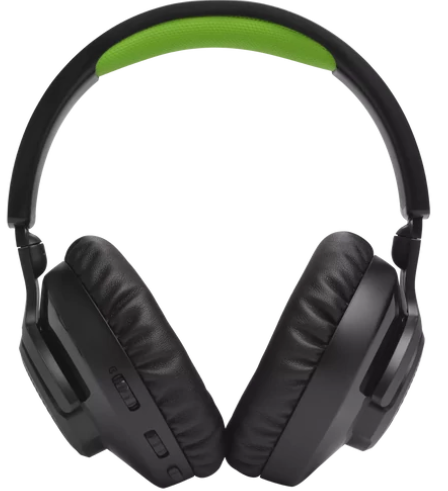
JBL Quantum 360X Wireless for XBOX Headphones
Introduction
Immerse yourself in the ultimate gaming experience with the **JBL Quantum 360X Wireless for XBOX Headphones**. Designed specifically for Xbox, these headphones offer compatibility with Windows Sonic Surround Sound, providing a rich, immersive gaming environment. Equipped with 40mm dynamic drivers, they deliver a frequency response of 20 Hz to 20 kHz, ensuring crisp sound quality. The detachable boom microphone features a frequency response of 100 Hz to 8 kHz, allowing for clear voice communication during team play. With a long-lasting battery life of up to 22 hours via 2.4GHz wireless and up to 26 hours via Bluetooth, these headphones are perfect for extended gaming sessions.
Targeted at serious gamers, the JBL Quantum 360X Wireless offers a seamless wireless experience with no audio drops. It is also compatible with PC and Bluetooth-enabled devices like smartphones and tablets. The estimated price range is around $150 to $200, making it an affordable choice for those seeking high-quality sound without breaking the bank. Availability is widespread across major retailers and online platforms.
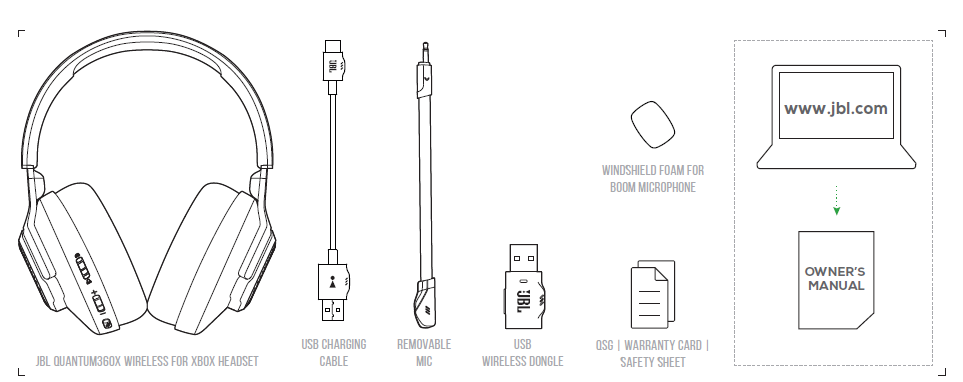
WHAT'S IN THE BOX
- Model: QUANTUM360X WIRELESS FOR XBOX
- Driver size: 40 mm Dynamic drivers
- Frequency response (Passive): 20 Hz - 20 kHz
- Frequency response (Active): 20 Hz - 20 kHz
- Microphone frequency response: 100 Hz - 8 kHz
- Max input power: 30 mW
- Sensitivity: 98 dB SPL @1 kHz / 1 mW
- Maximum SPL: 94 dB
- Microphone sensitivity: -42 dBV / Pa @1 kHz
- Impedance: 32 ohm
- 2.4GHz Wireless transmitter power: < 7 dBm (EIRP)
- 2.4GHz Wireless modulation: GFSK
- 2.4GHz Wireless carrier frequency: 2402 MHz - 2480 MHz
- Bluetooth transmitted power: < 6 dBm (EIRP)
- Bluetooth transmitted modulation: GFSK, π/4-DQPSK
- Bluetooth frequency: 2402 MHz - 2480 MHz
- Bluetooth profile version: HFP: v1.5, A2DP: v1.3
- Bluetooth version: BT Core: v5.2
- Battery type: Li-ion battery (3.7 V / 500 mAh)
- Power supply: 5 V, 1 A
- Charging time: 2 hrs
- Music play time with only 2.4GHz on: Up to 22 hrs
- Talk time with only 2.4GHz on: Up to 22 hrs
- Music play time with only BT on: Up to 26 hrs
- Talk time with only BT on: Up to 26 hrs
- Microphone pickup pattern: Omni-directional
- Weight: 253.1 g
Requirements
System compatibility
PC | Xbox™ | PlayStation™ | Nintendo Switch™ | Mobile | MAC

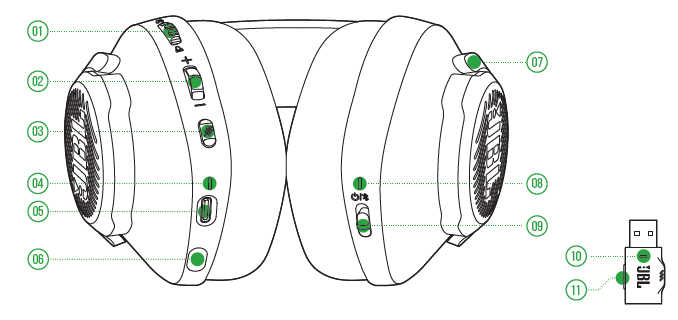
OVERVIEW
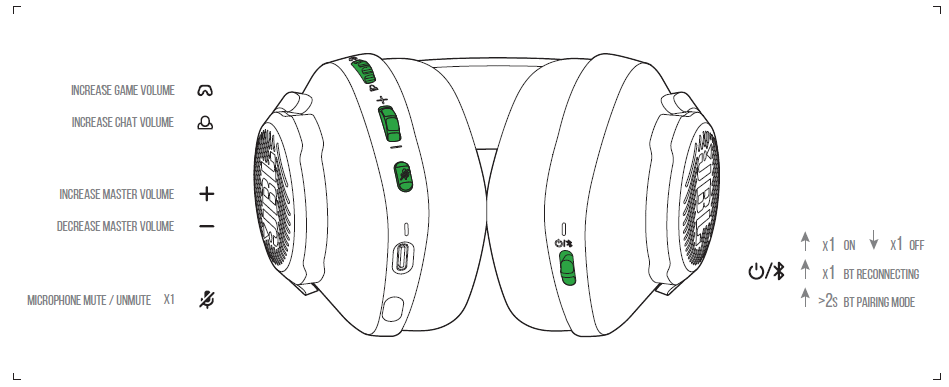
- Game audio-chat balance dial
- Volume Control
- Microphone Mute /unmute
- CHARGING LED
- USB-C port
- 2.5mm jack for boom microphone
- Flat-fold ear cup
- POWER / 2.4GHz / Bluetooth LED
- Power on / off and Bluetooth pairing slider
- 2.4GHz LED11 2.4GHz PAIRING BUTTON
POWER ON & CONNECT (XBOX)
.png)
POWER ON & CONNECT (PC, Mac,, ETC.)
.png)
Bluetooth
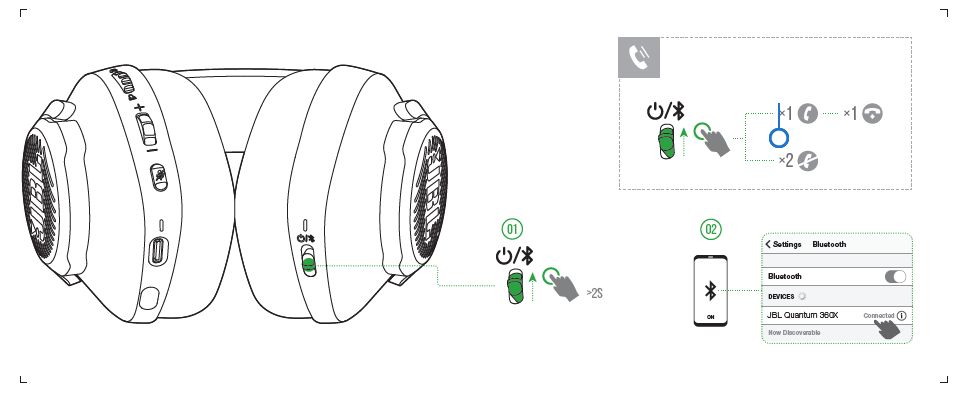
BUTTON COMMAND
Troubleshooting Common Issues
Here are some common problems and solutions for the JBL Quantum 360X Wireless:
- No Audio Output: Ensure the headset is properly paired with your device. Check the volume settings and mute status.
- Microphone Issues: Clean the microphone and ensure it is securely connected. Check for interference from other devices.
- Charging Problems: Verify the charging cable is undamaged and the port is clean. Use the correct power adapter.
For warranty and support, visit the official JBL website or contact their customer service team for assistance.
Pros and Cons
Pros
- Long Battery Life: Up to 22 hours via 2.4GHz and up to 26 hours via Bluetooth.
- Wireless Freedom: Enjoy gaming without being tethered to your console.
- Detachable Microphone: Offers flexibility and clear voice communication.
- Compatibility: Works with Xbox, Windows, and Bluetooth devices.
Cons
- Weight and Comfort: Some users find it slightly heavy.
- Price: While affordable, it may be out of budget for casual gamers.
Customer Reviews
Users praise the JBL Quantum 360X Wireless for its excellent sound quality and durable battery life. Common complaints include the weight of the headset and occasional connectivity issues. Overall, it garners positive reviews for its value and performance.
Rating: 4.5/5 stars. Recommended for serious gamers seeking wireless convenience and high-quality sound.
Faqs
How do I set up the jbl Quantum 360X Wireless for XBOX Headphones for the first time?
What should I do if my jbl Quantum 360X Wireless for XBOX Headphones is not working properly?
Can I use the jbl Quantum 360X Wireless for XBOX Headphones with other gaming consoles?
How do I maintain the jbl Quantum 360X Wireless for XBOX Headphones?
What are the key features that make the jbl Quantum 360X Wireless for XBOX Headphones different?
How do I optimize the audio quality of the jbl Quantum 360X Wireless for XBOX Headphones?
Can I use the jbl Quantum 360X Wireless for XBOX Headphones with Bluetooth devices?
How often should I charge the jbl Quantum 360X Wireless for XBOX Headphones?
More jbl manuals
- Pairing & Usage: Jbl Quantum TWS Air Earphones User Guide
- Pairing: Jbl Quantum 360P Console Wireless Headphones Setup Guide
- Pairing & Usage: Jbl Soundgear Sense Earphones User Manual
- Pairing : Jbl Live Flex 3 Earphones User Manual
- Setup & Pairing: Jbl Tour One M2 Headphone User Manual
- Pairing & Setup: Jbl Live 670NC Headphones Usage Guide
Leave a Comment