
Pairing & Setup: Jbl Live 670NC Headphones Usage Guide
Content
JBL Live 670NC Headphones
Introduction
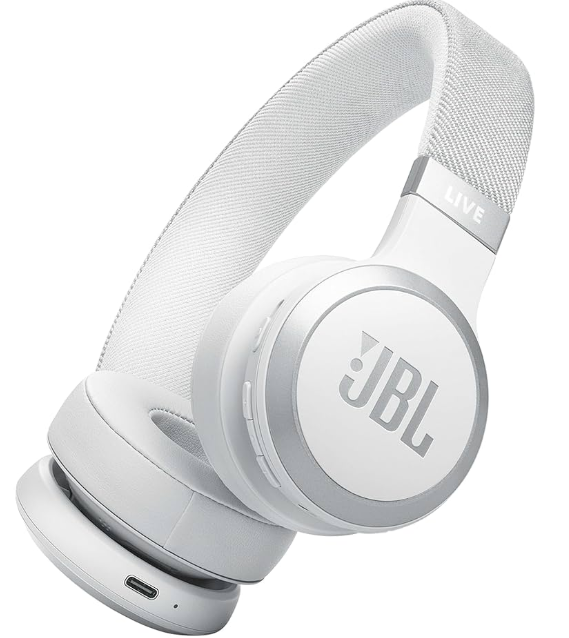
The JBL Live 670NC Headphones deliver a rich audio experience with JBL Signature Sound powered by advanced 40mm dynamic drivers, ensuring crisp highs and deep bass for music lovers and professionals alike. Designed for on-ear comfort, these wireless headphones feature True Adaptive Noise Cancelling (ANC) technology combined with Smart Ambient mode, allowing users to block out distractions or stay aware of their surroundings effortlessly. Perfectly suited for commuters, remote workers, students, and casual listeners, the Live 670NC offers seamless Bluetooth 5.3 connectivity with multipoint pairing, enabling connections to two devices simultaneously for uninterrupted calls and media playback.
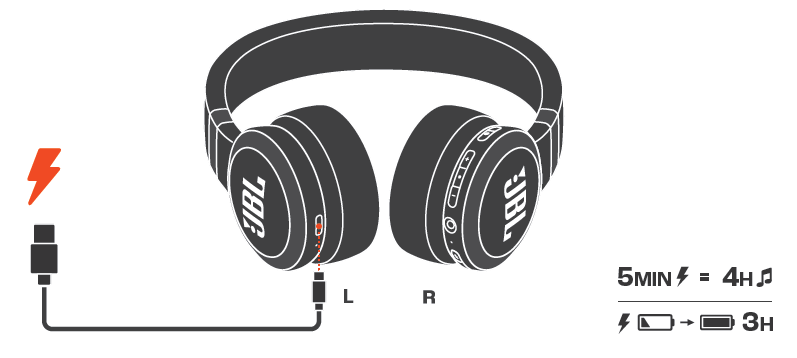
Boasting an impressive battery life of up to 65 hours with ANC off, and 50 hours when noise cancelling is active, these headphones support speed charging—just 5 minutes of charge provides an additional 4 hours of playtime. Integration with voice assistants like Alexa, Google Assistant, or Siri adds hands-free convenience. The headphones come equipped with a comfortable fabric headband and soft synthetic leather ear cushions, making long listening sessions enjoyable.
With a competitive price range typically between $130 and $160, the JBL Live 670NC headphones are widely available through major online retailers and electronics stores. Their combination of premium sound, adaptive noise cancelling, and user-friendly features makes them a compelling choice for anyone seeking versatile on-ear wireless headphones.
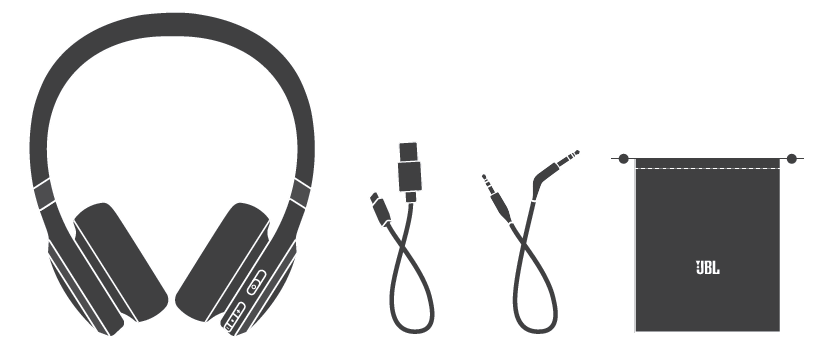
WHAT’S IN THE BOX
Specification
- Model: LIVE670NC
- Driver size: 40 mm/ 1.57" Dynamic Driver
- Power supply: 5 V 1 A
- Weight: 217 g/ 0.4784 lbs
- Battery type: Lithium-ion battery (850 mAh/ 3.7 V)
- Charging time: < 3 hrs from empty Music playtime with BT on and
- ANC off: up to 65 hrs
- Music playtime with BT on and ANC on: up to 50 hrs
- Music playtime with BT off and ANC on: up to 40 hrs
- Talk time with ANC on: up to 28 hrs
- Talk time with ANC off: up to 33 hrs
- Frequency response: BT mode: 20 Hz ~ 20 kHz
- AUX mode: 20 Hz ~ 40 kHz
- Impedance: 32ohmsm
- Sensitivity: 100 dB SPL@1 kHz
- Maximum SPL: 95 dB
- Microphone sensitivity: -38 dBV/Pa@1 kHz
- Bluetooth version: 5.3
- Bluetooth profile version: A2DP V1.4, HFP V1.8, AVRCP V1.6.2
- Bluetooth transmitter frequency range: 2.4 GHz - 2.4835 GHz
- Bluetooth transmitter power: ≤10 dBm (EIRP)
- Bluetooth transmitter modulation: GFSK, π/4-DQPSK, 8DPSK
- Maximum operation temperature: 45 °C
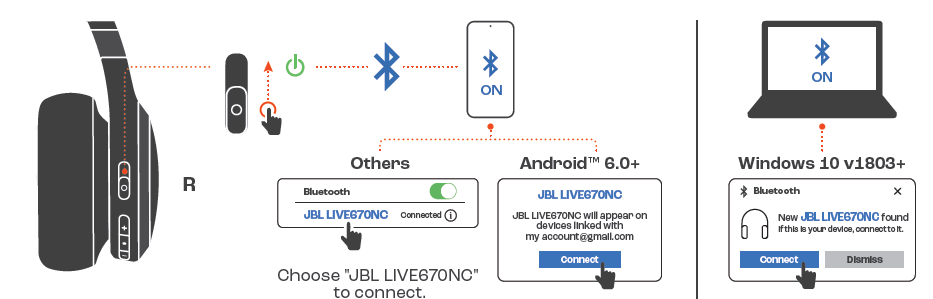
POWER ON & CONNECT
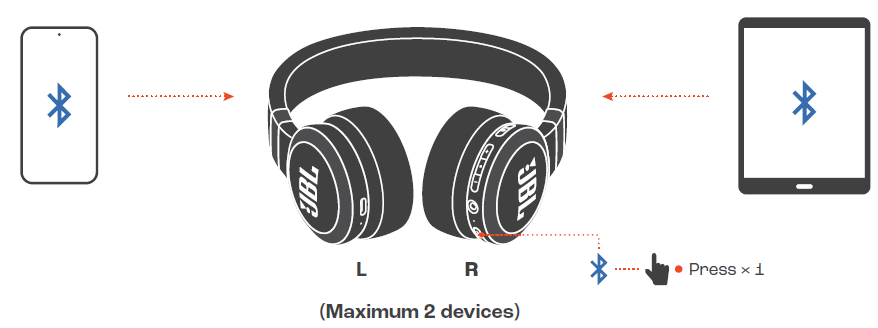
MULTI-POINT CONNECTION
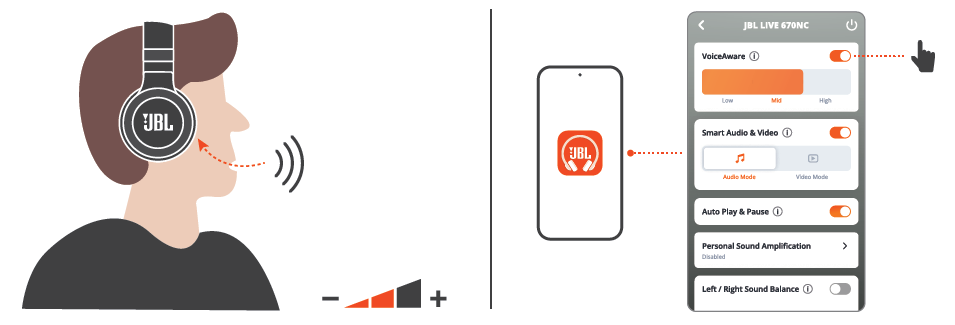
VOICEAWARE
CHARGING
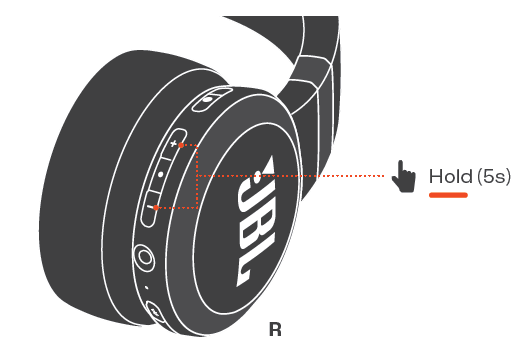
FACTORY RESET
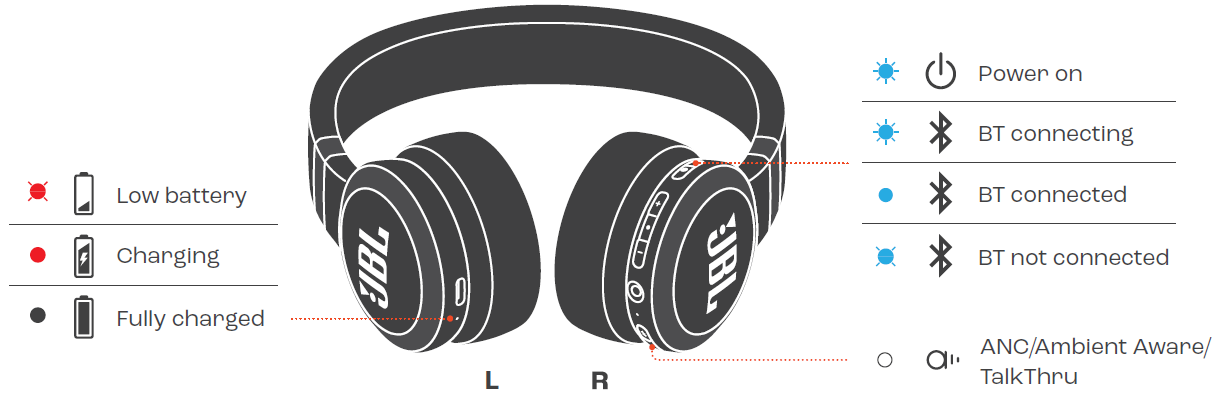
LED BEHAVIORS
Troubleshooting Common Issues with JBL Live 670NC Headphones
Despite their robust design, users may occasionally encounter issues. Common problems include pairing difficulties, audio dropouts, and ANC malfunction. If the headphones fail to connect via Bluetooth, ensure the device is within 10 meters (33 feet), and try resetting the headphones by powering off, then holding the multifunction button for 10 seconds. For ANC issues, toggle noise cancelling off and on again or update firmware through the JBL Headphones app.
Error codes are rare but may appear as blinking LED patterns; consult the user manual or JBL support site for specific indicators. To prevent problems, avoid prolonged exposure to moisture and extreme temperatures, and charge the headphones fully using the supplied USB-C cable.
The JBL Live 670NC headphones come with a manufacturer’s warranty covering defects and malfunctions for a specified period (usually one year). For technical support, users can visit www.jbl.com/support or contact JBL customer service via email or phone, as listed in the product documentation.
Pros and Cons of JBL Live 670NC Headphones: Balanced Insights for Potential Buyers
Pros
- Excellent battery life: Up to 65 hours with ANC off and 50 hours with ANC on, minimizing frequent charges.
- True Adaptive Noise Cancelling with Smart Ambient: Dynamic ANC adapts to environments, while Smart Ambient lets users stay aware safely.
- Multipoint Bluetooth 5.3 connectivity: Enables seamless switching between two devices, ideal for multitasking.
- Comfortable design: Lightweight with h fabric headband and synthetic leather ear cushions suited for extended wear.
- Voice assistant integration: Supports Alexa, Google Assistant, and Siri with simple touch controls.
Cons
- On-ear style may cause ear fatigue: Some users find on-ear headphones less comfortable than over-ear alternatives for long sessions.
- No support for high-resolution Bluetooth codecs: Lacks LDAC or aptX HD, limiting audio quality for audiophiles.
- Partial console compatibility: Audio only for PlayStation and Xbox, no mic support for gaming communication.
- Latency issues in some scenarios: While latency is low in ‘Audio’ mode, video sync may vary depending on app/device.
- Price competition: Alternatives like Sony WH-CH710N or Anker Soundcore Life Q35 provide similar ANC features at comparable prices.
Customer Reviews of JBL Live 670NC Headphones: Real User Feedback and Ratings
Users consistently praise the JBL Live 670NC Headphones for their outstanding battery longevity, effective noise cancelling, and clear call quality, often rating the product around 4.5 out of 5 stars across major retailers. Many highlight the convenience of multipoint Bluetooth connectivity and the intuitive touch controls. Common praises include the comfortable fit for daily commutes and work-from-home setups.
On the downside, some customers report slight discomfort after prolonged use due to ear pressure, and a few mention occasional connectivity hiccups during pairing. Several reviews note the absence of high-res codec support, although many agree that the sound quality remains satisfying for the price. Overall, the headphones are highly recommended for users seeking versatile, long-lasting wireless ANC headphones that balance performance and affordability.
Faqs
How do I set up my JBL Live 670NC Headphones for the first time with Bluetooth?
What should I do if my JBL Live 670NC Headphones are not connecting or pairing via Bluetooth?
How can I customize the noise cancellation and ambient sound features on JBL Live 670NC Headphones?
Are JBL Live 670NC Headphones compatible with all voice assistants?
What is the battery life of the JBL Live 670NC Headphones and how do I optimize it?
How do I properly clean and maintain my JBL Live 670NC Headphones?
Can I use the JBL Live 670NC Headphones in wired mode, and how do I switch between wired and wireless?
Why is the JBL Live 670NC Headphones’ touch control sometimes unresponsive and how can I fix it?
More jbl manuals
- Pairing : Jbl Live Flex 3 Earphones User Manual
- Pairing & Setup: Jbl Wave Flex 2 Earphones User Guide
- Pairing: Jbl Quantum 360P Console Wireless Headphones Setup Guide
- Pairing & Setup: Jbl Wave Buds 2 Earphones User Guide
- Usage & Pairing: Jbl Quantum 360X Wireless for XBOX Headphones User Manual
- Setup & Usage: Jbl Tune Flex 2 Earphones Step by Step Guide
Leave a Comment