
Pairing : Jbl Live Flex 3 Earphones User Manual
Content
JBL Live Flex 3 Earphones
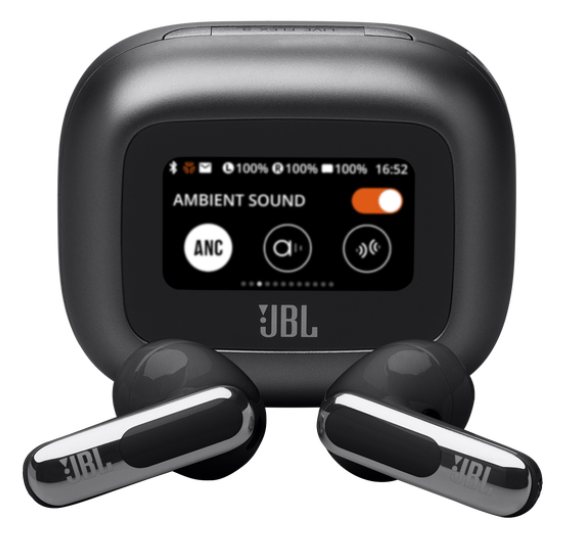
True Wireless Noise-Cancelling Open-Stick Earbuds
Introduction
The JBL Live Flex 3 Earphones are a premium pair of true wireless earbuds designed for users seeking high-fidelity audio combined with cutting-edge smart features. Featuring 12mm dynamic drivers, these earphones deliver deep bass, balanced midrange, and crisp high frequencies, offering immersive JBL Signature Sound enhanced by JBL Spatial Sound technology that creates a surround-like listening experience. Their open-stick design ensures a comfortable fit without tightly sealing the ear canal, making them ideal for users who prefer less ear fatigue during extended wear.
A standout feature is the innovative Smart Charging Case™ equipped with a 1.45-inch touchscreen display, allowing users to customize sound profiles, adjust volume, control playback, and manage noise-cancelling settings without the need for a smartphone app. The earbuds incorporate true adaptive noise cancelling (ANC) with four noise-sensing microphones that dynamically adjust to the ambient environment, giving personalized noise control tailored to the unique shape of your ear canal.
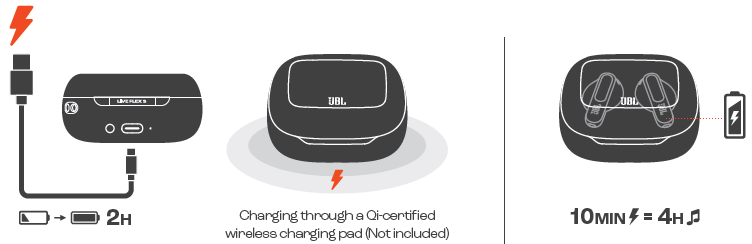
With up to 10 hours of battery life on a single charge and an additional 40 hours provided by the wireless charging case, the JBL Live Flex 3 ensures extended usage for daily commutes, workouts, or leisure. Quick charging via USB-C offers 4 hours of playback from just 10 minutes of charging. Targeted towards music lovers, commuters, and professionals needing clear calls with six beamforming mics for noise reduction, these earbuds blend convenience, style, and performance.
Available globally through JBL’s authorized retailers and online stores, the JBL Live Flex 3 earphones are priced in the mid to high range for wireless earbuds, typically around $150-$200 depending on region and retailer. Their combination of premium sound, smart features, and adaptive noise control makes them a compelling choice for those seeking versatile true wireless earbuds.
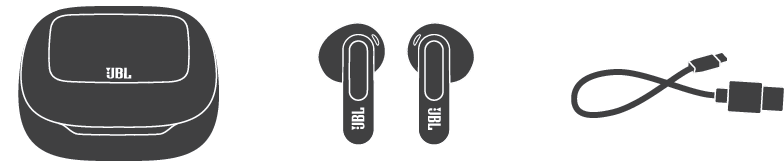
WHAT’S IN THE BOX
Specificaion
- Model (Earbud): LIVE FLEX 3
- (Charging case): LIVE FLEX 3C
- Driver size: 12 mm/ 0.47" Dynamic Driver
- Power supply: 5V 1A
- Earbud: 4.5 g per pc (9.0 g combined)/0.0099 lbs per pc (0.0198 lbs combined)
- Charging case: 63.7 g/ 0.1404 lbs
- Earbud battery type: Lithium-ion battery (50 mAh/ 3.85 V)
- Charging case battery type: Lithium-ion battery (690 mAh/ 3.85 V)
- Charging time: 2 hrs from empty
- Music playtime with BT on and ANC off: Up to 10 hrs
- Music playtime with BT on and ANC on: Up to 7 hrs
- Music playtime with BT on and True Adaptive ANC on: Up to 7 hrs
- Talk time with ANC off: Up to 5 hrs
- Talk time with ANC on: Up to 4 hrs
- Frequency response: 20 Hz - 40 kHz
- Impedance: 13 ohms
- Sensitivity: 103 dB SPL@1 kHz
- Maximum SPL: 95 dB
- Microphone sensitivity: -38 dBV/Pa@1 kHz
- Bluetooth version (Earbud): 5.3
- Bluetooth version (Charging case): 5.1
- Bluetooth profile version: A2DP V1.4, AVRCP V1.6.2, HFP V1.8
- Bluetooth transmitter frequency range: 2.4 GHz - 2.4835 GHz
- Bluetooth transmitter power (Earbud): <9 dBm (EIRP)
- Bluetooth transmitter power (Charging case): <10 dBm (EIRP)
- Bluetooth transmitter modulation (Earbud): GFSK, π/4-DQPSK, 8DPSK
- Bluetooth transmitter modulation(Charging case): GFSK
- Maximum operation temperature: 45 °C
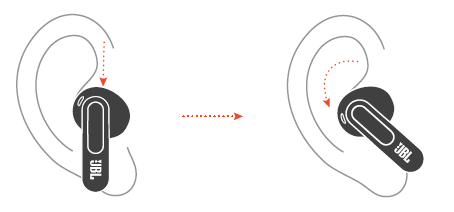
HOW TO WEAR
POWER ON & CONNECT
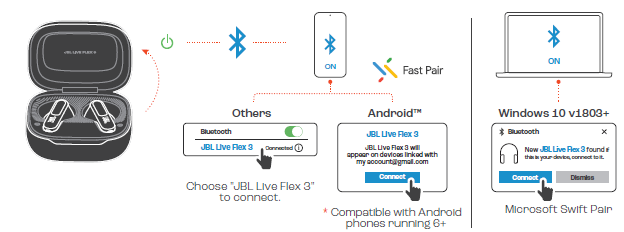
MANUAL SETUP
CHARGING
LED BEHAVIORS
Troubleshooting Common Issues with JBL Live Flex 3 Earphones
Despite their advanced technology, users may encounter some common issues with the JBL Live Flex 3 earphones. Below are troubleshooting tips and preventive measures:
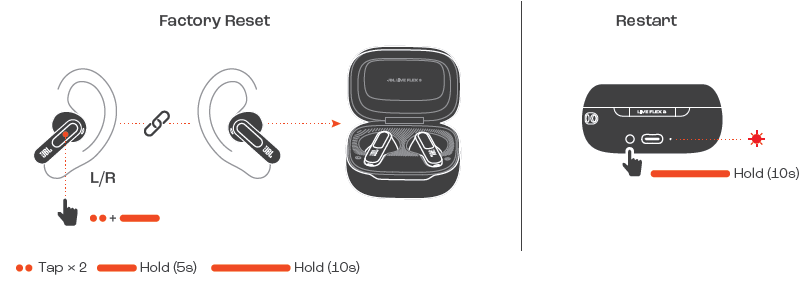
- No Sound or Audio Cutouts: Ensure Bluetooth 5.3 compatibility on your device and verify earbuds are fully charged. Re-pair the earbuds by closing and reopening the charging case or resetting via the case touchscreen controls.
- Charging Problems: Confirm that the USB-C cable and wireless charger are functioning. Clean charging contacts on the earbuds and the case regularly. Charging time from empty is approximately 2 hours.
- Noise Cancelling Not Working Properly: Make sure ANC is enabled on the case touchscreen and customize levels via the JBL Headphones App for personalized tuning. The open design means ANC may not fully block all background noise.
- Microphone Issues During Calls: Check that all six beamforming microphones are unobstructed and test calls in a quiet environment. Use the voice equalizer and voice level optimizer in the app for better clarity.
- Error Codes: Specific error codes are rare, but if encountered, resetting the earbuds via the case touchscreen and updating firmware via the JBL app usually resolves issues.
For warranty inquiries and support, JBL offers a standard 1-year limited warranty covering manufacturing defects. Contact JBL customer service via their official website or authorized dealer channels for assistance and repairs.
Pros & Cons of JBL Live Flex 3 Earphones
- Pros:
- Exceptional 12mm dynamic drivers delivering rich bass and clear highs across a wide range (20 Hz – 40 kHz).
- Innovative Smart Charging Case with a 1.45-inch touchscreen for on-the-go customization without smartphone access.
- True adaptive noise cancelling with real-time ambient adjustment using four noise-sensing microphones.
- Long battery life: up to 10 hours of playback plus 40 hours from the charging case with fast USB-C and wireless charging support.
- Six beamforming mics provide crystal-clear call quality even in noisy environments.
- Comfortable open-stick design suitable for extended wear without ear canal sealing.
- Cons:
- Open-ear design limits passive noise isolation, causing ANC to be less effective against low-frequency noises compared to in-ear sealed earbuds.
- Premium features come with a higher price tag (~$150-$200), which might deter budget-conscious buyers.
- Touch controls on the earbuds themselves can be sensitive, leading to accidental changes if not handled carefully.
- Some users report the ANC filters only higher frequency noise layers, leaving some background sounds noticeable.
- Value for Money: The JBL Live Flex 3 provides a strong feature set and superior sound quality that justify its price for audiophiles and tech enthusiasts, but those strictly seeking maximum noise cancellation might consider alternatives with in-ear silicone tips.
Customer Reviews and Feedback on JBL Live Flex 3 Earphones
Users consistently praise the JBL Live Flex 3 Earphones for their excellent sound quality, particularly the deep bass and clear highs delivered by the 12mm drivers. Many appreciate the convenience of the Smart Charging Case touchscreen that allows quick adjustments without the app. Battery life and fast charging capabilities also earn positive remarks.
However, some reviewers highlight that the open-stick design means noise cancelling does not completely block out background noise, especially in loud outdoor environments. A few users mention that the touch controls on the earbuds can be overly sensitive, causing unintended pauses or track skips.
Overall, these earbuds receive an average rating of about 4 out of 5 stars on most retail platforms. They are often recommended for users who prioritize sound quality and smart features over maximum noise isolation. Customers advise new buyers to try the fit carefully and to utilize the adaptive ANC customization for the best results.
Faqs
How do I set up my JBL Live Flex 3 Earphones for the first time?
What can I do if the JBL Live Flex 3 Earphones are not connecting to my device?
How do the True Adaptive Noise Cancelling features work on the JBL Live Flex 3 Earphones?
Are JBL Live Flex 3 Earphones compatible with all Bluetooth devices?
How can I optimize battery life when using JBL Live Flex 3 Earphones?
What are the key features of the JBL Live Flex 3 Earphones' Smart Charging Case?
How do I maintain and clean my JBL Live Flex 3 Earphones to ensure longevity?
Why do I hear some ambient noise when using JBL Live Flex 3 Earphones despite noise cancelling?
More jbl manuals
- Pairing: Jbl Quantum 360P Console Wireless Headphones Setup Guide
- Pairing & Setup: Jbl Live 670NC Headphones Usage Guide
- Usage & Pairing: Jbl Quantum 360X Wireless for XBOX Headphones User Manual
- Pairing & Setup: Jbl Wave Flex 2 Earphones User Guide
- Pairing & Usage: Jbl Quantum TWS Air Earphones User Guide
- Pairing & Setup: Jbl Wave Buds 2 Earphones User Guide
Leave a Comment